Kaizen Teams

Dropdown

Table of Contents

Time to read

·

12

Published on

·

September 25, 2026

Last updated on

·

September 25, 2026

Mathias Talon, Head of Strategic Partnerships at Kaizen Softworks

Mathias Talon

Actual farmer

Head of Strategic Partnerships

AI

AI

Business

Business

Build or Buy? How AI Changed the Decision

Published on

·

September 25, 2026

Last updated on

·

September 25, 2026

Time to read

·

12

Mathias Talon, Head of Strategic Partnerships at Kaizen Softworks

Mathias Talon

Head of Strategic Partnerships

You've said it in a meeting recently. "With AI, could we just build this ourselves?" It's a fair question. And for the first time in a long time, the answer might be yes, but not for the reasons most people think.

AI has changed the cost equation in two ways: custom software is faster and cheaper to build, and teams can test an idea earlier before committing to a full production build. Together, those shifts make building worth reconsidering in situations where it would have been dismissed a few years ago.

TL;DR

AI made custom software faster and cheaper to build. Projects that used to take six months can now take weeks, at half the cost. 

It also made it much cheaper to test an idea, get feedback, and refine what you need before committing to a production system.

Together, those changes open the build vs. buy decision to more companies. The most common mistake is still the same: committing too early, in either direction, before you've tested the problem and the path you're considering.

The old paradigm

For most of the 2000s and 2010s, the standard advice was simple: when in doubt, buy.

Building custom software meant a technical team, months of development, and an upfront investment, typically $100,000 or more, without knowing whether the result would solve the problem. SaaS subscriptions were cheaper, faster, and someone else's problem to maintain. For commodity workflows like payroll, email, accounting, and basic CRM, the math almost never favored building.

This logic was sound. And it still is, for those categories. Mature SaaS tools in commodity categories come with ecosystem value: documentation, integrations, training resources, community support. Building your own payroll system doesn't create competitive advantage. It creates infrastructure you have to maintain.

The problem is that companies applied this rule too broadly, including to the workflows that determine how they compete. The cost of building made that feel reasonable. It wasn't worth it.

For many mid-sized companies, that left an uncomfortable gap: generic tools were no longer enough for the way they operated, but custom software still looked like an enterprise-level investment.

That assumption deserves a second look.

AI changed both sides of the equation

Most of the conversation around AI and software has focused on one thing: building got faster and cheaper. That's true, but incomplete.

The cost of building dropped. A development project that took six to twelve months can now be completed in six to ten weeks. Costs that ran $100,000 or more have come down to $30,000-50,000 for comparable scope, and in some cases less. At Kaizen, our development teams work two to four times faster than before AI-assisted development became part of our process. The cost of the AI is marginal when teams work with clear requirements and structured context. When they iterate without direction, costs add up, but that's a process problem, not a technology one.

The cost of buying is going up. This part gets less attention, but it matters just as much. SaaS companies are embedding AI capabilities into their products and charging for them, separately. A platform that cost $12,000 per year is now $30,000-40,000 once you add the AI tier, the analytics add-on, and the integrations your operations need. For niche tools serving specialized industries, the pricing was already high and the functionality already limited. Add AI tiers on top and the three-year cost comparison starts to look different than it did when you last ran the numbers.

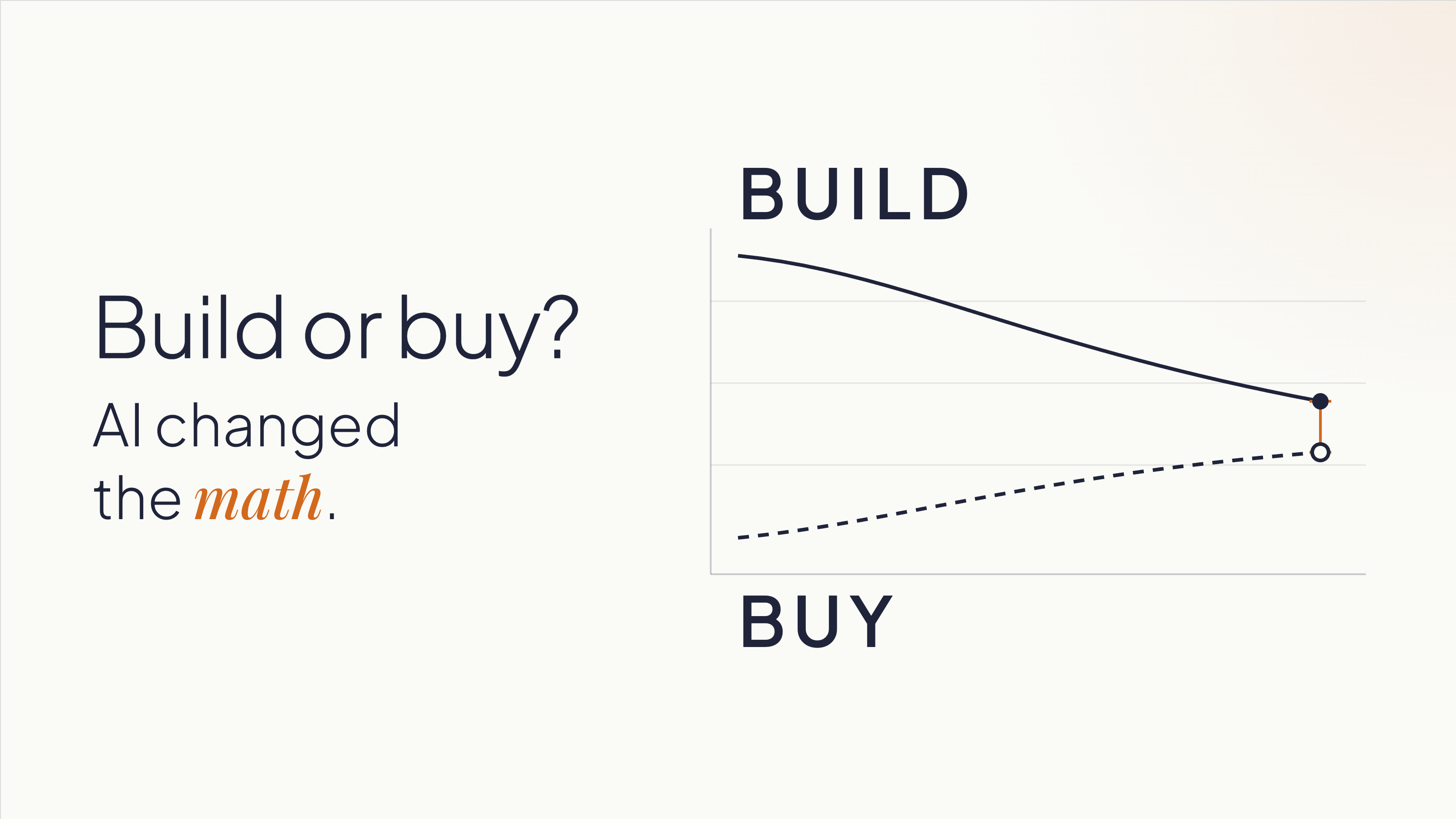
The result is that the two lines are crossing. Custom software is getting cheaper. SaaS, especially for complex or industry-specific use cases, is getting more expensive.

Most companies are still making this decision based on what building cost three years ago.

There's one more thing AI changed that doesn't get enough credit. It lowered the cost of being wrong early. A functional prototype that used to take weeks of development time can now be assembled in days.

That gives teams something concrete to react to, learn from, and change before deciding whether a full build makes sense.

When building makes sense now

The conditions for building have shifted, but the logic hasn't changed entirely. Building still makes most sense when two things are true:

  1. The workflow is part of how you differentiate.
  2. You understand it well enough to start defining what you need.

That second condition doesn't mean having every requirement figured out upfront. It means knowing the business and the process well enough to test assumptions, get feedback, and make increasingly specific decisions.

Companies that start building without that understanding can build the wrong thing faster. The speed advantage AI creates doesn't help if it's pointed in the wrong direction.

Some indicators that a workflow is worth owning:

You're working around your SaaS tools. Spreadsheets patching gaps in a platform. Manual re-entry because two systems don't talk. A Zapier automation that everyone is afraid to touch. These are signals that the tool is containing your problem, not solving it. You're paying the SaaS subscription and building a workaround on top of it. At that point, you're paying twice.

The workflow is where your competitive advantage lives. A logistics company with a particular, high-complexity routing and load assignment process is in a different situation than one that needs basic route planning. The first company's process is their edge, and owning that software means no vendor can change the pricing, pivot the product, or get acquired and leave them exposed. A standard CRM, by contrast, is rarely where a sales organization wins. Salesforce's roadmap reflects the priorities of thousands of customers. If your competitive advantage depends on a process that no SaaS vendor will prioritize, you can't buy your way there.

You shouldn't be adapting your processes to fit a tool. The tool should fit your processes. This is a signal for building: when a company has spent years reshaping how it operates around what a SaaS product can and can't do. That's the opposite of what software is supposed to accomplish. Custom software eliminates that inversion. It's built on domain expertise: knowledge of how your business operates. The software adapts to you.

Vendor dependency is a strategic risk. If a price increase, product pivot, or acquisition could disrupt your operations, you're already exposed. Ownership changes that exposure. It also changes your negotiating position if you stay with a vendor: companies that can credibly leave get better terms.

When buying still makes sense

None of this makes custom software the default answer.

For commodity workflows, buying is still faster and lower-risk. Payroll, basic CRM, email, project management, accounting: these categories have mature tools with strong ecosystems. Build a custom solution here and you've committed to recreating the documentation, integrations, training, and community support that already exist in the products you'd replace. That's rarely worth it.

When your process is still maturing, buying can teach you. A company implementing HubSpot is also adopting a structured methodology for sales, one they can refine as they learn. If you don't know what your ideal process looks like yet, building locks you into one version of it before you've earned the right opinions. Sometimes the right move is to buy, learn, and build later with better information.

When you can't realistically own what you'd build, buying is still the right answer. Custom software is an asset with ongoing maintenance requirements: security patches, library updates, performance monitoring, and someone accountable when things break. If your organization doesn't have that capacity internally, or doesn't have a committed external partner, a build will depreciate without upkeep. Be honest about this before you start.

What AI doesn't change

Two things remain constant, and underestimating either one is expensive.

A prototype is not a production system. AI makes it possible to build a working one in days, but its value is simpler than most people assume: it gives your team something concrete to react to, and those reactions reveal what you need.

One of the most expensive problems in software projects is teams discovering, weeks or months in, that they never agreed on what they were building. Everyone had a mental model. Nobody had tested whether those models matched each other. Show someone a working screen and they'll tell you five things they didn't know they thought until they saw it. That conversation, the one that surfaces the implicit assumptions, the disagreements, the things everyone knew but nobody said, is what the prototype is for.

Building from the requirements that come out of those conversations is a different project than building from initial assumptions. The prototype's purpose is to get you to better requirements faster. Production is a separate project, built from what you learned.

What AI doesn't do is replace the expertise required to architect a system that's secure, scalable, and maintainable over time. Security, data structure, integration design, and long-term ownership decisions don't go away because a prototype came together quickly. A fast prototype that moves to production without rethinking those decisions can accumulate technical debt that costs more than the original development savings. Moving fast into the wrong architecture isn't a win.

AI still needs context. Most teams carry knowledge that's never been written down: how things work, why a decision was made three years ago, what the exception to the rule is. AI doesn't pick that up. Neither does a development partner who starts building without asking the right questions. Explicit requirements matter more now, not less, because the tools that execute on those requirements are faster.

How to decide

Before committing to either direction, three questions are worth working through.

1. Is this process differentiating, and do you know it well enough to define it?

If your answer to the first part is yes, make sure your answer to the second part is honest. 

You don't need every requirement upfront. But you do need enough domain knowledge to describe the process, identify what makes it different, and use prototypes or other forms of validation to refine what the system needs to do.

If the answer is "we know how it works but we've never written it down," that work comes first, regardless of whether you build or buy.

2. What does the cost comparison look like over three years?

Include SaaS licensing at realistic price growth (most contracts escalate), implementation, training, integrations, and the cost of the workarounds your team already maintains. Then include the cost to build, plus what realistic ongoing maintenance looks like. The gap is usually narrower than the initial subscription price implies. If you've never run this comparison for your situation, you're deciding without the information you need.

3. Do you have the capacity to own what you'd build?

This means a specific person or team is accountable for what happens after launch, not "we'll figure it out" or "the vendor will handle it." If that accountability isn't concrete and named, the risk profile of building shifts, and buying may still be the right answer even if the cost comparison favors building.

Before you build or buy, validate the path

You don’t need to start building to find out whether building is the right path.

An AI Validation Sprint helps you evaluate the problem, the workflow, and the options before committing significant time or budget. Depending on what you already have, that might include reviewing your current process, comparing existing products, testing key assumptions, or building a lightweight prototype where seeing the workflow in action would help answer an open question.

The goal is to answer questions like:

  • Is the problem clear enough to solve?
  • Could an existing product meet the need without forcing major compromises?
  • What would custom software need to do differently?
  • Which assumptions should we test before making a larger investment?
  • What are the main technical and operational risks?
  • Does the evidence point toward building, buying, or doing more validation first?

Sometimes the answer is to build. Sometimes it’s to buy. We’ve recommended products like Shopify when an existing platform was the better fit, even when custom development was an option.

And if you already have an AI-built prototype, the same process can assess what’s solid, what only works under demo conditions, and what would need to change before it could become a production system.

The goal is not to justify a build. It’s to give you enough evidence to choose the path that makes sense for your business.

Ready to evaluate your options? Start with an AI Validation Sprint.
‍

You've said it in a meeting recently. "With AI, could we just build this ourselves?" It's a fair question. And for the first time in a long time, the answer might be yes, but not for the reasons most people think.

AI has changed the cost equation in two ways: custom software is faster and cheaper to build, and teams can test an idea earlier before committing to a full production build. Together, those shifts make building worth reconsidering in situations where it would have been dismissed a few years ago.

TL;DR

AI made custom software faster and cheaper to build. Projects that used to take six months can now take weeks, at half the cost. 

It also made it much cheaper to test an idea, get feedback, and refine what you need before committing to a production system.

Together, those changes open the build vs. buy decision to more companies. The most common mistake is still the same: committing too early, in either direction, before you've tested the problem and the path you're considering.

The old paradigm

For most of the 2000s and 2010s, the standard advice was simple: when in doubt, buy.

Building custom software meant a technical team, months of development, and an upfront investment, typically $100,000 or more, without knowing whether the result would solve the problem. SaaS subscriptions were cheaper, faster, and someone else's problem to maintain. For commodity workflows like payroll, email, accounting, and basic CRM, the math almost never favored building.

This logic was sound. And it still is, for those categories. Mature SaaS tools in commodity categories come with ecosystem value: documentation, integrations, training resources, community support. Building your own payroll system doesn't create competitive advantage. It creates infrastructure you have to maintain.

The problem is that companies applied this rule too broadly, including to the workflows that determine how they compete. The cost of building made that feel reasonable. It wasn't worth it.

For many mid-sized companies, that left an uncomfortable gap: generic tools were no longer enough for the way they operated, but custom software still looked like an enterprise-level investment.

That assumption deserves a second look.

AI changed both sides of the equation

Most of the conversation around AI and software has focused on one thing: building got faster and cheaper. That's true, but incomplete.

The cost of building dropped. A development project that took six to twelve months can now be completed in six to ten weeks. Costs that ran $100,000 or more have come down to $30,000-50,000 for comparable scope, and in some cases less. At Kaizen, our development teams work two to four times faster than before AI-assisted development became part of our process. The cost of the AI is marginal when teams work with clear requirements and structured context. When they iterate without direction, costs add up, but that's a process problem, not a technology one.

The cost of buying is going up. This part gets less attention, but it matters just as much. SaaS companies are embedding AI capabilities into their products and charging for them, separately. A platform that cost $12,000 per year is now $30,000-40,000 once you add the AI tier, the analytics add-on, and the integrations your operations need. For niche tools serving specialized industries, the pricing was already high and the functionality already limited. Add AI tiers on top and the three-year cost comparison starts to look different than it did when you last ran the numbers.

The result is that the two lines are crossing. Custom software is getting cheaper. SaaS, especially for complex or industry-specific use cases, is getting more expensive.

Most companies are still making this decision based on what building cost three years ago.

There's one more thing AI changed that doesn't get enough credit. It lowered the cost of being wrong early. A functional prototype that used to take weeks of development time can now be assembled in days.

That gives teams something concrete to react to, learn from, and change before deciding whether a full build makes sense.

When building makes sense now

The conditions for building have shifted, but the logic hasn't changed entirely. Building still makes most sense when two things are true:

  1. The workflow is part of how you differentiate.
  2. You understand it well enough to start defining what you need.

That second condition doesn't mean having every requirement figured out upfront. It means knowing the business and the process well enough to test assumptions, get feedback, and make increasingly specific decisions.

Companies that start building without that understanding can build the wrong thing faster. The speed advantage AI creates doesn't help if it's pointed in the wrong direction.

Some indicators that a workflow is worth owning:

You're working around your SaaS tools. Spreadsheets patching gaps in a platform. Manual re-entry because two systems don't talk. A Zapier automation that everyone is afraid to touch. These are signals that the tool is containing your problem, not solving it. You're paying the SaaS subscription and building a workaround on top of it. At that point, you're paying twice.

The workflow is where your competitive advantage lives. A logistics company with a particular, high-complexity routing and load assignment process is in a different situation than one that needs basic route planning. The first company's process is their edge, and owning that software means no vendor can change the pricing, pivot the product, or get acquired and leave them exposed. A standard CRM, by contrast, is rarely where a sales organization wins. Salesforce's roadmap reflects the priorities of thousands of customers. If your competitive advantage depends on a process that no SaaS vendor will prioritize, you can't buy your way there.

You shouldn't be adapting your processes to fit a tool. The tool should fit your processes. This is a signal for building: when a company has spent years reshaping how it operates around what a SaaS product can and can't do. That's the opposite of what software is supposed to accomplish. Custom software eliminates that inversion. It's built on domain expertise: knowledge of how your business operates. The software adapts to you.

Vendor dependency is a strategic risk. If a price increase, product pivot, or acquisition could disrupt your operations, you're already exposed. Ownership changes that exposure. It also changes your negotiating position if you stay with a vendor: companies that can credibly leave get better terms.

When buying still makes sense

None of this makes custom software the default answer.

For commodity workflows, buying is still faster and lower-risk. Payroll, basic CRM, email, project management, accounting: these categories have mature tools with strong ecosystems. Build a custom solution here and you've committed to recreating the documentation, integrations, training, and community support that already exist in the products you'd replace. That's rarely worth it.

When your process is still maturing, buying can teach you. A company implementing HubSpot is also adopting a structured methodology for sales, one they can refine as they learn. If you don't know what your ideal process looks like yet, building locks you into one version of it before you've earned the right opinions. Sometimes the right move is to buy, learn, and build later with better information.

When you can't realistically own what you'd build, buying is still the right answer. Custom software is an asset with ongoing maintenance requirements: security patches, library updates, performance monitoring, and someone accountable when things break. If your organization doesn't have that capacity internally, or doesn't have a committed external partner, a build will depreciate without upkeep. Be honest about this before you start.

What AI doesn't change

Two things remain constant, and underestimating either one is expensive.

A prototype is not a production system. AI makes it possible to build a working one in days, but its value is simpler than most people assume: it gives your team something concrete to react to, and those reactions reveal what you need.

One of the most expensive problems in software projects is teams discovering, weeks or months in, that they never agreed on what they were building. Everyone had a mental model. Nobody had tested whether those models matched each other. Show someone a working screen and they'll tell you five things they didn't know they thought until they saw it. That conversation, the one that surfaces the implicit assumptions, the disagreements, the things everyone knew but nobody said, is what the prototype is for.

Building from the requirements that come out of those conversations is a different project than building from initial assumptions. The prototype's purpose is to get you to better requirements faster. Production is a separate project, built from what you learned.

What AI doesn't do is replace the expertise required to architect a system that's secure, scalable, and maintainable over time. Security, data structure, integration design, and long-term ownership decisions don't go away because a prototype came together quickly. A fast prototype that moves to production without rethinking those decisions can accumulate technical debt that costs more than the original development savings. Moving fast into the wrong architecture isn't a win.

AI still needs context. Most teams carry knowledge that's never been written down: how things work, why a decision was made three years ago, what the exception to the rule is. AI doesn't pick that up. Neither does a development partner who starts building without asking the right questions. Explicit requirements matter more now, not less, because the tools that execute on those requirements are faster.

How to decide

Before committing to either direction, three questions are worth working through.

1. Is this process differentiating, and do you know it well enough to define it?

If your answer to the first part is yes, make sure your answer to the second part is honest. 

You don't need every requirement upfront. But you do need enough domain knowledge to describe the process, identify what makes it different, and use prototypes or other forms of validation to refine what the system needs to do.

If the answer is "we know how it works but we've never written it down," that work comes first, regardless of whether you build or buy.

2. What does the cost comparison look like over three years?

Include SaaS licensing at realistic price growth (most contracts escalate), implementation, training, integrations, and the cost of the workarounds your team already maintains. Then include the cost to build, plus what realistic ongoing maintenance looks like. The gap is usually narrower than the initial subscription price implies. If you've never run this comparison for your situation, you're deciding without the information you need.

3. Do you have the capacity to own what you'd build?

This means a specific person or team is accountable for what happens after launch, not "we'll figure it out" or "the vendor will handle it." If that accountability isn't concrete and named, the risk profile of building shifts, and buying may still be the right answer even if the cost comparison favors building.

Before you build or buy, validate the path

You don’t need to start building to find out whether building is the right path.

An AI Validation Sprint helps you evaluate the problem, the workflow, and the options before committing significant time or budget. Depending on what you already have, that might include reviewing your current process, comparing existing products, testing key assumptions, or building a lightweight prototype where seeing the workflow in action would help answer an open question.

The goal is to answer questions like:

  • Is the problem clear enough to solve?
  • Could an existing product meet the need without forcing major compromises?
  • What would custom software need to do differently?
  • Which assumptions should we test before making a larger investment?
  • What are the main technical and operational risks?
  • Does the evidence point toward building, buying, or doing more validation first?

Sometimes the answer is to build. Sometimes it’s to buy. We’ve recommended products like Shopify when an existing platform was the better fit, even when custom development was an option.

And if you already have an AI-built prototype, the same process can assess what’s solid, what only works under demo conditions, and what would need to change before it could become a production system.

The goal is not to justify a build. It’s to give you enough evidence to choose the path that makes sense for your business.

Ready to evaluate your options? Start with an AI Validation Sprint.

‍

Common questions

If AI makes building cheaper, does that mean building is usually better now?

No. Buying is still the right call for commodity workflows: payroll, basic CRM, email, accounting, standard project management. Building now deserves an evaluation instead of automatic dismissal. That's the shift, not a verdict that it's always the better choice. The question has changed; the answer still depends on your situation.

We already have an AI prototype someone built internally. What do we do with it?

Treat it as a conversation starter, something to react to before you invest in building it out. Before investing in turning it into a production system, assess what's solid and what needs rethinking: architecture, security, data model, ownership. A prototype that goes to production without that rethinking often creates technical debt that costs more than the original development savings.

What are the hidden costs of SaaS that companies tend to underestimate?

Common ones: price escalation after year one or two, the gap between the tier you bought and the features your operations need, implementation and training costs, the cost of integrations that weren't included, difficulty migrating your data if you want to leave, and the labor your team already spends working around the tool's limitations.

What risks stay even when AI speeds up development?

Security, scalability, integrations, and long-term maintenance don't go away. A fast prototype isn't automatically secure, and it's rarely designed with production load in mind. When a system starts affecting day-to-day operations: handling sensitive data, processing transactions, connecting to other platforms, architectural decisions that were invisible in the prototype start to matter. This is where experienced technical oversight adds value that AI tooling alone doesn't provide.

1
What is the difference between working with Kaizen versus a single designer?

Related Articles

View all articles

·

Sep 23, 2026

The cost of turnover in software teams (and how to protect context)

Developer turnover costs capacity for weeks and context for months. What software teams lose, how to measure it, and four questions to ask any partner.

12 read time

Read more

When an engineer leaves a software team, the visible cost is a vacancy. The expensive cost is invisible: the context that leaves with them, and the months the rest of the team spends rebuilding it.

We've seen this play out across client projects for years. This post covers what walks out the door when someone leaves, how to think about the real cost, and a simple framework for making better decisions when it happens, whether you work with us or not.

The short version

  • Turnover costs capacity for weeks. It costs context for months.
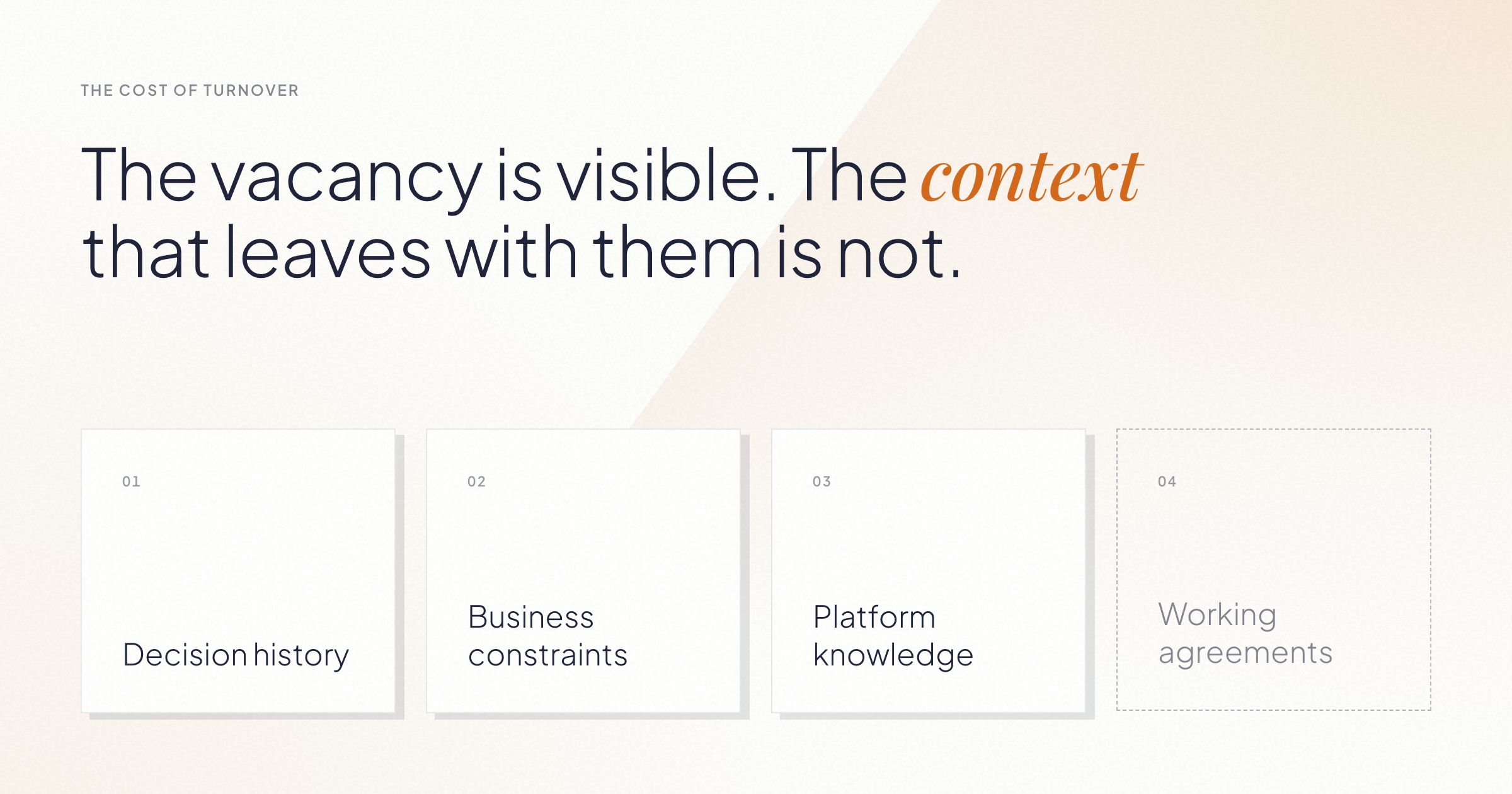
  • Context is specific and nameable: decision history, business constraints, platform knowledge, and working agreements.
  • The reflex to replace the exact profile that left is often the most expensive option. Sometimes the answer is already on your team.
  • You can evaluate any software partner on continuity with four questions. We include our own answers below.

What does a software team lose when someone leaves?

A software team loses two things when someone leaves: capacity and context. Capacity is visible and replaceable. Context is neither.

Context sounds abstract, so let's make it concrete. It comes in four forms:

Type of context What it looks like
Decision history Why the architecture is the way it is. Which alternatives were already tried and discarded, and why.
Business constraints The regulations, integrations, and non-negotiables that make certain changes risky.
Platform knowledge Where the fragile parts are. Which dependency breaks what. The bugs the team learned to avoid.
Working agreements How decisions get made with the client. What "done" means on this project. Who to ask about what.

A new hire can match the departed engineer's skills on day one. The four things above take months to rebuild, and while they're being rebuilt, the whole team pays: meetings run longer, settled decisions get relitigated, and senior people spend their time explaining instead of building.

What is the cost of developer turnover?

The cost of developer turnover is the ramp-up period multiplied across the team, not the recruiting fee. The math works like this:

The replacement operates below full productivity for months while they absorb the four types of context above. During that same period, the existing team diverts hours to onboarding, re-explaining, and reviewing more carefully than usual. So the cost is one person's ramp-up plus a productivity tax on everyone around them, at exactly the moment the project needed continuity.

This is why turnover gets underestimated. On the day someone resigns, it looks like an operational issue: fill the seat, keep moving. The bill arrives over the following two quarters, itemized as slower delivery, longer meetings, and decisions that used to be obvious.

Why replacing the exact profile is often the wrong reflex

The first thought is to backfill with an identical hire. Sometimes that's right. But the skill that is left with that person may be easier to replace than the context they gained: the client relationship, the platform history, and the judgment behind past decisions.

Someone already on the team may be able to learn a specific skill faster than a new specialist can learn the client, the platform, and the history behind the work. For a real example and four questions to ask before starting a search, see “Why adding people doesn't always fix a struggling team.”

How to evaluate a software partner on continuity

If you work with an external team, their turnover becomes your turnover. Four questions tell you most of what you need to know, and any serious partner should answer them with numbers:

What's your team retention rate? Ours has averaged 96% in recent years. Whatever the number, ask how it's measured and over what period.

How do you know people want to stay? Retention tells you what happened. An engagement measure tells you what's coming. Our eNPS (employee Net Promoter Score) is +83.

How do you spread context across the team? One person holding all the context is a risk with a name: bus factor. Ask how knowledge gets documented and shared, so continuity doesn't depend on any single individual.

Do you prepare capacity before it's needed? On some projects, we bring people up to speed on the business and the platform before there's an immediate need. When the project needs more capacity, nobody starts from zero.

These questions work on any vendor, including us. That's the point.

·

Sep 21, 2026

When PMs can ship code, what changes for Engineering?

AI coding agents give Product and Engineering more autonomy, plus a new coordination problem. See how a two-cycle model keeps both moving.

12 read time

Read more

AI has changed what Product Managers can do.

A PM can now go from an idea to working software in hours. They can build a flow, put it in front of a customer, learn from it, change it, and test again without waiting for every iteration to go through Engineering.

That creates an opportunity for product teams. It also creates a new challenge.

Just because a PM can build something doesn’t mean that thing is ready to become production software.

If we don’t rethink how Product and Engineering work together, faster prototyping can become more code for Engineering to untangle, more unclear ownership, and more pressure to turn experiments into production features.

The answer is to separate exploration from construction.

PMs and engineers are solving different problems

During product discovery, the PM is trying to answer: Should we build this?

That means testing assumptions, changing direction quickly, throwing things away, and getting something real enough in front of a customer to learn from it.

Engineering is solving a different problem: How do we build this correctly?

That means thinking about architecture, security, maintainability, performance, edge cases, and everything else required for software that has to live in production.

Both need AI. But they don’t need the same working conditions.

Exploration benefits from speed, autonomy, and low friction. Construction needs stronger guarantees and guardrails. Trying to optimize the same environment for both creates tension.

So instead of asking how PMs can safely contribute code to the production codebase, there’s a more useful question: What if PMs had their own space to build and validate ideas?

Give PMs a safe place to explore

A PM working with an AI coding agent can build functional versions of new ideas. Not a Figma screen. Not a ticket describing what something might do.

Working software that can be used to test the product experience. The important part is that this environment is separate from production.

That boundary gives the PM freedom to experiment without requiring the same controls we’d expect from production software. The environment can be designed so experiments can’t affect the live product or access things they shouldn’t.

Now the PM’s workflow can look more like:

Idea → build → test with users → learn → iterate

Engineering doesn’t need to be pulled into every cycle.  Engineering still matters. It  gets brought in once Product has stronger evidence about what’s worth building.

The prototype shouldn’t be the handoff

This is where things can go wrong.

If a PM spends two days building something with AI and then gives the repository to Engineering saying, “It mostly works, can you finish it?”, we haven’t improved the product development process. We may have just moved the mess downstream.

The prototype should help answer product questions. It shouldn’t make technical decisions on Engineering’s behalf.

What Engineering needs from exploration is intent.

  • What does the feature need to do?
  • How should it behave?
  • What did we learn from customers?
  • What happens in the important edge cases?
  • How will we know when the production version works as intended?

That becomes the handoff.

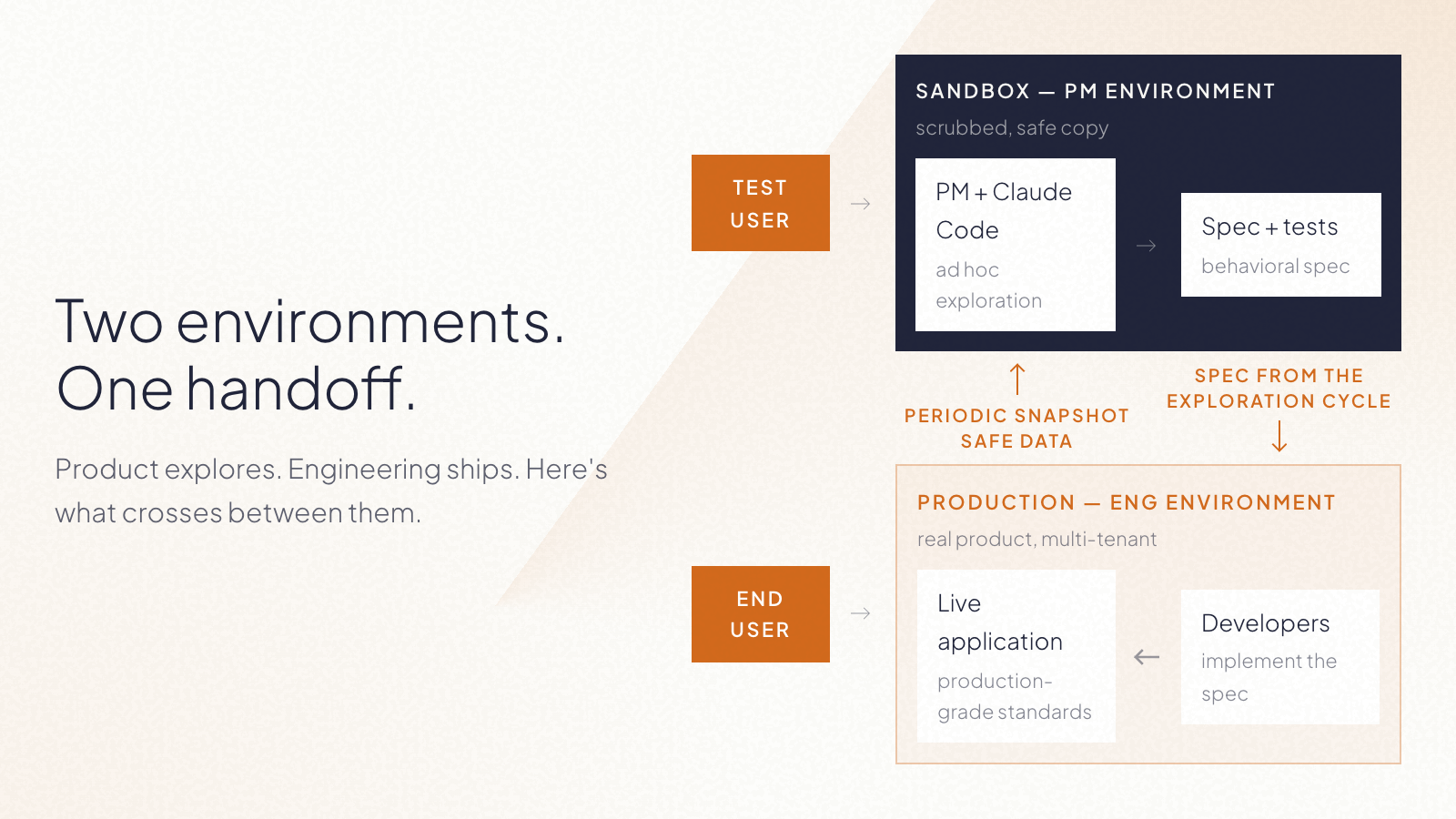
At Kaizen, we’ve been exploring a model where the bridge between the two cycles is a behavioral specification and a test plan, supported by the working prototype as a reference. The implementation itself stays behind.

What crosses into construction is the spec: a behavioral description, a test plan, and a link to the prototype as reference. The prototype itself stays where it was built.

In simple terms:

Product owns the what. Engineering owns the how.

That distinction matters even more now that AI makes it so easy for both sides to generate code.

What the workflow could look like

A PM starts with a product hypothesis. Instead of immediately turning it into a backlog item, they use AI to build enough of the experience to test it. They put it in front of users. They discover that part of the original idea was wrong. So they change it. They test again.

Once the problem and desired behavior are clear enough, the PM closes the exploration cycle with a clear specification and acceptance criteria.

Engineering then starts from that understanding, not from the PM’s experimental code only. They decide how the feature fits into the architecture, how it should be implemented, what needs to be verified, and how it reaches production.

The result is two parallel forms of autonomy:

  • PMs don’t need Engineering for every experiment.
  • Engineers don’t inherit implementation decisions from every experiment.

More autonomy doesn’t have to mean less ownership.

AI can make discovery faster

A lot of the conversation around AI in software teams is still about developer productivity. How much faster can we write code? How much implementation can an agent take on?

Those questions matter. But for Product, there may be an even bigger opportunity upstream. AI can shorten the distance between having an idea and learning whether that idea is any good.

That changes what PMs can bring to an engineering team. Instead of: “We think customers want this.” They can increasingly say: “We tested this behavior with customers. Here’s what worked, what didn’t, and exactly what we now need the product to do.”

That’s a much better starting point for building production software.

If you have a prototype and want to take the idea into production, we can help you determine what needs to happen next.

llms.txt