

Kaizen Teams

Dropdown

Table of Contents

Time to read

·

12

Published on

·

May 5, 2025

Last updated on

·

August 18, 2026

Valentina Ibinete, Marketing Lead at Kaizen Softworks

Valentina Ibinete

Travel magnet collector

Marketing Lead

AI

AI

Technology

Technology

From Prompt to Prototype in Minutes: Code with Windsurf Editor

Published on

·

August 18, 2026

Last updated on

·

August 18, 2026

Time to read

·

12

Valentina Ibinete, Marketing Lead at Kaizen Softworks

Valentina Ibinete

Marketing Lead

If you're curious about where AI is headed in software development, it's time to pay attention to Windsurf: an IDE powered by artificial intelligence that feels less like a tool and more like a copilot.

In our previous blog post, we went over the basics of what’s Windsurf and how it works. Now, let’s walk through a simple, step-by-step guide to help you get started.

Step 1: Plan Your Project

Before you jump into coding, take a step back and plan. This is where ChatGPT (or another conversational model) can shine. Use it to brainstorm ideas, organize your thoughts, and shape your prompt.

Let’s say you want to build a chatbot. You can ask ChatGPT to help you structure a well-defined prompt tailored for Windsurf.

🔍 Pro tip: The more complex or abstract your prompt is, the higher the chance of messy or overly generic code. If long-term maintainability matters, spend time writing a thoughtful prompt.

Step 2: Choose the Right Model

On the right side of the Windsurf interface, you’ll find Cascade, your AI copilot. Cascade can tap into several powerful foundation models:

Windsurf Editor interface showing options to select different AI models for coding assistance, including ChatGPT, Claude, and Gemini.

Each of these models brings its own strengths, and you can choose which one to use based on your goals or the task complexity. 

Some models, like Sonnet 3.7 (Thinking), use internal reasoning steps before generating final output. You’ll see the model “think out loud,” iterating on your prompt in real time. These “thinking” models are more resource-intensive and slightly slower, but they’re better at solving complex problems. 

However, they can sometimes overcomplicate things or drift off-track. A helpful strategy is to use them for ideation and problem-solving, then switch to a faster, more direct model for implementation.

🧠 Is one model better than the others? Sometimes. But results are non-deterministic. The best way to find what works is to experiment with models and prompt variations.

Step 3: Give Windsurf the Right Context

Windsurf starts every session with a clean slate. This means it doesn’t remember anything you’ve said in past conversations.

Just like you would explain things to a new teammate, you’ll need to provide all the relevant information upfront before asking it to write code. For example:

If you're building a chatbot, you might begin by asking Windsurf to read a README file so it understands the system’s specs and expected behavior.

Context is everything. Without it, Windsurf can’t generate helpful code. Here’s how to provide the right context:

  • Upload or paste documentation (README, API references, etc.)
    • Pro tip, ask Windsurf to generate the README file and documentation in MD format, and then edit it accordingly
  • Use features like rules and memories to keep recurring information handy
Windsurf Editor user interface with the Cascade AI agent in the sidebar, illustrating how users provide context for AI-assisted coding tasks, in this case, continuing integration tests.

⚠️ Reminder: Windsurf doesn’t retain information between sessions unless you explicitly use memory or rule features. Be intentional and include all necessary context up front.

Want to go deeper? Check out our dedicated blog post on giving Windsurf proper context.

Step 4: Paste Your Prompt

Once you’ve set the context, paste your prompt into the same conversation thread. From here, Windsurf takes over, picking the right tools, building your code step by step, and shows you its thinking along the way. 

Before making any changes to the code, always present the plan and ask for confirmation.” That way, we can review it, and models don’t go ahead and make changes on their own. So that’s a rule we should always stick to.

You can ask for edits, improvements, or further explanations as you go.

Step 5: Run Your App on Localhost

One of Windsurf’s most powerful features is its ability to generate full-stack applications (frontend and backend) in just minutes. It can:

  • Configure your environment
  • Generate working code
  • Run it locally using the “One Shot” flow

One Shot = one solid prompt → full app prototype

This is fantastic for prototyping and fast iteration. But it’s not a replacement for good software engineering practices.

💡 Important: One Shot outputs aren’t production-ready. Always review the code. AI can take you far, but great software still needs great developers behind it.

Step 6: Make Changes & Refine

Windsurf extends beyond the chat interface by offering intelligent autocompletion within the code editor, providing contextually relevant suggestions as you type.

Plus, there's this cool shortcut: Command + L. By selecting a portion of code and using this command, you can then enter instructions such as "comment this function," and Windsurf will propose the corresponding modification.

For every change Windsurf suggests, a little window will show up where you can check out the proposed code edits and either click "Accept" or "Decline".

Now, here's the deal: If you don't like what Windsurf makes and you just keep telling it to change stuff over and over, it can start adding a bunch of extra, messy code. It will keep adding new styles without getting rid of the old ones. It can get into this weird loop where it just keeps piling on code, and you won't even know what's being used and what's just junk.

Think about it this way: when you come back to your project tomorrow, Windsurf won't remember any of your previous chats. So, it'll use its search tool, find some old style that's not even being used, and try to change that instead. Then, nothing works, and you're wondering what's going on.

Remember, Windsurf's memory is short. It's like saying "hi" and having to introduce yourself again the next time. That's why writing clean, organized code makes it way easier for Windsurf's search tools to do their job right.

So, one of the best ways to handle this is to go back a step. You can literally tell Windsurf, "Forget that," using the "truncate conversation" feature. It's pretty sweet because you can hit "Revert this step," confirm it, and Windsurf will not only forget what it just did but also undo the code changes.

Bottom line: It's usually better to tweak your original prompt and go back than to keep asking Windsurf to fix something you didn't like in the first place. 

Wrap Up

Start small. Test different models. And most importantly, don’t skip the human touch. Even with powerful AI, great software still depends on great developers.

👉 Next up: We'll walk through the best ways to give Windsurf context so you can get even more of its potential.

If you're curious about where AI is headed in software development, it's time to pay attention to Windsurf: an IDE powered by artificial intelligence that feels less like a tool and more like a copilot.

In our previous blog post, we went over the basics of what’s Windsurf and how it works. Now, let’s walk through a simple, step-by-step guide to help you get started.

Step 1: Plan Your Project

Before you jump into coding, take a step back and plan. This is where ChatGPT (or another conversational model) can shine. Use it to brainstorm ideas, organize your thoughts, and shape your prompt.

Let’s say you want to build a chatbot. You can ask ChatGPT to help you structure a well-defined prompt tailored for Windsurf.

🔍 Pro tip: The more complex or abstract your prompt is, the higher the chance of messy or overly generic code. If long-term maintainability matters, spend time writing a thoughtful prompt.

Step 2: Choose the Right Model

On the right side of the Windsurf interface, you’ll find Cascade, your AI copilot. Cascade can tap into several powerful foundation models:

Windsurf Editor interface showing options to select different AI models for coding assistance, including ChatGPT, Claude, and Gemini.

Each of these models brings its own strengths, and you can choose which one to use based on your goals or the task complexity. 

Some models, like Sonnet 3.7 (Thinking), use internal reasoning steps before generating final output. You’ll see the model “think out loud,” iterating on your prompt in real time. These “thinking” models are more resource-intensive and slightly slower, but they’re better at solving complex problems. 

However, they can sometimes overcomplicate things or drift off-track. A helpful strategy is to use them for ideation and problem-solving, then switch to a faster, more direct model for implementation.

🧠 Is one model better than the others? Sometimes. But results are non-deterministic. The best way to find what works is to experiment with models and prompt variations.

Step 3: Give Windsurf the Right Context

Windsurf starts every session with a clean slate. This means it doesn’t remember anything you’ve said in past conversations.

Just like you would explain things to a new teammate, you’ll need to provide all the relevant information upfront before asking it to write code. For example:

If you're building a chatbot, you might begin by asking Windsurf to read a README file so it understands the system’s specs and expected behavior.

Context is everything. Without it, Windsurf can’t generate helpful code. Here’s how to provide the right context:

  • Upload or paste documentation (README, API references, etc.)
    • Pro tip, ask Windsurf to generate the README file and documentation in MD format, and then edit it accordingly
  • Use features like rules and memories to keep recurring information handy
Windsurf Editor user interface with the Cascade AI agent in the sidebar, illustrating how users provide context for AI-assisted coding tasks, in this case, continuing integration tests.

⚠️ Reminder: Windsurf doesn’t retain information between sessions unless you explicitly use memory or rule features. Be intentional and include all necessary context up front.

Want to go deeper? Check out our dedicated blog post on giving Windsurf proper context.

Step 4: Paste Your Prompt

Once you’ve set the context, paste your prompt into the same conversation thread. From here, Windsurf takes over, picking the right tools, building your code step by step, and shows you its thinking along the way. 

Before making any changes to the code, always present the plan and ask for confirmation.” That way, we can review it, and models don’t go ahead and make changes on their own. So that’s a rule we should always stick to.

You can ask for edits, improvements, or further explanations as you go.

Step 5: Run Your App on Localhost

One of Windsurf’s most powerful features is its ability to generate full-stack applications (frontend and backend) in just minutes. It can:

  • Configure your environment
  • Generate working code
  • Run it locally using the “One Shot” flow

One Shot = one solid prompt → full app prototype

This is fantastic for prototyping and fast iteration. But it’s not a replacement for good software engineering practices.

💡 Important: One Shot outputs aren’t production-ready. Always review the code. AI can take you far, but great software still needs great developers behind it.

Step 6: Make Changes & Refine

Windsurf extends beyond the chat interface by offering intelligent autocompletion within the code editor, providing contextually relevant suggestions as you type.

Plus, there's this cool shortcut: Command + L. By selecting a portion of code and using this command, you can then enter instructions such as "comment this function," and Windsurf will propose the corresponding modification.

For every change Windsurf suggests, a little window will show up where you can check out the proposed code edits and either click "Accept" or "Decline".

Now, here's the deal: If you don't like what Windsurf makes and you just keep telling it to change stuff over and over, it can start adding a bunch of extra, messy code. It will keep adding new styles without getting rid of the old ones. It can get into this weird loop where it just keeps piling on code, and you won't even know what's being used and what's just junk.

Think about it this way: when you come back to your project tomorrow, Windsurf won't remember any of your previous chats. So, it'll use its search tool, find some old style that's not even being used, and try to change that instead. Then, nothing works, and you're wondering what's going on.

Remember, Windsurf's memory is short. It's like saying "hi" and having to introduce yourself again the next time. That's why writing clean, organized code makes it way easier for Windsurf's search tools to do their job right.

So, one of the best ways to handle this is to go back a step. You can literally tell Windsurf, "Forget that," using the "truncate conversation" feature. It's pretty sweet because you can hit "Revert this step," confirm it, and Windsurf will not only forget what it just did but also undo the code changes.

Bottom line: It's usually better to tweak your original prompt and go back than to keep asking Windsurf to fix something you didn't like in the first place. 

Wrap Up

Start small. Test different models. And most importantly, don’t skip the human touch. Even with powerful AI, great software still depends on great developers.

👉 Next up: We'll walk through the best ways to give Windsurf context so you can get even more of its potential.

Related Articles

View all articles

·

Aug 28, 2026

About Catalyst 26: Partnerships & Ecosystem Conference

Everything to know about Catalyst 26: dates, price, who attends, both keynote recaps, and when the next Catalyst event is.

12 read time

Read more

Catalyst 26 was Partnership Leaders' fifth annual conference for partnership, ecosystem, and go-to-market professionals. It took place August 25 and 26, 2026, at the Marriott Hotel at the Brooklyn Bridge in New York, with more than 1,000 attendees and 70-plus speakers from companies including Anthropic, OpenAI, Google, Microsoft, IBM, BCG, and Siemens.

Dates August 25–26, 2026
Location Marriott Hotel at the Brooklyn Bridge, Brooklyn, NY
Edition 5th annual
Attendees 1,000+ partnership, ecosystem, and GTM professionals
Speakers 70+, including people from Anthropic, OpenAI, Google, Microsoft, IBM, BCG, and Siemens.
Price $849 early bird, rising to $999, then $1,999

Who Catalyst events are for

Catalyst brought together people building and running partner programs across SaaS, AI, consulting, systems integration, agencies, and major cloud platforms.

Attendees included executives leading partnership organizations, and people working directly in alliances, partner sales, marketing, operations, strategy, and enablement.

What Catalyst 26 is like

You can look at the agenda before a conference and have a pretty good idea of what you'll find. Being there is different.

This year's theme was "Navigating Frontier Ecosystems". Anthropic's Head of Partnerships and one of OpenAI's partner program leads appeared on the same agenda as people from Oracle, Siemens, IBM, and BCG, companies that have run formal partner programs for two decades.

That mix was one of the most interesting parts of the conference. Newer AI companies were discussing partner tiers, co-selling, and joint delivery alongside companies where those models have been part of their business for years.

What Catalyst 26 covered

Catalyst 26 split its sessions into eight pillars:

  • Advancing Organizational Maturity: turning partnerships into something measured and repeatable instead of one founder doing favors for another.
  • Become a Strategic Partner: getting partnerships involved when product and business decisions are made, not told about them afterward.
  • Frontier Partner Experience: adapting partner programs as AI changes how companies build and integrate products.
  • Path to CPO: career sessions for people aiming to lead partnerships at the executive level.
  • Co-Build: two companies building something together.
  • Co-Market: two companies running a campaign together.
  • Co-Sell: two sales teams working the same deal.
  • Co-Serve: two companies delivering the same engagement to a client.

Catalyst 26 sessions

Day 1 Keynote

The Day 1 keynote brought together Partnership Leaders’ CEO Asher Mathew, Tribe AI’s Co-founder & CEO Jaclyn Rice Nelson, Anthropic’s Head of Partnerships Phil Samenuk, and Boomi’s Chairman & CEO Steve Lucas.

Their discussion focused on how companies are relying on partners to build, sell, and deliver products across AI, cloud, and enterprise software. A few points stood out:

  • More companies have dedicated partner teams now, which means a generic, one-size-fits-all partner program doesn't cut it anymore. Partners show up when the program fits how they work.
  • New AI products and cloud services are shipping so fast that a partner program can't just get set once and left alone. Incentives, support, and how you work together need regular updates.
  • Partnerships also came up as a way to access data a company couldn’t reach on its own, whether that meant getting access to it, combining it, or putting it to use.
  • AI doesn't change the basics of a good partnership. Account planning, clear ownership, and relationships built over time still matter most.

Day 2 Keynote

The Day 2 keynote featured Ramp’s Lead Economist Ara Kharazian, Eliza’s Founder Brian Benedict, Siemens’ EVP Global Partner Ecosystem Dion Smith, and Oracle’s SVP, Partner Sales & Operations Strategy Leah Yomtovian.

A few points stood out:

  • The spending data told a slower story than expected: AI adoption is mostly going toward productivity gains and task automation, not some overnight shift.
  • Siemens is in the middle of folding more than 68,000 partners and roughly 200 separate programs into a single global one, mainly to make it easier to coordinate across IT and operational technology.
  • Oracle's approach is a running "listening tour": every partner gets the same baseline benefits, then incentives and credits get layered based on the type of partner and how they work with Oracle.
  • There was also talk of a newer kind of service team: bring in engineers, turn AI requirements into working products, and reuse delivery methods that already work instead of starting from scratch each time.

Next Catalyst events

The date and location of Catalyst 27 hasn’t been announced yet. In the meantime, you can check out the half-day Catalyst Summits in different cities:

  • October 20, 2026 - Seattle
  • October 27, 2026 - Chicago
  • October 2026 - Los Angeles
  • December 2026 - Singapore

Check Partnership Leaders’ events page for updates.
·

Aug 26, 2026

Why adding people doesn't always fix a struggling team

Learn when a software team should hire, wait, reorganize, or build skills internally, and how to tell which option will actually help.

12 read time

Read more

When a client asks to hire someone new, a common reaction is to open a search. There's more work, more pressure, and new features to build. It seems like the obvious thing to do.

But in our experience working with software development teams, the problem often isn't a lack of people. The problem is knowledge concentrated in too few people, unclear team roles, slow onboarding, or temporary demand.

The question worth asking isn't who can fill the position, but what would help the team work better. That points to one of three answers: hire, don't hire, or build the capability from within. Figuring out which one applies, and why, is the real work before opening a search.

What you should ask before assuming you need someone new

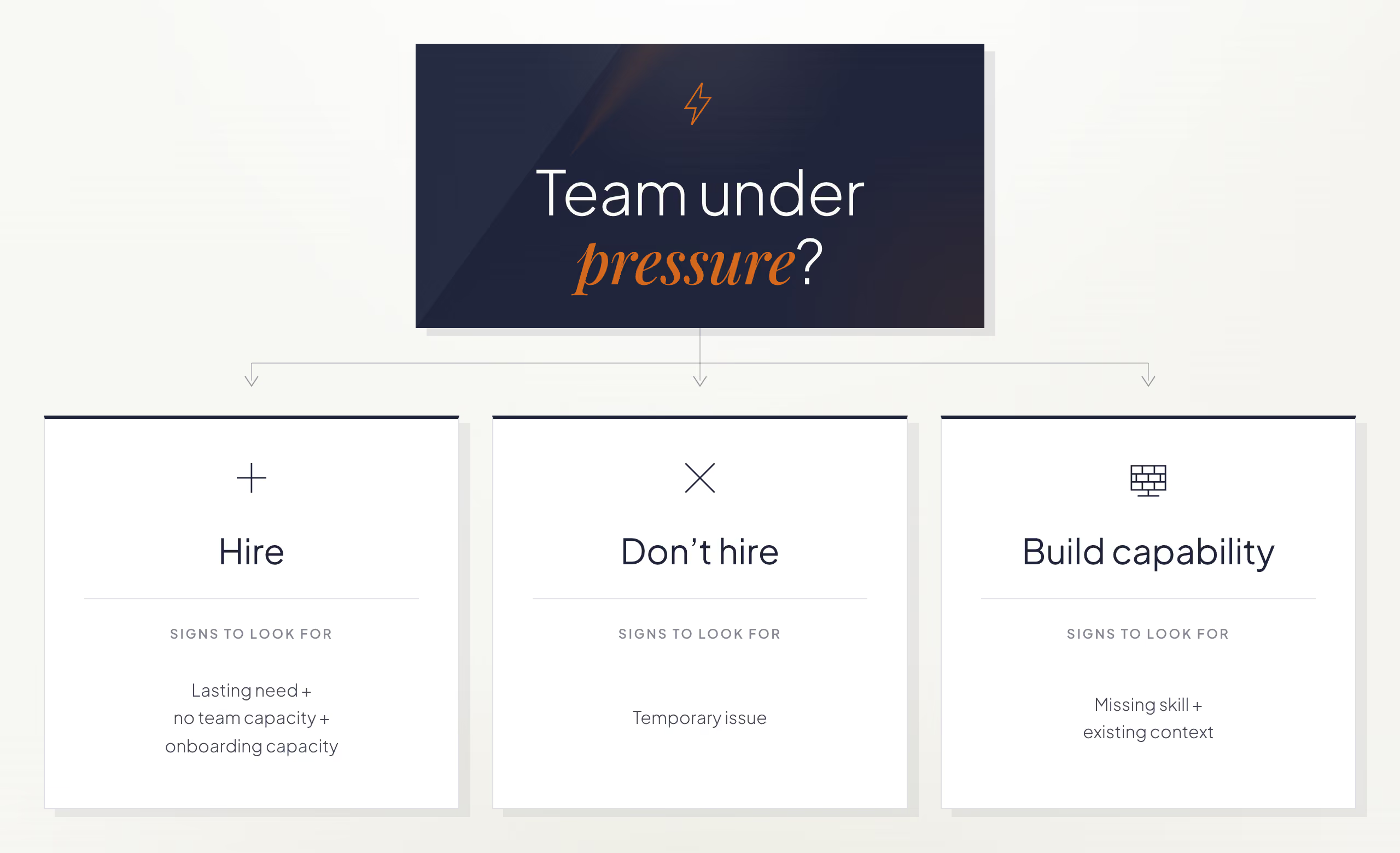
Hiring works when three conditions are met: the need will last, no one on the team has the capacity to take it on, and the team can onboard someone well. That last condition is easy to overlook. A team can have a real, lasting gap and still not be ready to bring someone in if no one has the time to guide them.

The risk comes from jumping straight from "there's more work" to "we need someone" without checking what's causing the pressure. It's easy to turn a request into a list of requirements (X years of experience, a specific technology, advanced English) and start the search. The real cause is often something else: a project that grew too fast, a tech lead with no time to onboard new hires, processes that stopped scaling, or a team that lost key people and needs to recover knowledge before adding headcount.

That's why, before thinking about who could fill the role, we ask these questions:

  • What outcome is the client trying to achieve?
  • What's happening on that team today?
  • What specific problem is this hire meant to solve?
  • Does adding a person solve that problem?
  • Is there someone on the team who could take this on?
  • Are there other, less obvious alternatives?

When the answers confirm the need will last, the current team can't cover it, and the team has the capacity to onboard someone, hiring is the right call: opening the search fills a gap the team can't close internally.

Does the problem need someone new to fix it?

Not hiring is the right call when the problem behind the request is temporary, or when it will resolve before the new hire finishes onboarding. Recommending against a hire may sound unusual for a company that offers staff augmentation, but our job as a strategic partner is not to maximize every opportunity but to recommend the best decision for the client. Depending on what's actually going on, the fix can look like:

  • An internal rotation: moving someone with spare capacity into the gap.
  • Reorganizing responsibilities across the team instead of adding a seat.
  • Hiring a different profile than the one originally requested.
  • Combining two roles into one instead of opening two searches.
  • Waiting a few weeks, when the project context is about to change on its own.

Is a temporary increase in workload a good reason to hire?

This happened on a project with a long onboarding period. The initial request seemed clear: hire a mid-level developer. There was work and budget available. But when we spoke with the team, we found that the workload increased because one team member had been temporarily reassigned to another sub-team. Before moving forward, we considered what would happen when that person came back.

The client's system was complex: any new hire needed several months to understand the business, the architecture, and the platform before they could contribute independently.

The problem justifying the hire was going to disappear, but the new hire wouldn't. By the time that person had enough context, the need that started the search would no longer exist.

We recommended against moving forward, even though there was budget to add someone. The client avoided an unnecessary hire and months of onboarding for a problem that was already resolving itself. Sometimes the best answer is to wait a few weeks; other times, it's reorganizing the team or developing internal talent.

How can you build team capability without hiring?

Build capability internally when the team already has product context but lacks a specific skill. Developing that skill internally can be faster than waiting for someone new to reach the same level of context.

More people doesn't always mean more capacity. Onboarding a new hire takes time from the people already on the team: explaining the business and the architecture, reviewing their work, and building trust. That's why, during the first few weeks, a team can become less productive while it onboards someone new. Complex projects can include years of technical decisions and undocumented knowledge. New hires still need time to learn that context.

Should you hire a specialist or train someone on your team?

A client needed a senior SQL Server specialist. That niche skill set made the role difficult and expensive to fill. We started the search and interviewed candidates, but the deeper issue became clear quickly: the real challenge on the project wasn't SQL Server. It was understanding a product shaped by years of evolution, multiple applications, and complex business logic.

The right person to develop that expertise was already on the team. Instead of hiring someone with deep SQL Server expertise, the client supported that team member in building the SQL Server skills the project needed. That person had business knowledge, motivation, and a much shorter learning curve than an external hire would have had. An outside specialist provided targeted support when needed.

The team gained SQL Server expertise without losing months waiting for a new hire to learn the product first. The person who took on SQL Server gained a valuable new skill without stepping away from the other work they were doing on the project.

A team's capacity depends on how its people complement each other, what knowledge they share, and what autonomy they've developed, not just on headcount. A team of ten people who are aligned, with shared context and autonomy, can generate more value than a team of fifteen where much of the time goes into onboarding new hires.

Should you hire, wait, or develop the skill internally?

Scenario Signal What to do
Hire The need will last, no one on the team can cover it, and the team can onboard someone well Open the search for a clearly defined role
Don't hire The problem is temporary or resolves before onboarding finishes Wait, reorganize the team, or cover the gap another way
Build internal capability Missing specific expertise, not people; someone already has the business context Develop the skill internally, with targeted outside support if needed

What questions do we ask first?

  1. What specific problem are we trying to solve?
  2. Will the need still exist after the person has been hired and onboarded?
  3. Is there someone on the team who could cover it?
  4. Do we have the capacity to onboard someone well?
  5. Is the problem a lack of people, or is it caused by unclear roles, missing product knowledge, slow onboarding, or a temporary increase in workload?
  6. What impact will this hire have six months from now?
  7. If we couldn't hire today, what other option would we explore?
  8. What higher-priority work would someone on the team have to stop doing to cover this need?

Wait to open a search when the team can't define the problem, confirm the need will last, or support onboarding. Clarify those points first.

If you're weighing this decision with your own team, let's talk about whether to hire, reorganize, or develop someone already on the team.

llms.txt