




Kaizen Teams

Dropdown

Table of Contents

Time to read

·

12

Published on

·

September 5, 2018

Last updated on

·

August 18, 2026

Pablo Marcano

Technology

Technology

Speed Up Your Web Development: A Dive into Sass

Published on

·

August 18, 2026

Last updated on

·

August 18, 2026

Time to read

·

12

Pablo Marcano

Welcome to the first installment of our series dedicated to streamlining web development and boosting your productivity.

If you've ever found yourself drowning in repetitive CSS tasks, this post is your lifeline. In this post, we'll delve into the basics of Sass, paving the way for a more efficient and enjoyable web development journey. Say hello to cleaner, more maintainable code, and wave goodbye to CSS monotony.

Web Development Journey

The scenario is simple, you're developing a website or web app, and for sure you want it to look as good as you can, which is obviously accomplished by using CSS. Then you find yourself repeating tag names, properties, colors, and having a gigantic main.css file (or maybe a lot of <src rel="stylesheet"> tags in your HTML header?).

And what if you want to change something as the main color of your website? Dozens of lines changed just because #7a19a8 seemed slightly better than #7211a0.

Image of Violet Color

Is there even a difference?

Well, to solve all of this and more, in 2006 the Syntactically awesome style sheets were created, Sass for the friends. Sass is a preprocessor scripting language that is interpreted or compiled into simple CSS. What all of this means is that Sass extends the CSS syntax, using a similar structure, with a lot more fuctionality.

Usage

All installation steps are covered in Sass' official install guide. In this post, I'm going to show you some basic syntax so you can make your CSS better since day one.

Variables

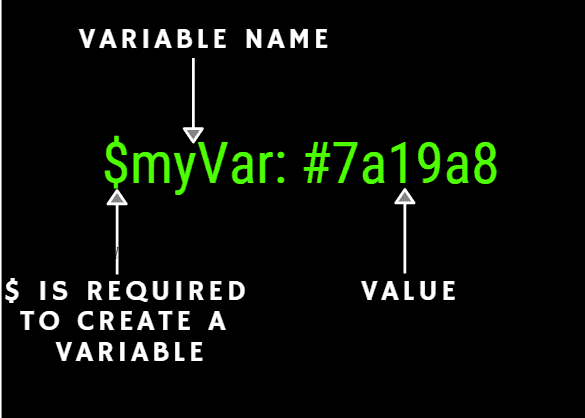
Variables are a core part of Sass, the premise is that you declare any data in the form of a valid data type in Sass, and you can use it all along your stylesheet. Here is the syntax:

Graphic of Variable Name

Nested Selectors

With Sass Selector nesting we can transform this:

div {
// Some properties for a div
}
div span {
// Some properties for a span tag inside a div
}
div p {
// Some properties for a p tag inside a div
}

Into:

div {
// Some div properties
span {
// Some properties of a span tag inside a div
}
p {
// Some properties of a p tag inside a div
}
}

Basically, you can nest selectors within selectors to avoid repeating tags each time you may need to go deeper in order to win specificity.

You can also add pseudo elements and modify parent selectors inside themselves with the & symbol, this way:

div {
// div properties
&.steve {
// properties of a div with steve class
}
}

Mixins

A mixin is a Sass feature that allows you to define reusable pieces of code, and even allows parameters, just as functions, in order to modify its behavior without having to draw upon semantic classes as .margin-box-size-1. Let's see them:

@mixin box-size($size: 1em) {
margin: $size;
padding: $size;
}

You define a mixin by using @mixin, then you name it, in this case is box-size and write down the parameters it will receive, if any. In this case we also have a default parameter $size: 1em. The variables will be replaced with their value at build time, and everything inside the mixin will be placed wherever is used across the stylesheet. You call the mixin function by using @include followed by the mixin name.

div {
@include box-size(3em);
}
// Will be replaced by
div {
margin: 3em;
padding: 3em;
}

Control Directives

With Sass we can bring common programming sentences into stylesheets, with control directives as @if, @for, @each and @while, we can sort out, repeat and take from a map or list any piece of code. Lets take a brief look over each syntax.

@if

The @if directive takes any SassScript truthy or false expression and executes whichever code sections applies:

@if (true) {
// This code will always run
} @else {
// this code will never run
}

@for

The @for directive is pretty straight forward, it runs the code inside the braces for a determined amount of times. The syntax is as follows:

// We declare a variable $i for the iterator, which starts at [from] and ends in [trough] values
@for $i from 1 through 6 {
margin: $i+px;
}

@while

The @while directive works pretty much as the @for directive, with the difference that the condition of the loop to execute is entirely on us, and not only an incremental operator.

$execute: true;
@while ($execute) {
@debug($execute);
}

Tip

@debug() will print out any value to the console while building, as its name says, its awesome for debugging!

@each

Last but not least, @each works slightly different from the other directives, as it goes trough a collection such a map or a list instead of simply a condition, and exposes the current value for you to use.

$colors: red green blue;
@each $color in $colors {
background: $color
}

Conclusion

And that's it! With this easy tool you can start to write cleaner and more maintainable CSS from now on.

If you have any doubts you can find me on twitter as @stiv_ml. I will be more than pleased to answer any question!

Welcome to the first installment of our series dedicated to streamlining web development and boosting your productivity.

If you've ever found yourself drowning in repetitive CSS tasks, this post is your lifeline. In this post, we'll delve into the basics of Sass, paving the way for a more efficient and enjoyable web development journey. Say hello to cleaner, more maintainable code, and wave goodbye to CSS monotony.

Web Development Journey

The scenario is simple, you're developing a website or web app, and for sure you want it to look as good as you can, which is obviously accomplished by using CSS. Then you find yourself repeating tag names, properties, colors, and having a gigantic main.css file (or maybe a lot of <src rel="stylesheet"> tags in your HTML header?).

And what if you want to change something as the main color of your website? Dozens of lines changed just because #7a19a8 seemed slightly better than #7211a0.

Image of Violet Color

Is there even a difference?

Well, to solve all of this and more, in 2006 the Syntactically awesome style sheets were created, Sass for the friends. Sass is a preprocessor scripting language that is interpreted or compiled into simple CSS. What all of this means is that Sass extends the CSS syntax, using a similar structure, with a lot more fuctionality.

Usage

All installation steps are covered in Sass' official install guide. In this post, I'm going to show you some basic syntax so you can make your CSS better since day one.

Variables

Variables are a core part of Sass, the premise is that you declare any data in the form of a valid data type in Sass, and you can use it all along your stylesheet. Here is the syntax:

Graphic of Variable Name

Nested Selectors

With Sass Selector nesting we can transform this:

div {
// Some properties for a div
}
div span {
// Some properties for a span tag inside a div
}
div p {
// Some properties for a p tag inside a div
}

Into:

div {
// Some div properties
span {
// Some properties of a span tag inside a div
}
p {
// Some properties of a p tag inside a div
}
}

Basically, you can nest selectors within selectors to avoid repeating tags each time you may need to go deeper in order to win specificity.

You can also add pseudo elements and modify parent selectors inside themselves with the & symbol, this way:

div {
// div properties
&.steve {
// properties of a div with steve class
}
}

Mixins

A mixin is a Sass feature that allows you to define reusable pieces of code, and even allows parameters, just as functions, in order to modify its behavior without having to draw upon semantic classes as .margin-box-size-1. Let's see them:

@mixin box-size($size: 1em) {
margin: $size;
padding: $size;
}

You define a mixin by using @mixin, then you name it, in this case is box-size and write down the parameters it will receive, if any. In this case we also have a default parameter $size: 1em. The variables will be replaced with their value at build time, and everything inside the mixin will be placed wherever is used across the stylesheet. You call the mixin function by using @include followed by the mixin name.

div {
@include box-size(3em);
}
// Will be replaced by
div {
margin: 3em;
padding: 3em;
}

Control Directives

With Sass we can bring common programming sentences into stylesheets, with control directives as @if, @for, @each and @while, we can sort out, repeat and take from a map or list any piece of code. Lets take a brief look over each syntax.

@if

The @if directive takes any SassScript truthy or false expression and executes whichever code sections applies:

@if (true) {
// This code will always run
} @else {
// this code will never run
}

@for

The @for directive is pretty straight forward, it runs the code inside the braces for a determined amount of times. The syntax is as follows:

// We declare a variable $i for the iterator, which starts at [from] and ends in [trough] values
@for $i from 1 through 6 {
margin: $i+px;
}

@while

The @while directive works pretty much as the @for directive, with the difference that the condition of the loop to execute is entirely on us, and not only an incremental operator.

$execute: true;
@while ($execute) {
@debug($execute);
}

Tip

@debug() will print out any value to the console while building, as its name says, its awesome for debugging!

@each

Last but not least, @each works slightly different from the other directives, as it goes trough a collection such a map or a list instead of simply a condition, and exposes the current value for you to use.

$colors: red green blue;
@each $color in $colors {
background: $color
}

Conclusion

And that's it! With this easy tool you can start to write cleaner and more maintainable CSS from now on.

If you have any doubts you can find me on twitter as @stiv_ml. I will be more than pleased to answer any question!

Related Articles

View all articles

·

Sep 21, 2026

When PMs can ship code, what changes for Engineering?

AI coding agents give Product and Engineering more autonomy, plus a new coordination problem. See how a two-cycle model keeps both moving.

12 read time

Read more

AI has changed what Product Managers can do.

A PM can now go from an idea to working software in hours. They can build a flow, put it in front of a customer, learn from it, change it, and test again without waiting for every iteration to go through Engineering.

That creates an opportunity for product teams. It also creates a new challenge.

Just because a PM can build something doesn’t mean that thing is ready to become production software.

If we don’t rethink how Product and Engineering work together, faster prototyping can become more code for Engineering to untangle, more unclear ownership, and more pressure to turn experiments into production features.

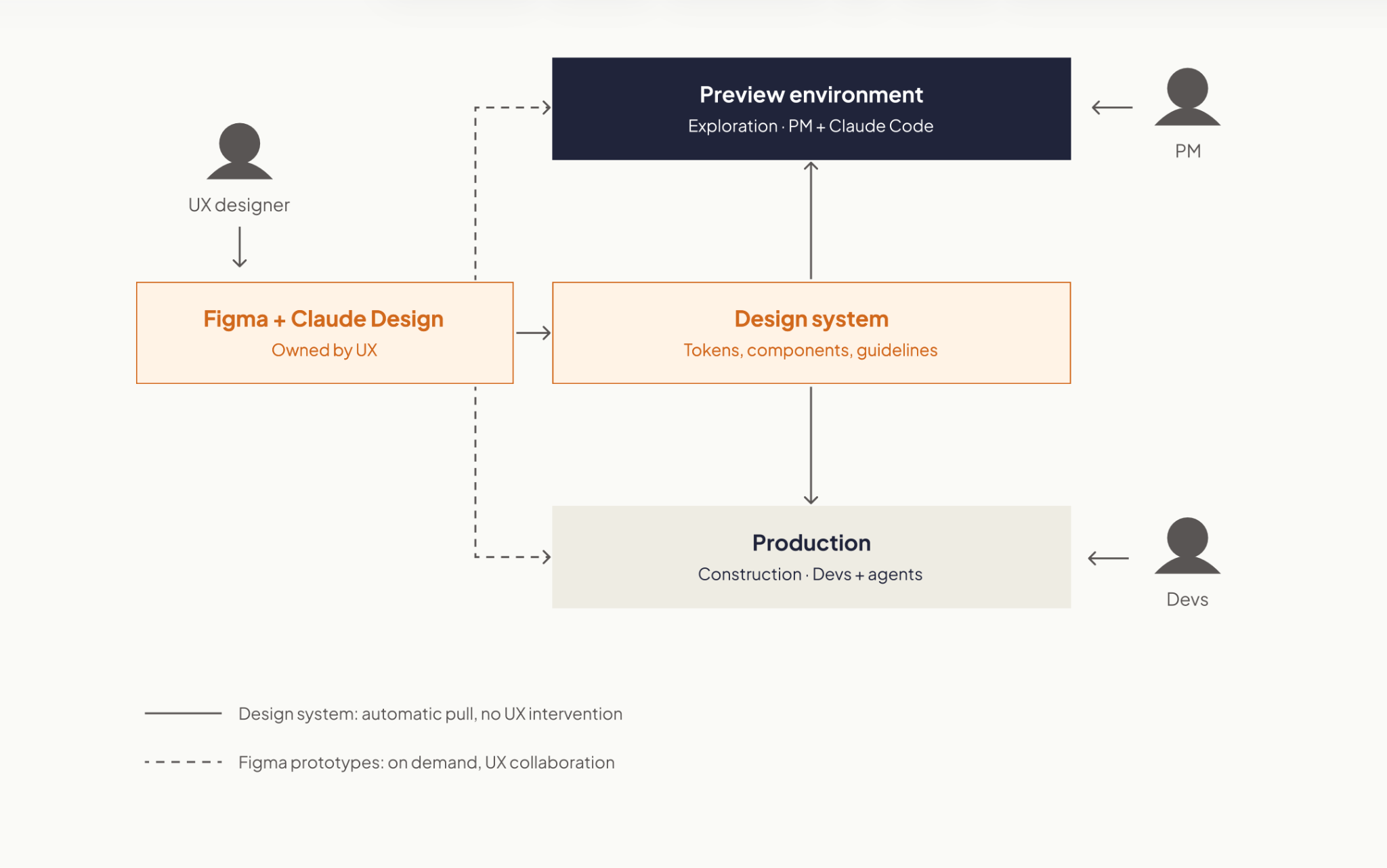
The answer is to separate exploration from construction.

PMs and engineers are solving different problems

During product discovery, the PM is trying to answer: Should we build this?

That means testing assumptions, changing direction quickly, throwing things away, and getting something real enough in front of a customer to learn from it.

Engineering is solving a different problem: How do we build this correctly?

That means thinking about architecture, security, maintainability, performance, edge cases, and everything else required for software that has to live in production.

Both need AI. But they don’t need the same working conditions.

Exploration benefits from speed, autonomy, and low friction. Construction needs stronger guarantees and guardrails. Trying to optimize the same environment for both creates tension.

So instead of asking how PMs can safely contribute code to the production codebase, there’s a more useful question: What if PMs had their own space to build and validate ideas?

Give PMs a safe place to explore

A PM working with an AI coding agent can build functional versions of new ideas. Not a Figma screen. Not a ticket describing what something might do.

Working software that can be used to test the product experience. The important part is that this environment is separate from production.

That boundary gives the PM freedom to experiment without requiring the same controls we’d expect from production software. The environment can be designed so experiments can’t affect the live product or access things they shouldn’t.

Now the PM’s workflow can look more like:

Idea → build → test with users → learn → iterate

Engineering doesn’t need to be pulled into every cycle.  Engineering still matters. It  gets brought in once Product has stronger evidence about what’s worth building.

The prototype shouldn’t be the handoff

This is where things can go wrong.

If a PM spends two days building something with AI and then gives the repository to Engineering saying, “It mostly works, can you finish it?”, we haven’t improved the product development process. We may have just moved the mess downstream.

The prototype should help answer product questions. It shouldn’t make technical decisions on Engineering’s behalf.

What Engineering needs from exploration is intent.

  • What does the feature need to do?
  • How should it behave?
  • What did we learn from customers?
  • What happens in the important edge cases?
  • How will we know when the production version works as intended?

That becomes the handoff.

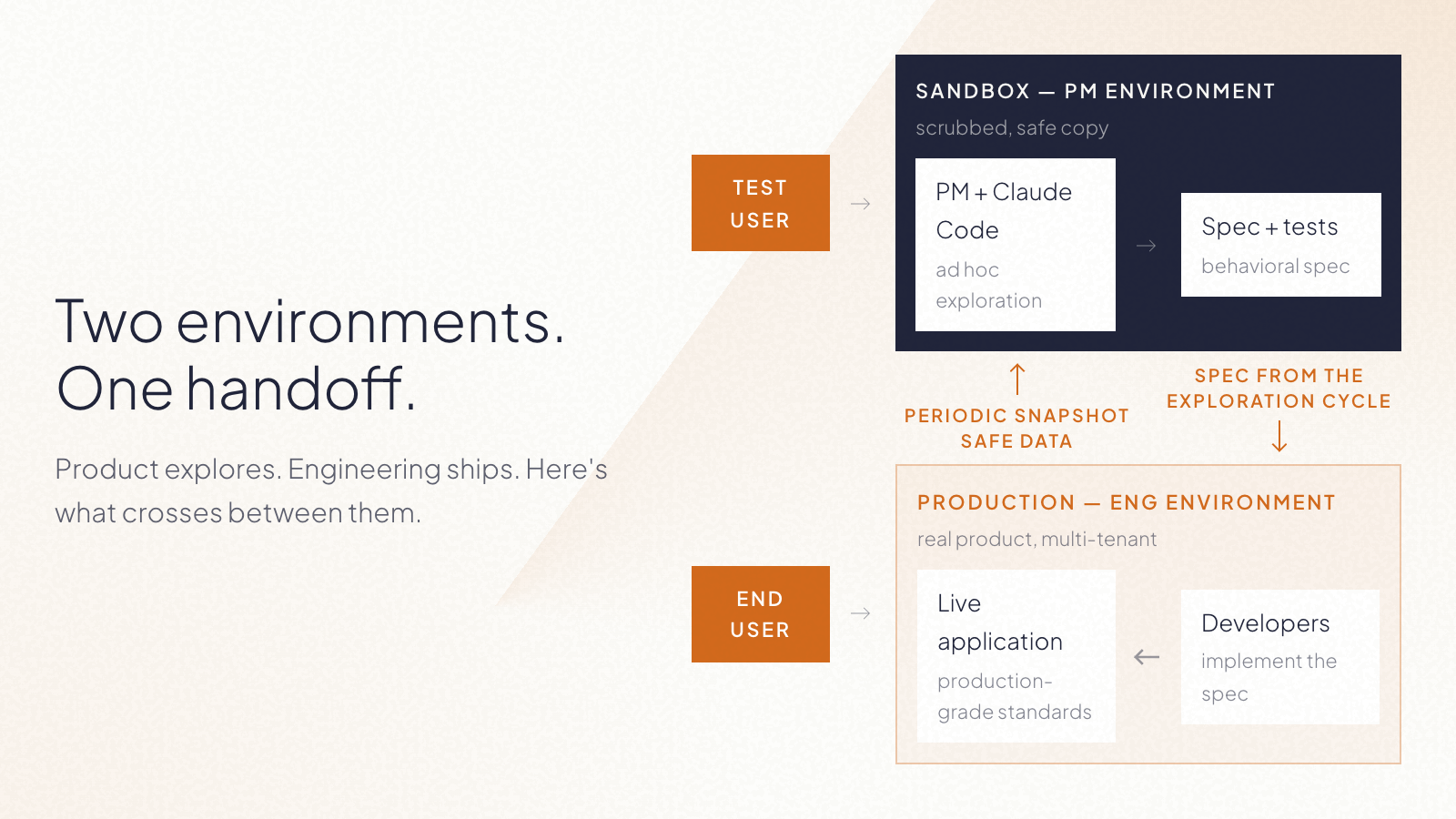
At Kaizen, we’ve been exploring a model where the bridge between the two cycles is a behavioral specification and a test plan, supported by the working prototype as a reference. The implementation itself stays behind.

What crosses into construction is the spec: a behavioral description, a test plan, and a link to the prototype as reference. The prototype itself stays where it was built.

In simple terms:

Product owns the what. Engineering owns the how.

That distinction matters even more now that AI makes it so easy for both sides to generate code.

What the workflow could look like

A PM starts with a product hypothesis. Instead of immediately turning it into a backlog item, they use AI to build enough of the experience to test it. They put it in front of users. They discover that part of the original idea was wrong. So they change it. They test again.

Once the problem and desired behavior are clear enough, the PM closes the exploration cycle with a clear specification and acceptance criteria.

Engineering then starts from that understanding, not from the PM’s experimental code only. They decide how the feature fits into the architecture, how it should be implemented, what needs to be verified, and how it reaches production.

The result is two parallel forms of autonomy:

  • PMs don’t need Engineering for every experiment.
  • Engineers don’t inherit implementation decisions from every experiment.

More autonomy doesn’t have to mean less ownership.
AI can make discovery faster

A lot of the conversation around AI in software teams is still about developer productivity. How much faster can we write code? How much implementation can an agent take on?

Those questions matter. But for Product, there may be an even bigger opportunity upstream. AI can shorten the distance between having an idea and learning whether that idea is any good.

That changes what PMs can bring to an engineering team. Instead of: “We think customers want this.” They can increasingly say: “We tested this behavior with customers. Here’s what worked, what didn’t, and exactly what we now need the product to do.”

That’s a much better starting point for building production software.

If you have a prototype and want to take the idea into production, we can help you determine what needs to happen next.

·

Aug 28, 2026

About Catalyst 26: Partnerships & Ecosystem Conference

Everything to know about Catalyst 26: dates, price, who attends, both keynote recaps, and when the next Catalyst event is.

12 read time

Read more

Catalyst 26 was Partnership Leaders' fifth annual conference for partnership, ecosystem, and go-to-market professionals. It took place August 25 and 26, 2026, at the Marriott Hotel at the Brooklyn Bridge in New York, with more than 1,000 attendees and 70-plus speakers from companies including Anthropic, OpenAI, Google, Microsoft, IBM, BCG, and Siemens.

Dates August 25–26, 2026
Location Marriott Hotel at the Brooklyn Bridge, Brooklyn, NY
Edition 5th annual
Attendees 1,000+ partnership, ecosystem, and GTM professionals
Speakers 70+, including people from Anthropic, OpenAI, Google, Microsoft, IBM, BCG, and Siemens.
Price $849 early bird, rising to $999, then $1,999

Who Catalyst events are for

Catalyst brought together people building and running partner programs across SaaS, AI, consulting, systems integration, agencies, and major cloud platforms.

Attendees included executives leading partnership organizations, and people working directly in alliances, partner sales, marketing, operations, strategy, and enablement.

What Catalyst 26 is like

You can look at the agenda before a conference and have a pretty good idea of what you'll find. Being there is different.

This year's theme was "Navigating Frontier Ecosystems". Anthropic's Head of Partnerships and one of OpenAI's partner program leads appeared on the same agenda as people from Oracle, Siemens, IBM, and BCG, companies that have run formal partner programs for two decades.

That mix was one of the most interesting parts of the conference. Newer AI companies were discussing partner tiers, co-selling, and joint delivery alongside companies where those models have been part of their business for years.

What Catalyst 26 covered

Catalyst 26 split its sessions into eight pillars:

  • Advancing Organizational Maturity: turning partnerships into something measured and repeatable instead of one founder doing favors for another.
  • Become a Strategic Partner: getting partnerships involved when product and business decisions are made, not told about them afterward.
  • Frontier Partner Experience: adapting partner programs as AI changes how companies build and integrate products.
  • Path to CPO: career sessions for people aiming to lead partnerships at the executive level.
  • Co-Build: two companies building something together.
  • Co-Market: two companies running a campaign together.
  • Co-Sell: two sales teams working the same deal.
  • Co-Serve: two companies delivering the same engagement to a client.

Catalyst 26 sessions

Day 1 Keynote

The Day 1 keynote brought together Partnership Leaders’ CEO Asher Mathew, Tribe AI’s Co-founder & CEO Jaclyn Rice Nelson, Anthropic’s Head of Partnerships Phil Samenuk, and Boomi’s Chairman & CEO Steve Lucas.

Their discussion focused on how companies are relying on partners to build, sell, and deliver products across AI, cloud, and enterprise software. A few points stood out:

  • More companies have dedicated partner teams now, which means a generic, one-size-fits-all partner program doesn't cut it anymore. Partners show up when the program fits how they work.
  • New AI products and cloud services are shipping so fast that a partner program can't just get set once and left alone. Incentives, support, and how you work together need regular updates.
  • Partnerships also came up as a way to access data a company couldn’t reach on its own, whether that meant getting access to it, combining it, or putting it to use.
  • AI doesn't change the basics of a good partnership. Account planning, clear ownership, and relationships built over time still matter most.

Day 2 Keynote

The Day 2 keynote featured Ramp’s Lead Economist Ara Kharazian, Eliza’s Founder Brian Benedict, Siemens’ EVP Global Partner Ecosystem Dion Smith, and Oracle’s SVP, Partner Sales & Operations Strategy Leah Yomtovian.

A few points stood out:

  • The spending data told a slower story than expected: AI adoption is mostly going toward productivity gains and task automation, not some overnight shift.
  • Siemens is in the middle of folding more than 68,000 partners and roughly 200 separate programs into a single global one, mainly to make it easier to coordinate across IT and operational technology.
  • Oracle's approach is a running "listening tour": every partner gets the same baseline benefits, then incentives and credits get layered based on the type of partner and how they work with Oracle.
  • There was also talk of a newer kind of service team: bring in engineers, turn AI requirements into working products, and reuse delivery methods that already work instead of starting from scratch each time.

Next Catalyst events

The date and location of Catalyst 27 hasn’t been announced yet. In the meantime, you can check out the half-day Catalyst Summits in different cities:

  • October 20, 2026 - Seattle
  • October 27, 2026 - Chicago
  • October 2026 - Los Angeles
  • December 2026 - Singapore

Check Partnership Leaders’ events page for updates.

llms.txt
