Just this month, I built a full design system in about 20 hours.
What used to take weeks, sometimes months, is now dramatically faster. So… what actually changed? And more importantly: what didn’t?
Design systems take time. On complex platforms, they can take hundreds of hours.
We were working with a large and complex product where inconsistencies had started to pile up. Different modules had evolved in isolation, teams were making independent decisions, and there were no shared guidelines. The answer was clear: we needed a design system.
AI tools were just starting to emerge back then. They were mostly useful for simple tasks as they tended to hallucinate when things got complex. Developers had started using them earlier than designers, MCP didn't exist yet, and Figma plugins were the best automation we had.
But the context has changed. Fast.
The Manual Era
We did what most teams did. We stopped, and we built it. Manually.
Picture two designers, a mountain of inconsistencies, and no map. We had to cross-reference information manually, digging through the code, detecting what could be merged, agreeing on naming conventions, deciding how to name components. Hours and hours of discussion until we finally landed on a solution.
In the end, we got there. A cleaner system, faster workflows, and for the first time, both teams speaking the same visual language. Hard-won, but it worked.
But now every month a new AI model seems to be released. Design is finally catching up with what developers faced about two years ago. New tools arose, and with that, the scope of our work as designers completely changed.
The Human Factor
For an internal project, I used our Kaizen site as a reference, combined with documentation from industry leaders as a guideline.
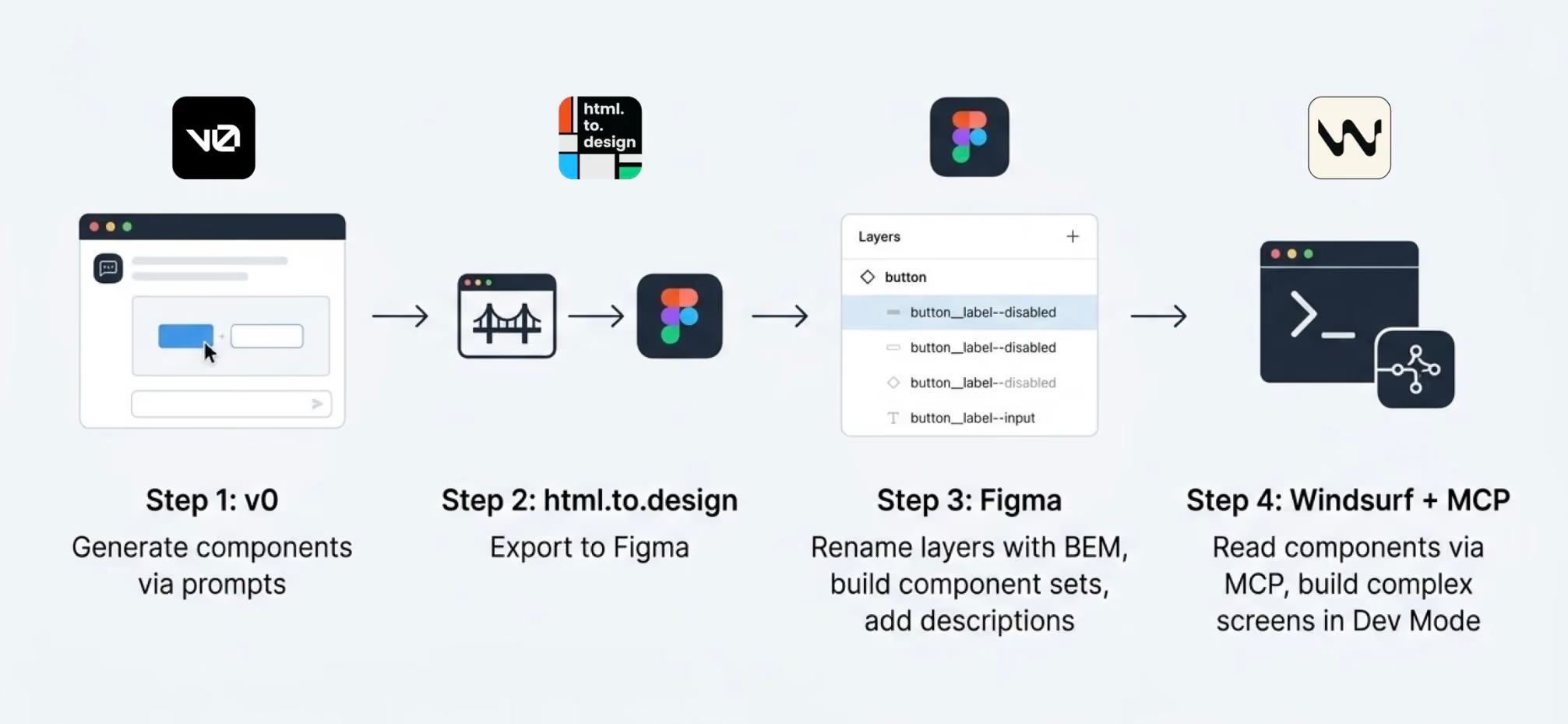
I started in v0, which is essentially a chat interface where you can generate UI components through prompts. I fed it the colors, typographies, and a reference image, and from there it was a back-and-forth: the AI generated, I reacted, adjusted, and pushed until the output matched what I had in my head. And just like that, I started prompting my way through a Design System.
Once a component was ready, I used the html.to.design plugin to bring it into Figma (yes, plugins are still alive!). Think of it as a bridge: the plugin exports designs directly from the browser into a Figma file.
Inside Figma, the intervention was more hands-on. First, I checked that everything was visually consistent with what was defined in v0: colors, typography, styles. Then I used Figma's built-in AI to rename all the component layers using BEM convention (something that would have taken a significant amount of time to do so manually).
BEM, which stands for Block Element Modifier, is a widely adopted naming convention in CSS. It structures layer names hierarchically and predictably, for example: button__label--disabled.
Using it keeps the code clean, readable, and consistent, especially when you're working alongside a developer who needs to understand what came out the other side.
Beyond naming, I also made sure the layer structure would generate the right properties when building component sets in Figma, so that all the variants would be correctly exposed and usable. My team also pointed out that adding descriptions to components and variants was key as context for any agent using them through an MCP.
The last step was connecting everything to Windsurf via MCP. With a frame selected in Dev Mode, Windsurf could read the Figma file and use the components to build more complex screens.
We worked closely with a developer throughout this phase. Not just for the technical knowledge, but because having someone who reads code fluently meant catching things we wouldn't have spotted otherwise. The design role here was direction and supervision: making sure the AI used the components correctly and didn't invent solutions where context was missing.
Every step of the process had a human decision behind it.
An Unexpected Discovery
At one point, before we had any of the naming conventions figured out, I selected a frame and asked Windsurf to build a form using the components inside it, styled to match a specific card. The developer next to me was skeptical until he saw the result, and then he was just as surprised as I was.
What we realized is that the MCP wasn't reading layer names to understand context. It was reading everything inside the frame, even the loose text sitting alongside the components. Good naming is still worth doing. But the MCP doesn't need it to understand what it's looking at.
Learning to Talk to an AI
The more specific and contained your prompt, the better the outcome. We started with the most atomic component: the button, and worked outward from there. Each approved component became context for the next one, so the system gradually picked up the visual language we were building.
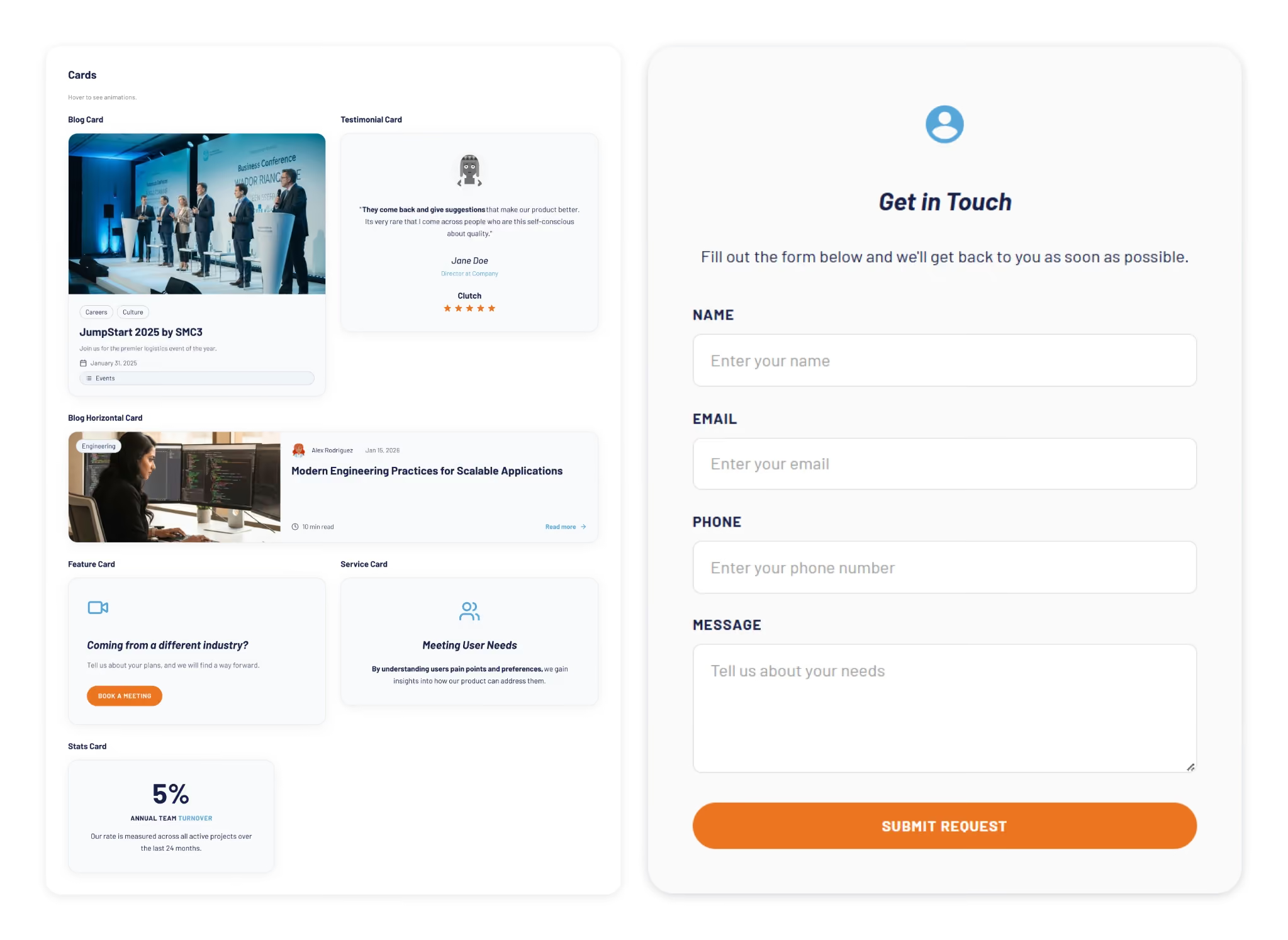
At some point I got ambitious and asked for five cards in a single prompt: blog card, service card, testimonial card, stats card, feature card… structures, states and all. The AI delivered.
Visually, everything looked fine. Then the developer looked at the code and pointed out that all five cards were independent components instead of variants of one. For a design system, that breaks everything.
One correction prompt fixed it. But it was a good reminder: the AI does exactly what you ask, not what you mean. And fixing it after the fact can cost more than getting it right from the start.
Some Things Learned Along the Way
Precision is key. Natural language is fine when you're asking for a cooking recipe, but when referring to a component, if you say things like "create" instead of "add", you'll probably end up with a whole new set of components instead of additional variants of an existing one.
The "Frame" is the context: MCPs can read everything inside the frame you select. This is a game-changer. It means the "naming conventions" debate might be shifting. If the AI understands the context visually and structurally, will we still spend hours discussing nomenclature in 2027?
No matter what happens, you can always roll back in less than 5 minutes and start over.
Work closely with a developer: they can help you understand MCPs and clear up any code-related doubts. Once you start to grasp their logic, you'll learn very quickly how to prompt in ways that AI actually understands.
There's nothing to lose by asking the AI to follow a specific naming convention for the code. It keeps everything clean and readable, and it takes no extra effort.
The AI covers roughly 80% of the work (generation, variations, exploration...), but the remaining 20% is where quality lives, and that part is not delegable. The AI executes. The judgment is still yours. And if you skip the review, you're not saving time: you'll spend it later.
Context matters more than tooling. What you don't define, the AI will invent. Small components may be resolved well, but large interfaces require more definition from the start. A well-defined system scales. An undefined one generates inconsistencies faster than you can fix them.
Figma is no longer the mandatory starting point. It's useful as a visual reference, a QA space, or a consolidation layer. But the AI doesn't need it. We still do.
There's no single right workflow yet. What you do depends on the project. We're in a transition moment where the tools change faster than the standards. The best thing you can do right now is experiment.
What AI Still Can’t Replace
Through all of this, a few things became very clear. These are the parts that didn’t change:
Knowing when something looks off. The AI generates, but it doesn't notice when the result doesn't feel right. That eye is yours.
Direction and supervision. The AI used the components we gave it, but without someone supervising it, it invents solutions where there is no context to work from.
The definition of done is still a human call, whether it's a conversation with a PO, a stakeholder, or just the designer's criteria. There's no prompt for that.
The context: knowing why certain decisions matter, what a component should communicate, what the user will actually feel. Business knowledge, stakeholder dynamics, unwritten rules, empathy for the end user. These take years to build and live in the people doing the work, not in the tools they use.
My Two Cents
The tools changed, and that gave me the chills, but throughout this experience I found that the designer's role is more alive than ever.
What once took a team weeks can now be prototyped in hours. That’s not a threat; it’s an invitation to get curious.
I'm still figuring a lot of this out, and I suspect most of us are. There's no right workflow yet, and honestly, that's fine. We are in a transition where tools change faster than standards. The best thing you can do is experiment. Don't wait for a "definitive" workflow, it might be obsolete by next month.
Go ahead, try prompting your way through a component. You might be surprised how fast the system starts to take shape.
Just this month, I built a full design system in about 20 hours.
What used to take weeks, sometimes months, is now dramatically faster. So… what actually changed? And more importantly: what didn’t?
Design systems take time. On complex platforms, they can take hundreds of hours.
We were working with a large and complex product where inconsistencies had started to pile up. Different modules had evolved in isolation, teams were making independent decisions, and there were no shared guidelines. The answer was clear: we needed a design system.
AI tools were just starting to emerge back then. They were mostly useful for simple tasks as they tended to hallucinate when things got complex. Developers had started using them earlier than designers, MCP didn't exist yet, and Figma plugins were the best automation we had.
But the context has changed. Fast.
The Manual Era
We did what most teams did. We stopped, and we built it. Manually.
Picture two designers, a mountain of inconsistencies, and no map. We had to cross-reference information manually, digging through the code, detecting what could be merged, agreeing on naming conventions, deciding how to name components. Hours and hours of discussion until we finally landed on a solution.
In the end, we got there. A cleaner system, faster workflows, and for the first time, both teams speaking the same visual language. Hard-won, but it worked.
But now every month a new AI model seems to be released. Design is finally catching up with what developers faced about two years ago. New tools arose, and with that, the scope of our work as designers completely changed.
The Human Factor
For an internal project, I used our Kaizen site as a reference, combined with documentation from industry leaders as a guideline.
I started in v0, which is essentially a chat interface where you can generate UI components through prompts. I fed it the colors, typographies, and a reference image, and from there it was a back-and-forth: the AI generated, I reacted, adjusted, and pushed until the output matched what I had in my head. And just like that, I started prompting my way through a Design System.
Once a component was ready, I used the html.to.design plugin to bring it into Figma (yes, plugins are still alive!). Think of it as a bridge: the plugin exports designs directly from the browser into a Figma file.
Inside Figma, the intervention was more hands-on. First, I checked that everything was visually consistent with what was defined in v0: colors, typography, styles. Then I used Figma's built-in AI to rename all the component layers using BEM convention (something that would have taken a significant amount of time to do so manually).
BEM, which stands for Block Element Modifier, is a widely adopted naming convention in CSS. It structures layer names hierarchically and predictably, for example: button__label--disabled.
Using it keeps the code clean, readable, and consistent, especially when you're working alongside a developer who needs to understand what came out the other side.
Beyond naming, I also made sure the layer structure would generate the right properties when building component sets in Figma, so that all the variants would be correctly exposed and usable. My team also pointed out that adding descriptions to components and variants was key as context for any agent using them through an MCP.
The last step was connecting everything to Windsurf via MCP. With a frame selected in Dev Mode, Windsurf could read the Figma file and use the components to build more complex screens.
We worked closely with a developer throughout this phase. Not just for the technical knowledge, but because having someone who reads code fluently meant catching things we wouldn't have spotted otherwise. The design role here was direction and supervision: making sure the AI used the components correctly and didn't invent solutions where context was missing.
Every step of the process had a human decision behind it.
An Unexpected Discovery
At one point, before we had any of the naming conventions figured out, I selected a frame and asked Windsurf to build a form using the components inside it, styled to match a specific card. The developer next to me was skeptical until he saw the result, and then he was just as surprised as I was.
What we realized is that the MCP wasn't reading layer names to understand context. It was reading everything inside the frame, even the loose text sitting alongside the components. Good naming is still worth doing. But the MCP doesn't need it to understand what it's looking at.
Learning to Talk to an AI
The more specific and contained your prompt, the better the outcome. We started with the most atomic component: the button, and worked outward from there. Each approved component became context for the next one, so the system gradually picked up the visual language we were building.
At some point I got ambitious and asked for five cards in a single prompt: blog card, service card, testimonial card, stats card, feature card… structures, states and all. The AI delivered.
Visually, everything looked fine. Then the developer looked at the code and pointed out that all five cards were independent components instead of variants of one. For a design system, that breaks everything.
One correction prompt fixed it. But it was a good reminder: the AI does exactly what you ask, not what you mean. And fixing it after the fact can cost more than getting it right from the start.
Some Things Learned Along the Way
Precision is key. Natural language is fine when you're asking for a cooking recipe, but when referring to a component, if you say things like "create" instead of "add", you'll probably end up with a whole new set of components instead of additional variants of an existing one.
The "Frame" is the context: MCPs can read everything inside the frame you select. This is a game-changer. It means the "naming conventions" debate might be shifting. If the AI understands the context visually and structurally, will we still spend hours discussing nomenclature in 2027?
No matter what happens, you can always roll back in less than 5 minutes and start over.
Work closely with a developer: they can help you understand MCPs and clear up any code-related doubts. Once you start to grasp their logic, you'll learn very quickly how to prompt in ways that AI actually understands.
There's nothing to lose by asking the AI to follow a specific naming convention for the code. It keeps everything clean and readable, and it takes no extra effort.
The AI covers roughly 80% of the work (generation, variations, exploration...), but the remaining 20% is where quality lives, and that part is not delegable. The AI executes. The judgment is still yours. And if you skip the review, you're not saving time: you'll spend it later.
Context matters more than tooling. What you don't define, the AI will invent. Small components may be resolved well, but large interfaces require more definition from the start. A well-defined system scales. An undefined one generates inconsistencies faster than you can fix them.
Figma is no longer the mandatory starting point. It's useful as a visual reference, a QA space, or a consolidation layer. But the AI doesn't need it. We still do.
There's no single right workflow yet. What you do depends on the project. We're in a transition moment where the tools change faster than the standards. The best thing you can do right now is experiment.
What AI Still Can’t Replace
Through all of this, a few things became very clear. These are the parts that didn’t change:
Knowing when something looks off. The AI generates, but it doesn't notice when the result doesn't feel right. That eye is yours.
Direction and supervision. The AI used the components we gave it, but without someone supervising it, it invents solutions where there is no context to work from.
The definition of done is still a human call, whether it's a conversation with a PO, a stakeholder, or just the designer's criteria. There's no prompt for that.
The context: knowing why certain decisions matter, what a component should communicate, what the user will actually feel. Business knowledge, stakeholder dynamics, unwritten rules, empathy for the end user. These take years to build and live in the people doing the work, not in the tools they use.
My Two Cents
The tools changed, and that gave me the chills, but throughout this experience I found that the designer's role is more alive than ever.
What once took a team weeks can now be prototyped in hours. That’s not a threat; it’s an invitation to get curious.
I'm still figuring a lot of this out, and I suspect most of us are. There's no right workflow yet, and honestly, that's fine. We are in a transition where tools change faster than standards. The best thing you can do is experiment. Don't wait for a "definitive" workflow, it might be obsolete by next month.
Go ahead, try prompting your way through a component. You might be surprised how fast the system starts to take shape.
Applying changes across microservices is difficult because business logic is distributed across multiple services, each with its own data, contracts, and responsibilities.
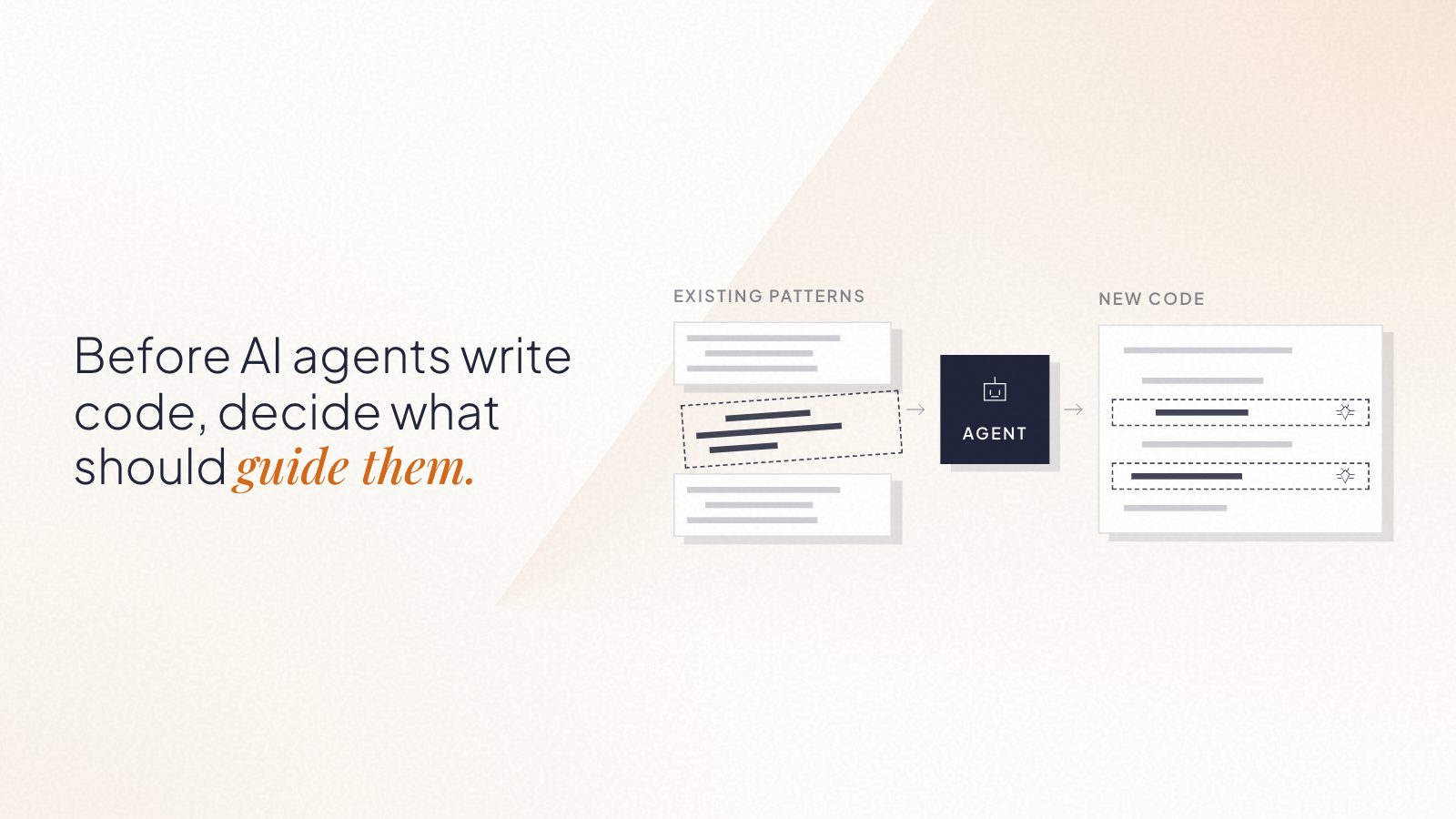
In our experiment at Kaizen Softworks, we tested whether an AI system could safely apply coordinated changes across a microservices architecture using only minimal input.
Short answer: Yes, but only when the AI has enough architectural context.
Why are coordinated changes in microservices so hard?
In distributed systems, a single business change rarely affects just one service.
It often requires:
Updating multiple microservices
Modifying message contracts
Keeping DTOs (Data Transfer Objects) consistent
Respecting domain boundaries defined by Domain-Driven Design (DDD)
Key entities in this system:
Microservice: An independently deployable service responsible for a specific domain
Aggregate (DDD): A cluster of domain objects treated as a single unit
DTO (Data Transfer Object): A structured format used to transfer data between services
Message/Event: A communication mechanism between services
The complexity is not in the code, it’s in the relationships between components.
The experiment: Can AI reason across services with minimal input?
We designed a controlled experiment to test whether an AI model could apply system-wide changes with limited information.
Input given to the AI:
Message definitions (events between services)
DTOs (data contracts)
Tasks the AI had to perform:
Identify affected aggregates
Determine service ownership
Apply coordinated changes across services
Maintain consistency in messages and DTOs
In other words, the AI had to behave like a software architect, not just a code generator.
What was the biggest obstacle?
The biggest challenge was not technical, it was contextual.
Problem: unclear service naming
Instead of descriptive names like:
order-service
billing-service
Our services were named:
john
sally
roger
This removed any semantic clues about responsibility.
Result: The AI could not infer which service owned which domain logic.
The missing piece: aggregate ownership mapping
To solve this, we introduced a simple but powerful structure:
Aggregate → Service mapping
Order → john
Shipment → sally
Invoice → roger
This created a clear relationship between domain concepts and system components.
Once ownership was explicit, the architecture became understandable.
How we used AI to generate architectural context
Instead of building this mapping manually, we used AI to analyze the codebase and extract:
Where each aggregate was defined
Which microservice implemented it
The relationship between domain and infrastructure
The result was a machine-readable architecture map.
In practice, we used AI to generate the context that AI itself needed.
Results: Can AI safely apply distributed changes?
With the architecture map in place, the AI was able to:
Trace message flows across services
Identify affected aggregates
Locate the correct microservices
Apply coordinated updates
Maintain consistency between DTOs and messages
While not perfect, the system worked reliably as a proof of concept.
What is the real limitation of AI in microservices?
The main limitation of AI is not code generation, it’s architectural understanding.
Without knowing:
Which components exist
How they relate
Who owns what
AI cannot safely modify a distributed system.
AI performance depends more on context quality than model capability.
When can AI safely modify microservices?
AI works well when:
Aggregate ownership is clearly defined
Message contracts are explicit
Architecture is structured and consistent
AI struggles when:
Naming is ambiguous
Relationships are implicit
Context is incomplete
Simple rule: If the architecture is clear, AI can reason. If not, it guesses.
Final thoughts
This experiment revealed something important:
AI doesn’t fail because it can’t write code. It fails because it can’t see the system.
As teams move toward AI-assisted development, the focus will likely shift from:
Writing better code to Designing better systems for machines to understand
At Kaizen Softworks, we see this as a foundational shift.
Because when AI can understand architecture, it doesn’t just generate code, it helps evolve systems.
There's a myth that in flat organizations, everyone decides on everything.
That's not how it works. At least not at Kaizen.
When people hear "no managers," they often picture one of two extremes: either total chaos where nobody is accountable, or endless meetings where 80 people vote on which coffee to buy. The reality is neither.
Not everyone decides on everything. Not everyone votes. What we do have is a clear set of decision-making methods that we choose based on context.
It depends on who's affected and how deep the impact goes
Before choosing how to decide, we ask ourselves a few questions:
Who is affected? A decision that only impacts one team doesn't need the whole company involved. A decision that affects everyone's daily work does.
How deep is the impact? Changing the office furniture is wide but shallow. Changing the salary model is deep and lasting.
Is it reversible? If we can easily undo it, we can move fast and just inform. If it's hard to reverse, we slow down and include more people.
How urgent is it? And here we're careful to distinguish real urgency from anxiety, the pressure to decide quickly because someone already has "the answer" in mind.
These dimensions help us pick the right method. Not every decision deserves the same process.
Our decision-making toolkit
Over the years, we've landed on a few methods that we use depending on the situation:
1. Role-based decisions
Some decisions belong to a specific role. If someone owns a responsibility, say, office logistics or hiring for a team, they decide within that domain. No committee needed. The key is that roles are transparent: everyone knows who owns what, and the scope of each role's authority is clear.
2. Advice Process
When a decision doesn't clearly belong to one role, or when it crosses boundaries, we use the advice process. Here's how it works:
Someone takes the initiative. They identify the problem and own the process.
They gather input from people who are affected and people with expertise.
They seek advice, real conversations, not rubber-stamping.
They make the decision and communicate it, including what advice they incorporated and what they didn't (and why).
The decision-maker is not a committee. It's one person (or a small group) who takes responsibility. But they don't decide in isolation, they bring in the perspectives that matter.
We sometimes call this "Team Advice" when a working group forms around an issue that doesn't naturally fall into anyone's area, and "Area Advice" when a team opens up a topic that exceeds their own scope.
3. Consent (not consensus)
Consent is not "everyone agrees." Consent means "no one has a strong enough objection to block this." We do use a poll, but not to count votes — we use a 1-to-5 scale to measure the level of agreement and surface objections, not to let the majority rule.
We use it in two flavors:
High-participation consent: For decisions with deep, company-wide impact. This is our most expensive and slowest method, which is exactly why we reserve it for high-impact decisions that affect many people. The Board sets the boundaries, for example, when we moved offices, they defined the monthly budget. Then a working group produced proposals, collected feedback, evolved them, and the whole company expressed their position for the final decision. Silence is not approval; we explicitly ask people to weigh in, even if it's just "I have no objection."
Lightweight consent: For decisions that are broad but not deep. Participation is optional, anyone who's interested can jump in. We share the proposal, open a window for objections, and if nobody opposes, we move forward. This gives us speed without sacrificing transparency. If nobody engages, that's a signal too, maybe the proposal doesn't add enough value, or we're using the wrong channel.
4. Inform, don't fake-consult
Not everything needs participation. When a decision has already been made through a legitimate process, the right move is to inform, not to fake-consult. One of the fastest ways to kill self-management is to ask for feedback and then ignore it. If you're not going to change course based on input, don't ask for it, just be transparent about the decision and the reasons behind it.
What we explicitly avoid
Decision by Voting. In a company context, majority rule creates losers. And losers become detractors, often generating more resistance than an autocratic decision would have. Instead of voting, we prefer to evolve a proposal through feedback until it's "good enough for now," and then introduce a review point to adjust later. If voting happens at all, it's the cherry on top, not the main course.
The "surprise" approach. Working behind closed doors and then unveiling a finished decision is a recipe for frustration. Adults don't need surprises. Adults need to feel like they're part of the process. The complaints that follow a surprise aren't about the decision itself, they're about not being included.
Why we work this way
We didn't adopt these methods because they're trendy. We adopted them because they solve real problems:
Better decisions. When you include affected people, you get information you wouldn't have had otherwise. Ideas emerge that no single person would have come up with alone.
Less resistance. A person who feels heard is far less likely to resist a decision, even one they wouldn't have made themselves.
Faster execution. It sounds counterintuitive, but participative decisions often execute faster because people already understand and support them. The time you "save" by deciding alone, you spend later managing pushback.
Distributed authority. When people can make decisions within their domain without escalating everything to a founder, the organization scales. The bottleneck disappears.
Resilience. If a shared decision fails, the group adjusts together. If a top-down decision fails, the blame falls on one person and the chances of proactive correction drop.
The real principle behind all of this
Transparency is the foundation. Every method we use, from role-based decisions to high-participation consent, works because information flows openly. People know what's being decided, who's deciding it, and how they can participate.
Horizontal doesn't mean structureless. It means fewer hierarchical levels, clearer roles, and intentional decision-making processes that match the weight of each decision.
Not everyone decides on everything. But everyone knows how things get decided.