Kaizen Teams

Dropdown

Table of Contents

Time to read

·

12

Published on

·

May 11, 2022

Last updated on

·

April 10, 2026

Valentina Ibinete, Marketing Lead at Kaizen Softworks

Valentina Ibinete

Travel magnet collector

Marketing Lead

How to Attract and Retain Software Development Talent?

Published on

·

April 10, 2026

Last updated on

·

April 10, 2026

Time to read

·

12

Valentina Ibinete, Marketing Lead at Kaizen Softworks

Valentina Ibinete

Marketing Lead

There is a very restricted talent pool and a massive demand for software developers in the U.S. Companies must do their best to attract the greatest people to their team. The IT industry is highly competitive so attracting and retaining top talent becomes one of the biggest challenges for every tech company.

In this scenario, we are frequently asked how we manage to have such a low turnover rate (10% overall) when IT recruiters are constantly contacting our teams with new job offers. In this context, it is essential to understand the motivations of our developers and the ways we can structure work environments to maximize longevity and career satisfaction.

Now, what is your plan to attract and retain high quality software development talent? We’ve come up with several strategies that have helped us to do so.

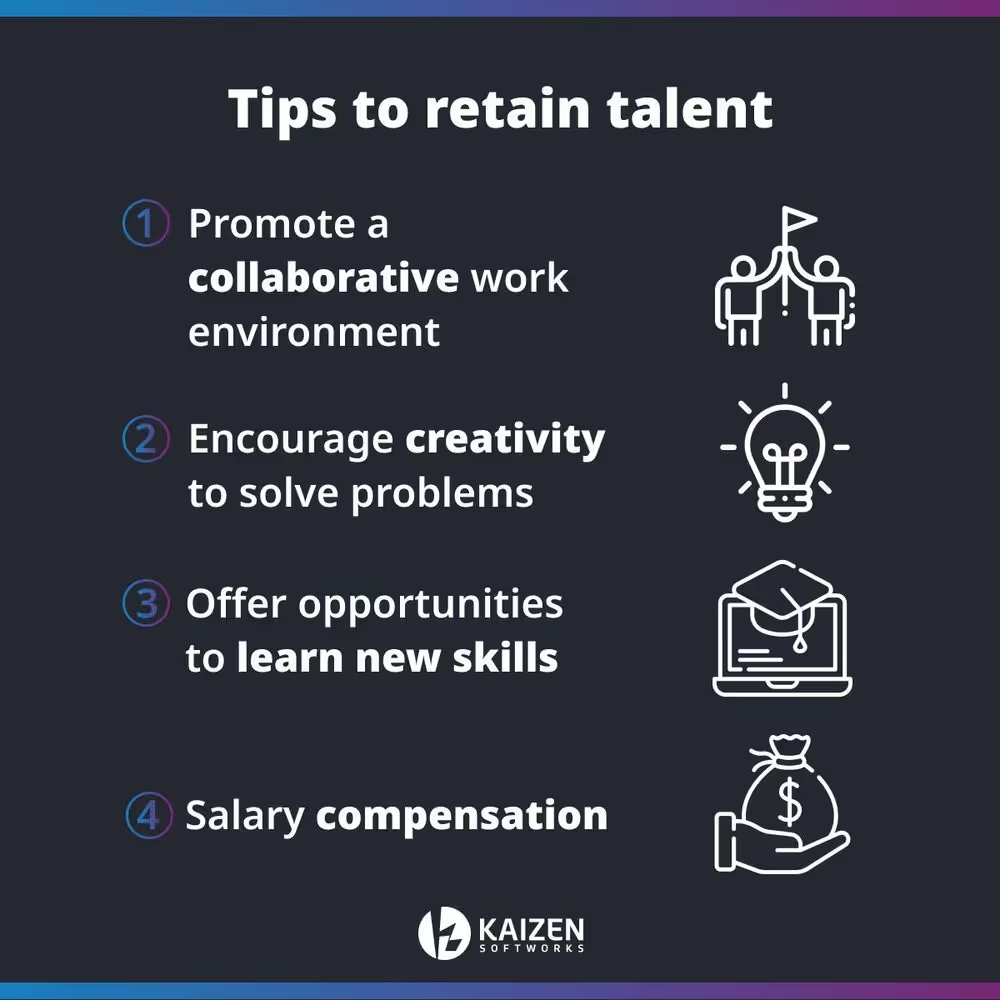
Graphic Image of Tips to Retain Software Development Talent

1- Promote a collaborative work environment

Creating a collaborative work environment fosters people to express their talents. Developers want to be part of an organization where their voices are heard, where they feel part of the company culture and have an influence on what happens within it.

You should allow your developers to participate in decisions that may affect both the institutional and software development team environment. Encouraging people to participate in the decision-making process that involves aspects beyond the specific tasks of their role, increases the perception of the influence they have both on the team and the company.

In other words, this means allowing and promoting cross-area collaboration.

By listening to and, more importantly, acting on the feedback provided by your developers, you'll let them know that you recognize their talents and make them feel that their contributions have a tangible impact on a team and organization level.

2- Encourage creativity to solve problems

There is nothing more counterproductive than having to solve a problem with techniques that may not be the most efficient ones. So why don't let your developers play with the methods they try and be the ones to come up with effective and creative solutions?

It's important to promote creative freedom to solve important problems. This job is, after all, their domain, which means they must have a responsible level of independence within it.

Also, this will encourage them to be more engaged with the company as there is trust in their work.

3- Offer opportunities to learn new skills

As the technology market continues to grow and evolve, your software developers should have the opportunity to grow with it.

Please notice that continual updating and self-improvement drew many developers to their profession in the first place.

You should offer the suitable training as these tech talents like to be challenged but they may resent being thrown into a new expertise without properly learning it first.

Keep in mind that having suitable resources is a crucial factor in developers' enthusiasm and outcomes. For example, let's say your engineers find a problem and don't know how to fix it. Hitting an obstacle directly proportional to the limits of their experience will end up discouraging them, affecting the project and the company in general.

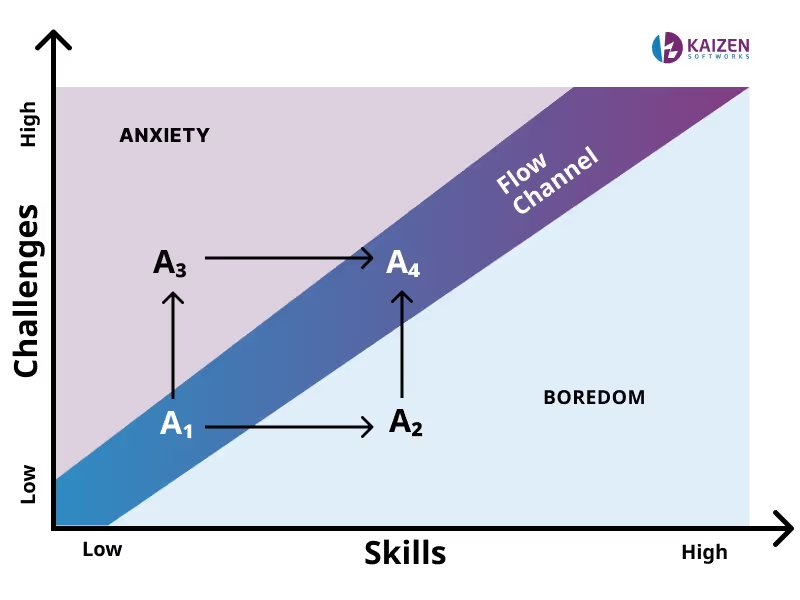
Challenges and Skills of Software Developers Graphic

This is an opportunity to provide enrichment. Empower them to master their skills and encourage them to continually improve by creating a culture where they learn that a long, profitable and fulfilling career comes from using skills to deliver software and create impact.

This fosters a culture of self-determination and adds to employee’s benefits.

4- Salary compensation

A key aspect of a developer's motivation is salary and compensation package for their work. To recognize the market value of a person, it is necessary to carry out labor market research and more importantly, ask yourself what gives them their experience and skills necessary for their job?

It is important to research the value that other companies in the industry provide, to ensure that the salaries and compensation plans offered, such as additional benefits, are attractive enough to keep developers engaged with the company.

A good employee deserves to be recognized for the value of their work and paid according to their responsibilities. Otherwise, they will be open to new opportunities that give them the compensation they believe their work deserves.

Image with tips to retain software development talent

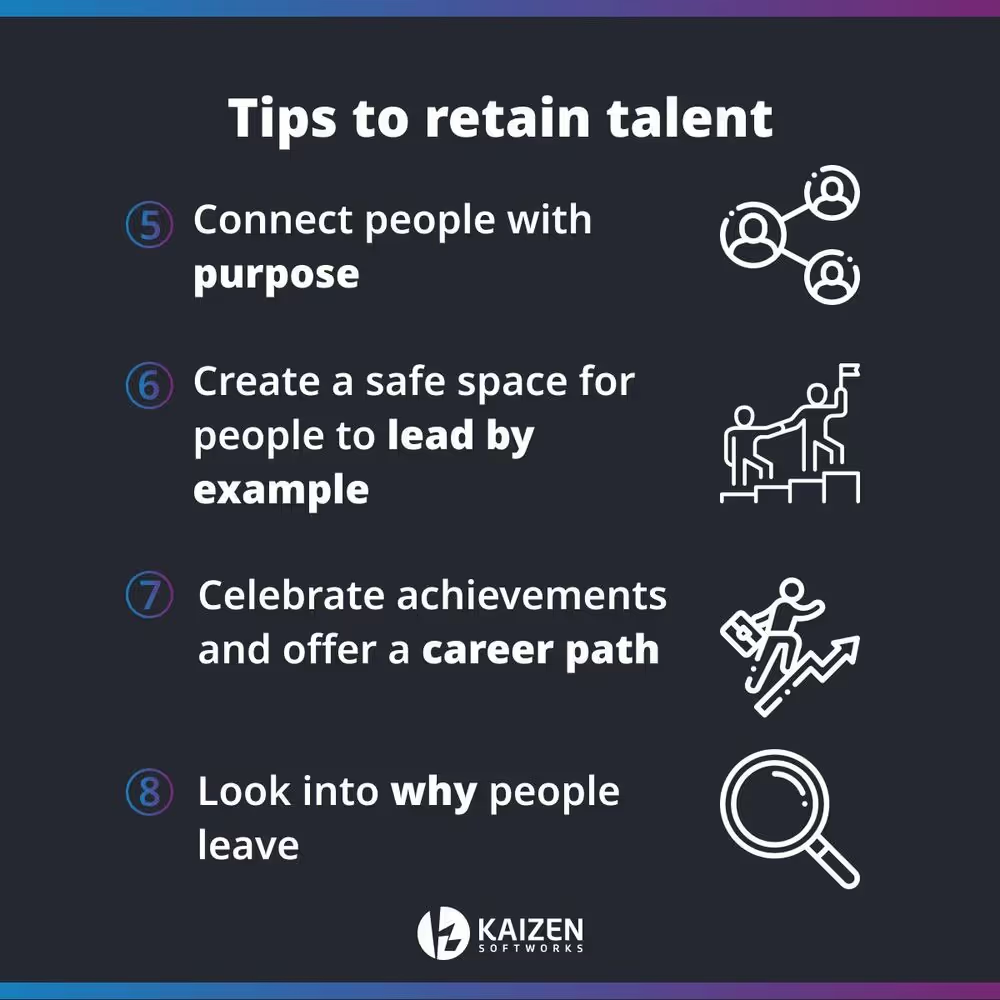
5- Connect people with purpose

Purpose has to do with being able to make a contribution to others and pursuing a higher goal. We find more and more professionals who no longer focus primarily on how much they are going to earn or what they are going to achieve, but on one main question: “what am I going to work for?”.

Connecting people with purpose, makes the differences between the technical and human sides of a person disappear. Working and living guided by a purpose benefits people because it gives them the opportunity to look inward and renew themselves by going beyond their own limits. Likewise, it gives a sense of belonging to the organization and reinforces organizational commitment.

Motivate people to ask questions like: why does what we do matter? What difference do we make in the world? What motivates us to continue offering our services? What motivates our clients to hire us?

6- Create a safe space for people to lead by example

The first few years as a software developer might be a stressful time that comes along with different challenges. Going through these early years can be an extremely frustrating experience if developers are not supported by a strong structure. That's why every company needs to have leaders with the experience and vision to support less experienced employees as they grow with the company.

Providing a safe space for developers to teach other team members is one of the best ways to increase team seniority. When developers are mentored, they learn. When they learn, they get involved. When they get involved, they are much more likely to stick around.

Therefore, recognizing and encouraging mentoring within teams and companies is one of the most important things a company can do.

Also, teaching others inspires them to take on new challenges, to share their knowledge and to continue growing from a soft skill point of view since it is an opportunity to develop empathy and improve leadership and communication skills.

7- Celebrate achievements and offer a career path

There is nothing more encouraging and fulfilling than knowing that your work makes a difference in your company and also in your client businesses. Let your employees know that their day-to-day work is important!

Implement recognition initiatives, celebrate team milestones, and provide small confidence boosts.

But recognition is not enough incentive to retain talent if you don’t support it with career advancement opportunities.

Career growth can mean fostering a culture of knowledge-sharing, which enables employees to discover new interests within the company, allowing role gaps to be filled internally.

Also, it makes them feel like they’re growing with the company and provides a sense of purpose and belonging, which in turn fosters loyalty and long term engagement.

8- Look into why people leave

Losing a team member can become an opportunity to learn from the experience and mitigate the risk of having the same problem in the near future. Just as not all problems have a solution, you can’t fix a problem you don't know about either.

Conducting an exit interview can help you to learn more about the reasons why people decide to leave the company and their perception of the work environment.

This information works as an opportunity to improve your current talent management process through receiving honest feedback on the true state of the organization, and the problems employees face on a day-to-day basis.

Conclusion

We invite you to reflect on the following questions: what excites your developers to go to work? How does the structure of your organization affect its overall performance? Are your developers surrounded by peers who can encourage and challenge them to improve? And more importantly, can your developers visualize a career within your company?

Whether you’re looking for software developers to take your business idea into a digital solution or want to further expand your current development team, we’re here to help.

There is a very restricted talent pool and a massive demand for software developers in the U.S. Companies must do their best to attract the greatest people to their team. The IT industry is highly competitive so attracting and retaining top talent becomes one of the biggest challenges for every tech company.

In this scenario, we are frequently asked how we manage to have such a low turnover rate (10% overall) when IT recruiters are constantly contacting our teams with new job offers. In this context, it is essential to understand the motivations of our developers and the ways we can structure work environments to maximize longevity and career satisfaction.

Now, what is your plan to attract and retain high quality software development talent? We’ve come up with several strategies that have helped us to do so.

Graphic Image of Tips to Retain Software Development Talent

1- Promote a collaborative work environment

Creating a collaborative work environment fosters people to express their talents. Developers want to be part of an organization where their voices are heard, where they feel part of the company culture and have an influence on what happens within it.

You should allow your developers to participate in decisions that may affect both the institutional and software development team environment. Encouraging people to participate in the decision-making process that involves aspects beyond the specific tasks of their role, increases the perception of the influence they have both on the team and the company.

In other words, this means allowing and promoting cross-area collaboration.

By listening to and, more importantly, acting on the feedback provided by your developers, you'll let them know that you recognize their talents and make them feel that their contributions have a tangible impact on a team and organization level.

2- Encourage creativity to solve problems

There is nothing more counterproductive than having to solve a problem with techniques that may not be the most efficient ones. So why don't let your developers play with the methods they try and be the ones to come up with effective and creative solutions?

It's important to promote creative freedom to solve important problems. This job is, after all, their domain, which means they must have a responsible level of independence within it.

Also, this will encourage them to be more engaged with the company as there is trust in their work.

3- Offer opportunities to learn new skills

As the technology market continues to grow and evolve, your software developers should have the opportunity to grow with it.

Please notice that continual updating and self-improvement drew many developers to their profession in the first place.

You should offer the suitable training as these tech talents like to be challenged but they may resent being thrown into a new expertise without properly learning it first.

Keep in mind that having suitable resources is a crucial factor in developers' enthusiasm and outcomes. For example, let's say your engineers find a problem and don't know how to fix it. Hitting an obstacle directly proportional to the limits of their experience will end up discouraging them, affecting the project and the company in general.

Challenges and Skills of Software Developers Graphic

This is an opportunity to provide enrichment. Empower them to master their skills and encourage them to continually improve by creating a culture where they learn that a long, profitable and fulfilling career comes from using skills to deliver software and create impact.

This fosters a culture of self-determination and adds to employee’s benefits.

4- Salary compensation

A key aspect of a developer's motivation is salary and compensation package for their work. To recognize the market value of a person, it is necessary to carry out labor market research and more importantly, ask yourself what gives them their experience and skills necessary for their job?

It is important to research the value that other companies in the industry provide, to ensure that the salaries and compensation plans offered, such as additional benefits, are attractive enough to keep developers engaged with the company.

A good employee deserves to be recognized for the value of their work and paid according to their responsibilities. Otherwise, they will be open to new opportunities that give them the compensation they believe their work deserves.

Image with tips to retain software development talent

5- Connect people with purpose

Purpose has to do with being able to make a contribution to others and pursuing a higher goal. We find more and more professionals who no longer focus primarily on how much they are going to earn or what they are going to achieve, but on one main question: “what am I going to work for?”.

Connecting people with purpose, makes the differences between the technical and human sides of a person disappear. Working and living guided by a purpose benefits people because it gives them the opportunity to look inward and renew themselves by going beyond their own limits. Likewise, it gives a sense of belonging to the organization and reinforces organizational commitment.

Motivate people to ask questions like: why does what we do matter? What difference do we make in the world? What motivates us to continue offering our services? What motivates our clients to hire us?

6- Create a safe space for people to lead by example

The first few years as a software developer might be a stressful time that comes along with different challenges. Going through these early years can be an extremely frustrating experience if developers are not supported by a strong structure. That's why every company needs to have leaders with the experience and vision to support less experienced employees as they grow with the company.

Providing a safe space for developers to teach other team members is one of the best ways to increase team seniority. When developers are mentored, they learn. When they learn, they get involved. When they get involved, they are much more likely to stick around.

Therefore, recognizing and encouraging mentoring within teams and companies is one of the most important things a company can do.

Also, teaching others inspires them to take on new challenges, to share their knowledge and to continue growing from a soft skill point of view since it is an opportunity to develop empathy and improve leadership and communication skills.

7- Celebrate achievements and offer a career path

There is nothing more encouraging and fulfilling than knowing that your work makes a difference in your company and also in your client businesses. Let your employees know that their day-to-day work is important!

Implement recognition initiatives, celebrate team milestones, and provide small confidence boosts.

But recognition is not enough incentive to retain talent if you don’t support it with career advancement opportunities.

Career growth can mean fostering a culture of knowledge-sharing, which enables employees to discover new interests within the company, allowing role gaps to be filled internally.

Also, it makes them feel like they’re growing with the company and provides a sense of purpose and belonging, which in turn fosters loyalty and long term engagement.

8- Look into why people leave

Losing a team member can become an opportunity to learn from the experience and mitigate the risk of having the same problem in the near future. Just as not all problems have a solution, you can’t fix a problem you don't know about either.

Conducting an exit interview can help you to learn more about the reasons why people decide to leave the company and their perception of the work environment.

This information works as an opportunity to improve your current talent management process through receiving honest feedback on the true state of the organization, and the problems employees face on a day-to-day basis.

Conclusion

We invite you to reflect on the following questions: what excites your developers to go to work? How does the structure of your organization affect its overall performance? Are your developers surrounded by peers who can encourage and challenge them to improve? And more importantly, can your developers visualize a career within your company?

Whether you’re looking for software developers to take your business idea into a digital solution or want to further expand your current development team, we’re here to help.

Related Articles

·

Jun 29, 2026

The wheel proposes, the oracle decides

How we pick the next UX Tiny Knowledge Byte speaker, with a spinning wheel and a Magic 8 Ball.

12 read time

Read more

A while ago we noticed something pretty common: everyone wanted to share more knowledge internally, but nobody wanted another heavy corporate ritual.

Internal talks usually start with good intentions and slowly disappear. They take time, preparation, and energy. And at some point people start feeling like they need to be experts before presenting anything.

So we tried the opposite.

15 minute talks.

Small topics.

Low pressure.

And one important rule: every session had to leave something useful behind. A tool, a workflow, an idea, a shortcut, a new way to approach a problem. Something people could actually use after the talk ended.

We didn’t want theory that went nowhere.

Somehow, that ended up working much better than we expected.

The idea was to reduce friction

Screenshot of the shared topic pool

Tiny Knowledge Bytes is intentionally simple:

  • anyone can suggest topics
  • anyone can end up presenting
  • you don’t need to master the topic
  • talks can come from experiments, client problems, tools or random discoveries
  • sessions should leave something practical behind
  • if nobody volunteers, the system picks someone for us

The goal was making knowledge sharing feel lightweight instead of exhausting.

Some of the best talks start with:

“I tried this yesterday and it was weird.”

The topic pool started growing on its own

Over time, topics started coming from everywhere.

Sometimes someone took a course and used a Tiny Knowledge Byte as a way to give something back to the team. Other times, a client problem triggered research into new tools, workflows or AI approaches.

A lot of sessions start from curiosity or necessity more than planning.

The pool slowly filled up with things like:

  • Synthetic Users
  • Google AI Studio
  • Design.md
  • Computer Vision
  • MCP + Figma
  • V0 workflows
  • AI orchestration
  • Figma plugins
  • comparing AI tools using the same prompt

And honestly, the mix is part of what makes it interesting.

Sometimes a UX session drifts into Computer Vision. Sometimes someone technical shares a visual workflow that half the design team ends up adopting later.

There’s not much curation. It behaves more like a constant exploration system.

Then another problem appeared: choosing who presents

And this is where things became unnecessarily dramatic.

Nobody wanted to be “the person who chooses”. So we started adding absurd layers of randomness until we somehow ended up building a full internal app called 2FS.

Two Factor Sorteo.

Yes, it’s real.

The wheel proposes. The oracle decides.

The logic is simple.

First, a wheel picks someone.

Then a Magic 8 Ball decides whether destiny approves the selection.

If the oracle rejects the person, the process starts again.

That’s it.

The app accidentally became part of the learning loop too

Apps developed for the Tiny Knowledge Bytes.

2FS originally started as an excuse to experiment with:

  • Claude Code
  • Claude Design
  • design systems
  • editorial interfaces
  • motion and microinteractions

Eventually those same explorations turned into future Tiny Knowledge Bytes.

The tool we used to select speakers started generating new topics itself.

The system started feeding itself

One of the most interesting side effects is that people started building things outside their usual role because of previous Tiny Knowledge Bytes.

2FS itself is a good example. A designer saw sessions about Claude tooling and AI workflows and thought:

“Maybe I can actually build this.”

What started as a ridiculous speaker selection tool became a real product experiment involving Claude Code, interface systems and interaction design.

Then it came back into the Tiny Knowledge Bytes circuit as a new talk.

That loop became surprisingly valuable:

someone learns something,

tries it,

builds something with it,

and eventually inspires someone else to do the same.

What ended up mattering most

Final Oracle Certificate.

Over time we realized knowledge sharing works much better when:

  • it doesn’t require huge preparation
  • it’s allowed to be imperfect
  • it mixes different disciplines
  • it leaves something practical behind
  • and somehow involves a mystical wheel connected to a Magic 8 Ball

At that point, it stops feeling like another internal obligation and starts feeling like something people genuinely want to keep alive.

·

May 27, 2026

What AI Can and Can’t Replace in Design Systems

What happens when you build a design system from v0, Figma, and Windsurf, and let AI handle the speed while you keep the judgment.

12 read time

Read more

Just this month, I built a full design system in about 20 hours.

What used to take weeks, sometimes months, is now dramatically faster. So… what actually changed? And more importantly: what didn’t?

Design systems take time. On complex platforms, they can take hundreds of hours.

We were working with a large and complex product where inconsistencies had started to pile up. Different modules had evolved in isolation, teams were making independent decisions, and there were no shared guidelines. The answer was clear: we needed a design system.

AI tools were just starting to emerge back then. They were mostly useful for simple tasks as they tended to hallucinate when things got complex. Developers had started using them earlier than designers, MCP didn't exist yet, and Figma plugins were the best automation we had.

But the context has changed. Fast.

The Manual Era

We did what most teams did. We stopped, and we built it. Manually.

Picture two designers, a mountain of inconsistencies, and no map. We had to cross-reference information manually, digging through the code, detecting what could be merged, agreeing on naming conventions, deciding how to name components. Hours and hours of discussion until we finally landed on a solution.

In the end, we got there. A cleaner system, faster workflows, and for the first time, both teams speaking the same visual language. Hard-won, but it worked.

But now every month a new AI model seems to be released. Design is finally catching up with what developers faced about two years ago. New tools arose, and with that, the scope of our work as designers completely changed.

The Human Factor

For an internal project, I used our Kaizen site as a reference, combined with documentation from industry leaders as a guideline.

I started in v0, which is essentially a chat interface where you can generate UI components through prompts. I fed it the colors, typographies, and a reference image, and from there it was a back-and-forth: the AI generated, I reacted, adjusted, and pushed until the output matched what I had in my head. And just like that, I started prompting my way through a Design System.

Once a component was ready, I used the html.to.design plugin to bring it into Figma (yes, plugins are still alive!). Think of it as a bridge: the plugin exports designs directly from the browser into a Figma file.

Inside Figma, the intervention was more hands-on. First, I checked that everything was visually consistent with what was defined in v0: colors, typography, styles. Then I used Figma's built-in AI to rename all the component layers using BEM convention (something that would have taken a significant amount of time to do so manually).

BEM, which stands for Block Element Modifier, is a widely adopted naming convention in CSS. It structures layer names hierarchically and predictably, for example: button__label--disabled.

Using it keeps the code clean, readable, and consistent, especially when you're working alongside a developer who needs to understand what came out the other side.

Beyond naming, I also made sure the layer structure would generate the right properties when building component sets in Figma, so that all the variants would be correctly exposed and usable. My team also pointed out that adding descriptions to components and variants was key as context for any agent using them through an MCP.

The last step was connecting everything to Windsurf via MCP. With a frame selected in Dev Mode, Windsurf could read the Figma file and use the components to build more complex screens.

We worked closely with a developer throughout this phase. Not just for the technical knowledge, but because having someone who reads code fluently meant catching things we wouldn't have spotted otherwise. The design role here was direction and supervision: making sure the AI used the components correctly and didn't invent solutions where context was missing.

Every step of the process had a human decision behind it.

AI-assisted UI design workflow showing v0 component generation, html.to.design export to Figma, BEM layer organization, and Windsurf MCP development handoff.

An Unexpected Discovery

At one point, before we had any of the naming conventions figured out, I selected a frame and asked Windsurf to build a form using the components inside it, styled to match a specific card. The developer next to me was skeptical until he saw the result, and then he was just as surprised as I was.

What we realized is that the MCP wasn't reading layer names to understand context. It was reading everything inside the frame, even the loose text sitting alongside the components. Good naming is still worth doing. But the MCP doesn't need it to understand what it's looking at.

UI component library preview with cards, testimonials, service blocks, statistics, and a contact form for a modern software development website.

Learning to Talk to an AI

The more specific and contained your prompt, the better the outcome. We started with the most atomic component: the button, and worked outward from there. Each approved component became context for the next one, so the system gradually picked up the visual language we were building.

At some point I got ambitious and asked for five cards in a single prompt: blog card, service card, testimonial card, stats card, feature card… structures, states and all. The AI delivered.

Visually, everything looked fine. Then the developer looked at the code and pointed out that all five cards were independent components instead of variants of one. For a design system, that breaks everything.

One correction prompt fixed it. But it was a good reminder: the AI does exactly what you ask, not what you mean. And fixing it after the fact can cost more than getting it right from the start.

Some Things Learned Along the Way

  • Precision is key. Natural language is fine when you're asking for a cooking recipe, but when referring to a component, if you say things like "create" instead of "add", you'll probably end up with a whole new set of components instead of additional variants of an existing one.
  • The "Frame" is the context: MCPs can read everything inside the frame you select. This is a game-changer. It means the "naming conventions" debate might be shifting. If the AI understands the context visually and structurally, will we still spend hours discussing nomenclature in 2027?
  • No matter what happens, you can always roll back in less than 5 minutes and start over.
  • Work closely with a developer: they can help you understand MCPs and clear up any code-related doubts. Once you start to grasp their logic, you'll learn very quickly how to prompt in ways that AI actually understands.
  • There's nothing to lose by asking the AI to follow a specific naming convention for the code. It keeps everything clean and readable, and it takes no extra effort.
  • The AI covers roughly 80% of the work (generation, variations, exploration...), but the remaining 20% is where quality lives, and that part is not delegable. The AI executes. The judgment is still yours. And if you skip the review, you're not saving time: you'll spend it later.
  • Context matters more than tooling. What you don't define, the AI will invent. Small components may be resolved well, but large interfaces require more definition from the start. A well-defined system scales. An undefined one generates inconsistencies faster than you can fix them.
  • Figma is no longer the mandatory starting point. It's useful as a visual reference, a QA space, or a consolidation layer. But the AI doesn't need it. We still do.
  • There's no single right workflow yet. What you do depends on the project. We're in a transition moment where the tools change faster than the standards. The best thing you can do right now is experiment.

What AI Still Can’t Replace

Through all of this, a few things became very clear. These are the parts that didn’t change:

  • Knowing when something looks off. The AI generates, but it doesn't notice when the result doesn't feel right. That eye is yours.
  • Direction and supervision. The AI used the components we gave it, but without someone supervising it, it invents solutions where there is no context to work from.
  • The definition of done is still a human call, whether it's a conversation with a PO, a stakeholder, or just the designer's criteria. There's no prompt for that.
  • The context: knowing why certain decisions matter, what a component should communicate, what the user will actually feel. Business knowledge, stakeholder dynamics, unwritten rules, empathy for the end user. These take years to build and live in the people doing the work, not in the tools they use.

My Two Cents

The tools changed, and that gave me the chills, but throughout this experience I found that the designer's role is more alive than ever.

What once took a team weeks can now be prototyped in hours. That’s not a threat; it’s an invitation to get curious.

I'm still figuring a lot of this out, and I suspect most of us are. There's no right workflow yet, and honestly, that's fine. We are in a transition where tools change faster than standards. The best thing you can do is experiment. Don't wait for a "definitive" workflow, it might be obsolete by next month.

Go ahead, try prompting your way through a component. You might be surprised how fast the system starts to take shape.

llms.txt