AI is already reading your website. Do you know what it's finding?
Published on
·
July 16, 2026
Last updated on
·
July 16, 2026
Time to read
·
12
Vera Gonzalez
Frontend Developer
Somewhere between a prospect Googling your company and a prospect never visiting your site at all, a new kind of visitor showed up.
It doesn't click. It doesn't scroll. It doesn't show up in Google Analytics. But it scans your website, decides what matters, and quietly influences whether your business gets mentioned the next time someone asks ChatGPT, Perplexity, or Google's AI Overviews for a recommendation.
We had no real way to know what these AI bots were finding on our own site. So, before telling anyone else what to do about it, we built something to find out for ourselves.
The blind spot in your analytics
Google Analytics tracks human sessions, not server-side crawler activity. That's the blind spot. A person searches, sees a list of links, clicks one, lands on your site; that's the journey it was designed to track.
That journey is changing. Fewer people start their research by typing a query into Google and scanning ten blue links. Most of them are asking an AI assistant directly: "who are good software partners for X," "what's the best tool for Y," and trusting the shortlist it hands back. To build that answer, the AI first sent something to read the web on its behalf: a bot with a name like GPTBot, PerplexityBot, or ClaudeBot, crawling pages much like search engines have for decades.
None of that shows up in your dashboards. Those bot visits don't count as sessions, don't trigger conversion tracking, and don't appear anywhere you're already looking. If your site is hard for those bots to read, poorly structured, or quietly blocking them without anyone realizing it, you're not losing a ranking position. You're being left out of a conversation you never knew was happening. It's a new kind of competitive risk. Not "we got outranked," but "we were never in the running, and nothing told us."
That's the gap we set out to close, starting with our own site.
Are AI bots even visiting our site? We stopped guessing.
Inside our Innovation Hub, the group that experiments with new tools and workflows before we bring them into client work, someone asked a simple question: are AI bots even visiting our site? And if they are, what are they actually able to see?
Nobody could answer that with confidence. Not because it's a hard problem to reason about, but because the tool to answer it didn't exist among the tools we already had. So instead of guessing, or buying something built for someone else's website, we built a small internal dashboard for our own.
What we built: a dashboard that tracks AI bot visits
The idea is simple, even if getting there wasn't: a small piece of code sits quietly in front of our website and notes every time a known AI bot stops by. It records which one it was, which page it looked at, whether it got a clean response or hit an error, and how deep into the site it went.
Right now we're tracking bots from OpenAI (the ones behind ChatGPT), Anthropic (Claude), Perplexity, Google, Microsoft's Bing, Meta, and Apple. That list will keep growing. New AI crawlers show up faster than anyone can keep a definitive catalog.
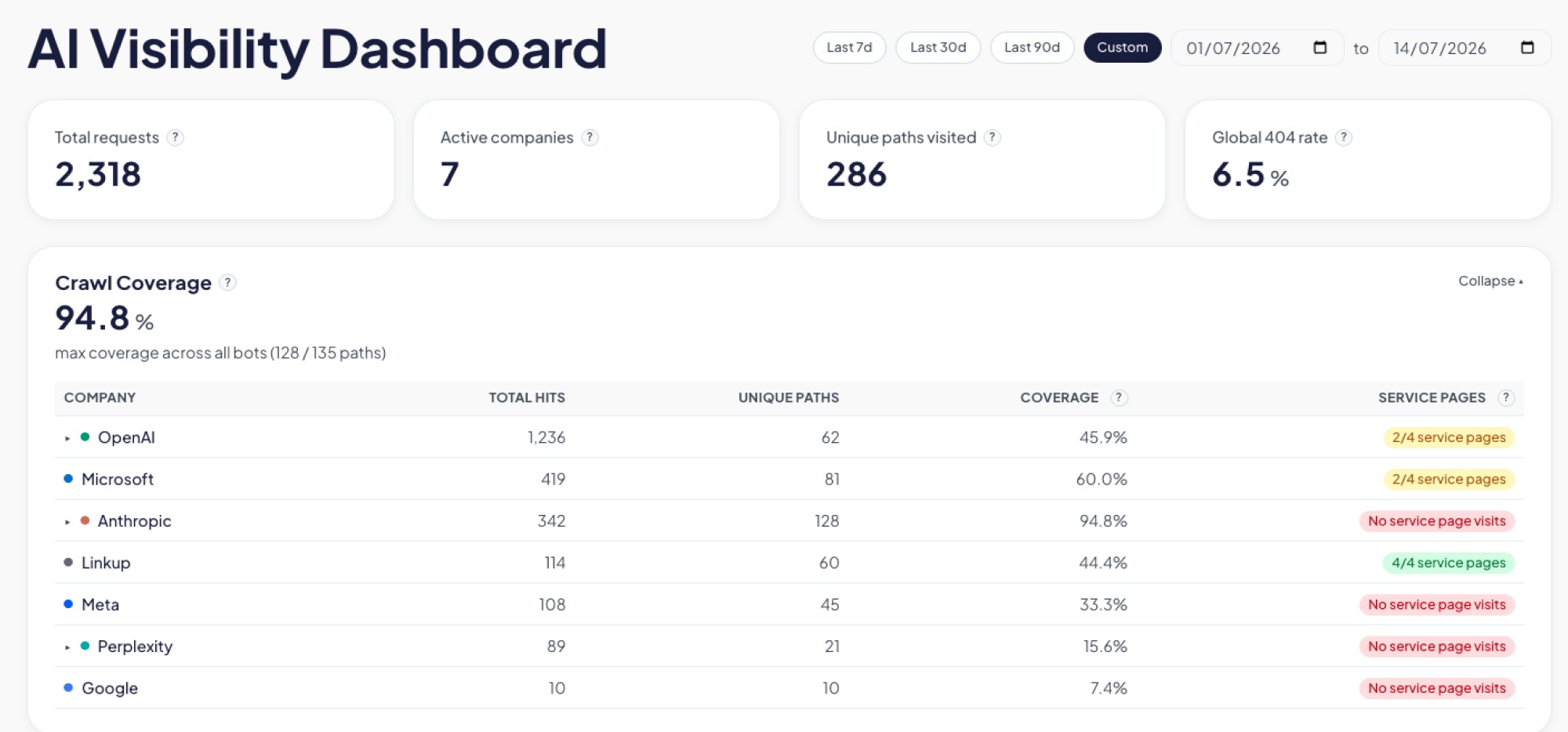
All of that gets pulled into a dashboard the team can check the same way we'd check any other business metric: how much of the site is actually getting crawled, where bots are hitting dead ends, whether they're respecting the instructions we leave for them, and how that changes over time.
Screenshot of an AI Visibility Dashboard showing traffic metrics and a crawl coverage table for AI bots like OpenAI, Anthropic, and Microsoft, tracking hits, unique paths, and service page visits by company.
What the dashboard caught in the first two weeks
We didn't have to wait long to see the point of building this. Two things came up in the first few weeks alone.
The file we thought was working
An llms.txt is a simple file some AI models look for to understand what a site is about. Like a lot of sites getting ready for an AI-driven web, we added one, checked it was live, and moved on, assuming that box was checked.
The dashboard said otherwise. Weeks in, not a single bot had requested it.
So we went digging, and read that crawlers rely on robots.txt to know an llms.txt file exists in the first place, and ours didn't reference it. We added the missing line. Bots still weren't picking it up.
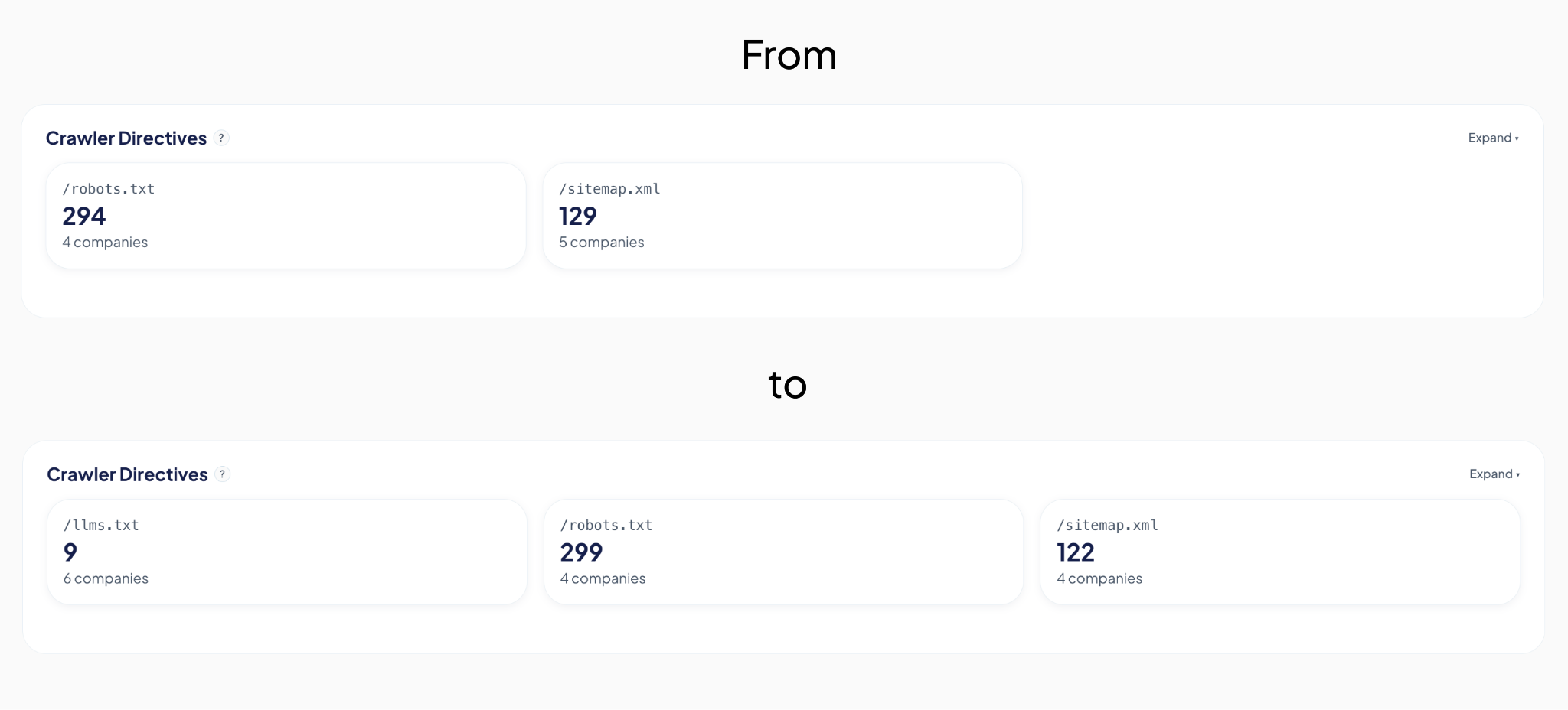
Third attempt: we added plain, visible links to the file in the site's header and footer, the same way we'd link to any other page. That's what did it. Two weeks of zero requests, and on the exact day we shipped that change, the file got six requests from five different AI companies.
Before and after adding links to llms.txt.
The detail we only noticed because the dashboard breaks bots down by type: those six requests were all from indexer and training bots, the ones that crawl the web to build a general picture of it, not yet from retrieval bots, the ones that fetch a page in real time to answer someone's specific question right now. That's a useful distinction. It's the difference between "we're now on the map" and "we're being pulled up live," and it tells us what to check for next.
None of that would have surfaced anywhere else. Not in Analytics, not in Search Console. We would have gone on believing the file was doing its job, simply because we remembered adding it.
The high-value pages AI bots were quietly skipping
The second finding was less comforting: several of our most important pages, the ones describing what we actually do, were barely being crawled at all. Not blocked, not broken. Just quietly skipped by many bots.
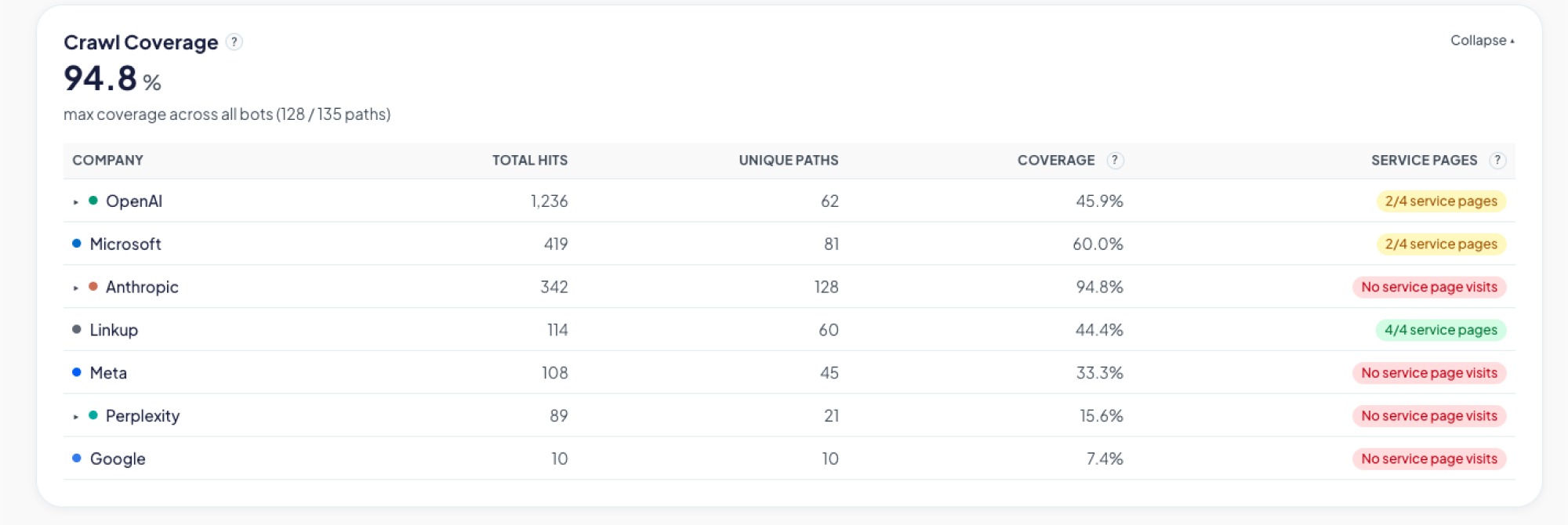
We built a graphic on the dashboard specifically for this: crawl coverage per bot, broken down page by page. Now, instead of assuming coverage is even across the site, we can see exactly which high-value pages each AI bot is actually reading, and which ones it's ignoring.
The Crawl Coverage table breaks down how thoroughly each AI bot is reading the site: total hits, unique paths crawled, and whether key service pages are being reached.
We're still working on closing that gap. The first fix we tried didn't move things the way we expected, so for now the coverage graphic itself is doing the real work: telling us, page by page and bot by bot, whether the next attempt actually helps instead of just hoping it does.
Neither of these was something we could have reasoned our way into. We only found them because we were finally looking.
Before you optimize, measure
It's tempting to jump straight to fixes: restructure content, add an llms.txt file, rewrite pages to be more "AI-friendly." We did some of that too. But our own llms.txt sat unused for weeks and we had no idea, because we had nothing telling us otherwise. Without a baseline, you can do all the "right" things and still have no idea whether any of them worked.
Our approach here mirrors how we tend to approach any technology problem: understand what's actually happening before deciding what to change. It's a small dashboard, built quickly, answering one honest question. It's already paid for itself twice over, and we're still early.
We'll keep sharing what we find as the picture gets clearer. If you're curious what your own numbers might look like, that's a conversation we're happy to have.
Somewhere between a prospect Googling your company and a prospect never visiting your site at all, a new kind of visitor showed up.
It doesn't click. It doesn't scroll. It doesn't show up in Google Analytics. But it scans your website, decides what matters, and quietly influences whether your business gets mentioned the next time someone asks ChatGPT, Perplexity, or Google's AI Overviews for a recommendation.
We had no real way to know what these AI bots were finding on our own site. So, before telling anyone else what to do about it, we built something to find out for ourselves.
The blind spot in your analytics
Google Analytics tracks human sessions, not server-side crawler activity. That's the blind spot. A person searches, sees a list of links, clicks one, lands on your site; that's the journey it was designed to track.
That journey is changing. Fewer people start their research by typing a query into Google and scanning ten blue links. Most of them are asking an AI assistant directly: "who are good software partners for X," "what's the best tool for Y," and trusting the shortlist it hands back. To build that answer, the AI first sent something to read the web on its behalf: a bot with a name like GPTBot, PerplexityBot, or ClaudeBot, crawling pages much like search engines have for decades.
None of that shows up in your dashboards. Those bot visits don't count as sessions, don't trigger conversion tracking, and don't appear anywhere you're already looking. If your site is hard for those bots to read, poorly structured, or quietly blocking them without anyone realizing it, you're not losing a ranking position. You're being left out of a conversation you never knew was happening. It's a new kind of competitive risk. Not "we got outranked," but "we were never in the running, and nothing told us."
That's the gap we set out to close, starting with our own site.
Are AI bots even visiting our site? We stopped guessing.
Inside our Innovation Hub, the group that experiments with new tools and workflows before we bring them into client work, someone asked a simple question: are AI bots even visiting our site? And if they are, what are they actually able to see?
Nobody could answer that with confidence. Not because it's a hard problem to reason about, but because the tool to answer it didn't exist among the tools we already had. So instead of guessing, or buying something built for someone else's website, we built a small internal dashboard for our own.
What we built: a dashboard that tracks AI bot visits
The idea is simple, even if getting there wasn't: a small piece of code sits quietly in front of our website and notes every time a known AI bot stops by. It records which one it was, which page it looked at, whether it got a clean response or hit an error, and how deep into the site it went.
Right now we're tracking bots from OpenAI (the ones behind ChatGPT), Anthropic (Claude), Perplexity, Google, Microsoft's Bing, Meta, and Apple. That list will keep growing. New AI crawlers show up faster than anyone can keep a definitive catalog.
All of that gets pulled into a dashboard the team can check the same way we'd check any other business metric: how much of the site is actually getting crawled, where bots are hitting dead ends, whether they're respecting the instructions we leave for them, and how that changes over time.
Screenshot of an AI Visibility Dashboard showing traffic metrics and a crawl coverage table for AI bots like OpenAI, Anthropic, and Microsoft, tracking hits, unique paths, and service page visits by company.
What the dashboard caught in the first two weeks
We didn't have to wait long to see the point of building this. Two things came up in the first few weeks alone.
The file we thought was working
An llms.txt is a simple file some AI models look for to understand what a site is about. Like a lot of sites getting ready for an AI-driven web, we added one, checked it was live, and moved on, assuming that box was checked.
The dashboard said otherwise. Weeks in, not a single bot had requested it.
So we went digging, and read that crawlers rely on robots.txt to know an llms.txt file exists in the first place, and ours didn't reference it. We added the missing line. Bots still weren't picking it up.
Third attempt: we added plain, visible links to the file in the site's header and footer, the same way we'd link to any other page. That's what did it. Two weeks of zero requests, and on the exact day we shipped that change, the file got six requests from five different AI companies.
Before and after adding links to llms.txt.
The detail we only noticed because the dashboard breaks bots down by type: those six requests were all from indexer and training bots, the ones that crawl the web to build a general picture of it, not yet from retrieval bots, the ones that fetch a page in real time to answer someone's specific question right now. That's a useful distinction. It's the difference between "we're now on the map" and "we're being pulled up live," and it tells us what to check for next.
None of that would have surfaced anywhere else. Not in Analytics, not in Search Console. We would have gone on believing the file was doing its job, simply because we remembered adding it.
The high-value pages AI bots were quietly skipping
The second finding was less comforting: several of our most important pages, the ones describing what we actually do, were barely being crawled at all. Not blocked, not broken. Just quietly skipped by many bots.
We built a graphic on the dashboard specifically for this: crawl coverage per bot, broken down page by page. Now, instead of assuming coverage is even across the site, we can see exactly which high-value pages each AI bot is actually reading, and which ones it's ignoring.
The Crawl Coverage table breaks down how thoroughly each AI bot is reading the site: total hits, unique paths crawled, and whether key service pages are being reached.
We're still working on closing that gap. The first fix we tried didn't move things the way we expected, so for now the coverage graphic itself is doing the real work: telling us, page by page and bot by bot, whether the next attempt actually helps instead of just hoping it does.
Neither of these was something we could have reasoned our way into. We only found them because we were finally looking.
Before you optimize, measure
It's tempting to jump straight to fixes: restructure content, add an llms.txt file, rewrite pages to be more "AI-friendly." We did some of that too. But our own llms.txt sat unused for weeks and we had no idea, because we had nothing telling us otherwise. Without a baseline, you can do all the "right" things and still have no idea whether any of them worked.
Our approach here mirrors how we tend to approach any technology problem: understand what's actually happening before deciding what to change. It's a small dashboard, built quickly, answering one honest question. It's already paid for itself twice over, and we're still early.
We'll keep sharing what we find as the picture gets clearer. If you're curious what your own numbers might look like, that's a conversation we're happy to have.
Common questions
Do AI bots crawl my website?
Most likely yes, but you can't see it in standard analytics. Bots like GPTBot, ClaudeBot, and PerplexityBot crawl sites the way search engines have for decades. The only way to know for sure is to check your server logs or a dedicated tracker.
Do AI crawler visits show up in Google Analytics?
No. Google Analytics tracks human sessions, not server-side crawler activity. AI bot visits don't count as sessions, don't trigger conversion tracking, and don't appear in your dashboards.
Why isn't my llms.txt file being read?
Adding the file isn't enough. Crawlers rely on robots.txt to know an llms.txt exists, so it needs to be referenced there. In our case, even that wasn't enough. Bots only started requesting it once we added plain, visible links to it in the site's header and footer.
What's the difference between indexer bots and retrieval bots?
Indexer and training bots crawl the web to build a general picture of it. Retrieval bots fetch a page in real time to answer someone's specific question. Being crawled by indexers means you're on the map. Being hit by retrieval bots means you're being pulled up live to answer someone right now.
How can I see which AI bots visit my site?
You need something that watches server-side requests and identifies known AI user agents, recording which bot visited, which page it read, whether it got a clean response, and how deep it went. Standard analytics won't show any of it.
1
What is the difference between working with Kaizen versus a single designer?
Think of it as hiring a specialist versus a generalist. A designer is one person juggling everything. With us, you get a dedicated designer backed by an entire team of specialists.
If we hit a tricky research problem, our user researcher jumps in. If we need high-level strategy, our UX lead is there. You get the right expert for the job without having to hire them all yourself. It’s a smarter, more reliable way to get things done right.
A while ago we noticed something pretty common: everyone wanted to share more knowledge internally, but nobody wanted another heavy corporate ritual.
Internal talks usually start with good intentions and slowly disappear. They take time, preparation, and energy. And at some point people start feeling like they need to be experts before presenting anything.
So we tried the opposite.
15 minute talks.
Small topics.
Low pressure.
And one important rule: every session had to leave something useful behind. A tool, a workflow, an idea, a shortcut, a new way to approach a problem. Something people could actually use after the talk ended.
We didn’t want theory that went nowhere.
Somehow, that ended up working much better than we expected.
The idea was to reduce friction
Screenshot of the shared topic pool
Tiny Knowledge Bytes is intentionally simple:
anyone can suggest topics
anyone can end up presenting
you don’t need to master the topic
talks can come from experiments, client problems, tools or random discoveries
sessions should leave something practical behind
if nobody volunteers, the system picks someone for us
The goal was making knowledge sharing feel lightweight instead of exhausting.
Some of the best talks start with:
“I tried this yesterday and it was weird.”
The topic pool started growing on its own
Over time, topics started coming from everywhere.
Sometimes someone took a course and used a Tiny Knowledge Byte as a way to give something back to the team. Other times, a client problem triggered research into new tools, workflows or AI approaches.
A lot of sessions start from curiosity or necessity more than planning.
And honestly, the mix is part of what makes it interesting.
Sometimes a UX session drifts into Computer Vision. Sometimes someone technical shares a visual workflow that half the design team ends up adopting later.
There’s not much curation. It behaves more like a constant exploration system.
Then another problem appeared: choosing who presents
And this is where things became unnecessarily dramatic.
Nobody wanted to be “the person who chooses”. So we started adding absurd layers of randomness until we somehow ended up building a full internal app called 2FS.
Two Factor Sorteo.
Yes, it’s real.
The wheel proposes. The oracle decides.
The logic is simple.
First, a wheel picks someone.
Then a Magic 8 Ball decides whether destiny approves the selection.
If the oracle rejects the person, the process starts again.
That’s it.
The app accidentally became part of the learning loop too
Apps developed for the Tiny Knowledge Bytes.
2FS originally started as an excuse to experiment with:
Claude Code
Claude Design
design systems
editorial interfaces
motion and microinteractions
Eventually those same explorations turned into future Tiny Knowledge Bytes.
The tool we used to select speakers started generating new topics itself.
The system started feeding itself
One of the most interesting side effects is that people started building things outside their usual role because of previous Tiny Knowledge Bytes.
2FS itself is a good example. A designer saw sessions about Claude tooling and AI workflows and thought:
“Maybe I can actually build this.”
What started as a ridiculous speaker selection tool became a real product experiment involving Claude Code, interface systems and interaction design.
Then it came back into the Tiny Knowledge Bytes circuit as a new talk.
That loop became surprisingly valuable:
someone learns something,
tries it,
builds something with it,
and eventually inspires someone else to do the same.
What ended up mattering most
Final Oracle Certificate.
Over time we realized knowledge sharing works much better when:
it doesn’t require huge preparation
it’s allowed to be imperfect
it mixes different disciplines
it leaves something practical behind
and somehow involves a mystical wheel connected to a Magic 8 Ball
At that point, it stops feeling like another internal obligation and starts feeling like something people genuinely want to keep alive.
Just this month, I built a full design system in about 20 hours.
What used to take weeks, sometimes months, is now dramatically faster. So… what actually changed? And more importantly: what didn’t?
Design systems take time. On complex platforms, they can take hundreds of hours.
We were working with a large and complex product where inconsistencies had started to pile up. Different modules had evolved in isolation, teams were making independent decisions, and there were no shared guidelines. The answer was clear: we needed a design system.
AI tools were just starting to emerge back then. They were mostly useful for simple tasks as they tended to hallucinate when things got complex. Developers had started using them earlier than designers, MCP didn't exist yet, and Figma plugins were the best automation we had.
But the context has changed. Fast.
The Manual Era
We did what most teams did. We stopped, and we built it. Manually.
Picture two designers, a mountain of inconsistencies, and no map. We had to cross-reference information manually, digging through the code, detecting what could be merged, agreeing on naming conventions, deciding how to name components. Hours and hours of discussion until we finally landed on a solution.
In the end, we got there. A cleaner system, faster workflows, and for the first time, both teams speaking the same visual language. Hard-won, but it worked.
But now every month a new AI model seems to be released. Design is finally catching up with what developers faced about two years ago. New tools arose, and with that, the scope of our work as designers completely changed.
The Human Factor
For an internal project, I used our Kaizen site as a reference, combined with documentation from industry leaders as a guideline.
I started in v0, which is essentially a chat interface where you can generate UI components through prompts. I fed it the colors, typographies, and a reference image, and from there it was a back-and-forth: the AI generated, I reacted, adjusted, and pushed until the output matched what I had in my head. And just like that, I started prompting my way through a Design System.
Once a component was ready, I used the html.to.design plugin to bring it into Figma (yes, plugins are still alive!). Think of it as a bridge: the plugin exports designs directly from the browser into a Figma file.
Inside Figma, the intervention was more hands-on. First, I checked that everything was visually consistent with what was defined in v0: colors, typography, styles. Then I used Figma's built-in AI to rename all the component layers using BEM convention (something that would have taken a significant amount of time to do so manually).
BEM, which stands for Block Element Modifier, is a widely adopted naming convention in CSS. It structures layer names hierarchically and predictably, for example: button__label--disabled.
Using it keeps the code clean, readable, and consistent, especially when you're working alongside a developer who needs to understand what came out the other side.
Beyond naming, I also made sure the layer structure would generate the right properties when building component sets in Figma, so that all the variants would be correctly exposed and usable. My team also pointed out that adding descriptions to components and variants was key as context for any agent using them through an MCP.
The last step was connecting everything to Windsurf via MCP. With a frame selected in Dev Mode, Windsurf could read the Figma file and use the components to build more complex screens.
We worked closely with a developer throughout this phase. Not just for the technical knowledge, but because having someone who reads code fluently meant catching things we wouldn't have spotted otherwise. The design role here was direction and supervision: making sure the AI used the components correctly and didn't invent solutions where context was missing.
Every step of the process had a human decision behind it.
An Unexpected Discovery
At one point, before we had any of the naming conventions figured out, I selected a frame and asked Windsurf to build a form using the components inside it, styled to match a specific card. The developer next to me was skeptical until he saw the result, and then he was just as surprised as I was.
What we realized is that the MCP wasn't reading layer names to understand context. It was reading everything inside the frame, even the loose text sitting alongside the components. Good naming is still worth doing. But the MCP doesn't need it to understand what it's looking at.
Learning to Talk to an AI
The more specific and contained your prompt, the better the outcome. We started with the most atomic component: the button, and worked outward from there. Each approved component became context for the next one, so the system gradually picked up the visual language we were building.
At some point I got ambitious and asked for five cards in a single prompt: blog card, service card, testimonial card, stats card, feature card… structures, states and all. The AI delivered.
Visually, everything looked fine. Then the developer looked at the code and pointed out that all five cards were independent components instead of variants of one. For a design system, that breaks everything.
One correction prompt fixed it. But it was a good reminder: the AI does exactly what you ask, not what you mean. And fixing it after the fact can cost more than getting it right from the start.
Some Things Learned Along the Way
Precision is key. Natural language is fine when you're asking for a cooking recipe, but when referring to a component, if you say things like "create" instead of "add", you'll probably end up with a whole new set of components instead of additional variants of an existing one.
The "Frame" is the context: MCPs can read everything inside the frame you select. This is a game-changer. It means the "naming conventions" debate might be shifting. If the AI understands the context visually and structurally, will we still spend hours discussing nomenclature in 2027?
No matter what happens, you can always roll back in less than 5 minutes and start over.
Work closely with a developer: they can help you understand MCPs and clear up any code-related doubts. Once you start to grasp their logic, you'll learn very quickly how to prompt in ways that AI actually understands.
There's nothing to lose by asking the AI to follow a specific naming convention for the code. It keeps everything clean and readable, and it takes no extra effort.
The AI covers roughly 80% of the work (generation, variations, exploration...), but the remaining 20% is where quality lives, and that part is not delegable. The AI executes. The judgment is still yours. And if you skip the review, you're not saving time: you'll spend it later.
Context matters more than tooling. What you don't define, the AI will invent. Small components may be resolved well, but large interfaces require more definition from the start. A well-defined system scales. An undefined one generates inconsistencies faster than you can fix them.
Figma is no longer the mandatory starting point. It's useful as a visual reference, a QA space, or a consolidation layer. But the AI doesn't need it. We still do.
There's no single right workflow yet. What you do depends on the project. We're in a transition moment where the tools change faster than the standards. The best thing you can do right now is experiment.
What AI Still Can’t Replace
Through all of this, a few things became very clear. These are the parts that didn’t change:
Knowing when something looks off. The AI generates, but it doesn't notice when the result doesn't feel right. That eye is yours.
Direction and supervision. The AI used the components we gave it, but without someone supervising it, it invents solutions where there is no context to work from.
The definition of done is still a human call, whether it's a conversation with a PO, a stakeholder, or just the designer's criteria. There's no prompt for that.
The context: knowing why certain decisions matter, what a component should communicate, what the user will actually feel. Business knowledge, stakeholder dynamics, unwritten rules, empathy for the end user. These take years to build and live in the people doing the work, not in the tools they use.
My Two Cents
The tools changed, and that gave me the chills, but throughout this experience I found that the designer's role is more alive than ever.
What once took a team weeks can now be prototyped in hours. That’s not a threat; it’s an invitation to get curious.
I'm still figuring a lot of this out, and I suspect most of us are. There's no right workflow yet, and honestly, that's fine. We are in a transition where tools change faster than standards. The best thing you can do is experiment. Don't wait for a "definitive" workflow, it might be obsolete by next month.
Go ahead, try prompting your way through a component. You might be surprised how fast the system starts to take shape.