






Kaizen Teams

Dropdown

Table of Contents

Time to read

·

12

Published on

·

December 20, 2022

Last updated on

·

April 10, 2026

Valentina Ibinete, Marketing Lead at Kaizen Softworks

Valentina Ibinete

Travel magnet collector

Marketing Lead

From Lost Development Project to Gained Friend

Published on

·

April 10, 2026

Last updated on

·

April 10, 2026

Time to read

·

12

Valentina Ibinete, Marketing Lead at Kaizen Softworks

Valentina Ibinete

Marketing Lead

We believe in doing things the right way, and we want to make sure our partners know that. That's why we live and breathe transparency as one of our main corporate values – even if it means saying no to opportunities.

In this post, we will present you with a Product Discovery case with a pretty unusual outcome. Keep reading to find out why we lost a project but ended up gaining a friend.

About UGallery

UGallery is an eCommerce platform founded in 2006, that connects artists directly with collectors on its website. Headquartered in San Francisco, CA, UGallery positions itself as an approachable and convenient alternative to the brick-and-mortar contemporary art gallery.

This platform allows artists to submit their artwork, and after a strict admission process carried out by the UGallery team, the artwork gets published in their e-commerce platform allowing people from all over the world to buy fine art.

Product Discovery

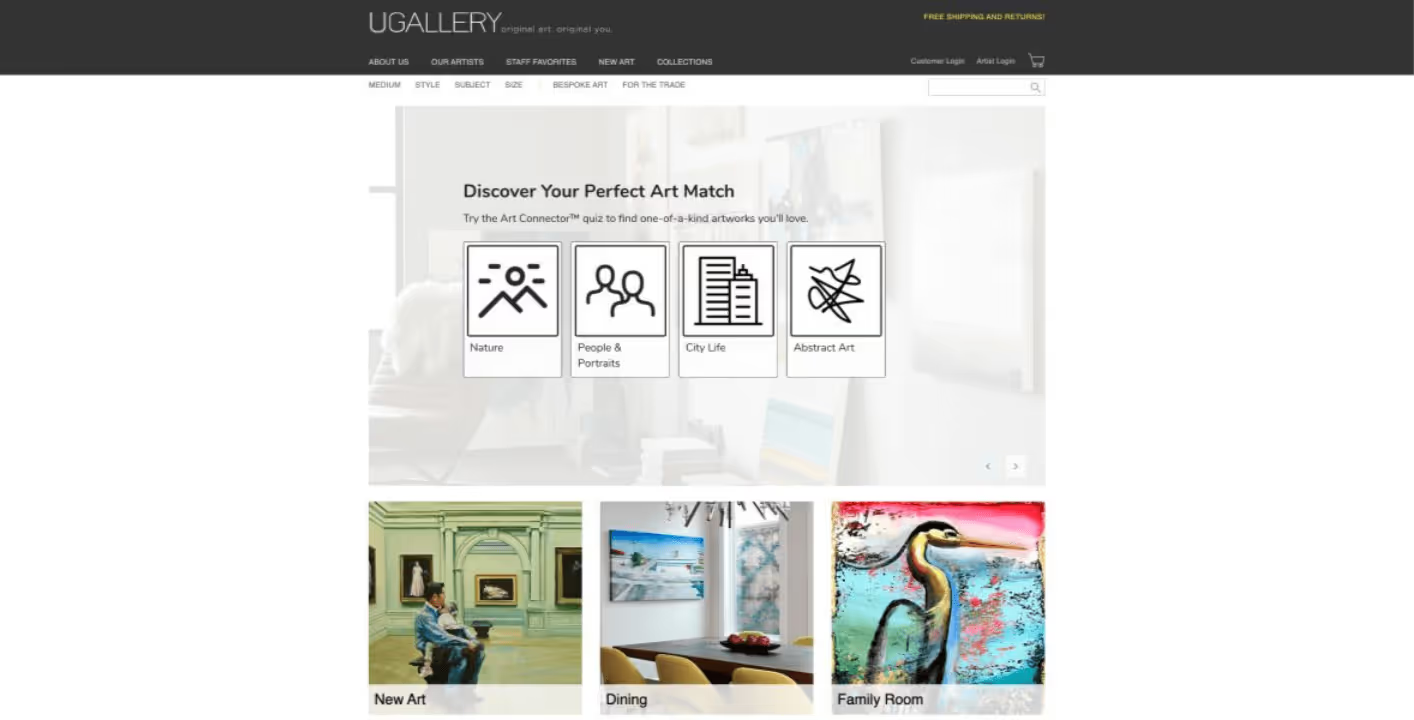
UGallery Home Screen
Product Discovery for UGallery

When UGallery first approached us, they were looking to improve their eCommerce platform but had the challenge of taking care of their profitability too, as each enhancement or modification to the platform implied the concentration of large resources (time and money), making it difficult to accurately estimate plans for the future.

Faced with this challenge, UGallery was concerned about their current development velocity, processes, forecasting abilities and robustness of their product. They thought that the solution would come by approaching a recommended software partner who is familiar and experienced with the technologies that compose their systems.

Our team investigated the root of their problem and we sought to understand whether the approach they considered the most appropriate was actually the most suitable solution based on the problem. Therefore, we investigated the history of UGallery and inquired about the specific pains they were experiencing.

Following a technical deep dive, we conclude that their productivity problems and system weaknesses could not be avoided just by partnering with someone experienced in their tech stack. Their codebase reflected over 2 decades of development with many code smells, moreover some technologies were already obsolete.

Despite our willingness to help, we knew that taking over the development of this platform would not change the experiences they were having. As tech debt grows, predictability, quality and velocity are taxed. When it is not properly managed, the expected return on investment for each development initiative decreases because the cost of maintenance gets higher. Hidden costs emerge, and the system becomes fragile.

After this analysis, we saw no real gain in transferring software development to us. Moreover, the learning curve costs of getting up to speed with non-standard development practices, and getting up to date with outdated technologies would be too high. And, in order to solve technical debt problems in an efficient way they would have to invest in rebuilding the software from scratch, since the cost of paying off tech debt within the current system was higher than rewriting the system.

As a result of this first consultation, UGallery could have a better picture of what was the root of their problem, and they decided not to proceed with the migration at that time, because they were not prepared money-wise.

A year later, UGallery returned to us with the idea of building a software from scratch as a solution to its problems of technical debt and platform scalability.

In order to successfully address their challenge, we stated that it was necessary to take a few steps back from the solution and understand whether a rewriting of Ugallery’s platform could solve the problems they were encountering or not. In other words, before putting hands on the rewriting, it was essential to understand what changes needed to be made and why.

Given this, our team understood that there were three possible solutions and divided the research tasks into the following lines:

  1. Explore a pre-built solution. Our team worked on the analysis of a specific pre-built solution to identify which mix of its plus ‘N’ number of plugins on the market were close to all UGallery’s needs.
  2. Explore other eCommerce frameworks. This would save implementation costs in all those submodules that are common to almost any e-commerce platform.
  3. Custom software development. Understand what they wanted to replicate from their current platform, the particularities of it and what would be the cost of migrating to a new system.

After investing over a month of work on identifying the scope of the project and working on a proof of concept, we found there was a high percentage of Feature Parity with a pre-built solution.

So, the best option for this client was to apply a pre-built solution, covering almost everything of what UGallery needed, instead of a custom software development solution.

This provided the client with a number of advantages:

  • Development cost reduction, making it 10 times cheaper to implement than custom software development.
  • High fidelity platform and tools recommendation with millions of active users.
  • Simpler and faster deployment system.
  • Extensible solution through both custom and third-party add-ons.
  • Possibility of implementing easy changes in real time without the need to know how to program.

Faced with this situation, our team had to discuss what we were going to do, since this result could imply not selling our services. We met internally and decided to give the customer a demo of the research findings to understand whether or not the customer would go ahead with this solution.

This was a tough decision and was very strongly debated. But it was also a values-based decision—we didn't want UGallery to spend the time and money it takes to build a custom solution when there are already tested SaaS solutions available that could do the work.

Here’s what Alex Farkas, founder of UGallery said about us:

“I would like to share a few words of genuine praise for Kaizen. Since launching our online art gallery in 2006, we’ve worked with seven dev shops in four countries. We’ve had mostly positive experiences, however, these external teams generally focused on individual tasks and features.

Big picture planning and particularly cost/benefit analysis of our projects wasn’t usually considered, and my partners and I became accustomed to this. Then we met the Kaizen team. We approached them because our codebase was old and becoming difficult to debug and add new features. Kaizen did a very deep study of both our business model and code and came up with several ideas for moving into the future. They listened to our needs and understood the big picture.

Here’s the most amazing part - in the course of their research, they determined that our best course of action was a SaaS solution that they didn’t offer. And they were right. Choosing this path has saved us considerable time and money. Instead of trying to sell us on something they could do, they gave us expert advice. In all of my years in business, this is one of the most memorable experiences of integrity and technical know-how. We were first referred to Kaizen by an acquaintance who spoke very highly of their team. And now I am happy to pass on the referral. This is how business should be done”.

Conclusion

We can finally say that we've made our contribution to UGallery. Through our Product Discovery process, we provided quality information to determine which solution best served our partner's needs, in terms of efficiency and profitability—and that's what really matters. It's not about closing deals; it’s about building trust and putting the interests of our clients before those of our company to provide differential value.

This serves as an example of why we believe in doing things the right way. We are committed to building long-term relationships with our partners, through an honest and trusting approach. It's also why we value transparency and open communication, so we can make sure both parties are on the same page and no one feels misled or taken advantage of during their project's lifecycle!

What we learned from this experience? That there is a lot more than just the technical stuff behind collaboration and innovation. It’s about understanding each other's needs and goals, being open-minded and flexible when it comes to solutions, respecting people's time, being honest when you don't know something or being humble enough to say “we’re not the right partner for your needs” … in short: being human!

Are you looking expert advice and a trusted partnership?

We are here to help you.

GET IN TOUCH

We believe in doing things the right way, and we want to make sure our partners know that. That's why we live and breathe transparency as one of our main corporate values – even if it means saying no to opportunities.

In this post, we will present you with a Product Discovery case with a pretty unusual outcome. Keep reading to find out why we lost a project but ended up gaining a friend.

About UGallery

UGallery is an eCommerce platform founded in 2006, that connects artists directly with collectors on its website. Headquartered in San Francisco, CA, UGallery positions itself as an approachable and convenient alternative to the brick-and-mortar contemporary art gallery.

This platform allows artists to submit their artwork, and after a strict admission process carried out by the UGallery team, the artwork gets published in their e-commerce platform allowing people from all over the world to buy fine art.

Product Discovery

UGallery Home Screen
Product Discovery for UGallery

When UGallery first approached us, they were looking to improve their eCommerce platform but had the challenge of taking care of their profitability too, as each enhancement or modification to the platform implied the concentration of large resources (time and money), making it difficult to accurately estimate plans for the future.

Faced with this challenge, UGallery was concerned about their current development velocity, processes, forecasting abilities and robustness of their product. They thought that the solution would come by approaching a recommended software partner who is familiar and experienced with the technologies that compose their systems.

Our team investigated the root of their problem and we sought to understand whether the approach they considered the most appropriate was actually the most suitable solution based on the problem. Therefore, we investigated the history of UGallery and inquired about the specific pains they were experiencing.

Following a technical deep dive, we conclude that their productivity problems and system weaknesses could not be avoided just by partnering with someone experienced in their tech stack. Their codebase reflected over 2 decades of development with many code smells, moreover some technologies were already obsolete.

Despite our willingness to help, we knew that taking over the development of this platform would not change the experiences they were having. As tech debt grows, predictability, quality and velocity are taxed. When it is not properly managed, the expected return on investment for each development initiative decreases because the cost of maintenance gets higher. Hidden costs emerge, and the system becomes fragile.

After this analysis, we saw no real gain in transferring software development to us. Moreover, the learning curve costs of getting up to speed with non-standard development practices, and getting up to date with outdated technologies would be too high. And, in order to solve technical debt problems in an efficient way they would have to invest in rebuilding the software from scratch, since the cost of paying off tech debt within the current system was higher than rewriting the system.

As a result of this first consultation, UGallery could have a better picture of what was the root of their problem, and they decided not to proceed with the migration at that time, because they were not prepared money-wise.

A year later, UGallery returned to us with the idea of building a software from scratch as a solution to its problems of technical debt and platform scalability.

In order to successfully address their challenge, we stated that it was necessary to take a few steps back from the solution and understand whether a rewriting of Ugallery’s platform could solve the problems they were encountering or not. In other words, before putting hands on the rewriting, it was essential to understand what changes needed to be made and why.

Given this, our team understood that there were three possible solutions and divided the research tasks into the following lines:

  1. Explore a pre-built solution. Our team worked on the analysis of a specific pre-built solution to identify which mix of its plus ‘N’ number of plugins on the market were close to all UGallery’s needs.
  2. Explore other eCommerce frameworks. This would save implementation costs in all those submodules that are common to almost any e-commerce platform.
  3. Custom software development. Understand what they wanted to replicate from their current platform, the particularities of it and what would be the cost of migrating to a new system.

After investing over a month of work on identifying the scope of the project and working on a proof of concept, we found there was a high percentage of Feature Parity with a pre-built solution.

So, the best option for this client was to apply a pre-built solution, covering almost everything of what UGallery needed, instead of a custom software development solution.

This provided the client with a number of advantages:

  • Development cost reduction, making it 10 times cheaper to implement than custom software development.
  • High fidelity platform and tools recommendation with millions of active users.
  • Simpler and faster deployment system.
  • Extensible solution through both custom and third-party add-ons.
  • Possibility of implementing easy changes in real time without the need to know how to program.

Faced with this situation, our team had to discuss what we were going to do, since this result could imply not selling our services. We met internally and decided to give the customer a demo of the research findings to understand whether or not the customer would go ahead with this solution.

This was a tough decision and was very strongly debated. But it was also a values-based decision—we didn't want UGallery to spend the time and money it takes to build a custom solution when there are already tested SaaS solutions available that could do the work.

Here’s what Alex Farkas, founder of UGallery said about us:

“I would like to share a few words of genuine praise for Kaizen. Since launching our online art gallery in 2006, we’ve worked with seven dev shops in four countries. We’ve had mostly positive experiences, however, these external teams generally focused on individual tasks and features.

Big picture planning and particularly cost/benefit analysis of our projects wasn’t usually considered, and my partners and I became accustomed to this. Then we met the Kaizen team. We approached them because our codebase was old and becoming difficult to debug and add new features. Kaizen did a very deep study of both our business model and code and came up with several ideas for moving into the future. They listened to our needs and understood the big picture.

Here’s the most amazing part - in the course of their research, they determined that our best course of action was a SaaS solution that they didn’t offer. And they were right. Choosing this path has saved us considerable time and money. Instead of trying to sell us on something they could do, they gave us expert advice. In all of my years in business, this is one of the most memorable experiences of integrity and technical know-how. We were first referred to Kaizen by an acquaintance who spoke very highly of their team. And now I am happy to pass on the referral. This is how business should be done”.

Conclusion

We can finally say that we've made our contribution to UGallery. Through our Product Discovery process, we provided quality information to determine which solution best served our partner's needs, in terms of efficiency and profitability—and that's what really matters. It's not about closing deals; it’s about building trust and putting the interests of our clients before those of our company to provide differential value.

This serves as an example of why we believe in doing things the right way. We are committed to building long-term relationships with our partners, through an honest and trusting approach. It's also why we value transparency and open communication, so we can make sure both parties are on the same page and no one feels misled or taken advantage of during their project's lifecycle!

What we learned from this experience? That there is a lot more than just the technical stuff behind collaboration and innovation. It’s about understanding each other's needs and goals, being open-minded and flexible when it comes to solutions, respecting people's time, being honest when you don't know something or being humble enough to say “we’re not the right partner for your needs” … in short: being human!

Are you looking expert advice and a trusted partnership?

We are here to help you.

GET IN TOUCH

Related Articles

View all articles

·

Jul 17, 2026

Generative UI: What it is, how it works, and when to use it

Generative UI lets AI build the screen each user needs, in real time. What it is, how it works, the trade-offs, and two working demos we built.

12 read time

Read more

Generative UI is a full-stack architecture that lets AI create, modify, and render user interfaces in real time, based on what each user needs at that exact moment. Instead of static, predefined screens, the interface assembles itself on the fly: a bar chart, a table, a comparison card when you're comparing things.

We've been building proofs of concept with it for the past few weeks. Most of what's written about generative UI is either too abstract or too exciting, so this is our attempt at neither: what it is, how it works, where it helps, where it doesn't, and what we learned from two demos we built.

The short version

  • Generative UI means the AI designs the screen that answers your question, not just the answer.
  • In production, most systems don't let the AI write code. It configures pre-built components. Safer, and good enough.
  • It shines in open-ended workflows like reporting and data exploration, where you can't pre-design every screen someone might need.
  • It complements standard UI. It doesn't replace it. Anyone telling you otherwise is selling something.

What is generative UI?

Generative UI is a full-stack architecture: the backend talks to the LLM, decides what the answer should look like, and picks the components, while the frontend renders them and handles how the user interacts with what’s on screen.

Compare that with how interfaces have always worked. A designer decides what goes on each screen, a developer builds it, and every user sees the same thing. Forever, or until the next redesign.

Generative UI flips that. The interface becomes dynamic and personal instead of static and universal. The AI doesn't just answer your question, it designs the screen that answers your question.

Dashboards and reporting are the most common use cases, but they're far from the only one. The same pattern works for dynamic forms, onboarding flows, and customer support, as it takes input just as easily as it presents output. It can even adjust font size, contrast, or layout for users with low vision, color blindness, or cognitive load.

The three types of generative UI

There are three levels of generative UI, from most constrained to most open (Google Cloud, 2026):

  1. Static. Everything is pre-built. The AI picks which screen to show you from a fixed library. Low risk, low flexibility.
  2. Declarative. The AI assembles a JSON tree that specifies which UI components to use, in what order, with what properties. It doesn't write code. It configures pre-designed widgets. This balances the AI's flexibility with the system's stability.
  3. Open. The AI generates completely new code from scratch and the frontend renders it. Maximum flexibility, maximum risk.

Most production systems today use the declarative approach, and that's what this post assumes from here on. The AI isn't writing HTML or CSS freestyle. It selects components, fills in pre-designed widgets, and composes them into the right screen.

How does generative UI work?

Generative UI works by turning a user request into structured data that describes an interface, then rendering that data as real components. The flow looks like this:

  1. The user asks for something, explicitly or inferred from context.
  2. An LLM analyzes the request. It invokes tools, pulls data, and makes the design decisions: what to show and how.
  3. The system generates structured data describing both the components and the information they'll display.
  4. That schema travels to the frontend through the AG-UI protocol, a standard for communication between agents and frontends. It defines events that keep the agent's state in the backend synchronized with the frontend framework.
  5. The frontend transforms the schema into actual widgets and renders them.

To the user, the result feels like magic. Behind the scenes, it's structured data flowing through a well-defined pipeline. We prefer the second description. It's the one you can build on.

Pros and cons of generative UI

Generative UI trades real personalization and faster development for added latency, inference costs, and less predictable layouts. That's the honest version. Here are the details.

What you gain

Benefit Why it matters
Real personalization Each user sees the view they need, not the view designed for the average user. When that happens, conversion follows.
Flexibility that scales A small set of components combines into thousands of screens, including views you never explicitly built.
Faster development You build the component library once. The system composes it, instead of your team coding endless specific screens.

What you pay for it

Trade-offs What to watch
Latency There's an LLM in the middle, and that adds response time.
Token costs Every generated screen has an inference cost attached.
Less muscle memory The same request won't always render the same layout. Users can't build habits around pixel positions.
Privacy Sending data through an LLM means thinking carefully about what you send and where it goes.

None of these are dealbreakers. There are known techniques to mitigate each one. 

Generative UI examples: two working demos

We built two demos. One with fictional data, one on top of a tool we use every day.

Aurora Goods: a conversational e-commerce dashboard

Aurora Goods is a fictional consumer e-commerce platform we created for the demo. The interface is simple: chat on the left, canvas on the right. You ask about the business, the LLM figures out what you need, pulls the data, and renders it visually.

Ask about 2025 sales and it shows the numbers on cards, with a short note on anything relevant. Ask it to break that down by region and it extends the same view instead of starting over, because it understands the second question builds on the first. This part took us a while to get right, and it's what makes the whole thing feel like a conversation rather than a search box.

The canvas isn't output-only either. You can click into any element and drill down: revenue by category, then inside electronics, then which products sold most.

You configure the widgets once. The system combines them and adds relevant commentary on the spot.

An internal reporting screen for our time-tracking tool

The second demo is closer to home: a generative reporting layer on top of the time-tracking tool we use every day at Kaizen. The questions in this demo are questions someone here has actually asked.

Instead of building dozens of hyper-specific reports, a small amount of code now handles virtually unlimited queries. How many hours were logged in May? Which anomalies showed up in April? How do billable and non-billable hours compare across two months? Who worked on a given project last month, and for how long? Each answer arrives as the right visualization: cards, lists, bar charts, plus a short summary that's easy to scan.

Two details won us over. The LLM suggests next steps, so exploring the data becomes a conversation. And when it's not sure, it asks instead of assuming. Ask for the hours of someone named Alex and, since we have more than one Alex on the team, it asks which one before answering.

Generative UI complements standard UI. That's the point.

Generative UI is a complement, not a replacement. Standard interfaces still win for stable, repetitive workflows where consistency matters. Nobody wants their checkout button to be creative. Generative UI wins where the workflow is complex and the questions are unpredictable.

It also changes what design systems are for. Beyond designing components and screens, teams will need to define semantic rules: how the AI should react to uncertainty, which interfaces match which intentions, and the guardrails that keep generated screens functional and safe.

That's a new kind of design work. And it's already starting.

Want to see generative UI applied to your own data? 

We build working proofs of concept in two weeks. Your data, your workflows, a real thing you can click.

Start a conversation.

·

Jul 16, 2026

AI is already reading your website. Do you know what it's finding?

We built an internal dashboard to track how AI crawlers like ChatGPT, Perplexity, Claude, and Google read our website. Here’s what it revealed about AI visibility, analytics blind spots, and the new risks facing B2B companies.

12 read time

Read more

Somewhere between a prospect Googling your company and a prospect never visiting your site at all, a new kind of visitor showed up.

It doesn't click. It doesn't scroll. It doesn't show up in Google Analytics. But it scans your website, decides what matters, and quietly influences whether your business gets mentioned the next time someone asks ChatGPT, Perplexity, or Google's AI Overviews for a recommendation.

We had no real way to know what these AI bots were finding on our own site. So, before telling anyone else what to do about it, we built something to find out for ourselves.

The blind spot in your analytics

Google Analytics tracks human sessions, not server-side crawler activity. That's the blind spot. A person searches, sees a list of links, clicks one, lands on your site; that's the journey it was designed to track.

That journey is changing. Fewer people start their research by typing a query into Google and scanning ten blue links. Most of them are asking an AI assistant directly: "who are good software partners for X," "what's the best tool for Y," and trusting the shortlist it hands back. To build that answer, the AI first sent something to read the web on its behalf: a bot with a name like GPTBot, PerplexityBot, or ClaudeBot, crawling pages much like search engines have for decades.

None of that shows up in your dashboards. Those bot visits don't count as sessions, don't trigger conversion tracking, and don't appear anywhere you're already looking. If your site is hard for those bots to read, poorly structured, or quietly blocking them without anyone realizing it, you're not losing a ranking position. You're being left out of a conversation you never knew was happening. It's a new kind of competitive risk. Not "we got outranked," but "we were never in the running, and nothing told us."

That's the gap we set out to close, starting with our own site.

Are AI bots even visiting our site? We stopped guessing.

Inside our Innovation Hub, the group that experiments with new tools and workflows before we bring them into client work, someone asked a simple question: are AI bots even visiting our site? And if they are, what are they actually able to see?

Nobody could answer that with confidence. Not because it's a hard problem to reason about, but because the tool to answer it didn't exist among the tools we already had. So instead of guessing, or buying something built for someone else's website, we built a small internal dashboard for our own.

What we built: a dashboard that tracks AI bot visits

The idea is simple, even if getting there wasn't: a small piece of code sits quietly in front of our website and notes every time a known AI bot stops by. It records which one it was, which page it looked at, whether it got a clean response or hit an error, and how deep into the site it went.

Right now we're tracking bots from OpenAI (the ones behind ChatGPT), Anthropic (Claude), Perplexity, Google, Microsoft's Bing, Meta, and Apple. That list will keep growing. New AI crawlers show up faster than anyone can keep a definitive catalog.

All of that gets pulled into a dashboard the team can check the same way we'd check any other business metric: how much of the site is actually getting crawled, where bots are hitting dead ends, whether they're respecting the instructions we leave for them, and how that changes over time.

Screenshot of an AI Visibility Dashboard showing traffic metrics and a crawl coverage table for AI bots like OpenAI, Anthropic, and Microsoft, tracking hits, unique paths, and service page visits by company.

What the dashboard caught in the first two weeks

We didn't have to wait long to see the point of building this. Two things came up in the first few weeks alone.

The file we thought was working

An llms.txt is a simple file some AI models look for to understand what a site is about. Like a lot of sites getting ready for an AI-driven web, we added one, checked it was live, and moved on, assuming that box was checked.

The dashboard said otherwise. Weeks in, not a single bot had requested it.

So we went digging, and read that crawlers rely on robots.txt to know an llms.txt file exists in the first place, and ours didn't reference it. We added the missing line. Bots still weren't picking it up.

Third attempt: we added plain, visible links to the file in the site's header and footer, the same way we'd link to any other page. That's what did it. Two weeks of zero requests, and on the exact day we shipped that change, the file got six requests from five different AI companies.

Before and after adding links to llms.txt.

The detail we only noticed because the dashboard breaks bots down by type: those six requests were all from indexer and training bots, the ones that crawl the web to build a general picture of it, not yet from retrieval bots, the ones that fetch a page in real time to answer someone's specific question right now. That's a useful distinction. It's the difference between "we're now on the map" and "we're being pulled up live," and it tells us what to check for next.

None of that would have surfaced anywhere else. Not in Analytics, not in Search Console. We would have gone on believing the file was doing its job, simply because we remembered adding it.

The high-value pages AI bots were quietly skipping

The second finding was less comforting: several of our most important pages, the ones describing what we actually do, were barely being crawled at all. Not blocked, not broken. Just quietly skipped by many bots.

We built a graphic on the dashboard specifically for this: crawl coverage per bot, broken down page by page. Now, instead of assuming coverage is even across the site, we can see exactly which high-value pages each AI bot is actually reading, and which ones it's ignoring.

The Crawl Coverage table breaks down how thoroughly each AI bot is reading the site: total hits, unique paths crawled, and whether key service pages are being reached.

We're still working on closing that gap. The first fix we tried didn't move things the way we expected, so for now the coverage graphic itself is doing the real work: telling us, page by page and bot by bot, whether the next attempt actually helps instead of just hoping it does.

Neither of these was something we could have reasoned our way into. We only found them because we were finally looking.

Before you optimize, measure

It's tempting to jump straight to fixes: restructure content, add an llms.txt file, rewrite pages to be more "AI-friendly." We did some of that too. But our own llms.txt sat unused for weeks and we had no idea, because we had nothing telling us otherwise. Without a baseline, you can do all the "right" things and still have no idea whether any of them worked.

Our approach here mirrors how we tend to approach any technology problem: understand what's actually happening before deciding what to change. It's a small dashboard, built quickly, answering one honest question. It's already paid for itself twice over, and we're still early.

We'll keep sharing what we find as the picture gets clearer. If you're curious what your own numbers might look like, that's a conversation we're happy to have.

llms.txt