Kaizen Teams

Dropdown

Table of Contents

Time to read

·

12

Published on

·

August 20, 2020

Last updated on

·

February 16, 2026

Pablo Marcano

Over-Engineering in React: Lessons & Mistakes to Avoid

Published on

·

February 23, 2026

Last updated on

·

February 16, 2026

Time to read

·

12

Pablo Marcano

React can be so simple and so powerful that it is one of the first choices when it comes to building a web app nowadays. But with great power comes great responsibility. Being so widespread and used, it's easy to find tons of results when looking for solutions that fulfill developer needs, but the most popular solution may not always be the best for every case.

In this article I’m going to cover some common patterns and tools developers tend to blindly stick to without assessing whether they actually apply to their specific use case or not.

Using a Library for State Management

Don’t get me wrong, correct state management is a fundamental part of building a reliable, scalable, and futureproof application. It’s particularly important to take it into account early on in our projects, but you might want to think twice before just starting with a template based off of  [insert popular state management library here]. There are a several reasons why I think this way:

  • It forces you to think and model your application in the library's way of doing things, instead of making choices that could reflect the business reality in a more accurate way. Whether you use redux or mobx (or nothing at all) should depend on if it makes sense for your use case, and not simply on what’s trendier.
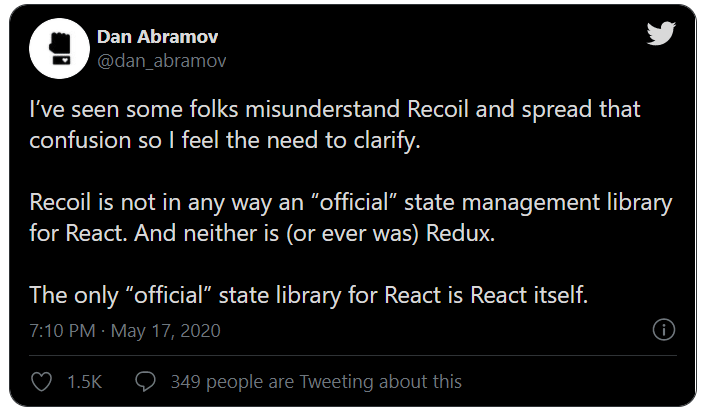
Official State Library for React
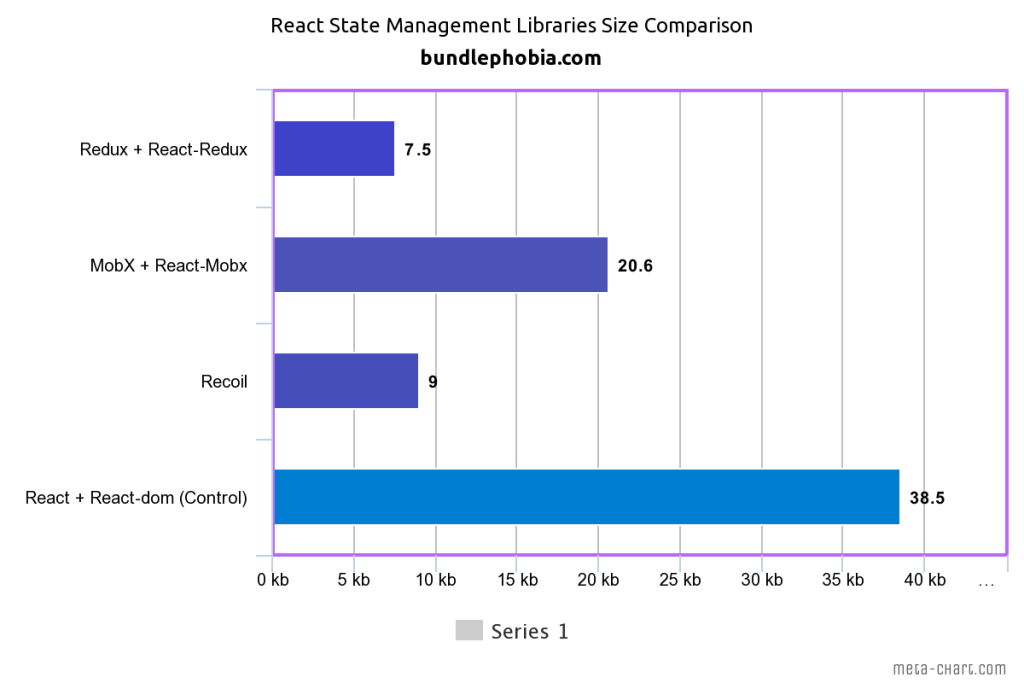
  • You may be making your app less performant. Bundle sizes and performance on lower end devices are metrics that we as developers tend to gloss over, but can end up making a huge difference on the way your users interact with your product. Also, there’s more library code that when used incorrectly may lead to unwanted re-renders, thus making your app less responsive.
A graphic
  • At the end of the day, it’s something new you need to learn, document, teach, maintain, and upgrade over time. This is the key factor when deciding to use a state management library or not: will it save you enough time and make your life that much easier in the long run that it’s worth teaching it to every new developer that joins the project? Will you have the time to document a specific scenario where you do things differently? Are you willing to upgrade all of your codebase because of a breaking change? If the answer to all of these questions is yes, then go ahead.

Creating Too Many Files/Folders

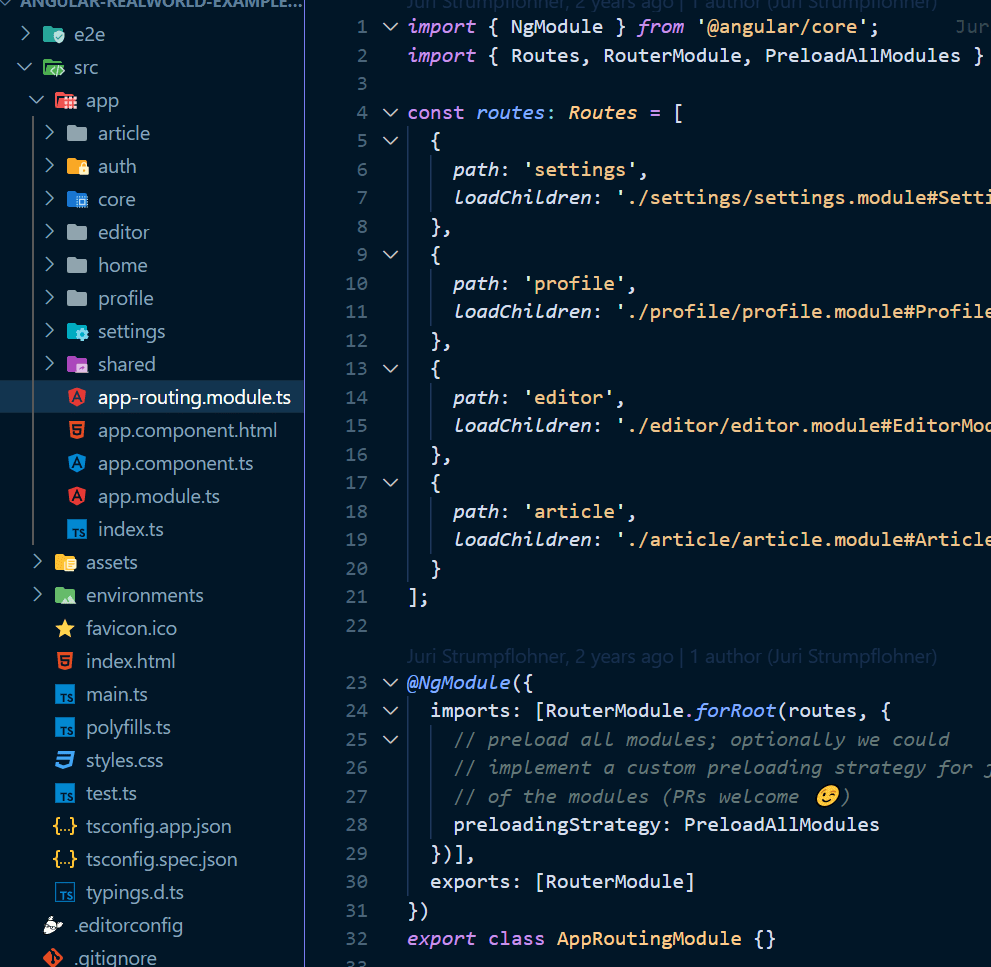
If you come from a framework like angular, you may be familiar with the idea of creating a couple of files and a folder just to organize your independent UI components. Add modules, routing files, indexes, and services and you’ll end up with a lot of boilerplate to make things work the way you want in any given scenario. Boilerplate is not a bad thing per-se, but with React we’re not required to have this much ceremony in order to build our apps.

A computer screen with lines of code

Now, I’m not saying you should go and delete all of your .js files and bake everything in the same file, but embracing the flexibility the framework gives you will help you create apps that are easier to navigate through, and therefore, are more maintainable. The official React documentation even encourages this approach, and provides us with some guidelines to take into account when laying out our app structure.

Here are some things I do to avoid unnecessary nesting/file creation:

  • Don’t create boundaries where there are none: While it’s pretty common to  consider that everything apps are made of is screens and components, what actually differentiates one from another? What you think of today as a component may become a screen down the road, or vice versa. Whenever your domain makes it clear that some things should belong to a folder, then go for it. Creating an extra file folder before the need comes up just creates extra work. Dan Abramov talks more about this in this article where he clarifies the difference between presentational and container components—but beware! You’ll actually find a disclaimer where he talks about how his views have changed since the writing of that article.
  • Leverage the power of hooks: You may be tempted to create new files as new complex components start forming, and eventually you might want to put together components that share similar logic in a folder. The thing is, you may be able to avoid all of the added complexity of similar-yet-specific components by using hooks to properly reuse your logic.
  • Use Styled Components: Styled Components can help keep all the styling and the logic related to it within the same file most of the time. This depends greatly on each use case, but they’ve gained popularity because of their flexibility and simplicity to setup, read, and maintain across my apps.

Testing the Wrong Places

While a robust testing suite should be a priority whenever you ship a product that will continue being developed in the future, testing the wrong places could be the source of many frustrations and time wastes, especially on the frontend. Let’s first define what these “wrong places” are and aren’t.

Kent Dodds writes in How to know what to test

“When writing code, remember that you already have two users that you need to support: End users, and developer users. Again, if you think about the code rather than the use cases, it becomes dangerously natural to start testing implementation details. When you do that, your code now has a third user.”

In this post we’re talking about how to make the “developer users” happier. If you’re able to write tests that will actually detect bugs in the future, you’ll inevitably be happier. How do you achieve this? By testing your app the way the users would, avoiding high-effort/low-value code chunks, and writing concise and understandable tests.

Let’s break these down one by one:

  • Testing the way users would use the app: Here I strongly recommend reading Kent Dodds Testing Implementation Details, who elaborates on how testing implementation details can lead to error prone tests that aren’t actually very useful for catching bugs.
  • Avoid high-effort/low-value code chunks: If you’re solely using code coverage as your metric to determine the quality of tests (which has its own problems), you’ll often find there’s some code dependant on a third party library that doesn’t quite work as you expected and drags the coverage down. In this case you’ll have to weigh how critical the feature is to the application vs the amount of time you’ll have to spend coding, maintaining, and replicating the functionality across several sections of your app.
  • Write concise and understandable tests: The more simple, explicit, and understandable a test is can reflect how well a functionality is written. While you should avoid making your implementation more complex just to simplify the tests, if your test can describe what the end goal of a functional piece is, a new maintainer might find it easier to read and make changes to the codebase.

While there are no rules set in stone for writing perfect React code, following these guidelines has saved me time and spared me from bugs and unnecessary meetings in my career. I hope it does the same for you.

Do you have any examples of over-engineering in your favorite framework? How do you usually solve them? Leave it on the comments!

React can be so simple and so powerful that it is one of the first choices when it comes to building a web app nowadays. But with great power comes great responsibility. Being so widespread and used, it's easy to find tons of results when looking for solutions that fulfill developer needs, but the most popular solution may not always be the best for every case.

In this article I’m going to cover some common patterns and tools developers tend to blindly stick to without assessing whether they actually apply to their specific use case or not.

Using a Library for State Management

Don’t get me wrong, correct state management is a fundamental part of building a reliable, scalable, and futureproof application. It’s particularly important to take it into account early on in our projects, but you might want to think twice before just starting with a template based off of  [insert popular state management library here]. There are a several reasons why I think this way:

  • It forces you to think and model your application in the library's way of doing things, instead of making choices that could reflect the business reality in a more accurate way. Whether you use redux or mobx (or nothing at all) should depend on if it makes sense for your use case, and not simply on what’s trendier.
Official State Library for React
  • You may be making your app less performant. Bundle sizes and performance on lower end devices are metrics that we as developers tend to gloss over, but can end up making a huge difference on the way your users interact with your product. Also, there’s more library code that when used incorrectly may lead to unwanted re-renders, thus making your app less responsive.
A graphic
  • At the end of the day, it’s something new you need to learn, document, teach, maintain, and upgrade over time. This is the key factor when deciding to use a state management library or not: will it save you enough time and make your life that much easier in the long run that it’s worth teaching it to every new developer that joins the project? Will you have the time to document a specific scenario where you do things differently? Are you willing to upgrade all of your codebase because of a breaking change? If the answer to all of these questions is yes, then go ahead.

Creating Too Many Files/Folders

If you come from a framework like angular, you may be familiar with the idea of creating a couple of files and a folder just to organize your independent UI components. Add modules, routing files, indexes, and services and you’ll end up with a lot of boilerplate to make things work the way you want in any given scenario. Boilerplate is not a bad thing per-se, but with React we’re not required to have this much ceremony in order to build our apps.

A computer screen with lines of code

Now, I’m not saying you should go and delete all of your .js files and bake everything in the same file, but embracing the flexibility the framework gives you will help you create apps that are easier to navigate through, and therefore, are more maintainable. The official React documentation even encourages this approach, and provides us with some guidelines to take into account when laying out our app structure.

Here are some things I do to avoid unnecessary nesting/file creation:

  • Don’t create boundaries where there are none: While it’s pretty common to  consider that everything apps are made of is screens and components, what actually differentiates one from another? What you think of today as a component may become a screen down the road, or vice versa. Whenever your domain makes it clear that some things should belong to a folder, then go for it. Creating an extra file folder before the need comes up just creates extra work. Dan Abramov talks more about this in this article where he clarifies the difference between presentational and container components—but beware! You’ll actually find a disclaimer where he talks about how his views have changed since the writing of that article.
  • Leverage the power of hooks: You may be tempted to create new files as new complex components start forming, and eventually you might want to put together components that share similar logic in a folder. The thing is, you may be able to avoid all of the added complexity of similar-yet-specific components by using hooks to properly reuse your logic.
  • Use Styled Components: Styled Components can help keep all the styling and the logic related to it within the same file most of the time. This depends greatly on each use case, but they’ve gained popularity because of their flexibility and simplicity to setup, read, and maintain across my apps.

Testing the Wrong Places

While a robust testing suite should be a priority whenever you ship a product that will continue being developed in the future, testing the wrong places could be the source of many frustrations and time wastes, especially on the frontend. Let’s first define what these “wrong places” are and aren’t.

Kent Dodds writes in How to know what to test

“When writing code, remember that you already have two users that you need to support: End users, and developer users. Again, if you think about the code rather than the use cases, it becomes dangerously natural to start testing implementation details. When you do that, your code now has a third user.”

In this post we’re talking about how to make the “developer users” happier. If you’re able to write tests that will actually detect bugs in the future, you’ll inevitably be happier. How do you achieve this? By testing your app the way the users would, avoiding high-effort/low-value code chunks, and writing concise and understandable tests.

Let’s break these down one by one:

  • Testing the way users would use the app: Here I strongly recommend reading Kent Dodds Testing Implementation Details, who elaborates on how testing implementation details can lead to error prone tests that aren’t actually very useful for catching bugs.
  • Avoid high-effort/low-value code chunks: If you’re solely using code coverage as your metric to determine the quality of tests (which has its own problems), you’ll often find there’s some code dependant on a third party library that doesn’t quite work as you expected and drags the coverage down. In this case you’ll have to weigh how critical the feature is to the application vs the amount of time you’ll have to spend coding, maintaining, and replicating the functionality across several sections of your app.
  • Write concise and understandable tests: The more simple, explicit, and understandable a test is can reflect how well a functionality is written. While you should avoid making your implementation more complex just to simplify the tests, if your test can describe what the end goal of a functional piece is, a new maintainer might find it easier to read and make changes to the codebase.

While there are no rules set in stone for writing perfect React code, following these guidelines has saved me time and spared me from bugs and unnecessary meetings in my career. I hope it does the same for you.

Do you have any examples of over-engineering in your favorite framework? How do you usually solve them? Leave it on the comments!

Related Articles

·

May 15, 2026

Can AI Safely Apply Changes Across Microservices?

Learn how AI can apply changes across microservices when service ownership, message contracts, DTOs, and architectural context are clearly defined.

12 read time

Read more

Applying changes across microservices is difficult because business logic is distributed across multiple services, each with its own data, contracts, and responsibilities.

In our experiment at Kaizen Softworks, we tested whether an AI system could safely apply coordinated changes across a microservices architecture using only minimal input.

Short answer: Yes, but only when the AI has enough architectural context.

Why are coordinated changes in microservices so hard?

In distributed systems, a single business change rarely affects just one service.

It often requires:

  • Updating multiple microservices
  • Modifying message contracts
  • Keeping DTOs (Data Transfer Objects) consistent
  • Respecting domain boundaries defined by Domain-Driven Design (DDD)

Key entities in this system:

  • Microservice: An independently deployable service responsible for a specific domain
  • Aggregate (DDD): A cluster of domain objects treated as a single unit
  • DTO (Data Transfer Object): A structured format used to transfer data between services
  • Message/Event: A communication mechanism between services

The complexity is not in the code, it’s in the relationships between components.

The experiment: Can AI reason across services with minimal input?

We designed a controlled experiment to test whether an AI model could apply system-wide changes with limited information.

Input given to the AI:

  • Message definitions (events between services)
  • DTOs (data contracts)

Tasks the AI had to perform:

  1. Identify affected aggregates
  2. Determine service ownership
  3. Apply coordinated changes across services
  4. Maintain consistency in messages and DTOs

In other words, the AI had to behave like a software architect, not just a code generator.

What was the biggest obstacle?

The biggest challenge was not technical, it was contextual.

Before and after diagram showing how ambiguous microservice names prevent AI from understanding service ownership, while aggregate-to-service mapping helps AI apply safe coordinated changes.

Problem: unclear service naming

Instead of descriptive names like:

  • order-service
  • billing-service

Our services were named:

  • john
  • sally
  • roger

This removed any semantic clues about responsibility.

Result: The AI could not infer which service owned which domain logic.

The missing piece: aggregate ownership mapping

To solve this, we introduced a simple but powerful structure:

Aggregate → Service mapping

  • Order → john
  • Shipment → sally
  • Invoice → roger

This created a clear relationship between domain concepts and system components.

Once ownership was explicit, the architecture became understandable.

How we used AI to generate architectural context

Instead of building this mapping manually, we used AI to analyze the codebase and extract:

  • Where each aggregate was defined
  • Which microservice implemented it
  • The relationship between domain and infrastructure

The result was a machine-readable architecture map.

In practice, we used AI to generate the context that AI itself needed.

Results: Can AI safely apply distributed changes?

With the architecture map in place, the AI was able to:

  • Trace message flows across services
  • Identify affected aggregates
  • Locate the correct microservices
  • Apply coordinated updates
  • Maintain consistency between DTOs and messages

While not perfect, the system worked reliably as a proof of concept.

What is the real limitation of AI in microservices?

The main limitation of AI is not code generation, it’s architectural understanding.

Without knowing:

  • Which components exist
  • How they relate
  • Who owns what

AI cannot safely modify a distributed system.

AI performance depends more on context quality than model capability.

When can AI safely modify microservices?

AI works well when:

  • Aggregate ownership is clearly defined
  • Message contracts are explicit
  • Architecture is structured and consistent

AI struggles when:

  • Naming is ambiguous
  • Relationships are implicit
  • Context is incomplete

Simple rule: If the architecture is clear, AI can reason. If not, it guesses.

Final thoughts

This experiment revealed something important:

AI doesn’t fail because it can’t write code.
It fails because it can’t see the system.

As teams move toward AI-assisted development, the focus will likely shift from:

Writing better code to Designing better systems for machines to understand

At Kaizen Softworks, we see this as a foundational shift.

Because when AI can understand architecture, it doesn’t just generate code, it helps evolve systems.

·

Mar 13, 2026

How We Make Decisions Without Managers

We don’t have traditional managers. This is how we make decisions and keep things moving.

12 read time

Read more

There's a myth that in flat organizations, everyone decides on everything.

That's not how it works. At least not at Kaizen.

When people hear "no managers," they often picture one of two extremes: either total chaos where nobody is accountable, or endless meetings where 80 people vote on which coffee to buy. The reality is neither.

Not everyone decides on everything. Not everyone votes. What we do have is a clear set of decision-making methods that we choose based on context.

It depends on who's affected and how deep the impact goes

Before choosing how to decide, we ask ourselves a few questions:

  • Who is affected? A decision that only impacts one team doesn't need the whole company involved. A decision that affects everyone's daily work does.
  • How deep is the impact? Changing the office furniture is wide but shallow. Changing the salary model is deep and lasting.
  • Is it reversible? If we can easily undo it, we can move fast and just inform. If it's hard to reverse, we slow down and include more people.
  • How urgent is it? And here we're careful to distinguish real urgency from anxiety, the pressure to decide quickly because someone already has "the answer" in mind.

These dimensions help us pick the right method. Not every decision deserves the same process.

Our decision-making toolkit

Over the years, we've landed on a few methods that we use depending on the situation:

1. Role-based decisions

Some decisions belong to a specific role. If someone owns a responsibility, say, office logistics or hiring for a team,  they decide within that domain. No committee needed. The key is that roles are transparent: everyone knows who owns what, and the scope of each role's authority is clear.

2. Advice Process

When a decision doesn't clearly belong to one role, or when it crosses boundaries, we use the advice process. Here's how it works:

  1. Someone takes the initiative. They identify the problem and own the process.
  2. They gather input from people who are affected and people with expertise.
  3. They seek advice, real conversations, not rubber-stamping.
  4. They make the decision and communicate it, including what advice they incorporated and what they didn't (and why).

The decision-maker is not a committee. It's one person (or a small group) who takes responsibility. But they don't decide in isolation, they bring in the perspectives that matter.

We sometimes call this "Team Advice" when a working group forms around an issue that doesn't naturally fall into anyone's area, and "Area Advice" when a team opens up a topic that exceeds their own scope.

3. Consent (not consensus)

Consent is not "everyone agrees." Consent means "no one has a strong enough objection to block this." We do use a poll, but not to count votes — we use a 1-to-5 scale to measure the level of agreement and surface objections, not to let the majority rule.

We use it in two flavors:

  • High-participation consent: For decisions with deep, company-wide impact. This is our most expensive and slowest method, which is exactly why we reserve it for high-impact decisions that affect many people. The Board sets the boundaries, for example, when we moved offices, they defined the monthly budget. Then a working group produced proposals, collected feedback, evolved them, and the whole company expressed their position for the final decision. Silence is not approval; we explicitly ask people to weigh in, even if it's just "I have no objection."
  • Lightweight consent: For decisions that are broad but not deep. Participation is optional, anyone who's interested can jump in. We share the proposal, open a window for objections, and if nobody opposes, we move forward. This gives us speed without sacrificing transparency. If nobody engages, that's a signal too, maybe the proposal doesn't add enough value, or we're using the wrong channel.

4. Inform, don't fake-consult

Not everything needs participation. When a decision has already been made through a legitimate process, the right move is to inform, not to fake-consult. One of the fastest ways to kill self-management is to ask for feedback and then ignore it. If you're not going to change course based on input, don't ask for it, just be transparent about the decision and the reasons behind it.

What we explicitly avoid

  • Decision by Voting. In a company context, majority rule creates losers. And losers become detractors, often generating more resistance than an autocratic decision would have. Instead of voting, we prefer to evolve a proposal through feedback until it's "good enough for now," and then introduce a review point to adjust later. If voting happens at all, it's the cherry on top, not the main course.
  • The "surprise" approach. Working behind closed doors and then unveiling a finished decision is a recipe for frustration. Adults don't need surprises. Adults need to feel like they're part of the process. The complaints that follow a surprise aren't about the decision itself, they're about not being included.

Why we work this way

We didn't adopt these methods because they're trendy. We adopted them because they solve real problems:

  • Better decisions. When you include affected people, you get information you wouldn't have had otherwise. Ideas emerge that no single person would have come up with alone.
  • Less resistance. A person who feels heard is far less likely to resist a decision, even one they wouldn't have made themselves.
  • Faster execution. It sounds counterintuitive, but participative decisions often execute faster because people already understand and support them. The time you "save" by deciding alone, you spend later managing pushback.
  • Distributed authority. When people can make decisions within their domain without escalating everything to a founder, the organization scales. The bottleneck disappears.
  • Resilience. If a shared decision fails, the group adjusts together. If a top-down decision fails, the blame falls on one person and the chances of proactive correction drop.

The real principle behind all of this

Transparency is the foundation. Every method we use, from role-based decisions to high-participation consent, works because information flows openly. People know what's being decided, who's deciding it, and how they can participate.

Horizontal doesn't mean structureless. It means fewer hierarchical levels, clearer roles, and intentional decision-making processes that match the weight of each decision.

Not everyone decides on everything. But everyone knows how things get decided.