Kaizen Teams

Dropdown

Table of Contents

Time to read

·

12

Published on

·

September 3, 2020

Last updated on

·

February 16, 2026

Valentina Ibinete, Marketing Lead at Kaizen Softworks

Valentina Ibinete

Travel magnet collector

Marketing Lead

Should You Be Outsourcing Software Development?

Published on

·

February 23, 2026

Last updated on

·

February 16, 2026

Time to read

·

12

Valentina Ibinete, Marketing Lead at Kaizen Softworks

Valentina Ibinete

Marketing Lead

Why Outsourcing?

Outsourcing is a powerful weapon, but if you don’t know how to harness its power, it might end up backfiring.

Offshoring or nearshoring software development tasks could prove very profitable for your organization and professionally enriching. We believe that anyone should be able to get the most out of an outsourcing experience.

Thus, in this post series we will be helping you understand whether to offshore or nearshore software development, with whom, and how. Armed with this knowledge, you’ll be able to make an educated decision on whether to embark on this journey.

In this first part, we will explain the most common risks and rewards associated with outsourcing, define what SMART objectives look like, and understand expectation versus reality so you can check if outsourcing is what you need to achieve your goals today.

Risks and Rewards

Does outsourcing seem like an appropriate technique for addressing your personal goals and professional objectives?

Chances are that if you survey your organization, you will find that some people say that outsourcing steals jobs and destroys organizational culture. Others might say that it could help the company stay in business and beat the competition.

Each side has valid points. Rather than debating, let’s explore some of the risks and rewards of outsourcing to see if it could work for you.

Risk types

Starting with the negatives, we can classify risks into three categories: external, internal, and personal.

External

External risks are related to factors outside your organization’s control. These include: geopolitical instability, intellectual property loss, inadequate vendor capabilities, and failure to meet joint responsibilities.

One of the most dramatic scenarios could involve a terrorist attack in “safe” offshore destinations like Mumbai or Moscow, which underscores the importance of understanding different countries’ political stability.

A less dramatic example would be when an unexpected change in tax regulation at an offshore location suddenly jeopardizes your investment.

Your potential partner’s financial stability, organizational maturity, technical skills, and ability to acquire and retain qualified talent are key to fully understand the situation you are getting into.

Internal

Internal risks are associated with factors your organization can control. The most notable ones include: unrealistic expectations, lack of organizational preparation, and negative staff impact.

Sometimes even the expectation of outsourcing, if incorrectly managed, can create organizational adversity by declining employees’ morale and productivity. Also, outsourcing initiatives will likely imply some degree of changes for existing processes and roles.

Maybe the most important internal challenge will lie in the unrealistic expectations that some organizations set about the end result. Exceptionally high-cost reduction expectations are one of the most common reasons for dissatisfaction.

Personal

Outsourcing can affect you personally in many ways, introducing changes to your lifestyle, career, and reputation.

Outsourcing may require you to increase the percentage of time you spend on activities you don’t enjoy or to shift working hours to cope with different time zones.

The very nature of outsourcing means that someone else does the work. In many cases, this will be someone whom you have little control over, but it is your name that will be in the line.

Moving from the role of individual contributor to representing an offshore or nearshore team might mean becoming a bearer of bad news. And that will have an inevitable impact on your reputation.

Reward types

With all the risks listed above, why would anyone want to outsource abroad anyways?

The answer is that competition is hard, the market is demanding and outsourcing could give your company a competitive edge. We can divide outsourcing benefits into organizational and personal ones:

Organizational

Cheaper salaries, a strong exchange rate between the US dollar and almost any other currency, lower overhead, economies of scale, controlled operation costs, productivity, and quality improvements all contribute to increased profit through resource efficiency and savings.

At the same time, outsourcing allows you to reallocate the workload during your busy season and shift less critical services abroad. This will help you meet deadlines faster and focus on disruptive innovation projects to gain a competitive advantage.

Outsourcing broadens your recruiting horizons. Having access to a huge staffing pool gives you access to hard-to-find personnel and the opportunity to team up with international experts. In addition, many outsourcing providers have a tremendous work ethic and drive to succeed.

A shortened time-to-market can be achieved as well. Having access to specialized skill sets, unique expertise, and certified processes can improve your competitive advantage.

Personal

There are several key personal benefits to choosing an international team.

From your career’s perspective, consider running an outsourcing engagement as a productive training session for developing management and leadership abilities. These are skills you can add to your resume and you would be surprised how often recruiters and companies look for outsourcing management abilities.

The skills you develop like negotiating, learning foreign languages, managing remote teams’ day-to-day, and assertiveness are invaluable skills that will benefit you in the long run. Accomplishing successful outsourcing engagements could catapult your career forward and open new doors.

Let’s not forget traveling! Seeing new places, meeting new and interesting people, experiencing foreign cultures, and trying new cuisines without spending your own money are major perks.

Having discussed outsourcing risks and rewards, you now have a better picture of the potential it has. But before deciding whether it’s for you first let’s consider which objectives you want to accomplish through outsourcing.

Defining SMART Objectives

This might not be the first time you’ve asked yourself if you should outsource a project, an initiative, or a company function.

Each time you face this situation, always remind yourself: you should only offshore or nearshore either when it is the only tool you have at your disposal or when it is the best tool for the job.

Consequently, you will first have to understand and determine what the “job” is in the first place.
When determining the “job,” you shouldn’t settle for broad goals like “need to reduce cost” or “put local staff to better use”, since ambiguity and lack of specification are lethal to success.

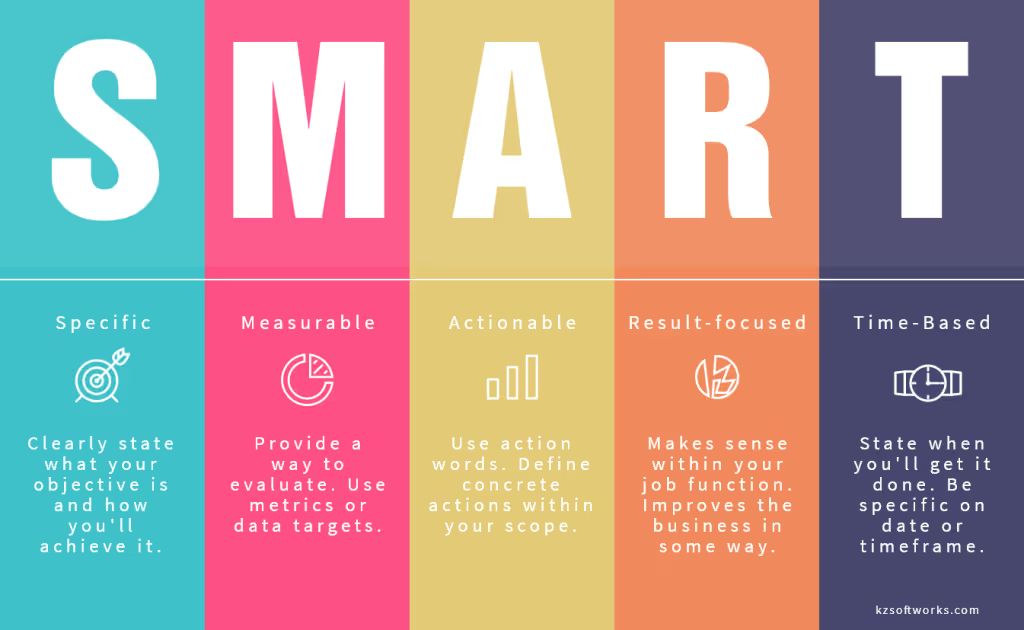
Specify your goal applying the SMART business management technique

Graphic of SMART objectives

Defining SMART criteria objectives help you stay focused on your goal and make good decisions. For instance, let’s check this objective: “Outsource to substantially improve quality assurance (QA).”

What’s the goal here: to use outsourcing or to improve QA? What does “substantially” mean? How long should it take for improvement to occur? This objective is too vague, doesn’t guide you towards actionable steps, and generates more questions than answers.

Now, let’s compare it with this other objective: “Reduce my department’s budget expenditures by 20% next quarter by nearshoring the maintenance of a legacy asset while my in-house team develops a new one”.

This one appears to be SMART since it’s specific and measurable (20%), it defines an action (nearshoring the maintenance of an asset), it focuses on results (reduce my department’s budget expenditures), and it’s time-bound (next quarter).

Defining a SMART goal is the first step when deciding if it makes sense to outsource work. But first, you might want to compare some financial and practical considerations to avoid common mistakes.

Expectations Versus Reality

Offshore outsourcing has been called one of the greatest stories ever sold.

Like many products today, outsourcing comes with a lot of fine print. The pain for smaller companies is that they don’t have the bandwidth even to read it.

However, understanding the fine print is important in these three areas: cost savings, vendor’s ability to scale, and quality of deliverables. Let’s check them out.

Cost Savings

How much money can you save by outsourcing? On the surface, it seems obvious. Even with wage inflation in India, China, and Eastern Europe, rates there are still substantially lower than in the United States.

For example, a mid-level Java developer in San Francisco earns roughly $75 per hour, compared to $25 per hour on average in Bangalore, Shenzhen, or St. Petersburg. At first glance, this lower rate translates into savings of more than 65%, or a 3:1 ratio (for every on-site Java developer you can get three offshore Java developers).

Is it that simple? Will getting three developers for the price of one give you three times the productivity? Unfortunately, no.

Hiring cheaper offshore developers doesn’t mean they will be as productive as local ones. Due to productivity issues, the difference in hourly rates could not necessarily translate into overall cost savings.

Overhead

Overhead expenses related to management, communications, and risk mitigation can eat away what you save in low hourly rates.

For example, if you outsource a small QA team, for example, you’ll probably need both local and offshore QA leads. Without outsourcing, a single lead is enough.

Moreover, if you distribute teams across multiple time zones, language and culture differences could significantly increase the volume of communications required to minimize misunderstandings.

Turnover Ratio

This one is an important expense to keep in mind. Losing a tech team member can be very expensive — as much as three to twelve months of employee salary. The turnover costs come from loss of productivity, hiring fees, training ramp-up, and other factors.

The degree of turnover is typically measured by turnover ratio or the number of lost employees divided by the team size over the course of the engagement. For example, a loss of two developers from a team of ten over the course of the engagement would be a 20% turnover ratio.

Ability to Scale

Many organizations face the challenge of adding personnel for an increased workload and ramping down when demand reduces. Outsourcing seems to be the perfect solution to this problem. Yet some staffing issues are inevitable:

Finding staff with specific skills, especially for cutting-edge technology, can be extremely time-consuming even for a top-tier vendor.

In your search for qualified personnel, consider which country you are outsourcing to and how the government supports young IT professionals.

Quality of Deliverables

There is a strong perception in the industry that the quality of deliverables produced by offshore personnel is inferior to that of local staff.

This perception is deeply flawed because outsourcing partners can either deliver higher or lower quality products and services than those of local employees. The challenge in getting quality deliverables lies in understanding all the aspects of communicating quality expectations to your partners and overseeing their work.

Summary

In this first post of these series, we have brought you general info and insights on outsourcing to help you check whether outsourcing software development is what you need to accomplish your goals.

First you have to be aware of the risks and challenges that come along on this journey. Some of them are external and out of your control, while others are internal to your organization and can be directly dealt with.

Of course, there are plenty of rewards as well like cost reduction, shortening time-to-market, improving workforce usage, improving your management skills, traveling around the world, and increasing productivity and process agility.

Second, you have to ask yourself what your goal is and what you want to accomplish by outsourcing. Remember that ambiguity and lack of detail are lethal to success. Thus defining goals with SMART criteria will go a long way in helping you establish realistic and actionable objectives.

Last, don’t forget to compare expectation versus reality. You would be better off bringing inflated expectations down to earth and taking into account factors like overhead expenses, vendor turnover ratio, scalability, quality of deliverables, and cost-saving versus productivity.

In the next installment of this series, we will be talking about what, with whom, and how to offshore or nearshore software development so you can make an educated decision on whether to do it.

We hope this post has been useful! A special shout-out to Daniel Castro who collaborated in the creation of this post.

Bibliography

Why Outsourcing?

Outsourcing is a powerful weapon, but if you don’t know how to harness its power, it might end up backfiring.

Offshoring or nearshoring software development tasks could prove very profitable for your organization and professionally enriching. We believe that anyone should be able to get the most out of an outsourcing experience.

Thus, in this post series we will be helping you understand whether to offshore or nearshore software development, with whom, and how. Armed with this knowledge, you’ll be able to make an educated decision on whether to embark on this journey.

In this first part, we will explain the most common risks and rewards associated with outsourcing, define what SMART objectives look like, and understand expectation versus reality so you can check if outsourcing is what you need to achieve your goals today.

Risks and Rewards

Does outsourcing seem like an appropriate technique for addressing your personal goals and professional objectives?

Chances are that if you survey your organization, you will find that some people say that outsourcing steals jobs and destroys organizational culture. Others might say that it could help the company stay in business and beat the competition.

Each side has valid points. Rather than debating, let’s explore some of the risks and rewards of outsourcing to see if it could work for you.

Risk types

Starting with the negatives, we can classify risks into three categories: external, internal, and personal.

External

External risks are related to factors outside your organization’s control. These include: geopolitical instability, intellectual property loss, inadequate vendor capabilities, and failure to meet joint responsibilities.

One of the most dramatic scenarios could involve a terrorist attack in “safe” offshore destinations like Mumbai or Moscow, which underscores the importance of understanding different countries’ political stability.

A less dramatic example would be when an unexpected change in tax regulation at an offshore location suddenly jeopardizes your investment.

Your potential partner’s financial stability, organizational maturity, technical skills, and ability to acquire and retain qualified talent are key to fully understand the situation you are getting into.

Internal

Internal risks are associated with factors your organization can control. The most notable ones include: unrealistic expectations, lack of organizational preparation, and negative staff impact.

Sometimes even the expectation of outsourcing, if incorrectly managed, can create organizational adversity by declining employees’ morale and productivity. Also, outsourcing initiatives will likely imply some degree of changes for existing processes and roles.

Maybe the most important internal challenge will lie in the unrealistic expectations that some organizations set about the end result. Exceptionally high-cost reduction expectations are one of the most common reasons for dissatisfaction.

Personal

Outsourcing can affect you personally in many ways, introducing changes to your lifestyle, career, and reputation.

Outsourcing may require you to increase the percentage of time you spend on activities you don’t enjoy or to shift working hours to cope with different time zones.

The very nature of outsourcing means that someone else does the work. In many cases, this will be someone whom you have little control over, but it is your name that will be in the line.

Moving from the role of individual contributor to representing an offshore or nearshore team might mean becoming a bearer of bad news. And that will have an inevitable impact on your reputation.

Reward types

With all the risks listed above, why would anyone want to outsource abroad anyways?

The answer is that competition is hard, the market is demanding and outsourcing could give your company a competitive edge. We can divide outsourcing benefits into organizational and personal ones:

Organizational

Cheaper salaries, a strong exchange rate between the US dollar and almost any other currency, lower overhead, economies of scale, controlled operation costs, productivity, and quality improvements all contribute to increased profit through resource efficiency and savings.

At the same time, outsourcing allows you to reallocate the workload during your busy season and shift less critical services abroad. This will help you meet deadlines faster and focus on disruptive innovation projects to gain a competitive advantage.

Outsourcing broadens your recruiting horizons. Having access to a huge staffing pool gives you access to hard-to-find personnel and the opportunity to team up with international experts. In addition, many outsourcing providers have a tremendous work ethic and drive to succeed.

A shortened time-to-market can be achieved as well. Having access to specialized skill sets, unique expertise, and certified processes can improve your competitive advantage.

Personal

There are several key personal benefits to choosing an international team.

From your career’s perspective, consider running an outsourcing engagement as a productive training session for developing management and leadership abilities. These are skills you can add to your resume and you would be surprised how often recruiters and companies look for outsourcing management abilities.

The skills you develop like negotiating, learning foreign languages, managing remote teams’ day-to-day, and assertiveness are invaluable skills that will benefit you in the long run. Accomplishing successful outsourcing engagements could catapult your career forward and open new doors.

Let’s not forget traveling! Seeing new places, meeting new and interesting people, experiencing foreign cultures, and trying new cuisines without spending your own money are major perks.

Having discussed outsourcing risks and rewards, you now have a better picture of the potential it has. But before deciding whether it’s for you first let’s consider which objectives you want to accomplish through outsourcing.

Defining SMART Objectives

This might not be the first time you’ve asked yourself if you should outsource a project, an initiative, or a company function.

Each time you face this situation, always remind yourself: you should only offshore or nearshore either when it is the only tool you have at your disposal or when it is the best tool for the job.

Consequently, you will first have to understand and determine what the “job” is in the first place.
When determining the “job,” you shouldn’t settle for broad goals like “need to reduce cost” or “put local staff to better use”, since ambiguity and lack of specification are lethal to success.

Specify your goal applying the SMART business management technique

Graphic of SMART objectives

Defining SMART criteria objectives help you stay focused on your goal and make good decisions. For instance, let’s check this objective: “Outsource to substantially improve quality assurance (QA).”

What’s the goal here: to use outsourcing or to improve QA? What does “substantially” mean? How long should it take for improvement to occur? This objective is too vague, doesn’t guide you towards actionable steps, and generates more questions than answers.

Now, let’s compare it with this other objective: “Reduce my department’s budget expenditures by 20% next quarter by nearshoring the maintenance of a legacy asset while my in-house team develops a new one”.

This one appears to be SMART since it’s specific and measurable (20%), it defines an action (nearshoring the maintenance of an asset), it focuses on results (reduce my department’s budget expenditures), and it’s time-bound (next quarter).

Defining a SMART goal is the first step when deciding if it makes sense to outsource work. But first, you might want to compare some financial and practical considerations to avoid common mistakes.

Expectations Versus Reality

Offshore outsourcing has been called one of the greatest stories ever sold.

Like many products today, outsourcing comes with a lot of fine print. The pain for smaller companies is that they don’t have the bandwidth even to read it.

However, understanding the fine print is important in these three areas: cost savings, vendor’s ability to scale, and quality of deliverables. Let’s check them out.

Cost Savings

How much money can you save by outsourcing? On the surface, it seems obvious. Even with wage inflation in India, China, and Eastern Europe, rates there are still substantially lower than in the United States.

For example, a mid-level Java developer in San Francisco earns roughly $75 per hour, compared to $25 per hour on average in Bangalore, Shenzhen, or St. Petersburg. At first glance, this lower rate translates into savings of more than 65%, or a 3:1 ratio (for every on-site Java developer you can get three offshore Java developers).

Is it that simple? Will getting three developers for the price of one give you three times the productivity? Unfortunately, no.

Hiring cheaper offshore developers doesn’t mean they will be as productive as local ones. Due to productivity issues, the difference in hourly rates could not necessarily translate into overall cost savings.

Overhead

Overhead expenses related to management, communications, and risk mitigation can eat away what you save in low hourly rates.

For example, if you outsource a small QA team, for example, you’ll probably need both local and offshore QA leads. Without outsourcing, a single lead is enough.

Moreover, if you distribute teams across multiple time zones, language and culture differences could significantly increase the volume of communications required to minimize misunderstandings.

Turnover Ratio

This one is an important expense to keep in mind. Losing a tech team member can be very expensive — as much as three to twelve months of employee salary. The turnover costs come from loss of productivity, hiring fees, training ramp-up, and other factors.

The degree of turnover is typically measured by turnover ratio or the number of lost employees divided by the team size over the course of the engagement. For example, a loss of two developers from a team of ten over the course of the engagement would be a 20% turnover ratio.

Ability to Scale

Many organizations face the challenge of adding personnel for an increased workload and ramping down when demand reduces. Outsourcing seems to be the perfect solution to this problem. Yet some staffing issues are inevitable:

Finding staff with specific skills, especially for cutting-edge technology, can be extremely time-consuming even for a top-tier vendor.

In your search for qualified personnel, consider which country you are outsourcing to and how the government supports young IT professionals.

Quality of Deliverables

There is a strong perception in the industry that the quality of deliverables produced by offshore personnel is inferior to that of local staff.

This perception is deeply flawed because outsourcing partners can either deliver higher or lower quality products and services than those of local employees. The challenge in getting quality deliverables lies in understanding all the aspects of communicating quality expectations to your partners and overseeing their work.

Summary

In this first post of these series, we have brought you general info and insights on outsourcing to help you check whether outsourcing software development is what you need to accomplish your goals.

First you have to be aware of the risks and challenges that come along on this journey. Some of them are external and out of your control, while others are internal to your organization and can be directly dealt with.

Of course, there are plenty of rewards as well like cost reduction, shortening time-to-market, improving workforce usage, improving your management skills, traveling around the world, and increasing productivity and process agility.

Second, you have to ask yourself what your goal is and what you want to accomplish by outsourcing. Remember that ambiguity and lack of detail are lethal to success. Thus defining goals with SMART criteria will go a long way in helping you establish realistic and actionable objectives.

Last, don’t forget to compare expectation versus reality. You would be better off bringing inflated expectations down to earth and taking into account factors like overhead expenses, vendor turnover ratio, scalability, quality of deliverables, and cost-saving versus productivity.

In the next installment of this series, we will be talking about what, with whom, and how to offshore or nearshore software development so you can make an educated decision on whether to do it.

We hope this post has been useful! A special shout-out to Daniel Castro who collaborated in the creation of this post.

Bibliography

Related Articles

·

Jul 17, 2026

Generative UI: What it is, how it works, and when to use it

Generative UI lets AI build the screen each user needs, in real time. What it is, how it works, the trade-offs, and two working demos we built.

12 read time

Read more

Generative UI is a full-stack architecture that lets AI create, modify, and render user interfaces in real time, based on what each user needs at that exact moment. Instead of static, predefined screens, the interface assembles itself on the fly: a bar chart, a table, a comparison card when you're comparing things.

We've been building proofs of concept with it for the past few weeks. Most of what's written about generative UI is either too abstract or too exciting, so this is our attempt at neither: what it is, how it works, where it helps, where it doesn't, and what we learned from two demos we built.

The short version

  • Generative UI means the AI designs the screen that answers your question, not just the answer.
  • In production, most systems don't let the AI write code. It configures pre-built components. Safer, and good enough.
  • It shines in open-ended workflows like reporting and data exploration, where you can't pre-design every screen someone might need.
  • It complements standard UI. It doesn't replace it. Anyone telling you otherwise is selling something.

What is generative UI?

Generative UI is a full-stack architecture: the backend talks to the LLM, decides what the answer should look like, and picks the components, while the frontend renders them and handles how the user interacts with what’s on screen.

Compare that with how interfaces have always worked. A designer decides what goes on each screen, a developer builds it, and every user sees the same thing. Forever, or until the next redesign.

Generative UI flips that. The interface becomes dynamic and personal instead of static and universal. The AI doesn't just answer your question, it designs the screen that answers your question.

Dashboards and reporting are the most common use cases, but they're far from the only one. The same pattern works for dynamic forms, onboarding flows, and customer support, as it takes input just as easily as it presents output. It can even adjust font size, contrast, or layout for users with low vision, color blindness, or cognitive load.

The three types of generative UI

There are three levels of generative UI, from most constrained to most open (Google Cloud, 2026):

  1. Static. Everything is pre-built. The AI picks which screen to show you from a fixed library. Low risk, low flexibility.
  2. Declarative. The AI assembles a JSON tree that specifies which UI components to use, in what order, with what properties. It doesn't write code. It configures pre-designed widgets. This balances the AI's flexibility with the system's stability.
  3. Open. The AI generates completely new code from scratch and the frontend renders it. Maximum flexibility, maximum risk.

Most production systems today use the declarative approach, and that's what this post assumes from here on. The AI isn't writing HTML or CSS freestyle. It selects components, fills in pre-designed widgets, and composes them into the right screen.

How does generative UI work?

Generative UI works by turning a user request into structured data that describes an interface, then rendering that data as real components. The flow looks like this:

  1. The user asks for something, explicitly or inferred from context.
  2. An LLM analyzes the request. It invokes tools, pulls data, and makes the design decisions: what to show and how.
  3. The system generates structured data describing both the components and the information they'll display.
  4. That schema travels to the frontend through the AG-UI protocol, a standard for communication between agents and frontends. It defines events that keep the agent's state in the backend synchronized with the frontend framework.
  5. The frontend transforms the schema into actual widgets and renders them.

To the user, the result feels like magic. Behind the scenes, it's structured data flowing through a well-defined pipeline. We prefer the second description. It's the one you can build on.

Pros and cons of generative UI

Generative UI trades real personalization and faster development for added latency, inference costs, and less predictable layouts. That's the honest version. Here are the details.

What you gain

Benefit Why it matters
Real personalization Each user sees the view they need, not the view designed for the average user. When that happens, conversion follows.
Flexibility that scales A small set of components combines into thousands of screens, including views you never explicitly built.
Faster development You build the component library once. The system composes it, instead of your team coding endless specific screens.

What you pay for it

Trade-offs What to watch
Latency There's an LLM in the middle, and that adds response time.
Token costs Every generated screen has an inference cost attached.
Less muscle memory The same request won't always render the same layout. Users can't build habits around pixel positions.
Privacy Sending data through an LLM means thinking carefully about what you send and where it goes.

None of these are dealbreakers. There are known techniques to mitigate each one. 

Generative UI examples: two working demos

We built two demos. One with fictional data, one on top of a tool we use every day.

Aurora Goods: a conversational e-commerce dashboard

Aurora Goods is a fictional consumer e-commerce platform we created for the demo. The interface is simple: chat on the left, canvas on the right. You ask about the business, the LLM figures out what you need, pulls the data, and renders it visually.

Ask about 2025 sales and it shows the numbers on cards, with a short note on anything relevant. Ask it to break that down by region and it extends the same view instead of starting over, because it understands the second question builds on the first. This part took us a while to get right, and it's what makes the whole thing feel like a conversation rather than a search box.

The canvas isn't output-only either. You can click into any element and drill down: revenue by category, then inside electronics, then which products sold most.

You configure the widgets once. The system combines them and adds relevant commentary on the spot.

An internal reporting screen for our time-tracking tool

The second demo is closer to home: a generative reporting layer on top of the time-tracking tool we use every day at Kaizen. The questions in this demo are questions someone here has actually asked.

Instead of building dozens of hyper-specific reports, a small amount of code now handles virtually unlimited queries. How many hours were logged in May? Which anomalies showed up in April? How do billable and non-billable hours compare across two months? Who worked on a given project last month, and for how long? Each answer arrives as the right visualization: cards, lists, bar charts, plus a short summary that's easy to scan.

Two details won us over. The LLM suggests next steps, so exploring the data becomes a conversation. And when it's not sure, it asks instead of assuming. Ask for the hours of someone named Alex and, since we have more than one Alex on the team, it asks which one before answering.

Generative UI complements standard UI. That's the point.

Generative UI is a complement, not a replacement. Standard interfaces still win for stable, repetitive workflows where consistency matters. Nobody wants their checkout button to be creative. Generative UI wins where the workflow is complex and the questions are unpredictable.

It also changes what design systems are for. Beyond designing components and screens, teams will need to define semantic rules: how the AI should react to uncertainty, which interfaces match which intentions, and the guardrails that keep generated screens functional and safe.

That's a new kind of design work. And it's already starting.

Want to see generative UI applied to your own data? 

We build working proofs of concept in two weeks. Your data, your workflows, a real thing you can click.

Start a conversation.

·

Jul 16, 2026

AI is already reading your website. Do you know what it's finding?

We built an internal dashboard to track how AI crawlers like ChatGPT, Perplexity, Claude, and Google read our website. Here’s what it revealed about AI visibility, analytics blind spots, and the new risks facing B2B companies.

12 read time

Read more

Somewhere between a prospect Googling your company and a prospect never visiting your site at all, a new kind of visitor showed up.

It doesn't click. It doesn't scroll. It doesn't show up in Google Analytics. But it scans your website, decides what matters, and quietly influences whether your business gets mentioned the next time someone asks ChatGPT, Perplexity, or Google's AI Overviews for a recommendation.

We had no real way to know what these AI bots were finding on our own site. So, before telling anyone else what to do about it, we built something to find out for ourselves.

The blind spot in your analytics

Google Analytics tracks human sessions, not server-side crawler activity. That's the blind spot. A person searches, sees a list of links, clicks one, lands on your site; that's the journey it was designed to track.

That journey is changing. Fewer people start their research by typing a query into Google and scanning ten blue links. Most of them are asking an AI assistant directly: "who are good software partners for X," "what's the best tool for Y," and trusting the shortlist it hands back. To build that answer, the AI first sent something to read the web on its behalf: a bot with a name like GPTBot, PerplexityBot, or ClaudeBot, crawling pages much like search engines have for decades.

None of that shows up in your dashboards. Those bot visits don't count as sessions, don't trigger conversion tracking, and don't appear anywhere you're already looking. If your site is hard for those bots to read, poorly structured, or quietly blocking them without anyone realizing it, you're not losing a ranking position. You're being left out of a conversation you never knew was happening. It's a new kind of competitive risk. Not "we got outranked," but "we were never in the running, and nothing told us."

That's the gap we set out to close, starting with our own site.

Are AI bots even visiting our site? We stopped guessing.

Inside our Innovation Hub, the group that experiments with new tools and workflows before we bring them into client work, someone asked a simple question: are AI bots even visiting our site? And if they are, what are they actually able to see?

Nobody could answer that with confidence. Not because it's a hard problem to reason about, but because the tool to answer it didn't exist among the tools we already had. So instead of guessing, or buying something built for someone else's website, we built a small internal dashboard for our own.

What we built: a dashboard that tracks AI bot visits

The idea is simple, even if getting there wasn't: a small piece of code sits quietly in front of our website and notes every time a known AI bot stops by. It records which one it was, which page it looked at, whether it got a clean response or hit an error, and how deep into the site it went.

Right now we're tracking bots from OpenAI (the ones behind ChatGPT), Anthropic (Claude), Perplexity, Google, Microsoft's Bing, Meta, and Apple. That list will keep growing. New AI crawlers show up faster than anyone can keep a definitive catalog.

All of that gets pulled into a dashboard the team can check the same way we'd check any other business metric: how much of the site is actually getting crawled, where bots are hitting dead ends, whether they're respecting the instructions we leave for them, and how that changes over time.

Screenshot of an AI Visibility Dashboard showing traffic metrics and a crawl coverage table for AI bots like OpenAI, Anthropic, and Microsoft, tracking hits, unique paths, and service page visits by company.

What the dashboard caught in the first two weeks

We didn't have to wait long to see the point of building this. Two things came up in the first few weeks alone.

The file we thought was working

An llms.txt is a simple file some AI models look for to understand what a site is about. Like a lot of sites getting ready for an AI-driven web, we added one, checked it was live, and moved on, assuming that box was checked.

The dashboard said otherwise. Weeks in, not a single bot had requested it.

So we went digging, and read that crawlers rely on robots.txt to know an llms.txt file exists in the first place, and ours didn't reference it. We added the missing line. Bots still weren't picking it up.

Third attempt: we added plain, visible links to the file in the site's header and footer, the same way we'd link to any other page. That's what did it. Two weeks of zero requests, and on the exact day we shipped that change, the file got six requests from five different AI companies.

Before and after adding links to llms.txt.

The detail we only noticed because the dashboard breaks bots down by type: those six requests were all from indexer and training bots, the ones that crawl the web to build a general picture of it, not yet from retrieval bots, the ones that fetch a page in real time to answer someone's specific question right now. That's a useful distinction. It's the difference between "we're now on the map" and "we're being pulled up live," and it tells us what to check for next.

None of that would have surfaced anywhere else. Not in Analytics, not in Search Console. We would have gone on believing the file was doing its job, simply because we remembered adding it.

The high-value pages AI bots were quietly skipping

The second finding was less comforting: several of our most important pages, the ones describing what we actually do, were barely being crawled at all. Not blocked, not broken. Just quietly skipped by many bots.

We built a graphic on the dashboard specifically for this: crawl coverage per bot, broken down page by page. Now, instead of assuming coverage is even across the site, we can see exactly which high-value pages each AI bot is actually reading, and which ones it's ignoring.

The Crawl Coverage table breaks down how thoroughly each AI bot is reading the site: total hits, unique paths crawled, and whether key service pages are being reached.

We're still working on closing that gap. The first fix we tried didn't move things the way we expected, so for now the coverage graphic itself is doing the real work: telling us, page by page and bot by bot, whether the next attempt actually helps instead of just hoping it does.

Neither of these was something we could have reasoned our way into. We only found them because we were finally looking.

Before you optimize, measure

It's tempting to jump straight to fixes: restructure content, add an llms.txt file, rewrite pages to be more "AI-friendly." We did some of that too. But our own llms.txt sat unused for weeks and we had no idea, because we had nothing telling us otherwise. Without a baseline, you can do all the "right" things and still have no idea whether any of them worked.

Our approach here mirrors how we tend to approach any technology problem: understand what's actually happening before deciding what to change. It's a small dashboard, built quickly, answering one honest question. It's already paid for itself twice over, and we're still early.

We'll keep sharing what we find as the picture gets clearer. If you're curious what your own numbers might look like, that's a conversation we're happy to have.

llms.txt