



Generative UI: What it is, how it works, and when to use it
Generative UI lets AI build the screen each user needs, in real time. What it is, how it works, the trade-offs, and two working demos we built.

12 min read
Read more

Insights, stories, and experiments from our team.
AI
UX Design
Generative UI lets AI build the screen each user needs, in real time. What it is, how it works, the trade-offs, and two working demos we built.

Santiago Chiappa
·

Jul 17, 2026
·
12 min read

Generative UI is a full-stack architecture that lets AI create, modify, and render user interfaces in real time, based on what each user needs at that exact moment. Instead of static, predefined screens, the interface assembles itself on the fly: a bar chart, a table, a comparison card when you're comparing things.
We've been building proofs of concept with it for the past few weeks. Most of what's written about generative UI is either too abstract or too exciting, so this is our attempt at neither: what it is, how it works, where it helps, where it doesn't, and what we learned from two demos we built.
Generative UI is a full-stack architecture: the backend talks to the LLM, decides what the answer should look like, and picks the components, while the frontend renders them and handles how the user interacts with what’s on screen.
Compare that with how interfaces have always worked. A designer decides what goes on each screen, a developer builds it, and every user sees the same thing. Forever, or until the next redesign.
Generative UI flips that. The interface becomes dynamic and personal instead of static and universal. The AI doesn't just answer your question, it designs the screen that answers your question.
Dashboards and reporting are the most common use cases, but they're far from the only one. The same pattern works for dynamic forms, onboarding flows, and customer support, as it takes input just as easily as it presents output. It can even adjust font size, contrast, or layout for users with low vision, color blindness, or cognitive load.
There are three levels of generative UI, from most constrained to most open (Google Cloud, 2026):
Most production systems today use the declarative approach, and that's what this post assumes from here on. The AI isn't writing HTML or CSS freestyle. It selects components, fills in pre-designed widgets, and composes them into the right screen.
Generative UI works by turning a user request into structured data that describes an interface, then rendering that data as real components. The flow looks like this:
To the user, the result feels like magic. Behind the scenes, it's structured data flowing through a well-defined pipeline. We prefer the second description. It's the one you can build on.
Generative UI trades real personalization and faster development for added latency, inference costs, and less predictable layouts. That's the honest version. Here are the details.
None of these are dealbreakers. There are known techniques to mitigate each one.
We built two demos. One with fictional data, one on top of a tool we use every day.
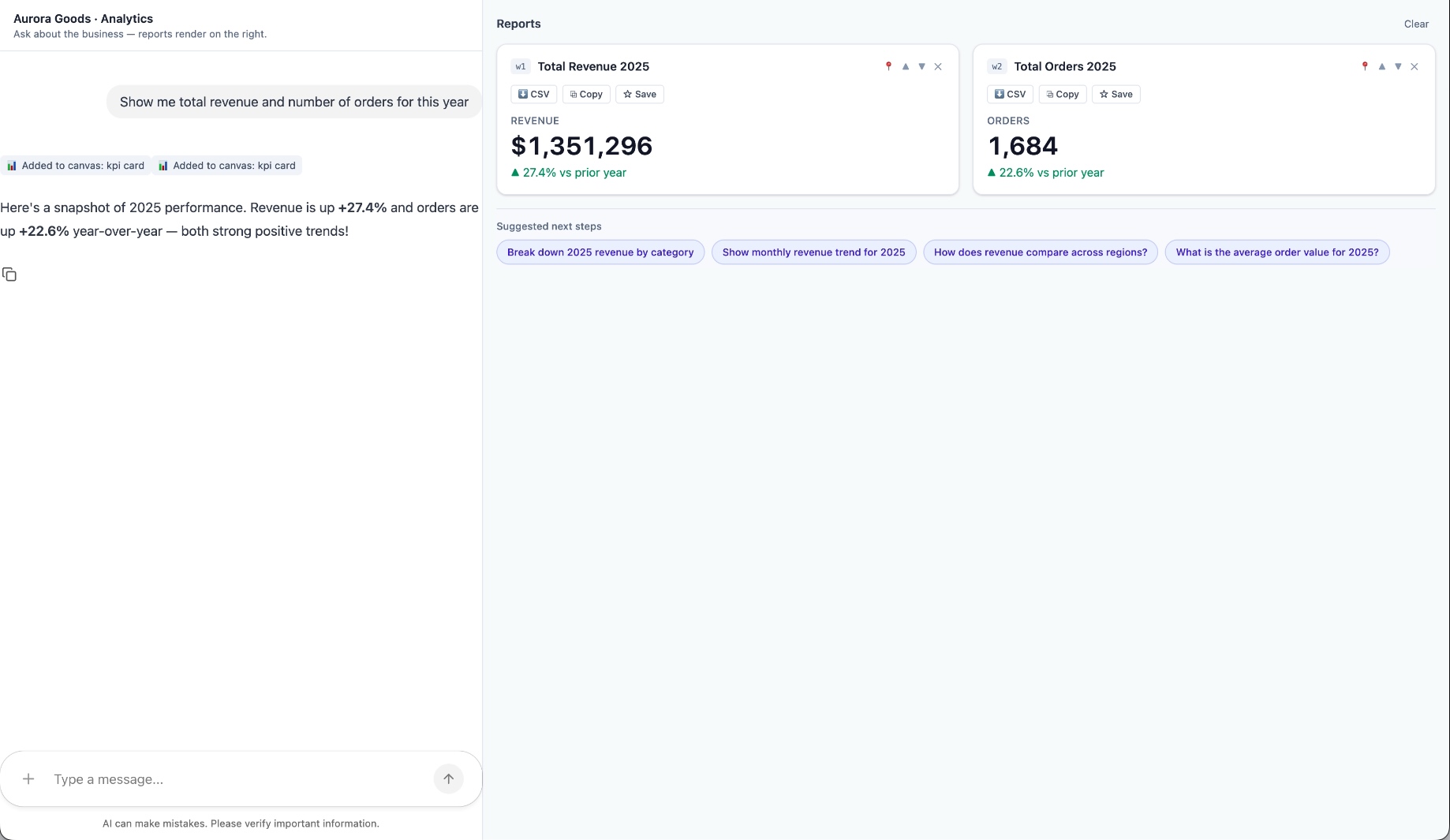
Aurora Goods is a fictional consumer e-commerce platform we created for the demo. The interface is simple: chat on the left, canvas on the right. You ask about the business, the LLM figures out what you need, pulls the data, and renders it visually.
Ask about 2025 sales and it shows the numbers on cards, with a short note on anything relevant. Ask it to break that down by region and it extends the same view instead of starting over, because it understands the second question builds on the first. This part took us a while to get right, and it's what makes the whole thing feel like a conversation rather than a search box.
The canvas isn't output-only either. You can click into any element and drill down: revenue by category, then inside electronics, then which products sold most.
You configure the widgets once. The system combines them and adds relevant commentary on the spot.
The second demo is closer to home: a generative reporting layer on top of the time-tracking tool we use every day at Kaizen. The questions in this demo are questions someone here has actually asked.
Instead of building dozens of hyper-specific reports, a small amount of code now handles virtually unlimited queries. How many hours were logged in May? Which anomalies showed up in April? How do billable and non-billable hours compare across two months? Who worked on a given project last month, and for how long? Each answer arrives as the right visualization: cards, lists, bar charts, plus a short summary that's easy to scan.
Two details won us over. The LLM suggests next steps, so exploring the data becomes a conversation. And when it's not sure, it asks instead of assuming. Ask for the hours of someone named Alex and, since we have more than one Alex on the team, it asks which one before answering.
Generative UI is a complement, not a replacement. Standard interfaces still win for stable, repetitive workflows where consistency matters. Nobody wants their checkout button to be creative. Generative UI wins where the workflow is complex and the questions are unpredictable.
It also changes what design systems are for. Beyond designing components and screens, teams will need to define semantic rules: how the AI should react to uncertainty, which interfaces match which intentions, and the guardrails that keep generated screens functional and safe.
That's a new kind of design work. And it's already starting.
We build working proofs of concept in two weeks. Your data, your workflows, a real thing you can click.
Generative UI lets AI build the screen each user needs, in real time. What it is, how it works, the trade-offs, and two working demos we built.
12 min read
Events

·
Nov 1, 2017
What it was actually like to be at .NET Conf Uruguay 2017: the biggest Microsoft event in South America, started by our team.
12 read time
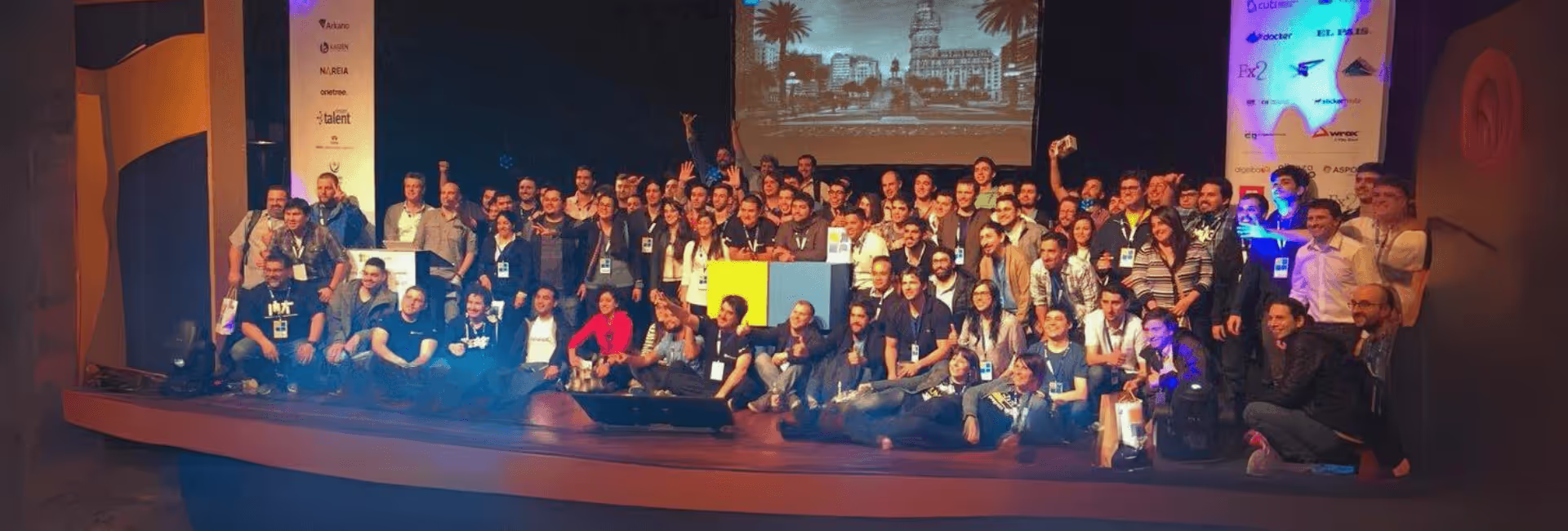
In the past week, the tech world witnessed the 4th edition of the .NET Conf UY v2017, the most significant community conference dedicated to Microsoft technologies in South America.
This nonprofit venture was founded by Kaizen Softworks in 2014 with an audacious idea to foster the Microsoft community in Uruguay, and since then, it has expanded its reach to Argentina and Colombia, with aspirations to include Chile and Peru by 2018.
More than 450 enthusiastic participants registered for the .NET Conf UY v2017 These attendees had diverse backgrounds, with 47% being software developers, followed by 18.5% IT students. The rest were spread across roles such as software architects, team leaders, managers & executives, directors & owners, and other industry functions.
This edition of the conference played host to 39 speakers from four different countries. It offered nine hands-on labs (workshops) over three days, including two Keynotes highlighting Microsoft's innovations on Day 1 and focusing on Women in Technology on Day 2.
In total, the conference featured 34 talks over two days, culminating in a memorable After Party. Since 2017, .NET Conf Global, the umbrella organization for all editions, has attracted over 130 speakers from 12 different countries, with the collective effort of more than 30 organizers and collaborators. This ambitious undertaking has led to six editions in three countries, backed by the support of over 120 sponsors from various parts of the world.
Some additional numbers about attendees:
The conference traditionally kicks off with Hands-On Labs (HOL). In this edition, nine workshops were conducted over three days, with three workshops held each day. The location for these enriching sessions was the education institute of one of the sponsors, Cultural Alliance Uruguay-United States.
The HOL sessions covered a wide range of topics, including .NET Standard, Azure, Xamarin, Progressive Web Apps, Microservices, Power BI, and SQL Server.
The heart of the conference was the 34 talks that unfolded over two information-packed days.
Eduardo Mangarelli delivered a keynote speech on Day 1, providing insights into four innovation projects that Microsoft had been actively working on. These projects served as excellent examples of how Microsoft technology is being applied and were highly inspiring for the audience.
Other topics covered on Day 1 included Data Science, Docker, Cognitive Services, Facial-Speech-Image recognition, Machine Learning, Microservices, Progressive Web Apps, Mobile Development, and .NET Core, among others.
Day 2 continued the momentum, beginning with Carolina Bañales's talk on Women in Technology, a topic of great significance to the conference.
This was followed by many engaging speakers who covered subjects like Azure Cosmos DB, Angular, ASP.NET Core, Chatbots, Big Data, DevOps, TypeScript, Infrastructure as Code, and Open Source, among others.
Sponsors played a significant role in the event, with several opting to set up booths to engage with attendees.
Gold sponsors like Kaizen Softworks made the most of this opportunity, with attendees visiting their booths to learn more about the company and participate in exciting raffles. Kaizen Softworks, for instance, raffled off prizes such as a Fire 7 tablet, an Amazon Echo Dot, and a Chromecast.
Moreover, the main raffle of the conference offered attendees a chance to win two flight tickets to Rio de Janeiro. To enter, attendees simply needed to install the official conference sponsor app and have their QR codes scanned by the sponsors. This creative approach encouraged attendees to explore every sponsor booth.
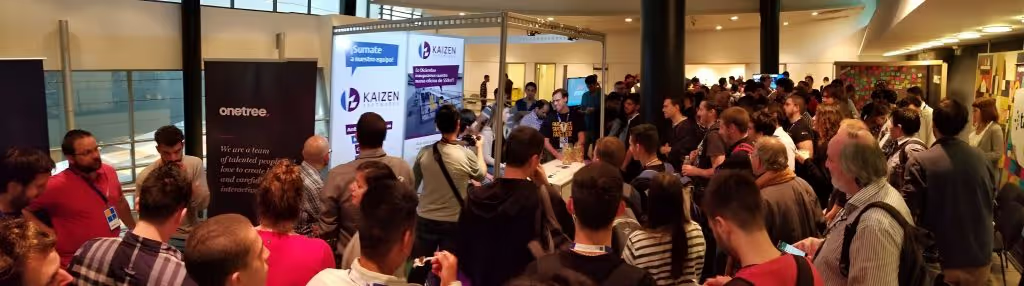
We love to take good care of our speakers and sponsors, that’s why at night on Day 1 of Conference we invite every speaker and gold sponsors to enjoy some food, music, fun and networking on a more private space. This time, Kaizen Softworks new office was the place where we enjoyed typical food from Uruguay!
After 5 days packed of information and learning, we ended with a beautiful After Party where every attendee, sponsors, speakers, organizers and collaborators enjoyed and celebrated another fun conference! Food, drinks and music were part of this in the 26th floor of ANTEL Tower enjoying a 360 degree view of the city like no other.
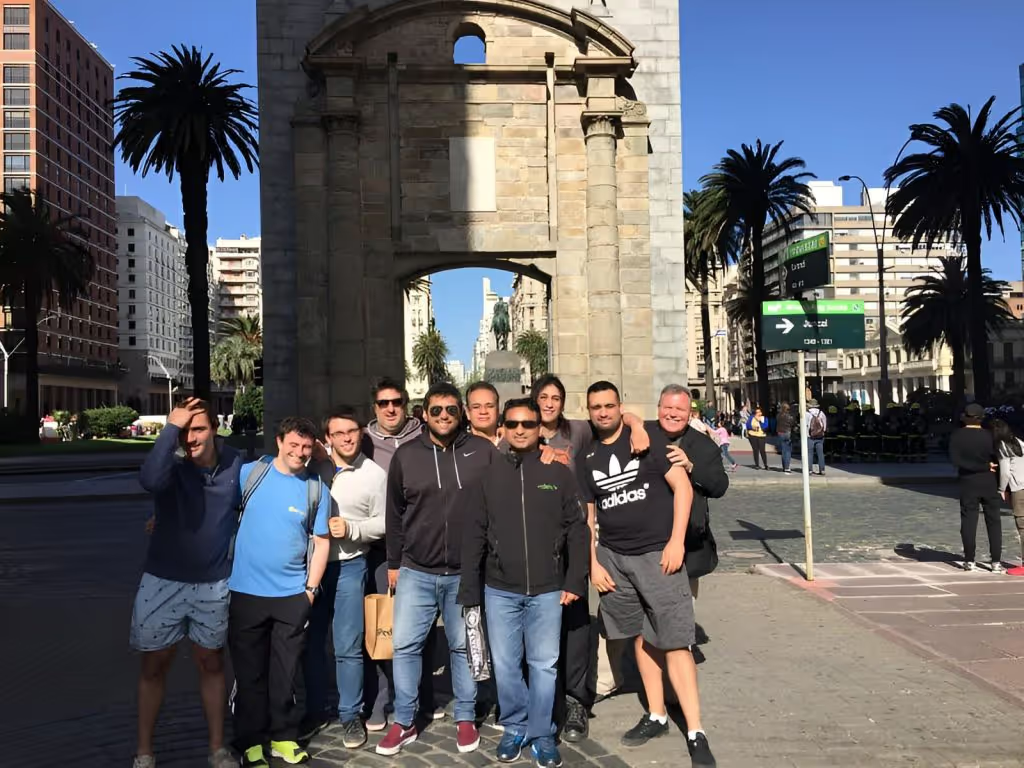
We know our foreign speakers had traveled pretty far from home to come to our conference and we value that a lot. In order to make their long trip worth it we say thanks by spending one day with them showing the city and having lunch together.
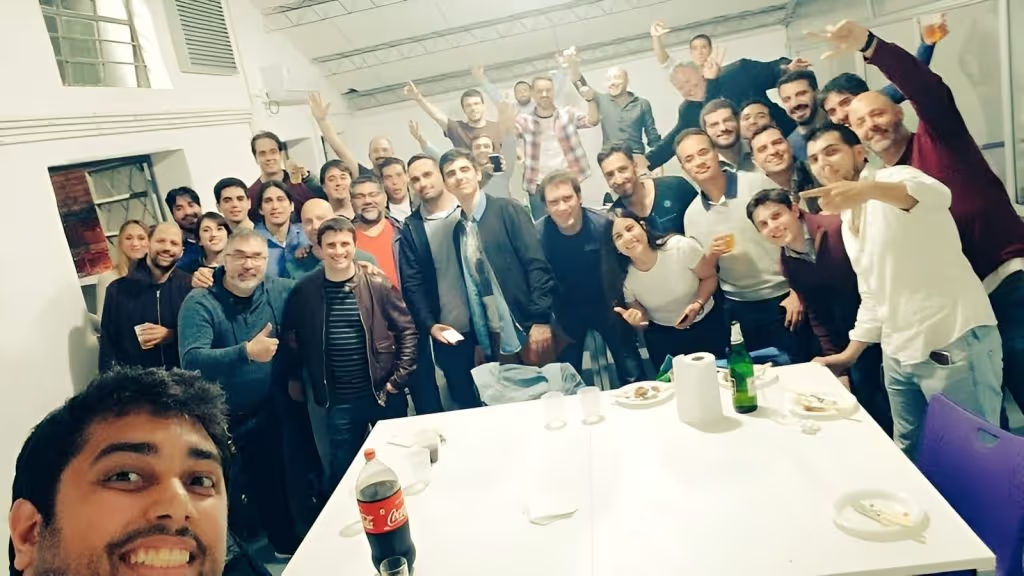
The .NET Conf UY v2017 marked the 4th edition of the conference, solidifying its reputation as the largest and most important community-organized event focusing on Microsoft technologies in South America. Inspired by this success, other communities in the region have launched their versions, such as .NET Conf AR and .NET Conf in Argentina and Colombia.
Looking ahead, the roadmap includes bringing the conference to Chile and Peru, promising more challenges and achievements in the future.
Who knows what else is waiting for us? I can’t wait for more challenges like this. See you at the next conf in who knows which country ;)

Technology
·
May 8, 2017
A clear overview of Microsoft Azure and how its cloud services help teams build, scale, secure, and modernize software systems.
12 read time
In today's tech-driven world, the Cloud-First approach has become the norm. If you haven't yet considered moving your existing systems to the cloud or integrating cloud services into your software architecture, you're missing out on opportunities to enhance agility, reduce costs, and gain a competitive edge.
I recently had the pleasure of being the keynote speaker at the Global Azure Bootcamp Montevideo , and this article is inspired by that presentation.
Gartner defines cloud computing as: 'A style of computing where scalable and elastic IT-related capabilities are provided ‘as a service’ to external customers using Internet technologies'. The cloud has five key attributes:
To make the most of these cloud attributes, you need a well-thought-out strategy for migration. Every company must decide how to leverage the cloud, focusing on three primary approaches:
By working on these three areas is how we really can transform our business.
At Kaizen Softworks , we are firm believers that Microsoft Azure offers one of the most comprehensive cloud solutions. Gartner has recognized Microsoft as a Leader in three Magic Quadrants of the Cloud: Cloud Infrastructure as Service, Public Cloud Storage Services, and Enterprise Application Platform as a Service.
Microsoft's SaaS solutions, such as Office 365, Microsoft Dynamics, and Power BI, are deployed globally and used by millions of customers.
For the other two cloud approaches, Microsoft Azure comes into play. Azure is a comprehensive cloud platform offering both higher-level services and infrastructure.
Amazon Web Services (AWS) is a great IaaS, but they don’t have SaaS, Salesforce has SaaS, but no IaaS, and the examples keep coming. By using a Cloud that covers all the three areas is how we can truly find the value of being agile, save money and integrate smoothly to transform our business.
Azure has a distinct advantage with its 34 regions , doubling what Amazon Web Services provides, and more regions are continually being added.
Azure is built on three foundational pillars:
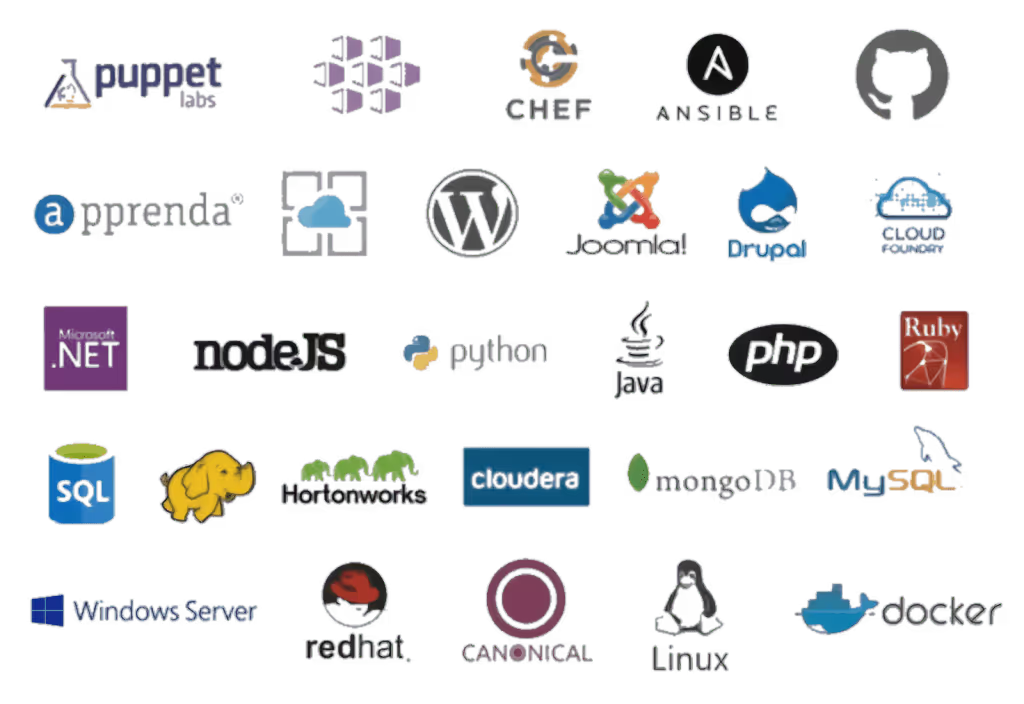
Azure provides an array of tools, technologies, and frameworks to choose from. You can select the best tools, programming languages, and platforms for your specific needs.
Having every Server OS including Linux with 12 different distributions, almost every DB system, so many different programming languages and platforms allows us to choose the best tool for the job and use the open source or commercial version on a case by case.
Here’s some of the tools and frameworks we can choose from:
We also have something very particular and unique to the Azure cloud, this is the Azure Stack. With it we get the same experience and power of the public cloud but on-premises or on a server provider hosting service.
Same management portal, same APIs, same apps and same DevOps experience. For government and other companies with particular needs and restrictions this is a huge deal. No other Cloud provider has this type of service.
Azure boasts a multitude of compliance certifications and standards, making it a preferred choice for 85% of Fortune 500 companies.
Security and Privacy are key to enterprise customers and Microsoft has vast experience running online services developing industry-leading security measures and privacy policies.
These are just a few, but you can check them all:

Azure focuses on productivity, allowing teams to work seamlessly with integrations between various tools, services, workloads, and infrastructure, creating an efficient DevOps lifecycle.
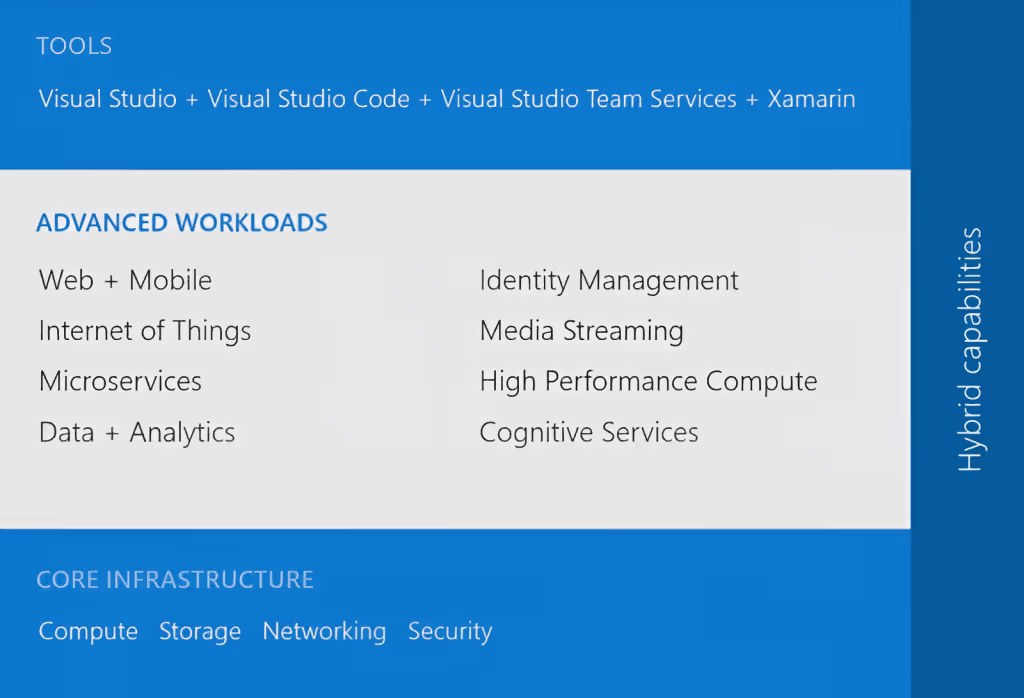
Using Visual Studio Team Services (VSTS) SaaS solution, we can code on a PC or Mac, using Visual Studio (and even Visual Studio for Mac — in preview), Eclipse or XCode; any IDE, any platform, any language, a SaaS solution used by more than 4 million developers worldwide.
We can have all the private repos we want using Git or TFS, without paying anything additional, or we can integrate with our repos from other platforms like GitHub. VSTS offers a full DevOps cycle with build service, deploy and unit testing; and you know what else? We can compile Java, Android, .NET and some more.
After we passed our Unit Tests we can do some Load Testing simulating thousands of users hitting our web app or backend before moving to a Production environment.
Once everything is tested and ok, we can establish and use our own release policies and deploy our apps and backends to the Azure Cloud. While in Production we can use Application Insights to study the performance of it and keep the cycle running.
The numbers speak for themselves:
Now, that’s some serious numbers but I also want to share some cool stories I heard from Scott Guthrie. Azure has been a game-changer for various industries:
AccuWeather, probably the biggest weather company out there, uses Azure to process more than 10 billion data inputs per day and 7 trillion unique data entities where they apply Machine Learning to be able to predict weather, not to mention they are using API services to sell this info to third parties too.
BMW built the whole ConnectedDrive platform using Azure technologies like Azure IoT, Machine Learning services, Data Services and many more.
Rolls Royce, well known for its cars but also for making flight engines are providing their customers a better experience by informing them of engine failures, preventing fails, predicting them, applying analytics and optimizing engine use.
All this by using Azure services like the IoT Suite, Cortana Analytics and Power BI, this last one used to analyze fuel consumption and suggest better routes that optimize it.
Azure's App Platform offers Web Apps, Mobile Apps, Logic Apps and API Apps. You can develop your apps in any language like Python, NodeJS, PHP, Java and .NET.
Azure offers features like:
I would like to give a special mention in the App Platform to Azure Functions. Azure Functions is a serverless computing service that allows you to code functions and pay only per invocation. It supports multiple languages and can be triggered by various events.
With this we forget about Virtual Machines, Apps and all that stuff and we just code some functions and that’s it. Our code runs in the cloud and we just pay per invocation, which can be triggered on certain events in Azure or by external services.
We can code these functions using F#, JavaScript, C#, Python, Batch, Bash, PHP and PowerShell and even code them using a web based interface, so no need for IDE neither — crazy. The Azure Functions runtime is open source and we can basically get it up and running anywhere, including AWS.
My very good friend Rachel Appel is working in the Azure Functions team at Microsoft, be sure to follow her and stay tuned for her speaking appearances.
When it comes to Microservices, Azure doesn’t leave us alone. We have three different approaches to choose from depending of our needs and situation. The most basic one is VM Scale Sets, then we can jump to Azure Container Service or lastly use Azure Service Fabric like many Azure customers chose including BMW, TalkTalk and many more.
The Azure Container Service has standard Docker tooling and API support, you can orchestrate everything thru Azure, and you can use it on Azure or Azure Stack.
Azure Service Fabric is a prescriptive microservice platform which also uses Docker but with more services like sanity state management and more. You have .NET and Java APIs on Windows Server and Linux and you can deploy it to Azure, Azure Stack, VMWare, OpenStack and AWS.
The data management options Azure has to offer is wide. We have some official Microsoft options like SQL Azure, DocumentDB and Azure Redis Cache, but then we also have some other interesting options like Postgres, DB2, Oracle, MySQL, Cassandra, MongoDB, CouchDB and RavenDB.
SQL Azure has more than 1.6 million databases running, it’s a first class citizen developed by Microsoft with high availability, durable and fault tolerant, and you can scale elastically all around the world. For your existing SQl Server databases, fear not my friend, it is compatible and we have a really cool tool to help us: SQL Database Migration Wizard.
DocumentDB is another first class citizen here, a fully managed NoSQL database system made by Microsoft that scales from GBs to 100s of TBs. High performance with support of millions of operations per second.
Another cool thing is that we can scale app data and throughput independently, a feature introduced based on client feedback. I’m also really happy to say that my friend and Microsoft MVP Matías Quaranta is joining the DocumentDB team in Redmond.
The Walking Dead No Man’s Land app that reached number 1 in the Apple App Store is an excellent example of DocumentDB use with 1 billion queries per day with responses of less than 10ms 99% of the time. A video is worth a million words:
We all know systems generate more and more data every day at a pace that only keeps incrementing, but this is really good news if we are clever enough to take advantage of that data, gain insights from it and take intelligent actions.
For this, we have a big suite of options to use depending of our needs to know what happened, why, what will happen and what we should do about it, this suite is called the Cortana Intelligence Suite and includes: Power BI, Machine Learning, SQL Data Warehouse, HDInsight, Data Lake Analytics, Data Lake Store, Stream Analytics, Data Factory, Data Catalog and Event Hubs.
IoT is not left behind in Azure with the Azure IoT Suite offering secure device connectivity and management, business workflow integration and pre-configured solutions to start quickly and customize later to our needs.
Some big names using this Suite but not limited to these are Ford in their newest vehicles and Thyssenkrupp. The market leader in elevator systems uses the Azure IoT Suite to analyze and predict failures so they can optimize the service experience offered to their clients.
If we move into infrastructure services in the Cloud, we can use Virtual Machines, Blob Storage, Active Directory, Virtual Networks, Load Balancers, DNS, Gateways.
I mean… you are a fully covered here too, there’s so many services in the Azure Cloud that we can take advantage from to create all the infrastructure of our systems in one place and manage everything from the same portal.
There’s up to 64 TB of storage per VM with less than 1ms read latency. If we step up, Azure has the largest VMs in the Public Cloud of up to 32 CPU cores and the latest generation of Intel processors, 450 GB RAM and 6.5 TB of local SSD! Crazy!
Companies using Azure Cloud Infrastructure include Walmart, United Nations, Samsung, Toyota, 3M and the list is long.
Nowadays hearing about attacks to companies systems is no surprise and Security has being positioned as a top priority for CIOs. Azure Security Center allows you to have visibility and control to prevent, detect and respond to security threats of your Cloud services.
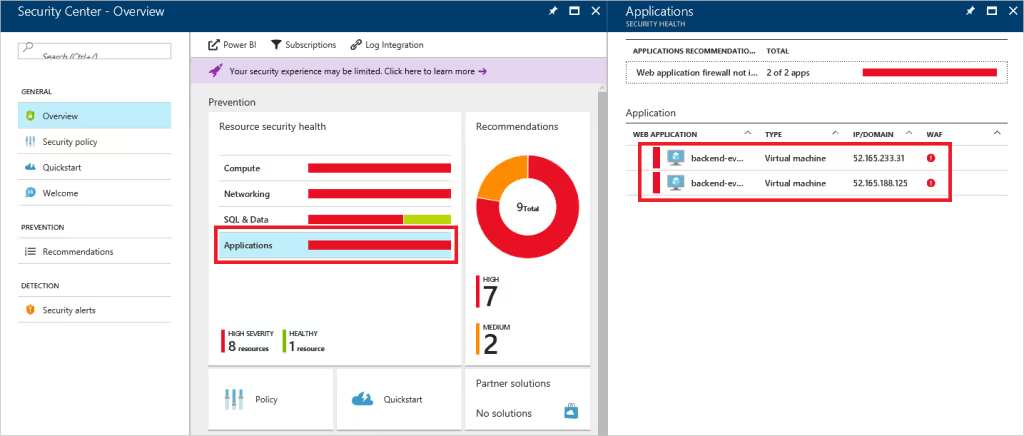
Again, all from the same management portal with integrations to known security solutions like Barracuda, Trend Micro and many more.

I hope I gave you an overview of why Microsoft Azure is a great opportunity to jump into the Cloud, in our experience at Kaizen Softworks it has been a great choice in every project we used it.
We have vast experience using the App Platform and is probably one of the easiest ways to start investigating and doing some tests of your systems with the Azure Cloud. In several of our projects we have used SQL Azure and is not in vain that 1.6M databases are in use in Azure, the experience is practically the same if you are used to work with SQL Server.
Some other great services we have been using for a long time are Azure Active Directory, Blob Storage and Service Bus among other, all of which together allows us to build robust architectures in the Cloud.
As we are big fans of Single Page Applications built using Angular and many other non-Microsoft tech we can also say that serving applications built using these technologies has been a breeze in the Azure Cloud. Choice and flexibility checked.
The DevOps experience while working with Microsoft is great from Source Code Repo options to build, deploy, test and analyze, I think that this well integrated lifecycle in the Cloud is what has let us rely so many aspects of the process in the platform and just take care of what’s really important: building the system. The productivity focus of Microsoft is clearly noticed.
As another remarkable point from our experience, we had the opportunity to work implementing the HIPAA Compliance standard in the Azure Cloud and there are a lot of aspects of it already covered by Azure out of the box, so another great differentiator there. Enterprise Ready verified.
Technology
·
Apr 1, 2017
A practical look at why mobile matters and how Xamarin helps teams build native apps for multiple platforms with less duplicated work.
12 read time
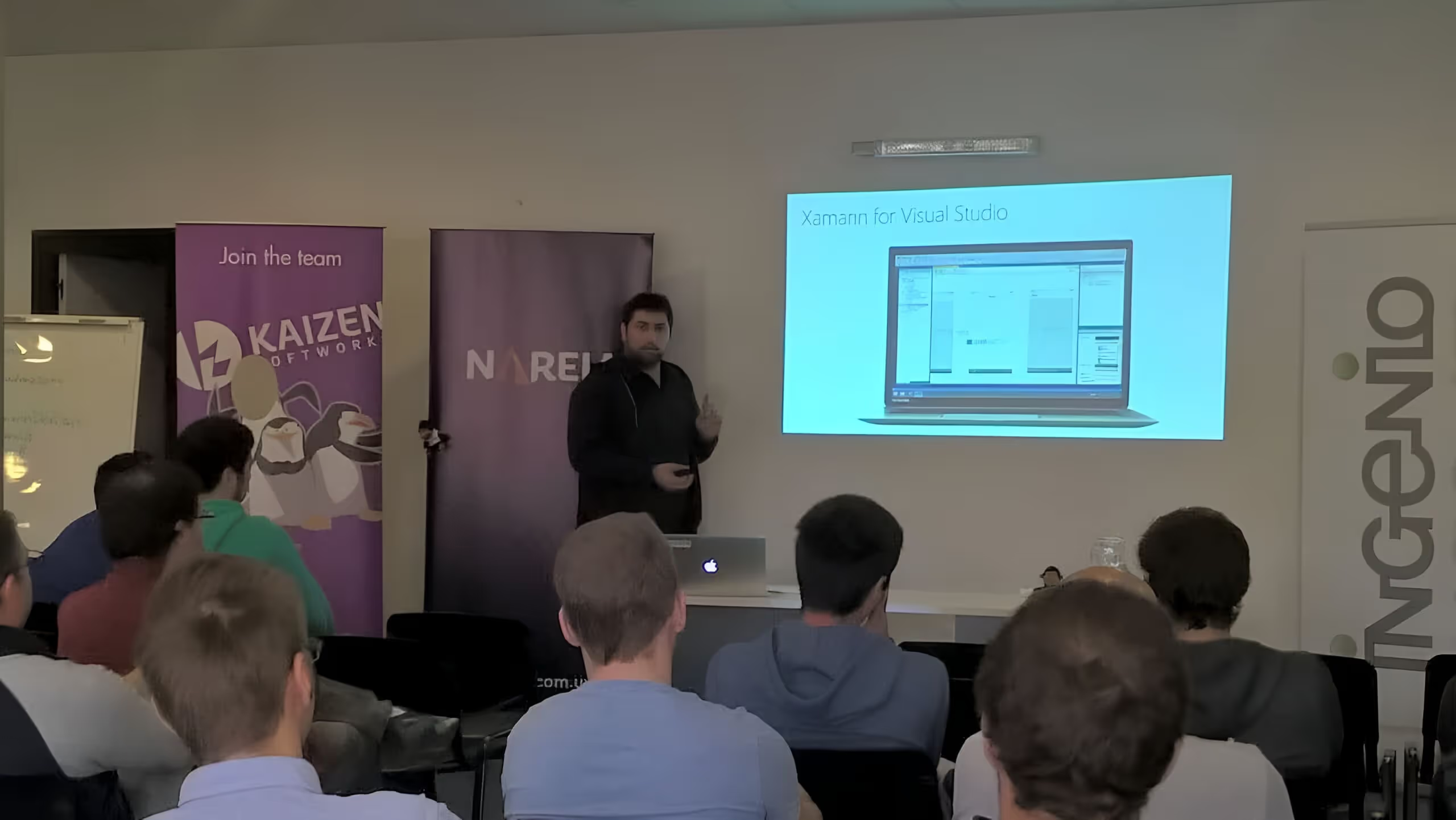
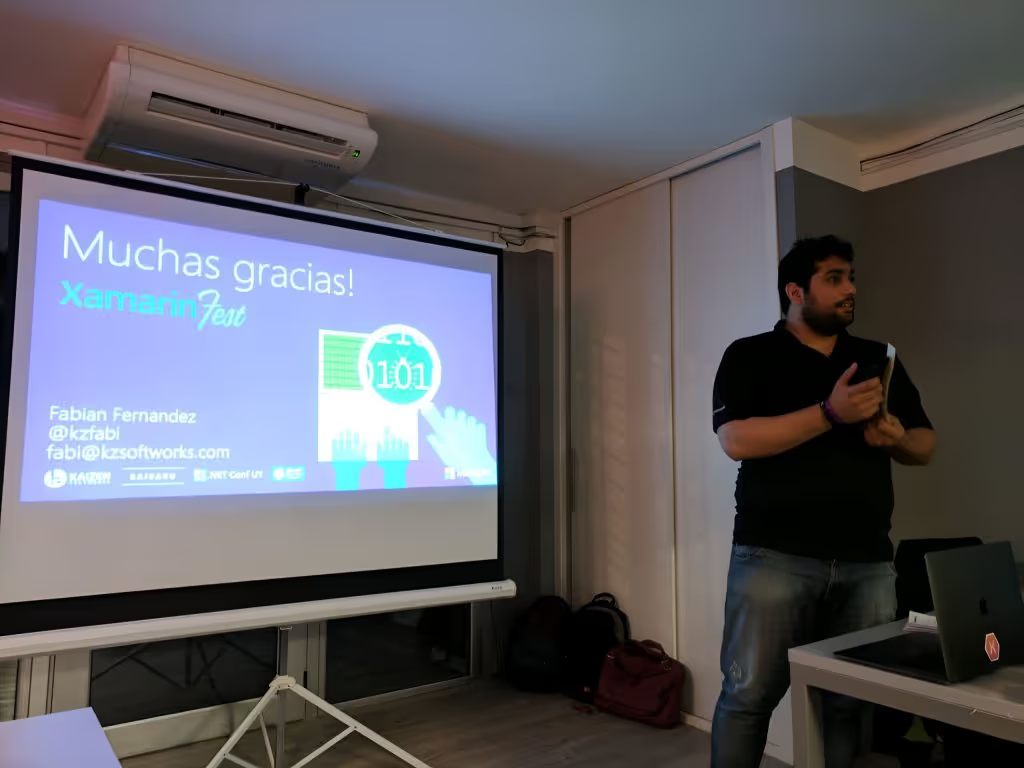
I recently had the pleasure to do the Keynote at Xamarin Fest LATAM, it was a full packed house at NetEffect Uruguay office (really cool office BTW!).
Whether you're a business owner, a developer, or simply a tech enthusiast, embracing mobile technology is crucial. This article explores the importance of going mobile and how you can save money while doing so, with a particular focus on cross-platform native app development using Xamarin.
Mobile technology has taken the world by storm. The number of global users accessing the internet via mobile devices surpassed desktop users in 2014, and the trend continues to grow.
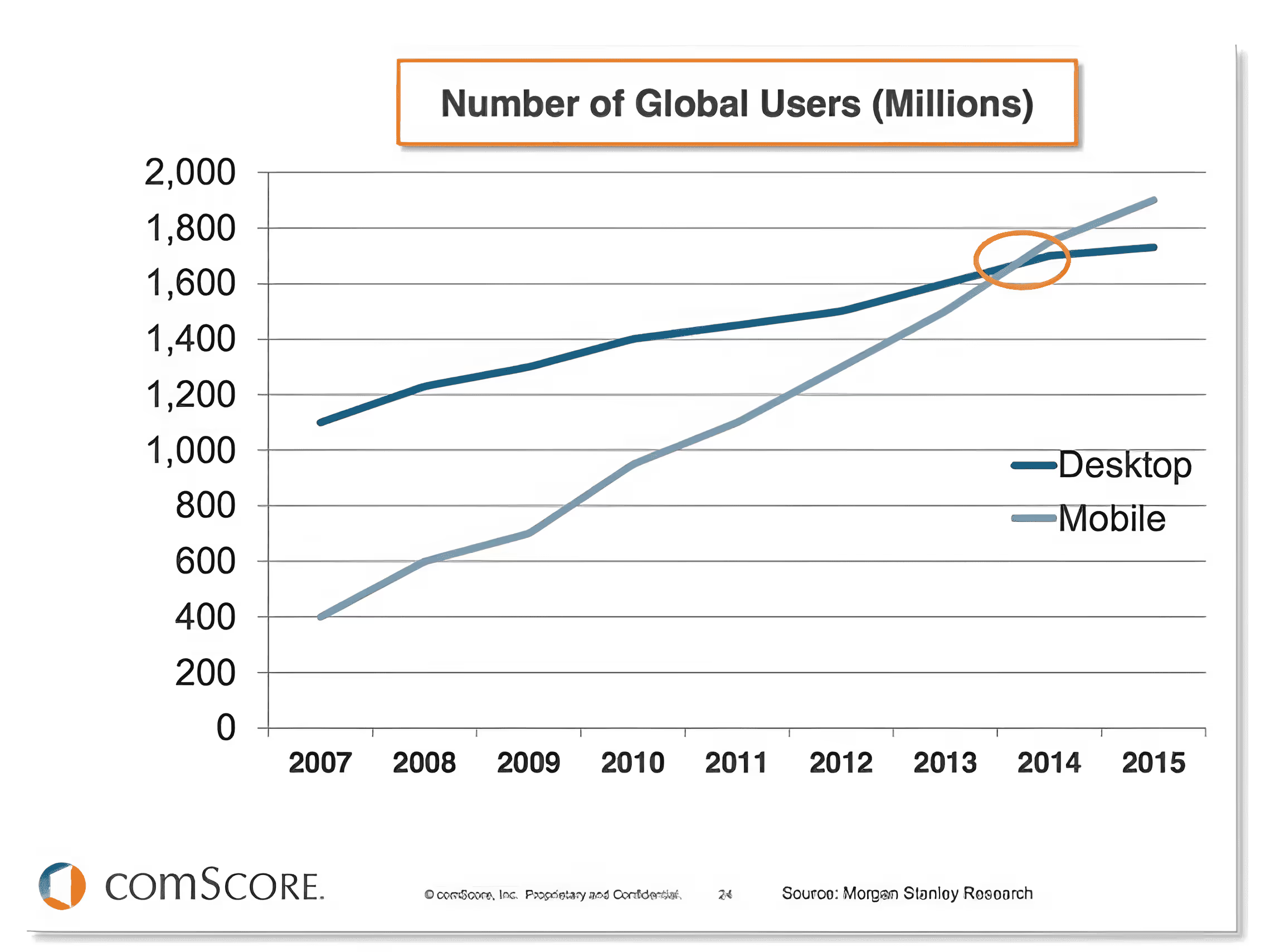
The shift towards mobile is evident in the statistics. For instance, time spent on mobile apps using smartphones witnessed an astonishing 80% growth from 2013 to 2016, demonstrating the increasing importance of mobile applications. Users are intentionally moving apps to their home screens, highlighting the preference for mobile apps over mobile browsers.
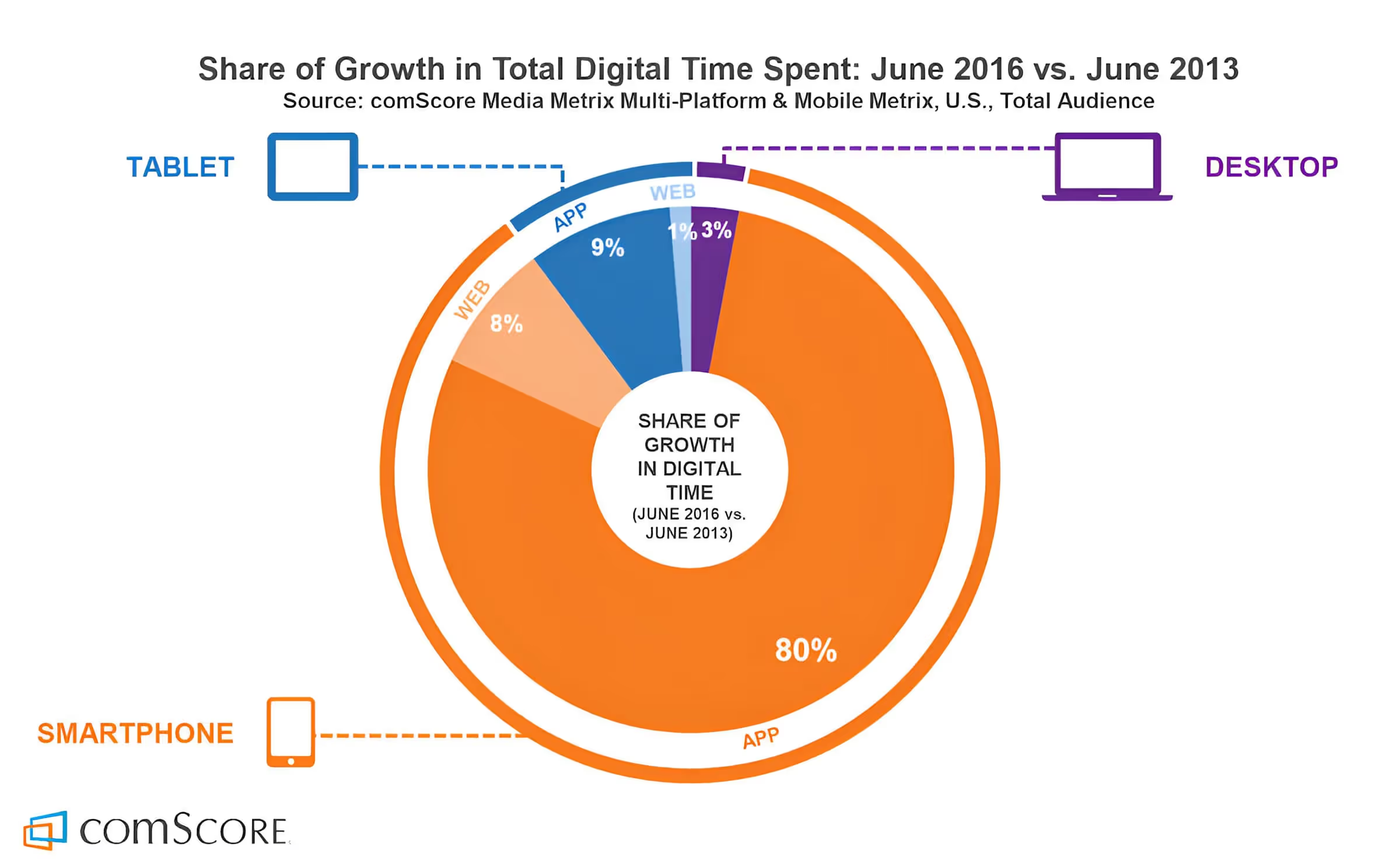
We can see here that time spent on web using a smartphone had a 8% growth from 2013 to 2016, while on a tablet was of 1%, and desktop of 3%. But here’s the deal: Time spent on mobile apps using a smartphone had 80% growth from 2013 to 2016 — WOW; and using a tablet was 9%.
Take a look at this other report, it shows that 75% of mobile users intentionally move apps to their Home Screen making it easier and faster to access their most used and favorite apps — they are not using their mobile browser, they want your app:
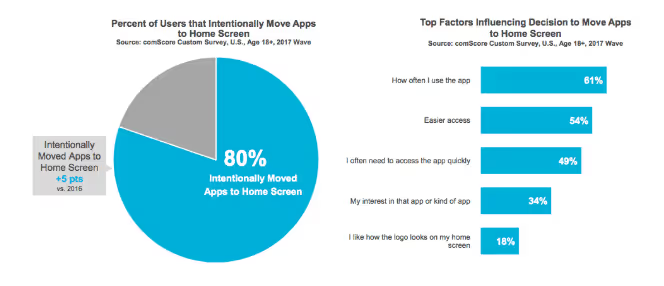
Mobile users are now accustomed to using an average of 27 different apps per month, making the mobile app market a highly competitive and promising space.
When it comes to mobile platforms, Android and iOS reign supreme. Android, in particular, has emerged as the dominant player, capturing the largest market share. To reach the widest audience, it's essential to target both of these platforms. However, building separate native apps for Android and iOS can be expensive and resource-intensive.
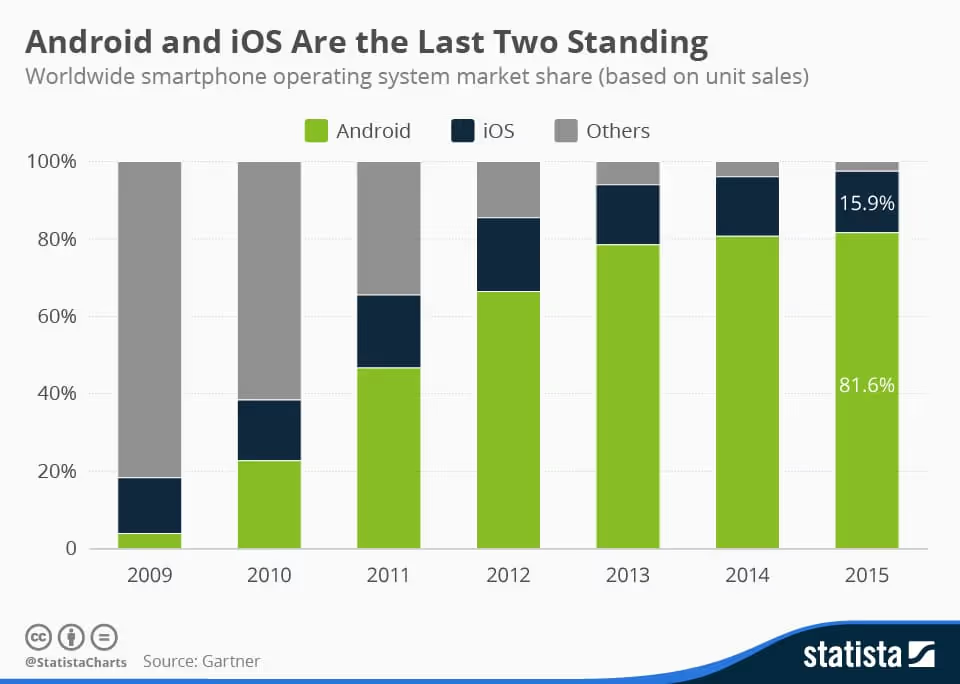
What all this means to us is that we should be at least targeting both platforms to reach the massive market out there. But for that, we have to invest a lot of money, right? You are probably thinking about two teams, one for iOS and another for Android. And you are right, I mean, you are right in start thinking about the decision of going native, that’s the way to go as you will be taking advantage of all the platform specific features, all the good performance users are used to experience and same native experience they have in all their other apps — well, the good apps.
iOS requires us to work on a Mac and we must know to code in Objective-C to work on XCode, the IDE that lets you build iOS apps. For Android, that’s a different story, you must know Java and code on Eclipse or Android Studio — which is really cool to be fair, can’t say the same about XCode. And if you don’t want Microsoft to be left behind, you must know the .NET Framework and code in C# while using Visual Studio — probably the best IDE out there, period.
If you start making numbers, you are already thinking how crazy it would be to have at least two teams building the same product.
This is where Xamarin, a Microsoft-owned tool, comes into play. Xamarin is a Visual Studio extension that you can select during installation or by modifying your Visual Studio setup. Once installed, it allows you to compile C# code into native applications. You can leverage the powerful features of Visual Studio, including debugging, IntelliSense, and more, while building apps faster through code and binary reuse.
Xamarin allows you to build cross-platform native apps using a single codebase and a unified skill set. You can use C# and .NET, along with Microsoft's Visual Studio, one of the industry's most acclaimed Integrated Development Environments (IDEs). Xamarin enables you to create apps for Windows Desktop, Windows Store, Windows Phone, iOS, and Android, all within the same development environment.
Xamarin's cost-effective approach is a game-changer. You only need to write around 20% custom code for the views of each platform you target, while sharing the remaining code and resources across platforms. This results in significant time and cost savings. Xamarin's use of XAML for designing user interfaces further simplifies the development process, eliminating the need for platform-specific languages like Objective-C or Java.
Licensing I hear? Of course, in the past it might have been a little expensive but since Microsoft acquired Xamarin, now it is free for up to 5 users or if you already have (or plan to have) Visual Studio Professional or Enterprise, then you are all set, it is included with it. What are you waiting for?
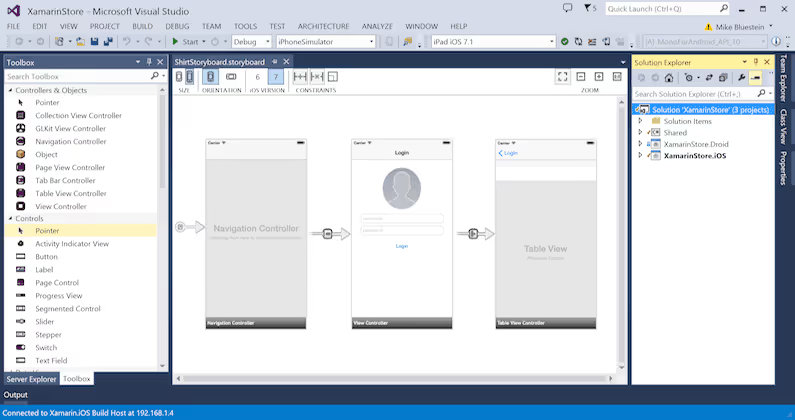
Xamarin simplifies UI design by offering a drag-and-drop interface in Visual Studio. It allows you to design for different screen sizes, resolutions, and OS versions, all from a single development environment. The Android designer in Xamarin is highly regarded, and the iOS designer is equally impressive.
Xamarin Test Cloud is a cloud-based testing environment that enables you to test your apps across a multitude of Android and iOS devices. You can perform simultaneous testing on real devices in the cloud, paying only for what you use. The platform offers performance monitoring, visual test results, and unit tests, streamlining the testing process.
In summary, the shift to mobile is undeniable, and Xamarin offers a cost-effective solution for cross-platform app development. It streamlines the development process, reduces expenses, and allows you to tap into the vast mobile app market with ease. Don't miss out on the mobile revolution; Xamarin can help you make the most of it.
If you're interested in Xamarin, resources are readily available online. You can also check the slides of the Keynote I gave at SlideShare as quick review of all this info.
If you prefer a hands-off approach, at Kaizen Softworks we can help you. We're a nearshore software development company based in Uruguay, specialized in native app development. We also incorporate the power of the Azure Cloud, Artificial Intelligence, Machine Learning, and Cognitive Services to create outstanding app experiences.
About Us
·
Mar 21, 2017
Our founder joined a podcast to talk about software and business. Here are some highlights.
12 read time
I was recently on a business trip across the U.S. and during my stay on Tampa, FL, I had the great honor of being interviewed by Clayton Hunt and John Callaway on their very first episode of the podcast they are starting at The 6 Figure Developer.
In this article, we'll explore some key takeaways from that discussion and see how they relate to the larger landscape of the tech industry.
Before we delve into the details, let's start with a brief overview of the podcast. The 6 Figure Developer Podcast, hosted by Clayton Hunt and John Callaway, is a platform dedicated to tech enthusiasts and committed to assisting developers in advancing their careers. It covers a wide range of topics, including Test Driven Development, the importance of Clean Code, professionalism, entrepreneurship, and explores the most up-to-date programming languages and cutting-edge concepts in the field.
We talked a lot about the .NET community in Uruguay, primarily focusing on two key aspects: the .NET Meetup and the .NET Conf. These events serve as valuable hubs for networking and knowledge sharing, bringing together tech enthusiasts from various backgrounds. Such communities play a significant role in fostering innovation and growth.
One of the most exciting discussions revolved around tech trends for the next five years, our opinions and preferences when coding and on software architecture, and about business and how we work at Kaizen Softworks.
Some other interesting topics surfaced during the interview:
In today's interconnected world, it's vital to collaborate with communities beyond the .NET realm. Cross-pollination of ideas and practices leads to innovation and growth.
Bringing international speakers to local tech events, like in Uruguay, is a fantastic way to expose the community to diverse perspectives and cutting-edge knowledge.
Tips were shared on how to become an effective public speaker. Clear communication is a key skill in the tech world, whether you're presenting at a conference or discussing ideas with your team.
Agility is a buzzword in tech, but it's not limited to software development. The discussion touched on how to implement agile practices even in non-agile workplaces.
The conversation also delved into business, particularly the experiences of growing Kaizen Softworks.
It wasn’t the first time I was interviewed or featured on a podcast but it was my first time to do it in English and it was a fun time. Clayton and John are really cool guys with great tech expertise and a lot to talk with.
The podcast with The 6 Figure Developer provided an opportunity to discuss essential aspects of the tech world - community, tech trends, and business. It emphasized the importance of collaboration, staying updated with industry trends, and embracing growth even in challenging circumstances. As the tech landscape continues to evolve, engaging with the community, staying agile, and being open to international perspectives will be more critical than ever.

About Us
12 read time
In the ever-evolving landscape of international trade, staying ahead of the curve is not just a competitive advantage; it's a necessity. SmartBorder, a leading logistics compliance software, understands this all too well.
To ensure they continue to meet the needs of their diverse customer base, they have made an exciting announcement. SmartBorder is partnering with Kaizen Softworks, a renowned Uruguayan software development company. Agreements are in place with programming set to begin in Q1 2017.
Launched in 2001, the SmartBorder line of U.S. Customs compliance software was designed from the ground up to increase productivity for customs brokers, carriers, and self-directed importers. With new guidelines and regulations being implemented at an ever-increasing pace, SmartBorder has proven its adaptability by constantly offering solutions that are extremely flexible, exceedingly reliable and most importantly increase the productivity of their client’s workforce.

SmartBorder's decision to collaborate with Kaizen Softworks is driven by their quest for innovation. With Kaizen's expertise in web development, particularly in Google's Angular framework, SmartBorder aims to usher in a new era of efficiency and functionality. Ron Barone, Director of Technology at SmartBorder, expressed his enthusiasm, stating: 'We are excited to partner with Kaizen Softworks to use Google’s Angular – one of the fastest web technologies available. It will be able to easily handle our large data entry requirements in the enterprise environment.'
The choice of Google's Angular framework is not arbitrary. It offers a host of advantages that are particularly crucial in the international trade industry. Angular allows for increased productivity, scalability, and flexibility in application development. In an environment where new regulations and compliance requirements are perpetually emerging, having cutting-edge technology is a game-changer for SmartBorder's customers, which include customs brokers, importers, and carriers.
Accuracy of the modules is key; as urgent shipments can be delayed or penalties issued if information is not transmitted correctly or timely to the appropriate government agencies. Partnering with a company that has in-depth experience in web development will create a better platform going forward, making it easier to release new functionality with fewer bugs.
In addition to new features and increased efficiency, SmartBorder customers can look forward to more capacity to automate and customize the new application for their needs. As organizations are increasingly moving towards software being built around their unique business, SmartBorder knows that the flexibility of this technology will be extremely beneficial to its customers.
No blogs matched this category, try applying different filters.
