



Generative UI: What it is, how it works, and when to use it
Generative UI lets AI build the screen each user needs, in real time. What it is, how it works, the trade-offs, and two working demos we built.

12 min read
Read more

Insights, stories, and experiments from our team.
AI
UX Design
Generative UI lets AI build the screen each user needs, in real time. What it is, how it works, the trade-offs, and two working demos we built.

Santiago Chiappa
·

Jul 17, 2026
·
12 min read

Generative UI is a full-stack architecture that lets AI create, modify, and render user interfaces in real time, based on what each user needs at that exact moment. Instead of static, predefined screens, the interface assembles itself on the fly: a bar chart, a table, a comparison card when you're comparing things.
We've been building proofs of concept with it for the past few weeks. Most of what's written about generative UI is either too abstract or too exciting, so this is our attempt at neither: what it is, how it works, where it helps, where it doesn't, and what we learned from two demos we built.
Generative UI is a full-stack architecture: the backend talks to the LLM, decides what the answer should look like, and picks the components, while the frontend renders them and handles how the user interacts with what’s on screen.
Compare that with how interfaces have always worked. A designer decides what goes on each screen, a developer builds it, and every user sees the same thing. Forever, or until the next redesign.
Generative UI flips that. The interface becomes dynamic and personal instead of static and universal. The AI doesn't just answer your question, it designs the screen that answers your question.
Dashboards and reporting are the most common use cases, but they're far from the only one. The same pattern works for dynamic forms, onboarding flows, and customer support, as it takes input just as easily as it presents output. It can even adjust font size, contrast, or layout for users with low vision, color blindness, or cognitive load.
There are three levels of generative UI, from most constrained to most open (Google Cloud, 2026):
Most production systems today use the declarative approach, and that's what this post assumes from here on. The AI isn't writing HTML or CSS freestyle. It selects components, fills in pre-designed widgets, and composes them into the right screen.
Generative UI works by turning a user request into structured data that describes an interface, then rendering that data as real components. The flow looks like this:
To the user, the result feels like magic. Behind the scenes, it's structured data flowing through a well-defined pipeline. We prefer the second description. It's the one you can build on.
Generative UI trades real personalization and faster development for added latency, inference costs, and less predictable layouts. That's the honest version. Here are the details.
None of these are dealbreakers. There are known techniques to mitigate each one.
We built two demos. One with fictional data, one on top of a tool we use every day.
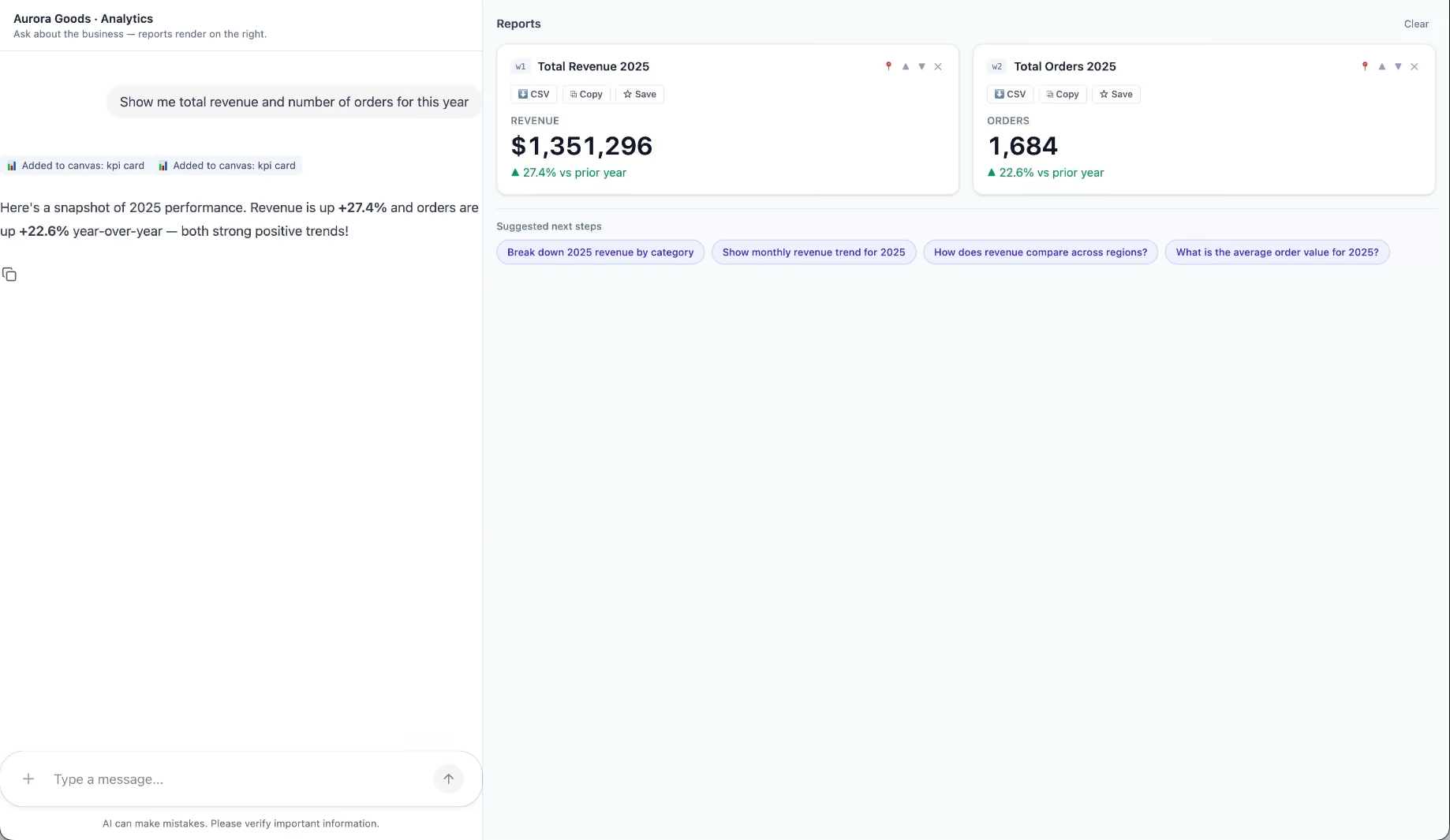
Aurora Goods is a fictional consumer e-commerce platform we created for the demo. The interface is simple: chat on the left, canvas on the right. You ask about the business, the LLM figures out what you need, pulls the data, and renders it visually.
Ask about 2025 sales and it shows the numbers on cards, with a short note on anything relevant. Ask it to break that down by region and it extends the same view instead of starting over, because it understands the second question builds on the first. This part took us a while to get right, and it's what makes the whole thing feel like a conversation rather than a search box.
The canvas isn't output-only either. You can click into any element and drill down: revenue by category, then inside electronics, then which products sold most.
You configure the widgets once. The system combines them and adds relevant commentary on the spot.
The second demo is closer to home: a generative reporting layer on top of the time-tracking tool we use every day at Kaizen. The questions in this demo are questions someone here has actually asked.
Instead of building dozens of hyper-specific reports, a small amount of code now handles virtually unlimited queries. How many hours were logged in May? Which anomalies showed up in April? How do billable and non-billable hours compare across two months? Who worked on a given project last month, and for how long? Each answer arrives as the right visualization: cards, lists, bar charts, plus a short summary that's easy to scan.
Two details won us over. The LLM suggests next steps, so exploring the data becomes a conversation. And when it's not sure, it asks instead of assuming. Ask for the hours of someone named Alex and, since we have more than one Alex on the team, it asks which one before answering.
Generative UI is a complement, not a replacement. Standard interfaces still win for stable, repetitive workflows where consistency matters. Nobody wants their checkout button to be creative. Generative UI wins where the workflow is complex and the questions are unpredictable.
It also changes what design systems are for. Beyond designing components and screens, teams will need to define semantic rules: how the AI should react to uncertainty, which interfaces match which intentions, and the guardrails that keep generated screens functional and safe.
That's a new kind of design work. And it's already starting.
We build working proofs of concept in two weeks. Your data, your workflows, a real thing you can click.
Generative UI lets AI build the screen each user needs, in real time. What it is, how it works, the trade-offs, and two working demos we built.
12 min read

Technology

·
Sep 22, 2020
Slow sites hurt more than just UX. This is how we approach performance and SEO together.
12 read time
Across the internet today, we can find websites with many different types of features: sliders, videos, images, animations, and more that make them attractive to end users. However, all of these features can have a negative impact on one major factor: performance.
But wait, why should I care?
According to DoubleClick by Google, 53% of mobile site visits were abandoned if a page took longer than 3 seconds to load. Also, it was found that sites loading within 5 seconds had 35% lower bounce rates, 70% longer sessions, and 25% higher ad viewability than sites taking nearly four times longer at 19 seconds.
The performance impact can be measured in revenue too. DoubleClick found publishers whose sites loaded within five seconds earned up to twice as much ad revenue as sites loading within 19 seconds.
So you should care, and a lot. Performance can be the one thing that is making users ignore your website. It plays a major role when it comes to retaining users, user experience, and revenue. It also affects Google Rankings. That means performance is taken into account by Google when positioning your website in the search results higher (or lower) than your competitors.
So, how can we improve it?
A browser’s rendering engine is in charge of displaying what you see on the screen. In order to accomplish this, it has to parse HTML and create a DOM tree with all the existing HTML elements, render tree construction combining CSS attributes and the DOM tree, figure out each element’s position (layout process), and then paint the page.
When rendering a page, the rendering engine considers CSS as render blocking resources and scripts as render and parsing blocking resources.
That means that, by default, the page won’t be painted until the CSS and javascript are loaded, parsed, and executed. That presents a problem if your website has lots of CSS and javascript blocking parsing and rendering on your website, since performance can be affected dramatically and the site will take a long time to load.
Loading your website resources at the right time is essential to improving your website performance. If you load resources that avoid blocking parsing and rendering, your site will display much faster and the lesser critical content can be loaded in the background while the user interacts with the page. There are several ways to do this:
Loading CSS with media type ‘print’ will tell the browser that the resource is not important because the media type doesn’t match the current environment (screen), and will load the stylesheet asynchronously without blocking page rendering.
<link rel="stylesheet” href="style.css" media=”print” onload=”this.media=’all’”>
loadCSS is a popular library that also makes this possible.
<head>
    <script id="loadcss">
      // load a CSS file just before the script element containing this code
      loadCSS( "path/to/mystylesheet.css", document.getElementById("loadcss") );
    </script>
</head>
We also can combine this with ‘rel=preload’ (in supported browsers) if we want non critical CSS to be loaded as soon as possible.
<link rel="preload" href="style.css" as="style">
This approach has a major downfall if applied to all CSS on the page: the browser will show a Flash of Unstyled Content (FOUC) before loading the CSS. This means that some essential CSS needs to block page rendering in order for the page to be displayed with its proper, critical styles. But asynchronously loading the remaining styles is a must for improving performance.
In order to load javascript efficiently without blocking HTML parsing, it’s very important that the scripts are placed in the right position. If placed in the header with no async or defer attributes, a lot of delay will occur because the browser will have to load and execute the script before continuing with HTML parsing and rendering. In order to avoid this, a common practice is to place the script tags before the tag. However, async and defer are better approaches:
Async is a boolean attribute that you can place in a script tag that allows the browser to load the script in the background while it keeps parsing the HTML, and then execute the script as soon as it is loaded. This blocks the parsing if it happens before the browser finishes parsing. Async scripts are executed in random order as they become available.
Defer is also a boolean attribute that you can place in a script tag that allows the browser to load the script in the background while it keeps parsing the HTML. It then executes the script after the parsing is done. It’s similar to placing the script at the bottom of the page, the only difference being that it’s loaded in parallel while the HTML is parsing content. It also allows you to execute all deferred scripts in the order in which they appear on the document.
Note that both of these attributes are only useful if the scripts are declared in the header, otherwise they won’t do anything.
Comparing both attributes, async may block html parsing but defer guarantees not to. Neither of them guarantee anything on blocking rendering (however that can be done with the onLoad event).
Furthermore, their biggest difference is the execution order. Async scripts are executed in a random order as they become available, while deferred scripts are executed in the order of their appearance.
I recommend to use async loading in third party scripts where the loading order isn’t important (i.e. Google global site tag) and defer loading for scripts that need the whole DOM loaded and/or their relative execution order is important.
Comparing script loading performance, we obtain these results:

These techniques (along with image lazy loading which is a critical performance improvement that we will comment on in a future post) were implemented on our site in order to improve its performance.
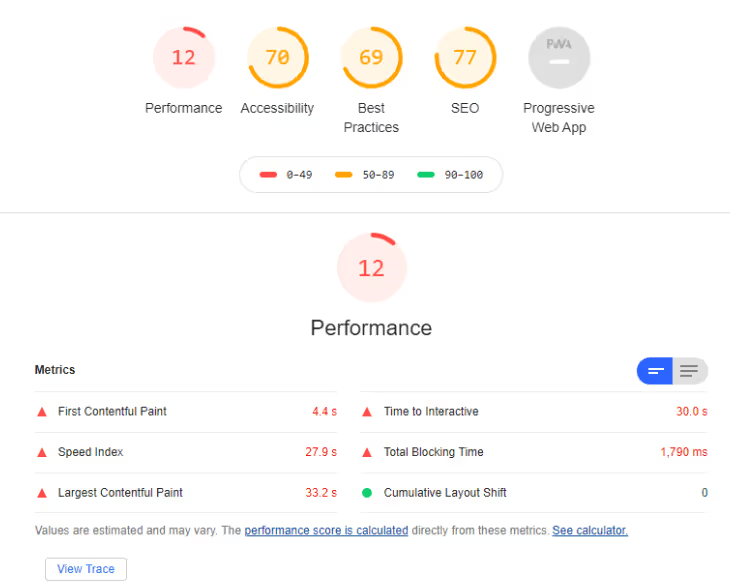
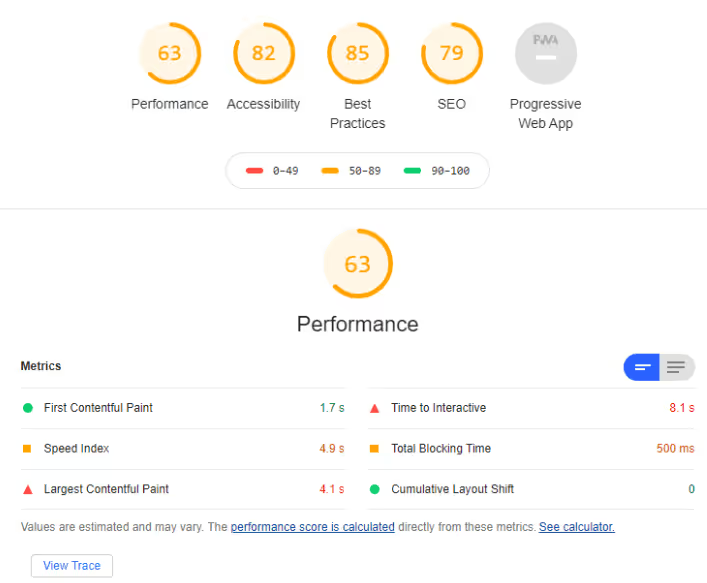
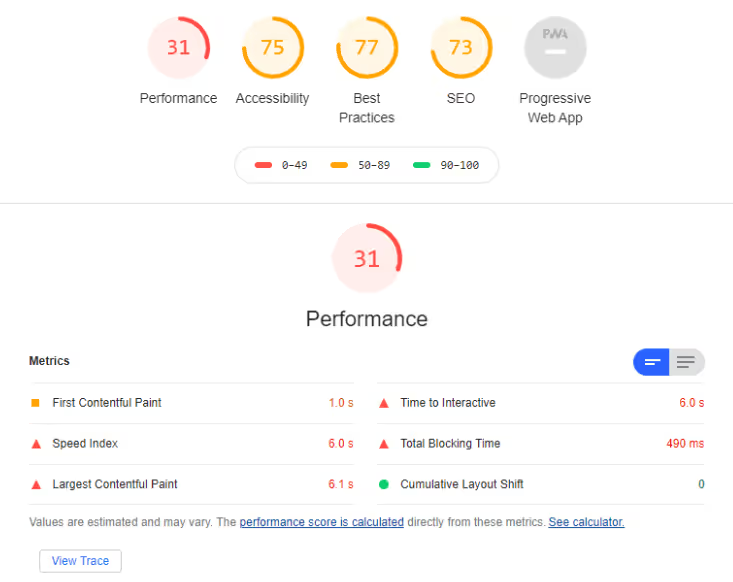
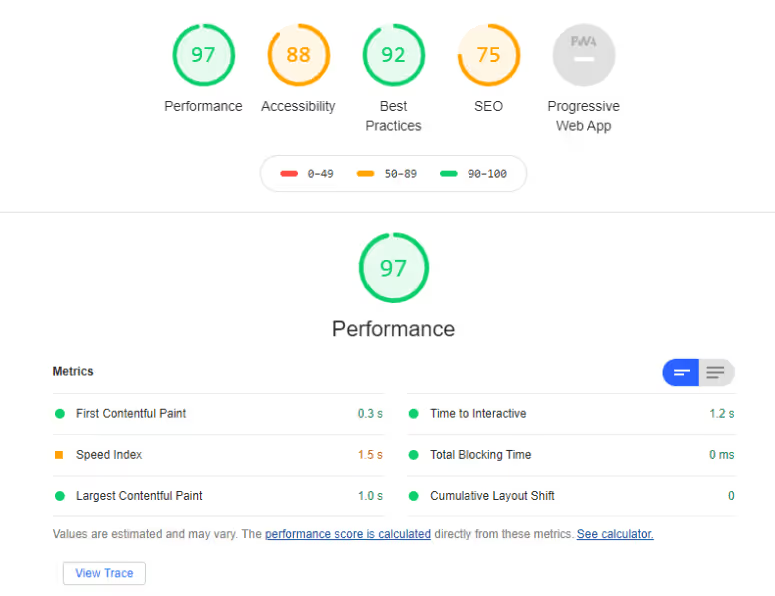
For comparison, the performance of the site’s old and new versions was measured locally using Lighthouse version 6. In the results shown below, we see a clear improvement in performance with the first contentful paint rendering almost four times faster in the newer version and the largest contentful paint rendering almost six times faster.
Old Sit
New Site
Old Site
New Site

Business

·
Sep 3, 2020
12 read time
Outsourcing is a powerful weapon, but if you don’t know how to harness its power, it might end up backfiring.
Offshoring or nearshoring software development tasks could prove very profitable for your organization and professionally enriching. We believe that anyone should be able to get the most out of an outsourcing experience.
Thus, in this post series we will be helping you understand whether to offshore or nearshore software development, with whom, and how. Armed with this knowledge, you’ll be able to make an educated decision on whether to embark on this journey.
In this first part, we will explain the most common risks and rewards associated with outsourcing, define what SMART objectives look like, and understand expectation versus reality so you can check if outsourcing is what you need to achieve your goals today.
Does outsourcing seem like an appropriate technique for addressing your personal goals and professional objectives?
Chances are that if you survey your organization, you will find that some people say that outsourcing steals jobs and destroys organizational culture. Others might say that it could help the company stay in business and beat the competition.
Each side has valid points. Rather than debating, let’s explore some of the risks and rewards of outsourcing to see if it could work for you.
Starting with the negatives, we can classify risks into three categories: external, internal, and personal.
External
External risks are related to factors outside your organization’s control. These include: geopolitical instability, intellectual property loss, inadequate vendor capabilities, and failure to meet joint responsibilities.
One of the most dramatic scenarios could involve a terrorist attack in “safe” offshore destinations like Mumbai or Moscow, which underscores the importance of understanding different countries’ political stability.
A less dramatic example would be when an unexpected change in tax regulation at an offshore location suddenly jeopardizes your investment.
Your potential partner’s financial stability, organizational maturity, technical skills, and ability to acquire and retain qualified talent are key to fully understand the situation you are getting into.
Internal
Internal risks are associated with factors your organization can control. The most notable ones include: unrealistic expectations, lack of organizational preparation, and negative staff impact.
Sometimes even the expectation of outsourcing, if incorrectly managed, can create organizational adversity by declining employees’ morale and productivity. Also, outsourcing initiatives will likely imply some degree of changes for existing processes and roles.
Maybe the most important internal challenge will lie in the unrealistic expectations that some organizations set about the end result. Exceptionally high-cost reduction expectations are one of the most common reasons for dissatisfaction.
Personal
Outsourcing can affect you personally in many ways, introducing changes to your lifestyle, career, and reputation.
Outsourcing may require you to increase the percentage of time you spend on activities you don’t enjoy or to shift working hours to cope with different time zones.
The very nature of outsourcing means that someone else does the work. In many cases, this will be someone whom you have little control over, but it is your name that will be in the line.
Moving from the role of individual contributor to representing an offshore or nearshore team might mean becoming a bearer of bad news. And that will have an inevitable impact on your reputation.
With all the risks listed above, why would anyone want to outsource abroad anyways?
The answer is that competition is hard, the market is demanding and outsourcing could give your company a competitive edge. We can divide outsourcing benefits into organizational and personal ones:
Organizational
Cheaper salaries, a strong exchange rate between the US dollar and almost any other currency, lower overhead, economies of scale, controlled operation costs, productivity, and quality improvements all contribute to increased profit through resource efficiency and savings.
At the same time, outsourcing allows you to reallocate the workload during your busy season and shift less critical services abroad. This will help you meet deadlines faster and focus on disruptive innovation projects to gain a competitive advantage.
Outsourcing broadens your recruiting horizons. Having access to a huge staffing pool gives you access to hard-to-find personnel and the opportunity to team up with international experts. In addition, many outsourcing providers have a tremendous work ethic and drive to succeed.
A shortened time-to-market can be achieved as well. Having access to specialized skill sets, unique expertise, and certified processes can improve your competitive advantage.
Personal
There are several key personal benefits to choosing an international team.
From your career’s perspective, consider running an outsourcing engagement as a productive training session for developing management and leadership abilities. These are skills you can add to your resume and you would be surprised how often recruiters and companies look for outsourcing management abilities.
The skills you develop like negotiating, learning foreign languages, managing remote teams’ day-to-day, and assertiveness are invaluable skills that will benefit you in the long run. Accomplishing successful outsourcing engagements could catapult your career forward and open new doors.
Let’s not forget traveling! Seeing new places, meeting new and interesting people, experiencing foreign cultures, and trying new cuisines without spending your own money are major perks.
Having discussed outsourcing risks and rewards, you now have a better picture of the potential it has. But before deciding whether it’s for you first let’s consider which objectives you want to accomplish through outsourcing.
This might not be the first time you’ve asked yourself if you should outsource a project, an initiative, or a company function.
Each time you face this situation, always remind yourself: you should only offshore or nearshore either when it is the only tool you have at your disposal or when it is the best tool for the job.
Consequently, you will first have to understand and determine what the “job” is in the first place.
When determining the “job,” you shouldn’t settle for broad goals like “need to reduce cost” or “put local staff to better use”, since ambiguity and lack of specification are lethal to success.
Specify your goal applying the SMART business management technique
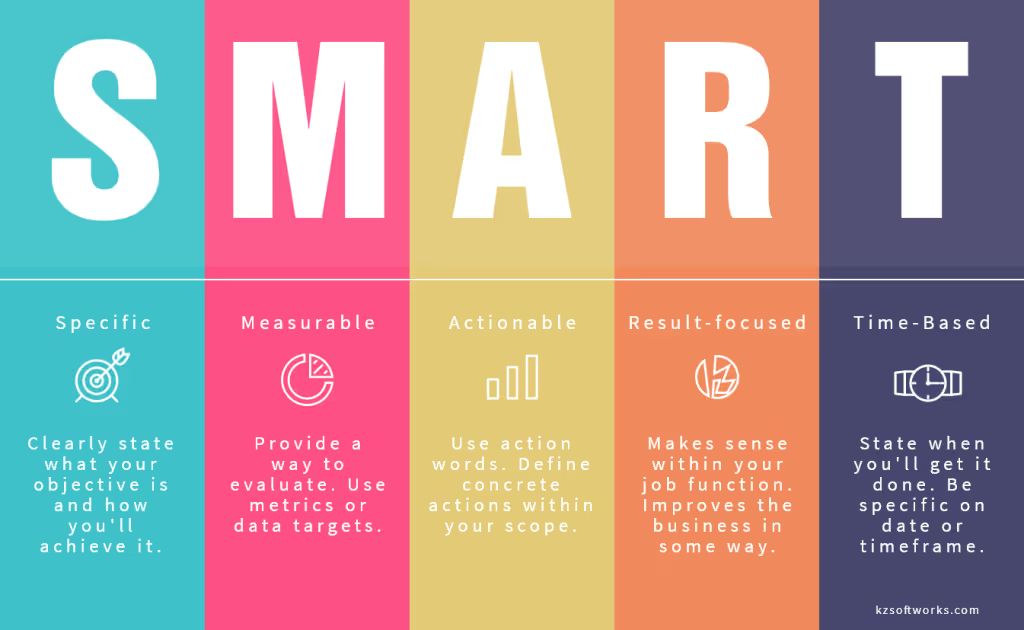
Defining SMART criteria objectives help you stay focused on your goal and make good decisions. For instance, let’s check this objective: “Outsource to substantially improve quality assurance (QA).”
What’s the goal here: to use outsourcing or to improve QA? What does “substantially” mean? How long should it take for improvement to occur? This objective is too vague, doesn’t guide you towards actionable steps, and generates more questions than answers.
Now, let’s compare it with this other objective: “Reduce my department’s budget expenditures by 20% next quarter by nearshoring the maintenance of a legacy asset while my in-house team develops a new one”.
This one appears to be SMART since it’s specific and measurable (20%), it defines an action (nearshoring the maintenance of an asset), it focuses on results (reduce my department’s budget expenditures), and it’s time-bound (next quarter).
Defining a SMART goal is the first step when deciding if it makes sense to outsource work. But first, you might want to compare some financial and practical considerations to avoid common mistakes.
Offshore outsourcing has been called one of the greatest stories ever sold.
Like many products today, outsourcing comes with a lot of fine print. The pain for smaller companies is that they don’t have the bandwidth even to read it.
However, understanding the fine print is important in these three areas: cost savings, vendor’s ability to scale, and quality of deliverables. Let’s check them out.
How much money can you save by outsourcing? On the surface, it seems obvious. Even with wage inflation in India, China, and Eastern Europe, rates there are still substantially lower than in the United States.
For example, a mid-level Java developer in San Francisco earns roughly $75 per hour, compared to $25 per hour on average in Bangalore, Shenzhen, or St. Petersburg. At first glance, this lower rate translates into savings of more than 65%, or a 3:1 ratio (for every on-site Java developer you can get three offshore Java developers).
Is it that simple? Will getting three developers for the price of one give you three times the productivity? Unfortunately, no.
Hiring cheaper offshore developers doesn’t mean they will be as productive as local ones. Due to productivity issues, the difference in hourly rates could not necessarily translate into overall cost savings.
Overhead expenses related to management, communications, and risk mitigation can eat away what you save in low hourly rates.
For example, if you outsource a small QA team, for example, you’ll probably need both local and offshore QA leads. Without outsourcing, a single lead is enough.
Moreover, if you distribute teams across multiple time zones, language and culture differences could significantly increase the volume of communications required to minimize misunderstandings.
This one is an important expense to keep in mind. Losing a tech team member can be very expensive — as much as three to twelve months of employee salary. The turnover costs come from loss of productivity, hiring fees, training ramp-up, and other factors.
The degree of turnover is typically measured by turnover ratio or the number of lost employees divided by the team size over the course of the engagement. For example, a loss of two developers from a team of ten over the course of the engagement would be a 20% turnover ratio.
Many organizations face the challenge of adding personnel for an increased workload and ramping down when demand reduces. Outsourcing seems to be the perfect solution to this problem. Yet some staffing issues are inevitable:
Finding staff with specific skills, especially for cutting-edge technology, can be extremely time-consuming even for a top-tier vendor.
In your search for qualified personnel, consider which country you are outsourcing to and how the government supports young IT professionals.
There is a strong perception in the industry that the quality of deliverables produced by offshore personnel is inferior to that of local staff.
This perception is deeply flawed because outsourcing partners can either deliver higher or lower quality products and services than those of local employees. The challenge in getting quality deliverables lies in understanding all the aspects of communicating quality expectations to your partners and overseeing their work.
In this first post of these series, we have brought you general info and insights on outsourcing to help you check whether outsourcing software development is what you need to accomplish your goals.
First you have to be aware of the risks and challenges that come along on this journey. Some of them are external and out of your control, while others are internal to your organization and can be directly dealt with.
Of course, there are plenty of rewards as well like cost reduction, shortening time-to-market, improving workforce usage, improving your management skills, traveling around the world, and increasing productivity and process agility.
Second, you have to ask yourself what your goal is and what you want to accomplish by outsourcing. Remember that ambiguity and lack of detail are lethal to success. Thus defining goals with SMART criteria will go a long way in helping you establish realistic and actionable objectives.
Last, don’t forget to compare expectation versus reality. You would be better off bringing inflated expectations down to earth and taking into account factors like overhead expenses, vendor turnover ratio, scalability, quality of deliverables, and cost-saving versus productivity.
In the next installment of this series, we will be talking about what, with whom, and how to offshore or nearshore software development so you can make an educated decision on whether to do it.
We hope this post has been useful! A special shout-out to Daniel Castro who collaborated in the creation of this post.

Technology
12 read time
React can be so simple and so powerful that it is one of the first choices when it comes to building a web app nowadays. But with great power comes great responsibility. Being so widespread and used, it's easy to find tons of results when looking for solutions that fulfill developer needs, but the most popular solution may not always be the best for every case.
In this article I’m going to cover some common patterns and tools developers tend to blindly stick to without assessing whether they actually apply to their specific use case or not.
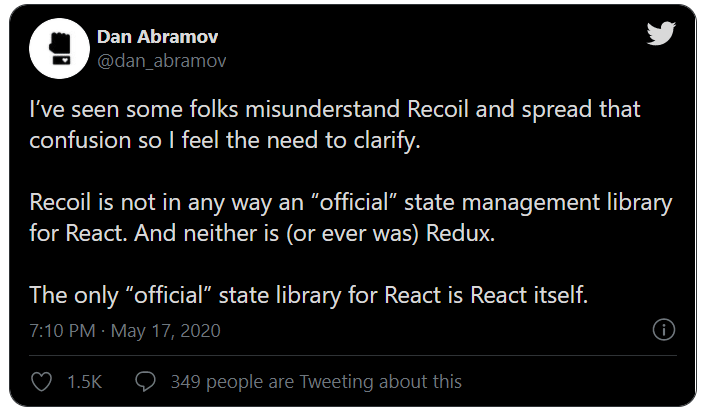
Don’t get me wrong, correct state management is a fundamental part of building a reliable, scalable, and futureproof application. It’s particularly important to take it into account early on in our projects, but you might want to think twice before just starting with a template based off of [insert popular state management library here]. There are a several reasons why I think this way:

If you come from a framework like angular, you may be familiar with the idea of creating a couple of files and a folder just to organize your independent UI components. Add modules, routing files, indexes, and services and you’ll end up with a lot of boilerplate to make things work the way you want in any given scenario. Boilerplate is not a bad thing per-se, but with React we’re not required to have this much ceremony in order to build our apps.
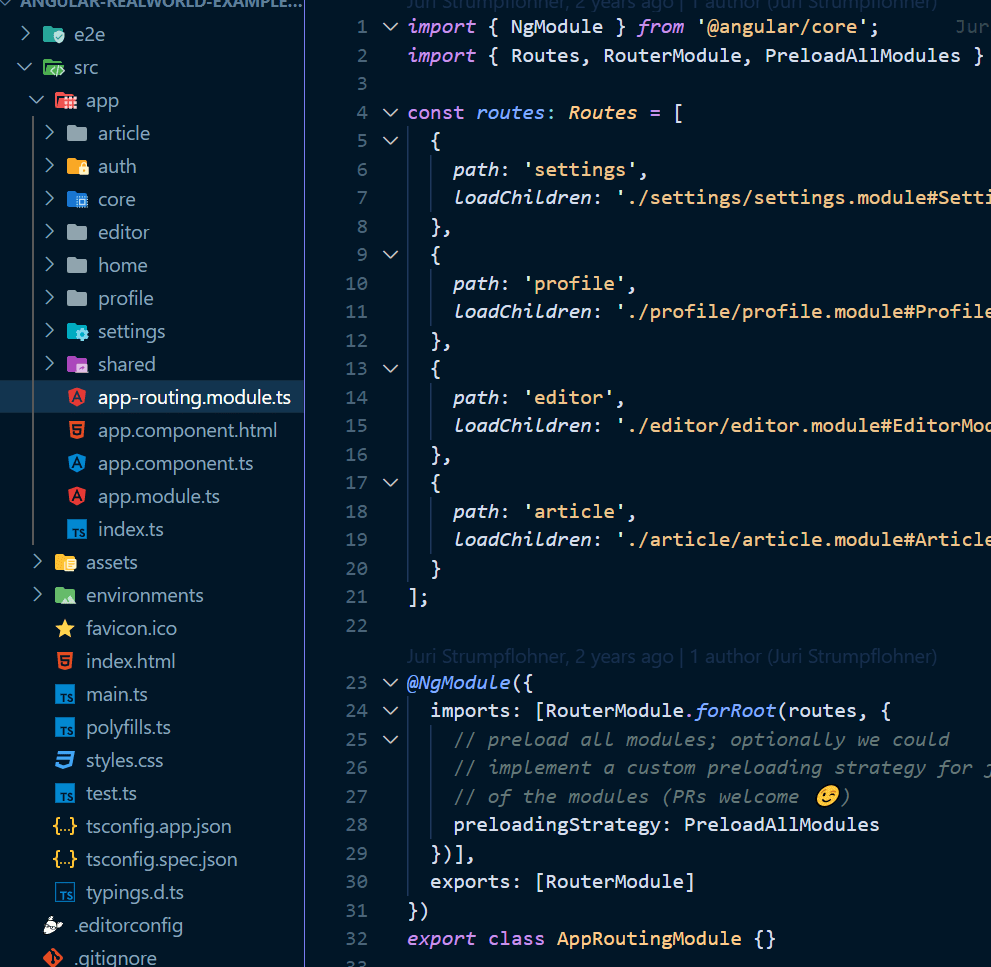
Now, I’m not saying you should go and delete all of your .js files and bake everything in the same file, but embracing the flexibility the framework gives you will help you create apps that are easier to navigate through, and therefore, are more maintainable. The official React documentation even encourages this approach, and provides us with some guidelines to take into account when laying out our app structure.
While a robust testing suite should be a priority whenever you ship a product that will continue being developed in the future, testing the wrong places could be the source of many frustrations and time wastes, especially on the frontend. Let’s first define what these “wrong places” are and aren’t.
Kent Dodds writes in How to know what to test
“When writing code, remember that you already have two users that you need to support: End users, and developer users. Again, if you think about the code rather than the use cases, it becomes dangerously natural to start testing implementation details. When you do that, your code now has a third user.”
In this post we’re talking about how to make the “developer users” happier. If you’re able to write tests that will actually detect bugs in the future, you’ll inevitably be happier. How do you achieve this? By testing your app the way the users would, avoiding high-effort/low-value code chunks, and writing concise and understandable tests.
While there are no rules set in stone for writing perfect React code, following these guidelines has saved me time and spared me from bugs and unnecessary meetings in my career. I hope it does the same for you.
Do you have any examples of over-engineering in your favorite framework? How do you usually solve them? Leave it on the comments!

About Us
Project Management
·
Jun 30, 2020
Picking a nearshore partner isn’t trivial. These are the things we’d look for.
12 read time
There’s plenty of material telling you about the benefits of outsourcing software development services to nearshore companies. The upsides are similar time zone, cultural affinity, a high-quality talent pool, and cost reductions. Even though these things are true, that’s just a general idea of what nearshore outsourcing is all about.
You might be already interested in it, but given how many software development teams are out there, how do you know which one you should partner with?
Read on as we point out what factors are most important to consider when choosing your next nearshore software partner.

If you’re considering nearshoring just to save as much money as possible, then you’re missing the point. In fact, just considering the cheapest option could lead to bad experiences.
Magne Jørgensen, researcher and professor at the University of Oslo, showed in a research paper that software providers with bids 25% lower than the average correlate to a 9% increase in the frequency of project failure for the same skill level, suggesting that an excessive emphasis on low prices makes it more likely that projects fail.
Software development is no simple task. It takes hard work, knowledge, skill, and most importantly time, to end up with a scalable, testable, and user-friendly software product ready to run.
Promises of exceptionally quick work at the lowest price should be viewed with healthy skepticism. You might know of folks in your community who have already gone through bad situations when their cheap outsourced software turned sour, like Boeing's offshore outsource fiasco.
Don’t get discouraged though!
Finding quality nearshore software development companies while not breaking the bank is still possible because of the exchange rate, salary differences, and great talent pool. You just need to take your time and correctly assess your potential partners before making a decision, which leads me to my next point.
Avoid injecting money into a black box, only to open it months or years later and find something completely different than what you were expecting. Partnering with software companies with a strong agile approach is a great way to prevent this.
The Forbes Technology Council agrees that an agile software development process translates into quality project management: faster feedback cycles, effective problem identification, disrupting changes prevention, flexible prioritization, maintaining high customer satisfaction, identifying benefits sooner, free commitment and continuous improvement.
Software development does better in an ongoing back-and-forth process, where you describe your desired result to your IT partner, evaluate the intermediate results, both parties provide feedback and exchange opinions, and iterate the process until convergence is finally achieved.
And how do I identify a software company with a strong agile culture you ask? You should evaluate how they behave. Shy away from those trying to sell you pre-established solutions, and stick to those who are honestly trying to understand what your needs are and how your business model works.
A good agile team will not only come to the Scrum Ceremonies with regular updates, but they will dive deep into your ideas and actively look to suggest recommendations and improvements to your product.
Every project is unique, and will require the most focused, responsible, and committed development team to bring your ideas down to earth and successfully deliver. Checking references is a good starting point.
Nowadays our brains are being bombarded with information and stimulus coming from everywhere, specifically from our computers and cell phones, constantly distracting us with our social media feed, news updates, work info, and more.
Therefore, customers aren’t only needing, but are demanding, simple and easy-to-use UX/UI that lets them quickly understand and make use of your services, giving a necessary rest to their busy heads meanwhile.
To get an idea of how important this is, take for instance a research study by Baymard where they tracked the global average e-commerce cart abandonment rate for 9 years, concluding it was around 69%. The main reasons were UX/UI flaws at the design and check-out flow that frustrated or made it hard for users to buy.
If this wasn’t enough to make a point, suffice to say that after a no-ROI period, Walmart decided to redesign its website in 2018, paying special attention to UX/UI. The results: Walmart’s e-commerce sales grew by 43%.
The important question here is whether your software consultant can turn all those lines of code into something accessible and easy for your customers to use and love.
When searching for your next nearshore software development agency, take a look at their case studies. See if their previous projects not only do what they say but also look professional, simple, and smooth.
Don’t forget that even if you have the most solid software engine running, it's worthless if users find it counterintuitive.
Today's world moves fast. To survive, you must have the ability to quickly adapt to new situations.
What worked for you in the past might not be useful now. Committing to long-term relationships with a partner through hard-binding legal contracts might not be your best bet.
Outstanding nearshore digital transformation agencies know and embrace this. Moreover, they will offer flexible working frameworks where you can easily ramp up and down without any bureaucracy.
They will freely let you decide if you want to stay or leave because they’re committed to consistently providing you with the best service. That way you’ll want to keep choosing them as your software development partner because you continue to see ROI in the relationship. That’s the kind of value-based relationship you’re looking for!
So far we’ve talked about software companies and business, but given that nearshoring is the central topic of this post, we can’t avoid talking about countries.
Their strengths and weaknesses vary a lot from region to region, making it difficult to establish generalities. However, there are some key factors you should keep in mind when researching countries: political, economic, and judicial stability.
Usually, nearshore countries fall into the category of “developing countries”, which makes them interesting because of lower costs, but many often suffer from social upheavals, economic crises, and mismanaged governments.
Any of these issues can put your investment or business at risk because they could lead to exchange rate restrictions, massive layoffs, authoritarian governments, or expropriations.
When looking at which country to choose, consider Uruguay. This South American country is recognized worldwide for its enduring democratic institutions and solid rule of lay, high human development index, stable and open economy, excellent English level, the fastest internet connection in the region and massive tech education investment.
Key things to keep in mind when choosing which nearshore digital transformation agency to partner with:

Technology

·
Jun 3, 2020
12 read time
Nowadays, JavaScript is all over the place. As the code evolved, testing libraries and strategies like TDD and BDD also did. Indeed, we all agree on the same thing: Code must be tested.
In the past years, a big part of the community shifted towards Functional programming. As a side effect, the paradigm shift brought us a more straightforward way of defining and writing unit tests.
So the thing is …

What is Functional programming?
Functional programming is a programming paradigm — a style of building the structure and elements of computer programs — that treats computation as the evaluation of mathematical functions and avoids changing-state and mutable data — wikipedia
Let's take a look at an example of code which will be the system under test:
const showResponseMessage = (response, source) => {
  let message = source.message;
  if(response.data.status) {
    message += response.data.status;
  }
  if(response.data.title) {
    message += " " + response.data.title;
  }
  return message;
}
Pretty simple, right? The function receives a response and a source, we compose the message based on data received on the response, and we return it. Let's test it!
describe('It should show the error message', ()=> {
  const response = {data: {status: 'fail', title: 'edit'}}
  const source = { message: 'The post action had '}
  it('Adds the extra info', ()=> {
    expect(showResponseMessage(response, status)).toEqual('The post action had fail edit')
  })
})
Looks simple, right? Straight forward I'd say, let's improve it:
const showResponseMessage = (response, source) => {
  let messageResponse = getMessage(source);
  const {status, title} = response.data;
  messageResponse = addStatus(status, messageResponse);
  messageResponse = addTitle(status, messageResponse);
  return messageResponse;
}
const getMessage = source => source.message;
const addStatus = (status, message) => {
  return message + " " + status
}
const addTitle = (title, message) => {
  return message + " " + title
}
I know, the number of code lines increased, at a glance, it just seems like a more sophisticated way of achieving the same thing. But, we increased the number of tests too, enhancing the overall quality assurance.
describe('It should show the error message', ()=> {
  const source = { message: 'The post action had'}
  const response = {data: {status: 'fail', title: 'edit'}}
  const {status, title} = response.data;
  it('gets the message from source', ()=> {
    expect(getMessage(source)).toEqual('The post action had')
  })
  it('Adds Title properly', ()=> {
    let message = getMessage(source);
    expect(addTitle(title, message)).toEqual('The post action had  edit')
  })
  it('Adds Status properly', ()=> {
    let message = getMessage(source);
    expect(addStatus(status, message)).toEqual('The post action had  fail')
  })
  it('Adds returns the right message', ()=> {
    expect(showResponseMessage(response, source)).toEqual('The post   action had fail edit')
  })
})
In the first example, if we change the structure of the response and title, the test will fail, but we won't know why the test failed. Did it fail because of a missing response message or a wrong title retrieved as part of the response?
In the second example, we are testing each functionality separately. By assigning each function it's own responsibility, we make the code more maintainable, efficient, and versatile. For more information, check the single responsibility principle.
Let's consider the following scenario, suppose that our business logic changes, and we want to prevent the spaces on title and status. In such a case, we will have to create a function that receives a text and returns the sanitized version. To test that function, we have to create a test that solely asses that requirement; this test will not be related to showResponseMessage, but to space trimming.
That example points out a single case. However, as the logic and size of the application grow, the more relevant this approach to testing will become. When we start working with async calls, with the ability of composition and Higher-Order functions, we can make our "features" readable and our functions real units.
Furthermore, all of our original values are immutable. In the first example, we modified the message variable, now we don't, we still have our original message — And why is that important? Mutation means change, change adds complexity, opens the door for bugs, and sometimes makes things unpredictable.
When our code is predictable, self-explanatory, and easier to track and read, it's much easier to write cleaner tests.
'Indeed, the ratio of time spent reading versus writing is well over 10 to 1. We are constantly reading old code as part of the effort to write a new code. ...[Therefore,] making it easy to read makes it easier to write.' Robert C Martin.
So stay functional for simple testing and happier code reviews :)

Technology
12 read time
End to End (e2e) testing is a technique that helps ensure the quality of mobile applications in an environment as close to real life as possible, testing the continuous integration of all the pieces that integrate a software automatically. On a mobile app, this could be particularly useful given the diversity of real devices and platforms our software is running on top of.
Due to the cross-platform nature of React Native, e2e testing proves to be particularly messy to work on. As a result, we have to write all of our tests bearing this in mind, changing the way we access to certain properties or query elements no matter the tool we use for connecting to it. Still, automation testing tools like Appium and WebdriverIO allow us to work over a common and somewhat standard interface.
The following instructions assume we already have React applications built with expo, and use Jest for our unit-testing solution.
Disclaimer: The following instructions are based on a Windows machine running an android emulator. output/commands may vary slightly on different architectures.
$ npm i -D webdriverio babel-plugin-jsx-remove-data-test-id concurently
WebdriverIO will work as our “client” for the appium server in the case of JS. There is more to come regarding how to use other clients such as python.
babel-plugin-jsx-remove-data-test-id will help us remove unwanted accessibilityLabels from our mobile app, since that’s the preferred way of targeting elements for both IOS and Android platforms
concurrently will help us automate the running of appium server and jest to do our e2e tests
$ npm install appium-doctor -g
This will help us identify if we have all of the needed dependencies to correctly run appium in an emulator.
Depending on the host OS we want to test in, we could run:
$ appium-doctor --android
or
$ appium-doctor --ios
For this particular case I’ll be running the android version. This will prompt some output on the console. If we have all the required dependencies installed we should see a message similar to the following
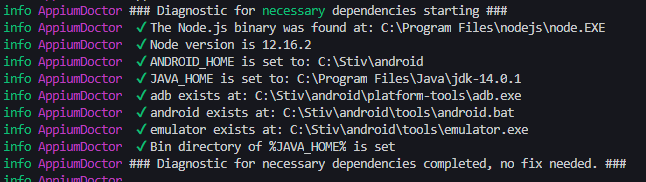
If not all necessary dependencies are met at this point, instead of checkmarks before any given item you’ll see a red X symbol. Check the end of the input for more information on how to fix the particular Issues you’re prompted.
We’re not going to fix the optional requirements that appium-doctor prompts for the time being, feel free to go over those once you have the testing solution working.
By this point, you should be able to run your appium server without any issues, in order to do so just type
$ appium
You should see something similar to

If you do so, congrats! you have correctly set up appium.
Now, let's set up our tests.
One of the key features of React Native is its ability to write code once and run it in both iOS and Android, that is what we want our mobile tests to behave in the same way. There are some limitations for this, since the only way we can write a selector for both platforms is through the accessibilityLabel attribute in React Native.
This may become an issue if your mobile app depends on accessibility features. Make sure to use correct, semantic and descriptive accessibility labels at any place you intend to use them.
If a great accessibility is not on the scope of your current project (it should), you can use accessibilityLabel as a perfect target for querying your elements, just make sure you don’t accidentally worsen the experience of people using screen readers or any other assistive technology.
In order to do this, we’re going to configure our babel setup to remove the accessibility labels whenever we build for production:
/// babel.config.js
module.exports = function() {
  return {
    presets: ['babel-preset-expo'],
    env: {
      production: {
        plugins: [
          [
            'babel-plugin-jsx-remove-data-test-id',
            { attributes: 'accessibilityLabel' },
          ],
        ],
      },
    },
  };
};
Let’s write our first test script now:
I’ve created a called LoginTest.spec.js inside a new folder called e2e. Inside the file you can find the following:
// myapp/e2e/LoginTest.spec.js
import wdio from 'webdriverio';
jasmine.DEFAULT_TIMEOUT_INTERVAL = 60000;
const opts = {
  path: '/wd/hub/',
  port: 4723,
  capabilities: {
    platformName: 'android',
    deviceName: 'emulator-5554',
    app: 'my-app-name.apk',
    automationName: 'UiAutomator2',
  },
};
describe('Expo test example', function() {
  let client;
  beforeAll(async function() {
    client = await wdio.remote(opts);
    await client.pause(3000);
    const pack = await client.getCurrentPackage();
    const activity = await client.getCurrentActivity();
    await client.closeApp();
    await client.startActivity(pack, activity); //Reload to force update
    await client.pause(3000);
  });
  afterAll(async function() {
    await client.deleteSession();
  });
  it('should allow us to input username', async function() {
    // Arrange
    const field = await client.$('~username');
    const visible = await field.isDisplayed();
    // Act
    await field.addValue('testUsername');
    // Assert
    expect(visible).toBeTruthy();
    expect(await field.getText()).toEqual('testUsername');
  });
});
That may be a lot of new code to digest at once, so let’s go line by line:
import wdio from 'webdriverio';
First, we import the WebdriverIO client. This is the main package that will include the functionality we need to query elements from the react app and simulate events on the emulator.
jasmine.DEFAULT_TIMEOUT_INTERVAL = 60000;
This will tell our test runner (in this case jest) to make the tests error after a certain number of ms have passed. Here we’re setting it explicitly in the test, but if you’re using jest you can modify the testTimeout property on your jest configuration. If you’re using any other test runner, I’d recommend going through their documentation, most of them have a similar property.
const opts = {
  path: '/wd/hub/',
  port: 4723,
  capabilities: {
    platformName: 'android',
    deviceName: 'emulator-5554',
    app: 'my-app-name.apk',
    automationName: 'UiAutomator2',
  },
};
These are the configurations for our driver to know what to look for when using the appium interface to query and save elements.
You can get the device name going on your emulator > help > about
In order to generate an app from expo, you have to run the command:
expo build:android
And wait in the queue for it to build.
In this case, I placed the downloaded apk in the root folder for my project, and renamed it my-app-name.apk.
Since we’re using WebdriverIO, the automationName will be UiAutomator2, as that’s how appium recognizes it.
Since lines 18-33 are mostly about setup, we won’t focus on that for now. The next part focuses on line 34 and forward.
The idea of this test is just to showcase a normal flow on a test, therefore we will be dealing with a fairly simple use case: Checking that we have a valid username input:
const field = await client.$('~username');
const visible = await field.isDisplayed();
The first line allows us to query an item by accesibilityLabel. As I have previously mentioned, for more information about specific selectors go to the WebdriverIO documentation.
The second line checks whether our previously selected item is visible on the current screen, more information here.
await field.addValue('testUsername');
This line simulates user typing into the selected field. In this case, we’re inserting the ‘testUsername’ text inside the previously selected username field:
expect(visible).toBeTruthy();
expect(await field.getText()).toEqual('testUsername');
Lastly, we use Jest to check that the field is indeed visible on our Login Screen, and that the text on the given username field is the same as the one we wrote in it.
Since we’re using Jest as our test runner on our React Native app, I’ve set up a command on my package.json to run the appium server and to run Jest in watch mode at the same time. It looks like this:

Here we’re using concurrently, a simple npm package that allows us to run several npm scripts at the same time. In this case we run the appium server and jest in watch mode, add their names and different colors to easily recognize them in the console, and pass the standard input to the jest command. This way we can narrow down our tests or do things like run coverage reports.
With this done, we simply have to run npm run test:e2e on our console, and expect something like this:
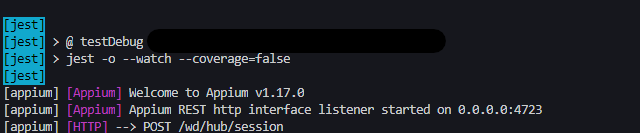
to be run, and something like this:
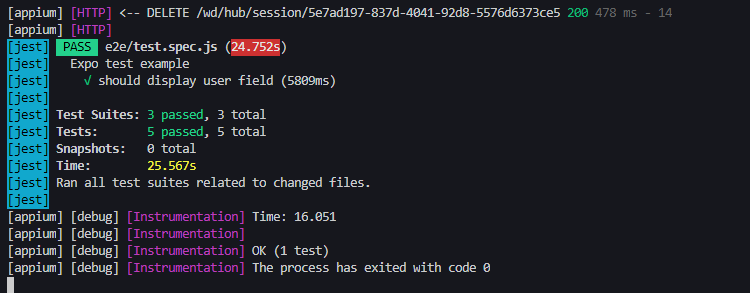
to be the output. If so, congratulations, you’ve correctly set up your integration tests for your react native app.
While we’re far away from calling it a day on our e2e react app testing solution, the main automation testing setup it’s done. Next steps include integrating it with a CI/CD pipeline and making it work on IOS platforms.
Further Reading
https://webdriver.io/
https://discuss.appium.io/
http://appium.io/

About Us

·
Dec 30, 2019
We’re entering a new chapter. Here’s who’s leading it and where we’re heading.
12 read time
The times they are a-changin' at Kaizen Softworks. We have a new CEO at our company: Bruno Bologna. Bruno brings more than 10 years of experience in the IT industry, having roles under his belt from client support, sales, business analysis, process improvement, to a software developer, technical leader, and software architect.Since his incorporation to our company in December 2015, he has been playing a key role in the direction of Kaizen. He is a member of the Board since then and has been involved with several projects. Starting his career at Kaizen as Software Developer, with roles of Architect and Tech Leader, he has evolved during the last 3 years to a role where he is more actively engaged in the general direction of the company. With a great interest in people & process, he has been a key player in suggesting, implementing, and developing new and better ways of running the firm, in line with our continuous improvement motto.
The decision of passing the direction to a new CEO comes from both of our founders, Fabian Fernandez (former CEO), and Rolando Larrainci (former CTO), who will be leaving their executive roles in January 2020, engaging only at the Board Member level to collaborate with Bruno with the strategic vision and direction of the company. This movement will allow our founders to focus more on the general picture and not in the daily operations of the company, gaining time to develop new ventures and pursue new dreams.The change is bringing great news to everyone involved as the reorganization is generating new roles and allowing people to grow in their career paths taking new and more challenging responsibilities as the ones executed once by Fabian and Rolando are being appropriately delegated into our new CEO, Bruno, and new roles like Account Managers, People Care, Client Care, and Sales Manager, among others.
2019 has been a great year of growth at Kaizen along with several hours of continuous work on how to best proceed with the transition to our new CEO. He will have a challenging 2020 where one of the main objectives is to implement OKRs (Objectives and Key Results) at the company and team levels. Bruno has been studying OKRs all along 2019, thinking about how to best implement this process at Kaizen. Together with our founders, they have come to the following company-wide OKRs.
Company-wide objective: Mature and grow in this new stage, promoting our values in the process.Objectives:
Here's John Doerr on OKRs: https://youtu.be/L4N1q4RNi9IWe look forward to the success of Bruno as CEO at Kaizen and to keep the continuous improvement our founders have promoted since day one. Cheers! You can get in touch with Bruno on LinkedIn if you want to continue the conversation.

About Us
12 read time
It's December 1st and Kaizen is 5 years old now since it all started back in 2014. As every year, we celebrate by engaging with the whole team and their families renting a big house with a pool and bar for a full week. Check how much fun we had in this post!
During December of 2019, we rented a house in Punta del Este, one of the most beautiful tourist spots in Uruguay, especially during Summer. It was a great week where part of the team spent the weekdays at the house working and having fun. Then by the weekend, the whole team gathered at the house to spend all day Saturday having an asado, drinking and laughing.
As every year, we had the "Kaizen Awards", a fun way of celebrating the things that happened in our company during the year.

While eating and drinking with our family and friends, we had a ton of fun playing ping-pong, playing board games, tennis-football, and swimming in the pool!

See you next year!


About Us
·
Sep 2, 2019
12 read time
Team collaboration is key to develop quality software. While we work most of the time from our Delivery Center to deliver software applying agile methodologies, having the chance to meet in person with our clients to collaborate, work on details, and reduce ramp-up time, usually at the beginning of the project, is highly valuable for everyone involved.
During 2019 our team traveled 4 times to meet with customers based in Boston, MA and Buffalo, NY. SmartBorder, Blueport, and SmartSense are some of them. You can learn about their feedback in our success cases section.
Usually, these trips take 1 week where we visit the client, have several meetings, work side by side, adjust details, and of course have some fun outside the office to build a great and trusting relationship.




No blogs matched this category, try applying different filters.
