



Generative UI: What it is, how it works, and when to use it
Generative UI lets AI build the screen each user needs, in real time. What it is, how it works, the trade-offs, and two working demos we built.

12 min read
Read more

Insights, stories, and experiments from our team.
AI
UX Design
Generative UI lets AI build the screen each user needs, in real time. What it is, how it works, the trade-offs, and two working demos we built.

Santiago Chiappa
·

Jul 17, 2026
·
12 min read

Generative UI is a full-stack architecture that lets AI create, modify, and render user interfaces in real time, based on what each user needs at that exact moment. Instead of static, predefined screens, the interface assembles itself on the fly: a bar chart, a table, a comparison card when you're comparing things.
We've been building proofs of concept with it for the past few weeks. Most of what's written about generative UI is either too abstract or too exciting, so this is our attempt at neither: what it is, how it works, where it helps, where it doesn't, and what we learned from two demos we built.
Generative UI is a full-stack architecture: the backend talks to the LLM, decides what the answer should look like, and picks the components, while the frontend renders them and handles how the user interacts with what’s on screen.
Compare that with how interfaces have always worked. A designer decides what goes on each screen, a developer builds it, and every user sees the same thing. Forever, or until the next redesign.
Generative UI flips that. The interface becomes dynamic and personal instead of static and universal. The AI doesn't just answer your question, it designs the screen that answers your question.
Dashboards and reporting are the most common use cases, but they're far from the only one. The same pattern works for dynamic forms, onboarding flows, and customer support, as it takes input just as easily as it presents output. It can even adjust font size, contrast, or layout for users with low vision, color blindness, or cognitive load.
There are three levels of generative UI, from most constrained to most open (Google Cloud, 2026):
Most production systems today use the declarative approach, and that's what this post assumes from here on. The AI isn't writing HTML or CSS freestyle. It selects components, fills in pre-designed widgets, and composes them into the right screen.
Generative UI works by turning a user request into structured data that describes an interface, then rendering that data as real components. The flow looks like this:
To the user, the result feels like magic. Behind the scenes, it's structured data flowing through a well-defined pipeline. We prefer the second description. It's the one you can build on.
Generative UI trades real personalization and faster development for added latency, inference costs, and less predictable layouts. That's the honest version. Here are the details.
None of these are dealbreakers. There are known techniques to mitigate each one.
We built two demos. One with fictional data, one on top of a tool we use every day.
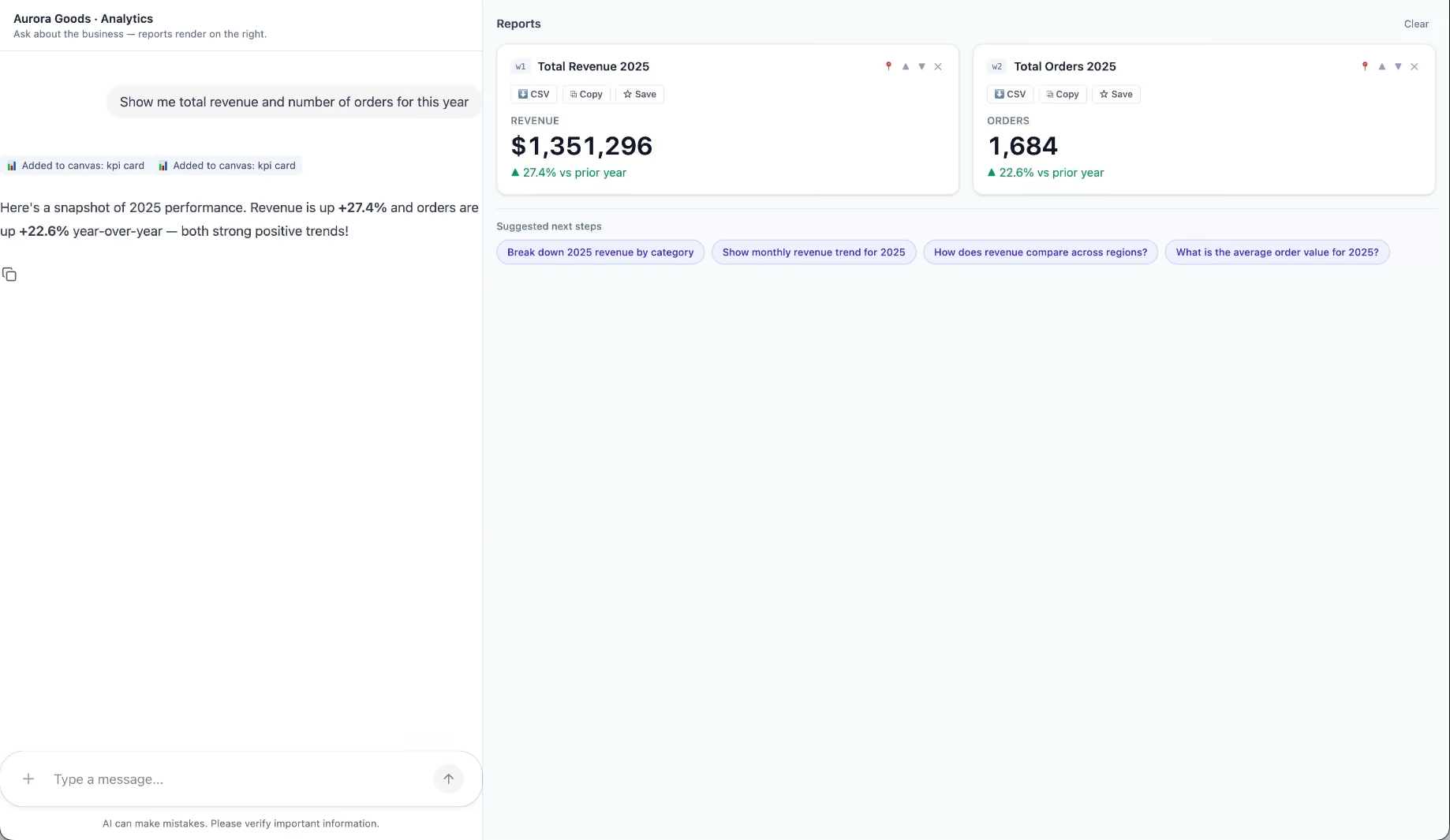
Aurora Goods is a fictional consumer e-commerce platform we created for the demo. The interface is simple: chat on the left, canvas on the right. You ask about the business, the LLM figures out what you need, pulls the data, and renders it visually.
Ask about 2025 sales and it shows the numbers on cards, with a short note on anything relevant. Ask it to break that down by region and it extends the same view instead of starting over, because it understands the second question builds on the first. This part took us a while to get right, and it's what makes the whole thing feel like a conversation rather than a search box.
The canvas isn't output-only either. You can click into any element and drill down: revenue by category, then inside electronics, then which products sold most.
You configure the widgets once. The system combines them and adds relevant commentary on the spot.
The second demo is closer to home: a generative reporting layer on top of the time-tracking tool we use every day at Kaizen. The questions in this demo are questions someone here has actually asked.
Instead of building dozens of hyper-specific reports, a small amount of code now handles virtually unlimited queries. How many hours were logged in May? Which anomalies showed up in April? How do billable and non-billable hours compare across two months? Who worked on a given project last month, and for how long? Each answer arrives as the right visualization: cards, lists, bar charts, plus a short summary that's easy to scan.
Two details won us over. The LLM suggests next steps, so exploring the data becomes a conversation. And when it's not sure, it asks instead of assuming. Ask for the hours of someone named Alex and, since we have more than one Alex on the team, it asks which one before answering.
Generative UI is a complement, not a replacement. Standard interfaces still win for stable, repetitive workflows where consistency matters. Nobody wants their checkout button to be creative. Generative UI wins where the workflow is complex and the questions are unpredictable.
It also changes what design systems are for. Beyond designing components and screens, teams will need to define semantic rules: how the AI should react to uncertainty, which interfaces match which intentions, and the guardrails that keep generated screens functional and safe.
That's a new kind of design work. And it's already starting.
We build working proofs of concept in two weeks. Your data, your workflows, a real thing you can click.
Generative UI lets AI build the screen each user needs, in real time. What it is, how it works, the trade-offs, and two working demos we built.
12 min read

Project Management

·
Nov 18, 2024
A practical look at how a small AI and automation contest helped one software team share ideas, break routine, and boost engagement.
12 read time
After working with the same software development team for over 5 years, keeping morale high, maintaining motivation, and ensuring commitment can be challenging. If you want to know how a small internal contest on the use of artificial intelligence, automation, and best practices can help revitalize team spirit, I invite you to continue reading this article.

Within the constant search to keep team morale high and break the routine of tasks that a software developer usually does, one day I had the inspiration to organize a contest. But we’re not talking about just any contest; it had to consider the following points:
With these characteristics, the first internal contest for the team on the use of automation and/or artificial intelligence was created, with a prize of USD 100 for the winner.
Carrying out this idea might seem complicated, but in practice, it isn’t. Simply send out a nicely designed announcement with the theme, the prize, the rules, and an invitation to participate.
It’s important to explain the evaluation rules for the contest as well as who will be the jury. For this first case, I was responsible for selecting the winner and established the following criteria:
Each participant has 5 minutes to present. If they have time left, it can be used for questions from the audience. If there is no time left, the event moderator can allow extra time for questions, considering the total time allocated for the presentations.
In our case, we allocated 1 hour and 30 minutes for the presentation day. There were 8 participants in the contest and some additional presentations outside the contest. These out-of-contest presentations can usually be from the jury to show another good practice to the team. But it is important that everyone respects the time limits so that the entire activity can be completed within the total allocated time.
Based on this original idea, small changes can be made to make this activity even more fun. For example, listeners who are not participating in the contest can have a voting sheet similar to the jury to keep track of their favorites. This way, another winner can be added to the contest besides the one selected by the jury. It should be noted that this other winner should also receive a prize
Before diving into this initiative, I recommend talking to your peers and supervisors. They can provide even better ideas and much more reach. But be careful. If you’re doing this for the first time, I suggest conducting a fairly limited proof of concept with your closest team members. After this experience, you can evaluate taking it to other teams or globally within your workplace.
At this point, you’re probably thinking this is great, but you have doubts about how to get sponsorship for the money. However, that’s very simple… you ask your company by showing them this article detailing the benefits of this idea!
And as the cherry on top, I suggest writing an article about the experience and sharing it with the company. Even better, it can be a good article to publish on the company blog to show the rest of the world what is being done internally. This can attract the attention of new developers and also clients who find you through web searches.

Our first contest was a complete success. Everyone enjoyed it and learned a lot. We discovered many tools and ideas that people were using on their own and had not shared. Even customized tools that were very similar and could be combined to achieve something even better.
As for me, I can say that I was more than satisfied with that first trial. The presentations were so good that I had a bittersweet feeling. On one hand, I was happy for the winner, but on the other, I was sad because others also deserved a prize for what they had accomplished.
To conclude, I also want to mention that I was able to secure a bit more money for the winner of the popular vote, so we had at least two winners. But beware, not everything is rosy. I leave some questions to be evaluated:
Good luck, and let me know how it goes.
ScrumJedi, November 2024
Events
Startups

·
Nov 13, 2024
Key takeaways from DC Startup & Tech Week 2024 on startup growth, funding, AI, and the value of building real community connections.
12 read time
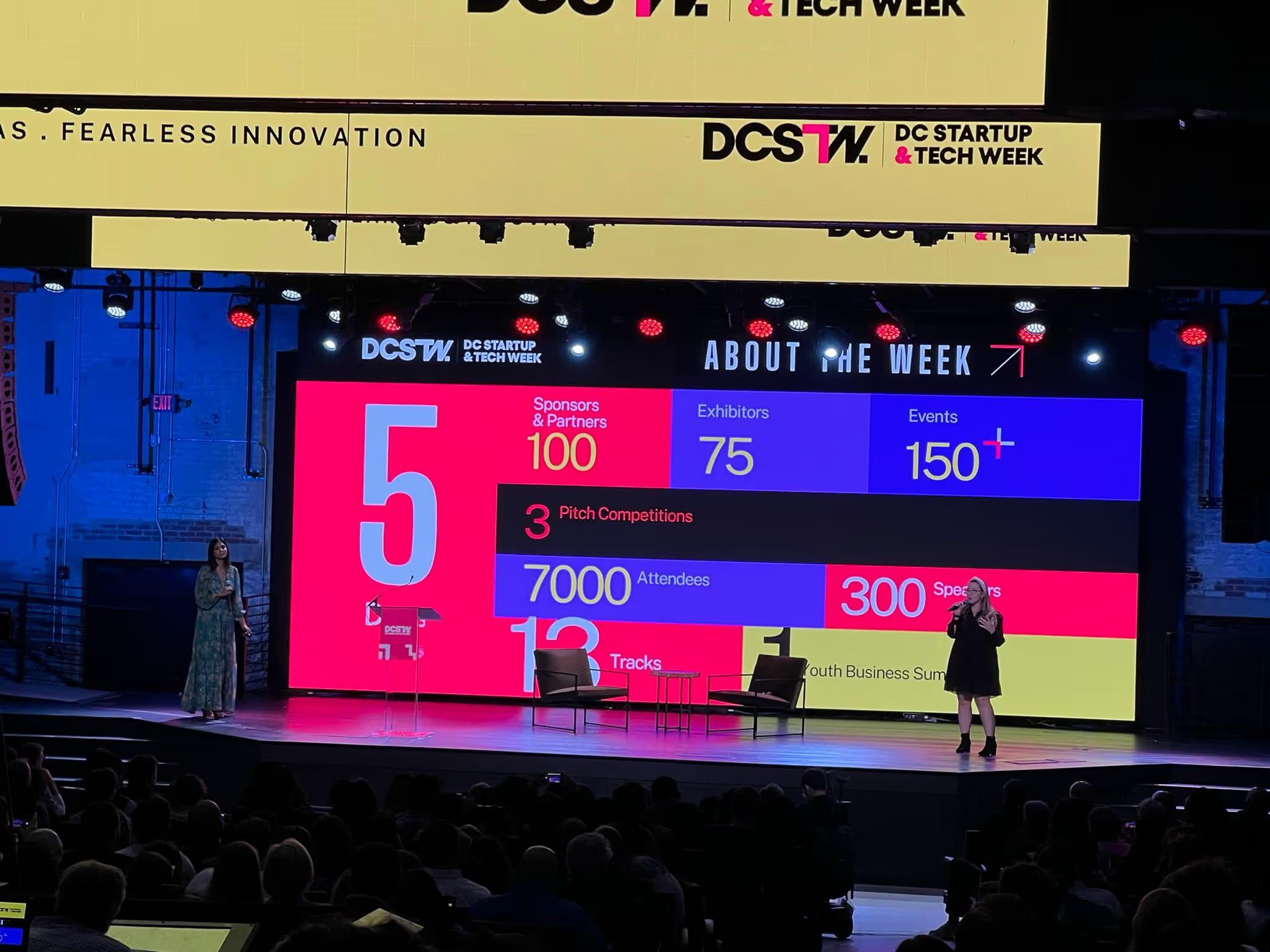
DC Startup & Tech Week (DCSTW) 2024 was a dynamic gathering of over 7,000 participants from across the globe, held from October 21-25, 2024.
This year’s event offered 13 core tracks and specialized sub-tracks, designed for startups at every growth stage—from ideation to growth—providing a prime opportunity to explore trends, sharpen strategic skills, and build connections within the startup ecosystem.
DCSTW 2024 catered to a broad mix of attendees, including founders at all stages, investors, venture capitalists, community organizers, and service providers, along with newcomers keen to dive into tech and startup culture.
Whether just starting out or scaling, the event offered valuable insights and opportunities for startups to interact directly with potential mentors, partners, and clients.
DCSTW 2024 offered a range of ticket options to make the event accessible to different audiences. I purchased the Investor, Resource, and Services Early Bird ticket for $97, which provided access to all public DCSTW events from October 21-25.
This ticket was specifically for non-founder attendees, including investors, service providers, and business development professionals. It covered entry to public sessions, networking events, and the chance to connect with startups and peers across the startup ecosystem.
DCSTW was organized around 13 core tracks designed to guide startups at every growth stage:
In addition to the main tracks, DCSTW offered sub-tracks diving into specialized topics, such as:
Life Science Sub-Track
Cannabis Sub-Track
Government & Innovation Sub-Track
Web 3 Sub-Track
Female Founders and Funders Sub-Track
-Mental Health Sub-Track
Climate and Sustainability Sub-Track
Developer Sub-Track
These sub-tracks enriched the core topics, allowing attendees to explore niche areas and connect with experts and entrepreneurs within their specific fields. For further information on sessions and opportunities, you can check the DC Startup & Tech Week Schedule
Pitch competitions were a standout feature of DCSTW, allowing both early-stage and growth-focused startups to present their ideas before expert judges and an engaged audience.
For many founders, these competitions provided valuable feedback, industry exposure, and the possibility of investor interest. Youth innovators and consumer packaged goods (CPG) disruptors were also given the chance to showcase their ideas, adding diversity and energy to the competition.
For startups, DCSTW 2024 was a prime opportunity to gain actionable insights, grow networks, and access funding expertise. Key takeaways included:
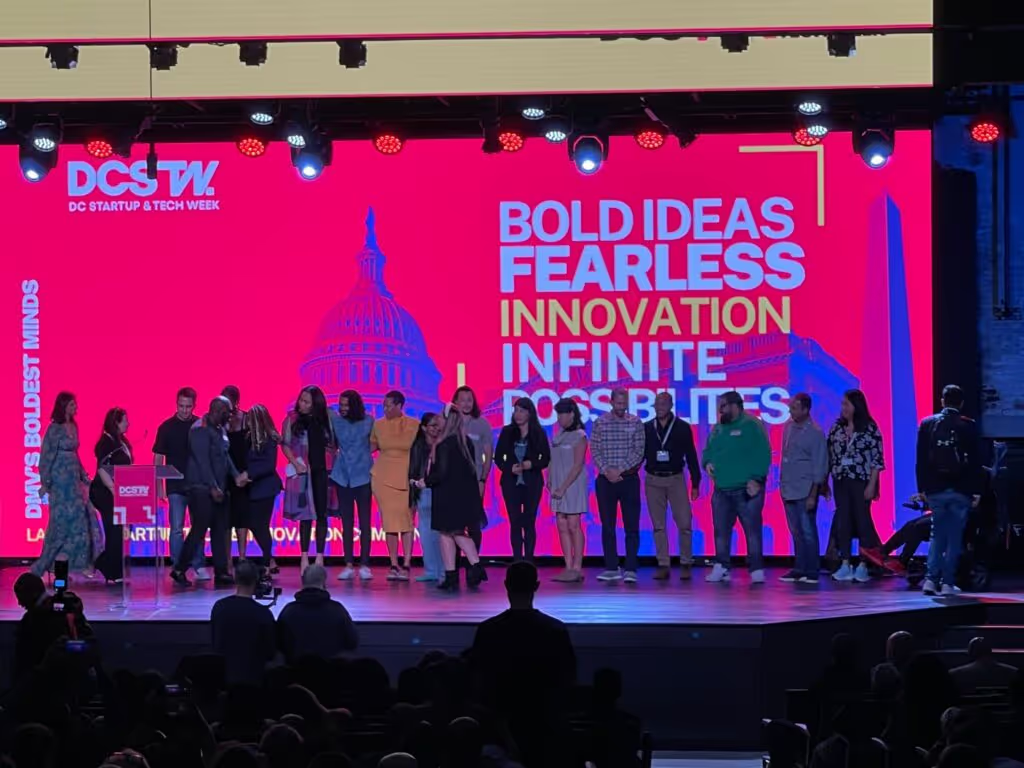
Funding and Pitch Guidance: Venture capitalists and angel investors shared practical advice on preparing pitches, navigating funding rounds, and understanding the latest investment trends.
Learning from Leaders: Sessions featured strategies from seasoned entrepreneurs on scaling challenges, customer retention, and effective marketing.
Networking with Purpose: Numerous networking sessions, including happy hours and lunch events, created valuable opportunities to form partnerships, seek mentorship, and build relationships essential for scaling a startup.
One of the best parts of DCSTW was connecting with people who are passionately working on all sorts of innovative projects. I met founders building solutions for real estate management, AI-powered lobbying, blockchain-based IP management, a secondary marketplace for golf course tee times, buy-side private equity valuation, IP law, and more.
Each conversation added new perspectives, and I left the event energized by the potential to collaborate and create with such a talented community.
For any startup team or aspiring entrepreneur, it’s definitely an event worth attending for the insights, connections, and inspiration it provides.
Project Management

·
Oct 23, 2024
A simple guide to product discovery and how it helps startups validate ideas, reduce risk, and build what users actually need.
12 read time
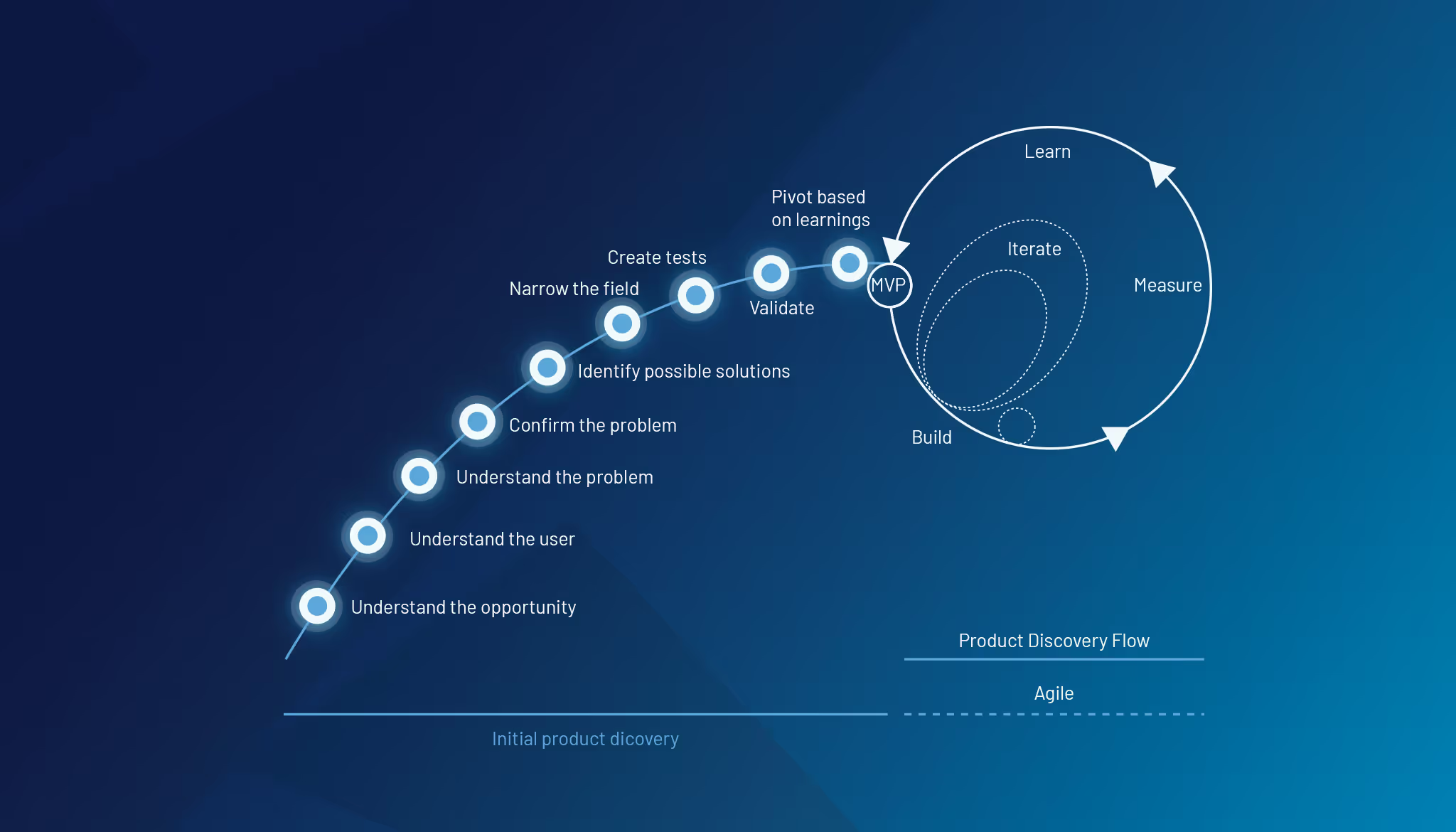
Bringing a software product to market—or taking an existing product to the next level—can be a thrilling adventure filled with opportunities and challenges. Whether you’re launching something new or refining a current offering, there’s a critical question every startup must ask: Are we building the right thing, or improving in the right way?
Success isn’t about gut instincts or chasing the latest trends—it comes from truly understanding the problem you’re solving for your users. That’s where product discovery becomes a game-changer. This process helps startups—both new and established—build or improve products that resonate with users and address real needs.
Product discovery is an iterative process of validating ideas, deeply understanding user needs, and defining a clear path for development or improvement. It ensures that whether you’re building from scratch or refining an existing product, you’re solving the right problem in the right way.
A common pitfall for startup founders is falling in love with the solution they’ve envisioned rather than the problem they set out to solve. This mindset can blind you to new opportunities for growth or make you resistant to necessary changes. Product discovery shifts your focus back to the problem, allowing you to adapt and pivot as needed.
For startups looking to grow, this is especially crucial—your product must evolve with your users. Falling in love with the problem means staying flexible and constantly evaluating whether you’re still addressing your users’ biggest pain points.
Dig deeper into the problem through user research. Use qualitative and quantitative methods to gather insights about users’ behaviors, needs, and frustrations. Tools like user interviews, observation, and empathy maps help you understand their context.
Remember, understanding your users is the foundation of effective product discovery.
Clarify your business objectives and define what success looks like. This can involve setting clear goals for your product and determining how to measure the impact. These metrics will guide the rest of the discovery process and keep you focused on what truly matters.
Once you understand the problem, gather your team to brainstorm possible solutions. Encourage creative thinking and diverse perspectives to ensure a broad set of ideas. Keep an open mind and explore various approaches, remembering that collaboration can spark innovative ideas.
Out of the many ideas generated, prioritize them based on feasibility, user value, and business impact. This step helps you focus on the most promising solutions to prototype or test, ensuring that your resources are spent wisely.
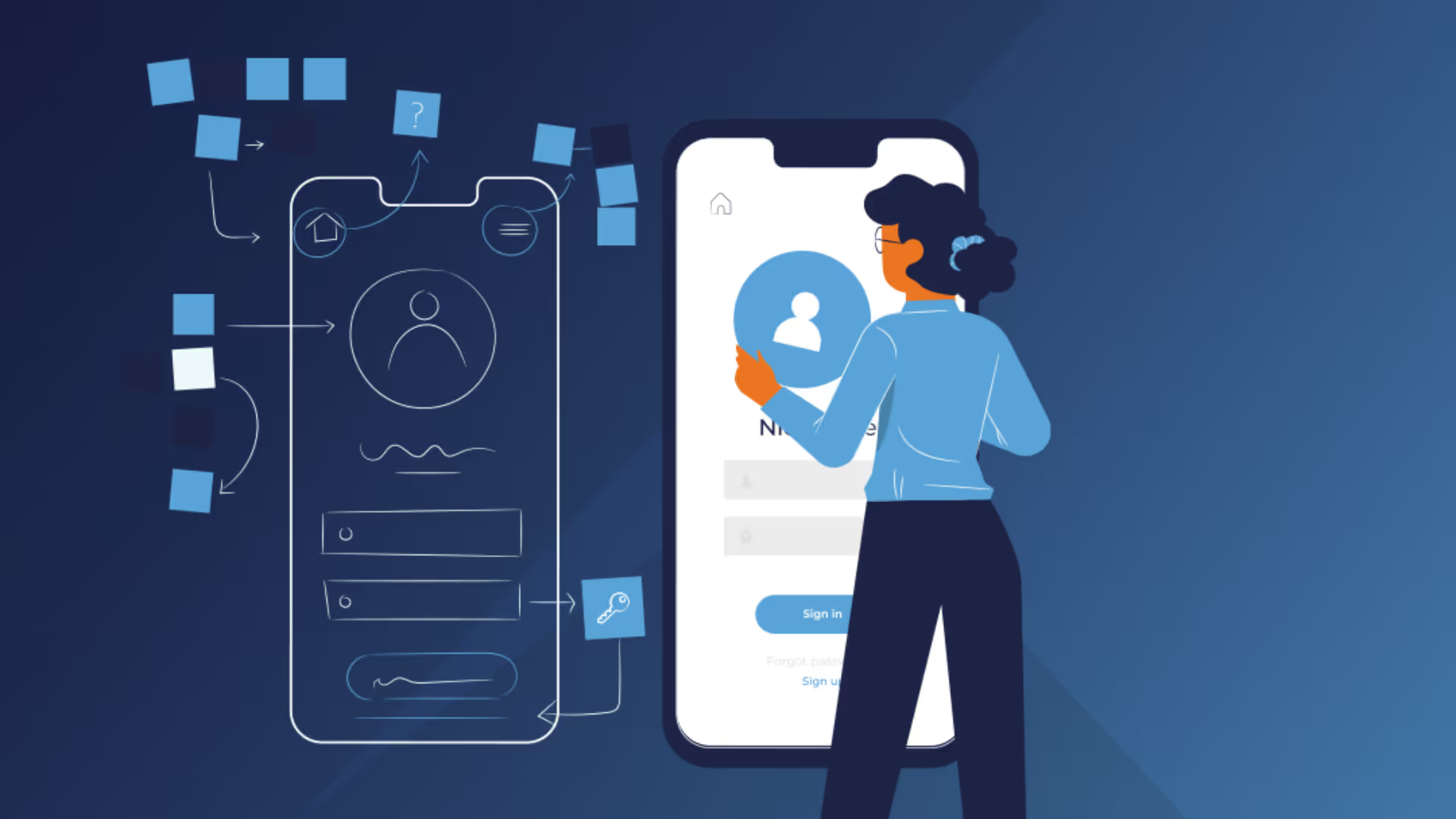
Develop low-fidelity prototypes or mockups of the most viable solution ideas. Test these prototypes with real users to gather feedback. The goal is to validate the solution early before investing significant resources in development. This step can save you time and money down the line.
Use the feedback from testing to refine the solution. Iterate multiple times, improving the product idea with each round of user insights. This helps ensure you’re solving the right problem in the best possible way.
Once the solution is validated, map out the steps for bringing it to life. This includes defining the key features, timelines, and milestones needed to develop, launch, and continuously improve the product. A clear roadmap will guide your team and keep everyone aligned.
At Kaizen Softworks, we understand the journey of building or refining a product can feel overwhelming. That’s why we specialize in guiding startups through the product discovery process.
Let’s connect and talk about how we can help turn your vision into reality.
Project Management
Startups
UX Design

·
Sep 22, 2024
A practical guide to UX audits and heuristic evaluations, and how they help teams find usability issues before they hurt growth.
12 read time
Building a product that stands out in the market isn't just about features or innovation—it’s about delivering a seamless, user-friendly experience. But how do you ensure your product is intuitive, usable, and enjoyable for your users? This is where UX audits and usability heuristic evaluations come into play.
A UX audit focuses on assessing the strengths and weaknesses of your product’s user experience (UX). It’s about identifying what's working well in your interface and what may cause frustration or confusion for your users. Ultimately, the process provides actionable insights to improve usability.
By taking an objective look at areas like interaction design, navigation, and visual consistency, you gain a clearer understanding of how user-friendly your product really is.
At Kaizen Softworks, we use industry-recognized principles like Jakob Nielsen’s 10 Usability Heuristics to evaluate your product systematically and objectively.
We know how hectic startup life can be—juggling timelines, investor expectations, and ensuring your product stands out. Here’s why UX audits and heuristic evaluations are crucial, especially for startups:
A heuristic evaluation benchmarks your design against established usability principles (heuristics). It involves analyzing how well your system aligns with widely accepted usability standards, helping to pinpoint areas for improvement.
Let’s break down 10 usability principles (heuristics) that we apply in our designs reviews, and how they can highlight opportunities for improvement in your product:
Once we’ve identified strengths and weaknesses in your product’s design, the next step is to create a prioritized list of improvements using a framework like RICE (Reach, Impact, Confidence, Effort). This allows your team to focus on the most critical changes that can make the biggest difference for users.
After implementing these changes, validating the improvements through user testing or feedback loops ensures your modifications truly enhance the user experience.
At Kaizen Softworks, we specialize in helping startups and product teams enhance their product’s user experience through expert UX Audits. They can typically take anywhere from a few hours to a full day, depending on the complexity and scope of your product.
Let’s talk about how a usability review can help your product be the best it can— intuitive, efficient and built for long-term success.
Project Management

·
Aug 26, 2024
12 read time
Did you know that 84% of developers in distributed teams struggle with communication? As software development teams grow and become more distributed, maintaining effective communication and role clarity becomes increasingly challenging.
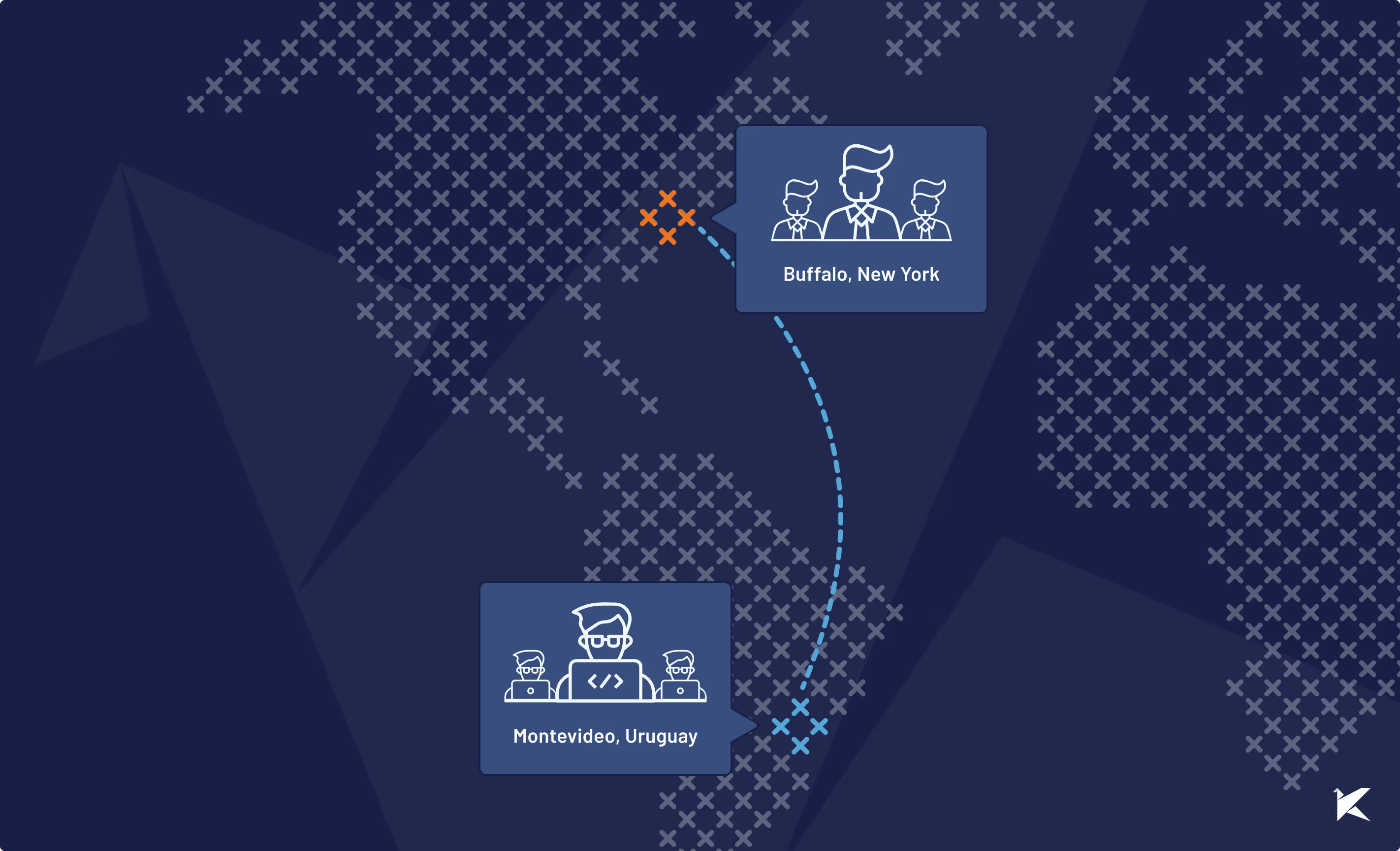
In this blog post, we explore how one of our partners’ projects, which we have been collaborating on since 2016, successfully scaled communication as our team expanded from a small group to a large, distributed team of developers. These strategies offer valuable lessons for any software team navigating similar growth.
Our collaboration with this client started as a modest project with just a few developers from our team. Communication was straightforward, and roles were flexible. However, as the software gained traction, our team expanded from 2 developers to over 25, bringing new challenges, particularly in maintaining effective communication and defining clear roles within a growing, geographically dispersed team.
A recent report by GitLab shows that 84% of software developers believe clear communication is crucial for team success in a distributed environment. Our experience in the project reflects this, as the sudden increase in team size made it difficult to keep everyone aligned and informed.
To address these challenges, our team rolled out some key strategies to scale communication effectively:
We set up new Slack channels to streamline discussions by topic and urgency. This helped team members focus on relevant conversations and avoid information overload.
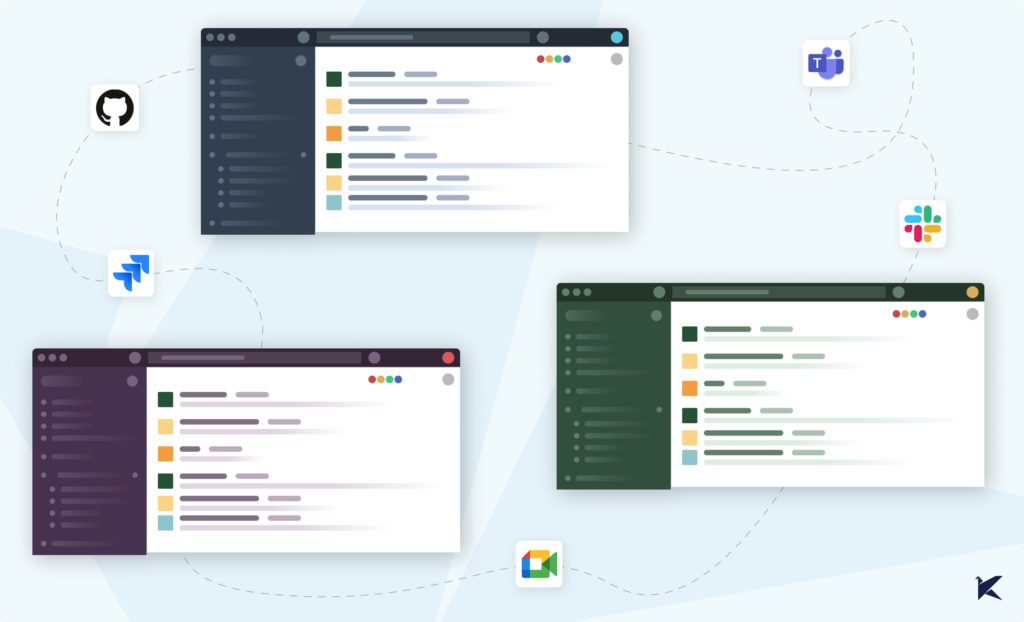
We refined our daily stand-ups to deliver quick, high-level updates, ensuring the whole team stayed informed. For critical tasks, we formed smaller, cross-functional groups that met regularly to dive deeper into the project’s most important aspects.
To keep these meetings efficient, we introduced the role of a facilitator—someone responsible for keeping discussions on track, making sure everyone has a chance to contribute, and clearly define follow-up actions. This approach was essential in keeping the team productive and communication flowing smoothly.
Recognizing that nothing beats face-to-face interaction, we made it a priority to meet our partner and their team in person. We traveled to the United States to start our partnership in a healthy way, having the chance to dive deeper into their needs and aligning on project goals.
But it wasn’t all work and no play. These trips gave us the chance to bond after hours, sharing good times that helped build a strong team spirit rooted in trust. By closing the physical gap, we not only ensured a more productive collaboration but also made the process more enjoyable for everyone involved. After all, a team that works well together and has fun together is unstoppable!
As the team grew, it became clear that the informal role distribution that had worked in the past was no longer sufficient. New responsibilities emerged, and specialized roles were necessary to handle them. However, assigning these roles and ensuring that team members were prepared for their new responsibilities required careful planning.
Roles on this project weren’t rigidly assigned. Instead, as new needs emerged, team members who showed both interest and aptitude naturally stepped into these roles. A key figure in this process was the Jedi Master, one of our principal engineers, who had been with the project since the beginning. The Jedi Master played a crucial role in mentoring team members, guiding them through their transitions, and ensuring they felt supported as they took on new responsibilities.
Under the Jedi Master’s guidance, team members gradually took on new roles. As they gained experience, Jedi’s involvement decreased, allowing the new leaders to fully embrace their responsibilities.
We implemented a comprehensive onboarding process for new team members, including a set of courses and tasks tailored to the project’s needs. Continuous feedback and opportunities for new members to suggest improvements helped them integrate smoothly and contribute effectively from the start.
The strategies implemented at this project resulted in a well-coordinated, efficient team capable of handling the complexities of a large-scale software project. Communication became more streamlined, roles were clearly defined, and team members were well-prepared to meet the demands of their positions.
This approach not only maintained the quality of the codebase but also strengthened our team’s relationship with our partner. The quality of the product remained high, with functionalities behaving as expected, thanks to the effective communication and role management strategies in place.
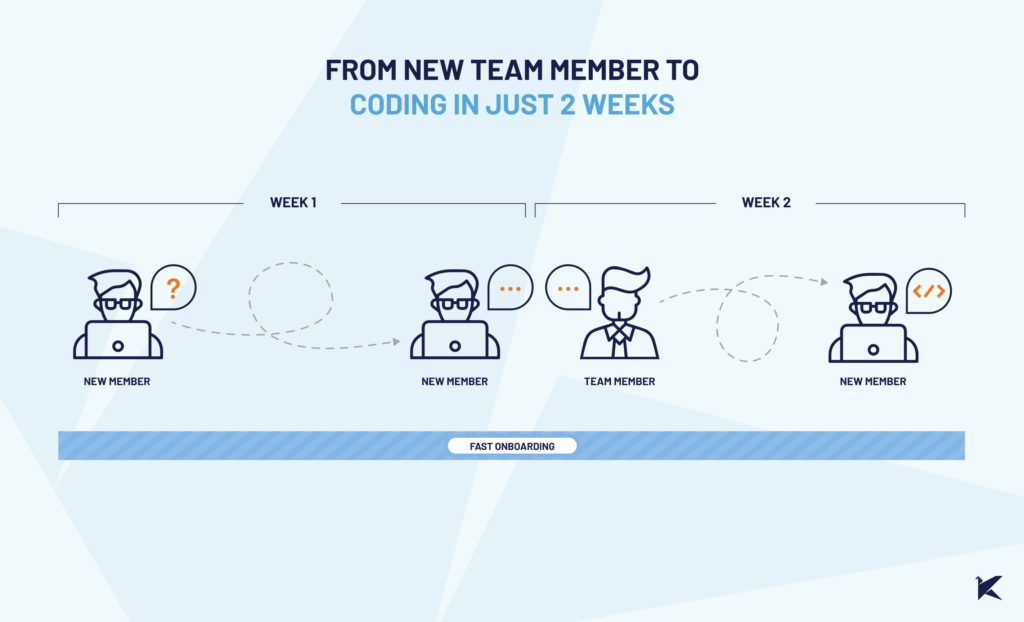
This experience highlights several key takeaways for managing a growing software development team:
Scaling a software development team is challenging, but with the right strategies in place, it’s possible to manage growth without sacrificing quality. Our experience with this project demonstrates the importance of evolving communication, defining roles carefully, and investing in team development to ensure long-term success.
Technology
UX Design
12 read time
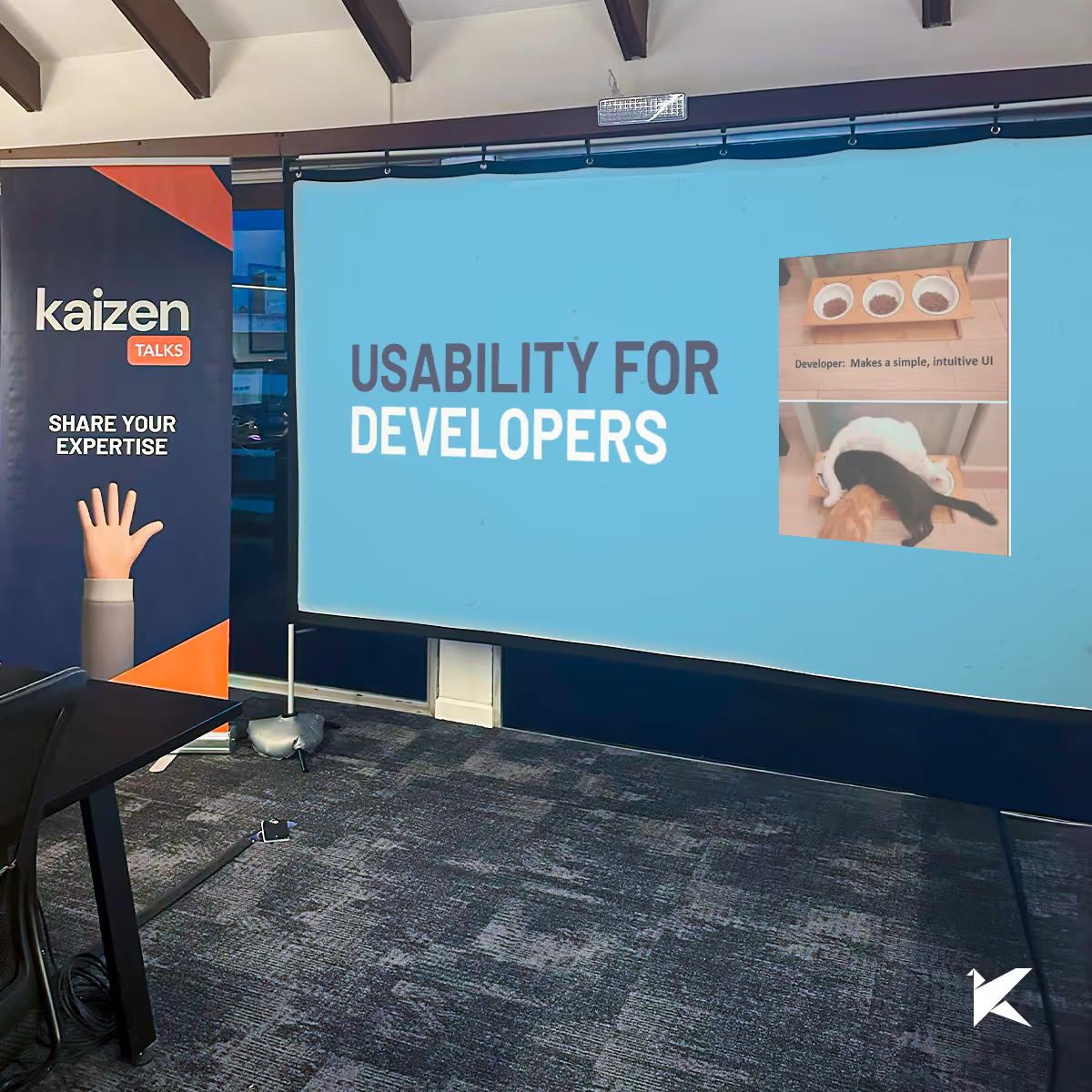
Usability isn't just a designer's jergon. For developers, understanding usability can make a big difference. It makes it easier to work independently and effectively collaborate with designers and users. This understanding cuts down on the back-and-forth between design, development, and product owners, saving you time.
In this blog post, we'll show you how to understand, evaluate, and prioritize usability using practical tools. These tips will empower you to work more independently and improve your development process.
First, we should start by defining usability. Usability is all about making it easy for users to interact with a product and achieve their goals efficiently and effectively. It’s not just a vague concept—there are universal rules and guidelines we can follow, and even adapt to our specific product.
When we talk about usability, we focus on three main aspects:
These aspects are measurable. For example, reducing the time it takes a user to complete a task by 20%, not only improves usability but also translates into quantifiable costs savings and user satisfaction.
Usability it's a fundamental part of the development process that can streamline workflows and reduce the need for revisions. Here's why it's essential for developers:
Understanding usability allows developers to connect more effectively with other departments such as user experience (UX) designers, product owners, and users. This common ground promotes better communication and ensures everyone is focused on user-centric goals.
When developers have a good grasp of usability, the transition between design and development becomes smoother. Early involvement in usability discussions can cut down on extensive revisions and ensure features are well-planned from the start.
Planning features with usability in mind prevents costly back-and-forth adjustments after launch. Addressing usability issues early not only guarantees functionality but also improves the user experience of the final product.
Consider usability as a part of the big picture, not just an add-on. This perspective allows developers to anticipate user needs, streamline their development processes, and deliver more efficient solutions.
Usability evaluations equip developers with tangible metrics to identify and prioritize issues effectively. This clarity prevents unnecessary changes based on subjective opinions and focuses efforts on addressing critical user experience challenges.
There is no single way to evaluate usability, and there’s no definitive rulebook that applies to every single situation. That said, in this article we’ll be focusing on different heuristic lists. These lists provide general rules or guidelines for identifying usability problems in user interface design.
Some common examples include Nielsen's Usability Heuristics, Gerhardt-Powals' Cognitive Engineering Principles, Shneiderman's Eight Golden Rules of Interface Design, Bastien and Scapin's Ergonomic Criteria, Don Norman's Design Principles, and the ISO 9241-110 Dialogue Principles.
The great thing about these lists is that they’re not set in stone. You can adapt them to fit your unique business needs. For example, if you’re in the business of selling light switches, the height and position of the switch would be pretty crucial parameters in terms of usability.
So, grab a list, understand it, and start evaluating whether you’re meeting usability standards. Remember, customizing the list to your own specific situation and business context is a must.
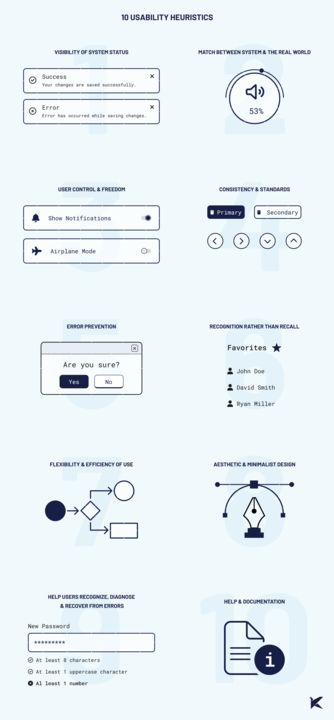
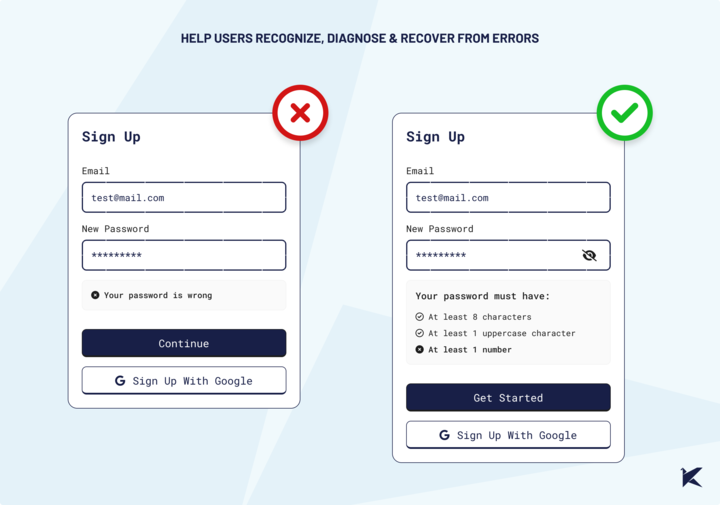
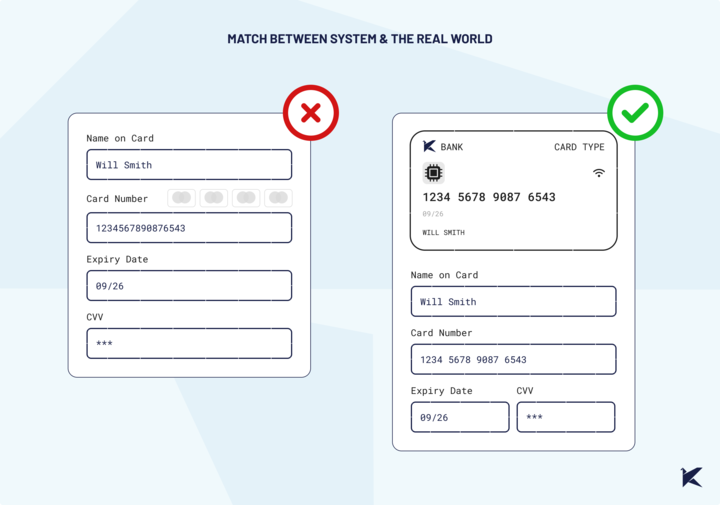
When prioritizing usability issues, it's important to have a systematic approach to ensure that we address the most critical problems first. One effective method is to use formulas that assign a specific weight to each issue. These formulas can consider several criteria to determine the priority level.
For example, we can rate the business impact on a scale from 1 to 5.
We can also categorize the criticality of the usability problem, ranging from blocker to suggestion, including moderate and serious levels.
Additionally, the duration of the issue's existence can be part of this formula, gaining more weight over time.
It's important not to rush to address the first piece of feedback, especially when it comes from someone influential like a CEO or Product Owner. We often tend to over-prioritize such feedback, but even well-intentioned suggestions can sometimes cause more harm than good.
So, what should we do? We need to learn how to assign a weight to each usability issue to focus on those that will have the most significant impact. By doing so, we ensure that we address the most critical usability issues first, allocate resources effectively, minimize costs, and achieve significant improvements in usability, leading to a higher return on investment.
When generating solutions, it's ideal to have multiple options to bring to the table for discussion. Having various solutions allows us to evaluate different complexities with different levels of effort.
Sometimes, putting a lot of effort into a small problem doesn't make sense, just as solving a big problem with minimal effort might not be effective. By considering multiple solutions, we can weigh the pros and cons of each and choose the most appropriate approach for the situation.
Understanding usability is crucial for developers. It enhances collaboration, reduces rework, and ensures features are user-friendly from the start. By focusing on efficiency, effectiveness, and satisfaction, you can create products that not only function well but also delight users.
Next time you’re planning a feature, think about usability and see the difference it makes.

UX Design
Project Management
·
Jun 25, 2024
UX research isn’t just a phase, it shapes the whole project. Here’s how it helps define scope early on.
12 read time
As a UX Lead, I often see management and development teams underestimate the importance of UX research when estimating project scopes.
Some believe that having an innovative idea or cutting-edge technology is enough to attract users, without realizing the crucial role of user experience in keeping those users satisfied and engaged. Others only rely on their gut feelings or limited feedback from a handful of early adopters, assuming they fully understand their audience's needs.
Unfortunately, these misconceptions often results in delaying or even skipping UX research altogether. This common oversight can lead to missing critical features and functionalities, leaving the product short of user expectations.
In this blog post, we’ll explore how UX is crucial in defining the project scope effectively, illustrated through a real-world example from one of our clients.
Our client envisioned a golfing app and provided us with wireframes to estimate the project. During our discovery process, we immersed ourselves in their business to understand their needs better. Our discovery team even organized a golfing match to gain firsthand insights into their operations and user preferences.
As we delved deeper using various UX methodologies like information architecture, flow mapping, and wireframes, a significant issue emerged: The wireframes provided were insufficient to create a viable Minimum Viable Product (MVP), missing essential features.
Key missing elements included:
While other companies might have overlooked these gaps when estimating the project, we chose transparency and communicate this to our client.

If we had only based the project estimate on the low-fidelity wireframes, this would have led to various problems down the line.
As the project progresses, the addition of unexpected features or functionalities can cause the project to grow beyond its original estimate. This can disrupt workflow, delay timelines, and compromise quality due to the urgent need to reallocate resources and increase workloads.
By applying UX methods to our client’s project, we discovered the scope was actually three times larger than initially thought. Fortunately, this early insight allowed us to provide an accurate projection of the project requirements, timeline, and cost to build a viable MVP.

Unexpected scope changes often require more resources, time, and money, leading to budget overruns. For example, if a product launch is delayed from March to July, hiring a sales team in January could result in unnecessary costs. Our early discovery revealed that the initial budget our client had in mind wasn’t sufficient to build an MVP, prompting them to reconsider their funding.
Without proper UX research, such adjustments are sometimes realized only when it’s too late.
Introducing new requirements mid-project can disrupt workflows and extend project timelines. This might require revising or modifying tasks already underway, leading to increased costs and delays.

Rushing to meet deadlines can lead to shortcuts in testing, resulting in bugs and usability issues, compromising the product's quality and user experience. These compromises can accumulate as "technical debt," including disorganized code and insufficient testing.
Contrary to the belief that UX is time-consuming and costly, UX research can be quick and save extensive development hours and money.
UX research clarifies user needs, reducing uncertainty and risks. Methods like information architecture and user testing help teams anticipate challenges early, minimizing costly rework later.
By using UX methods, our discovery team provided our client with a clearer understanding of the project's real costs, turning abstract uncertainties into tangible insights.
UX research helps to define the project scope by identifying user needs and priorities, reducing the risk of missing important features. A clear scope helps teams plan and allocate resources efficiently, leading to timely and within-budget project delivery.
UX research validates assumptions and provides data-driven insights before large investments. This approach prevents the development of unnecessary features and helps prioritize effectively.
Our honest and accurate estimate led the client to delay further development until securing additional funding. While we risked losing a client, we built a trusted partnership, leading to future projects.
By using UX tools, both we and our client realized the product scope for the golfing app was larger than expected. For the client, the real benefit was avoiding future problems and unexpected costs from an incomplete app.
UX research helps to ensure a top-quality product, align the product vision and budget, and reduce uncertainties for development teams, stakeholders, and users.
With our cross-functional expertise, we'll help you keep your project on track, within budget, and aligned with your vision.

Events

·
May 10, 2024
12 read time
For the 10th year in a row, the Uruguayan Chamber of Information Technologies (CUTI) gathered Uruguayan tech companies to celebrate the “International Day of Women and Girls in Science” and inspire girls to explore tech careers. On April 25th, we welcomed over 30 girls aged 14 to 16 to our office.
In this blog post, I’ll share with you how “Techy por el Día” came about and how the day went in our office with the girls from Liceo 47.
Technology shapes our world in countless ways, from how we work and communicate to how we learn and understand the world around us. However, there’s a significant global challenge that we can’t ignore: the gender gap in tech. Women are often underrepresented in tech-related educational and professional fields, limiting their opportunities to contribute to and benefit from the industry (Píriz, 2024).
This disparity isn’t unique to any one country. Studies suggest that girls’ interest in technology tends to wane as they grow older due to a mix of cultural, social, institutional, and economic factors (ANEP, 2024). Uruguay stands out as a key player, being the largest per capita exporter of software in Latin America and the fourth-largest exporter in terms of dollars in Latin America (Uruguay XXI, 2021).
In 2015, the United Nations General Assembly declared February 11th as the International Day of Women and Girls in Science. The goal? Achieve full and equal access to and participation in science for women.
In Uruguay, institutions like the National Administration of Public Education (ANEP) are working to ensure girls and women have equal access to and participation in science and technology fields. This effort is crucial to reducing the gender gap and harnessing the diverse talents and perspectives that drive innovation.
According to ANEP (2024), “Promoting, encouraging, incentivizing, and inspiring the study of sciences and technology is essential to contribute to the personal and professional growth of girls, young women, and women, and key to enriching the scientific and technological field with diverse talents and creative and innovative perspectives to face current challenges and sustainable development.”
On Thursday, April 25th, we had the pleasure of welcoming over 30 girls aged 14 to 16 to our offices.
We kicked off the day with a shared lunch and an introductory talk about what we do at Kaizen Softworks, the meaning of our company’s name, our different teams, and introducing our horizontal and collaborative approach.
To introduce the following activities, we explained the process of creating a digital product: ideation, design, development, testing, and implementation. Then, we randomly divided the girls into four groups to carry out workshops on UX design, development, Quality Assurance (QA), and Information Technology (IT).
This activity began in the entrance hall of our office, where we organized a comprehensive tour of our facilities. During this tour, we provided a detailed explanation of our infrastructure—its composition and why it’s crucial for the smooth functioning of the company. In the server room, we introduced the rack, the nerve center from which all information is distributed throughout the office.
Key concepts like access points, cabling, and smart devices present in different areas were discussed. In the workspaces, we highlighted the installed equipment and underscored its importance to ergonomics and the overall employee experience.
Apart from work areas, we toured common areas like the kitchen, barbecue zone, courtyard, and pool—essential spaces for leisure and downtime for our team members. Our People Care team took the opportunity to share information about our dynamics, benefits, and integration activities that contribute to making Kaizen’s culture unique.
Our UX Design Workshop started off with an engaging presentation about our dedicated UX design team. We highlighted each team member’s unique roles and emphasized the importance of collaborative effort in crafting meaningful and user-friendly experiences.
Using real-life examples, we painted a vivid picture of how good and bad user experiences are part of our everyday lives. For the hands-on activity, we chose Instagram as a case study—being a widely recognized and used app among the participants. Together, we identified usability issues they encountered when using the app, and then collectively brainstormed solutions using creative techniques like the prioritization matrix and the “crazy 8” tool.
The fun activity served as a practical introduction to the subsequent stages that a design team would undertake, such as prototyping, testing, and implementing the design.
In the Development Workshop, we aimed to provide a sneak peek into a developer’s daily life. We steered clear of overly advanced concepts, considering the participants’ basic or zero level of knowledge. Using an example of a project task board, we explained the significance of “To Do,” “In Progress,” “Testing,” and “Done”—fundamental for fostering collaboration within a development team.
To make the experience relatable to the participants, we turned once again to Instagram, exploring what new functionalities could be implemented or fine-tuned. We broke down several functions into small tasks that the participants could work on, making the experience interactive and engaging.
Our QA workshop aimed to demystify the functional tester role in a fun and practical way. We used a simple device—a calculator—as an example to facilitate understanding of more complex concepts. Various versions of the calculator with different bugs were projected on a screen for an interactive, hands-on experience.
Through collaboration and creating exploratory test cases together, we encouraged participants to identify bugs. We also used everyday examples to emphasize the importance of detecting and fixing bugs, highlighting how this improves the user experience.
Finally, we gathered all the teams together to share experiences from the different activities they participated in. One of our goals was to ignite the girls’ interest in technology, so we also shared resources such as Ceibal, Jovenes a Programar, and INEFOP where they could further expand their knowledge if they wish.
We want to extend a big thank you to the girls and staff from Liceo 47, as well as those girls who came to participate in this edition with us. We hope this is just one of many opportunities where we can contribute our bit to stimulate interest and the development of local talent in our country!

Project Management
Startups
UX Design
·
Apr 4, 2024
12 read time
In product management, the value of UX research often takes a backseat, with resources mainly focused on development. But skipping this step leads to unforeseen user experience challenges, resulting in increased project costs and delayed delivery timelines.
Clare-Marie Karat, a former IBM UX researcher, says that:
Spending $1 on UX research can save you $10 in development and $100 in maintenance.
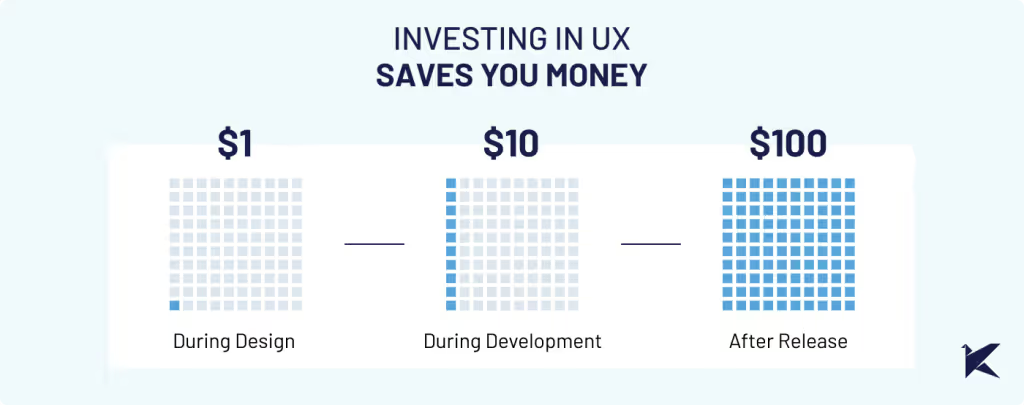
Also, the Nielsen Norman Group found that 85% of usability issues can be found by testing with just five users.
Let's have a look at a real-life example with one of our clients to discuss why prioritizing UX research isn’t just a good practice– it’s absolutely crucial for your project’s success.
When we teamed up with our client, we quickly noticed many users were struggling to use their mobile app on small screens. Key features of the app were hard to access, leading to incomplete tasks and decreased productivity.
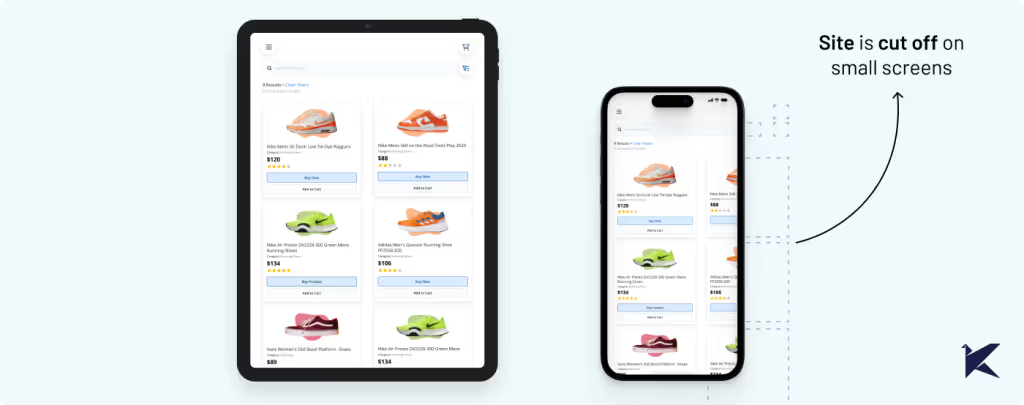
Even though our client knew about the problem, they didn't realize how serious it was. But when we checked the metrics, we found out that a surprising 73% of users faced this problem.
This reinforced that we needed to dig deeper with UX research to fully understand the impact.
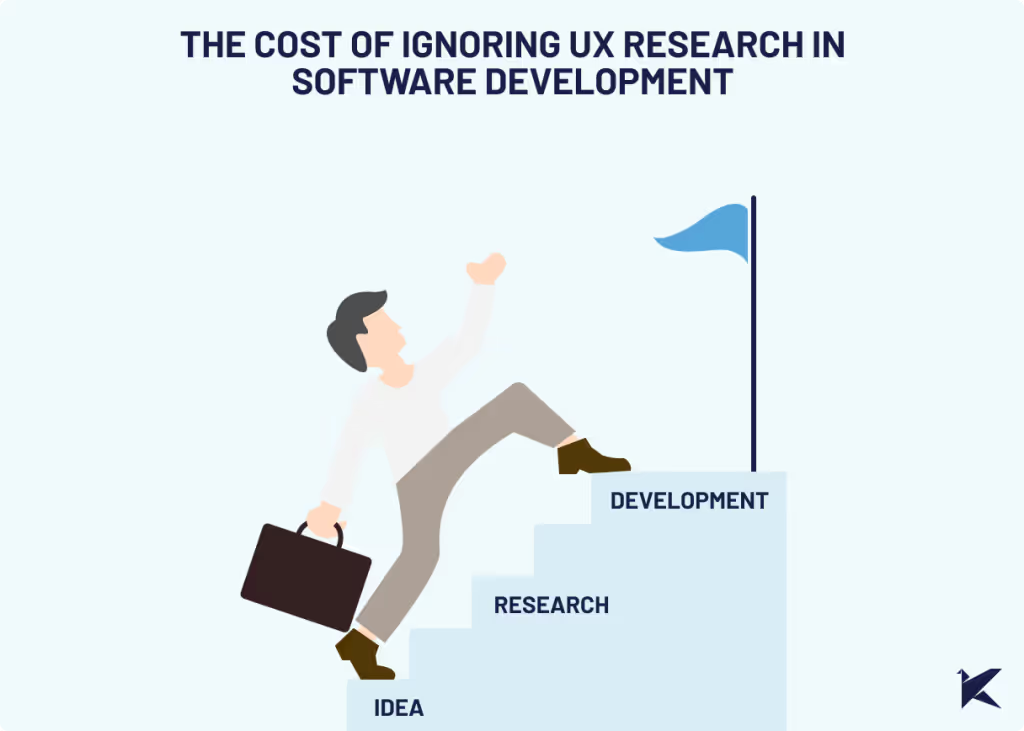
When assumptions aren't validated through user feedback and usability testing, the development team rushes into production without proper validation. As a result, when the final product hits the market, usability issues arise, requiring rework from both design and development teams.
According to Usability.org at least 50% of a developers’ time during the project is spent doing rework that is avoidable.
Challenges in our client’s scenario included:
Overlooking the UX of smaller screens caused unexpected technical challenges and required restructuring efforts, ultimately prolonging the development process and delaying release dates.
Despite our careful planning, significant time and effort were needed for design revisions and development rework, disrupting our laid-out roadmap. This not only increased costs but also resulted in setbacks for other planned features and milestones.
After experiencing the issues mentioned earlier, users continued to struggle with using the product and reached out to customer support for assistance. Our client's customer service team faced a heavy workload, constantly troubleshooting and seeking solutions for emerging usability problems.
This drained valuable time, and the workload costs on customer support staff increased.
Empathic design prioritizes understanding user needs and integrating them into the design process. This requires a clear understanding of the end users, their needs, and their experiences.
Without this understanding, achieving true empathy is impossible. When a product doesn't meet user expectations or fails to solve their problems effectively, it leads to customer dissatisfaction.
Usability problems can cause users to abandon the product, resulting in revenue loss from both existing and potential customers.
In our client's case, usability problems on smaller screens eroded trust among major clients who heavily relied on these devices, damaging their reputation as a reliable software provider.
As a UX team, we proposed conducting empathetic research. This type of research focuses on understanding user needs, problems, preferences, and behaviors. Its goal is to gain critical insights into the end user, ensuring that the final product meets their expectations.
After conducting empathetic work, we realized that the impact on the usability of the features on small screens was significant. Not only was it uncomfortable to use, but in some cases, it didn't allow the functionality to be used at all.
This research uncovered many other unrelated problems with small screens, such as discrepancies between the original design and implementations. This demonstrates the value of investing in UX research in a project that is alive and not just in design stages.
By integrating UX research into our client's future development process, we can identify problems early on, guaranteeing that the final solution is user-friendly. This approach results in a streamlined development process and reduces unexpected costs associated with rework.
We recommended establishing a comprehensive UX quality assurance process to ensure a seamless user experience and detect usability problems before development.
To achieve this, we suggested purchasing and successfully integrated 4-inch screens into our design process and usability testing. By simulating the user journey on these smaller screens, we could identify usability problems more effectively.
Testing each product increment with devices that closely mirror the final user experience helped us improve the overall product quality and user satisfaction.
With valuable insights from our research, we prioritized redesign efforts to focus on addressing the most critical usability problems first. This approach ensured that significant improvements were implemented fast, and development resources were allocated efficiently.
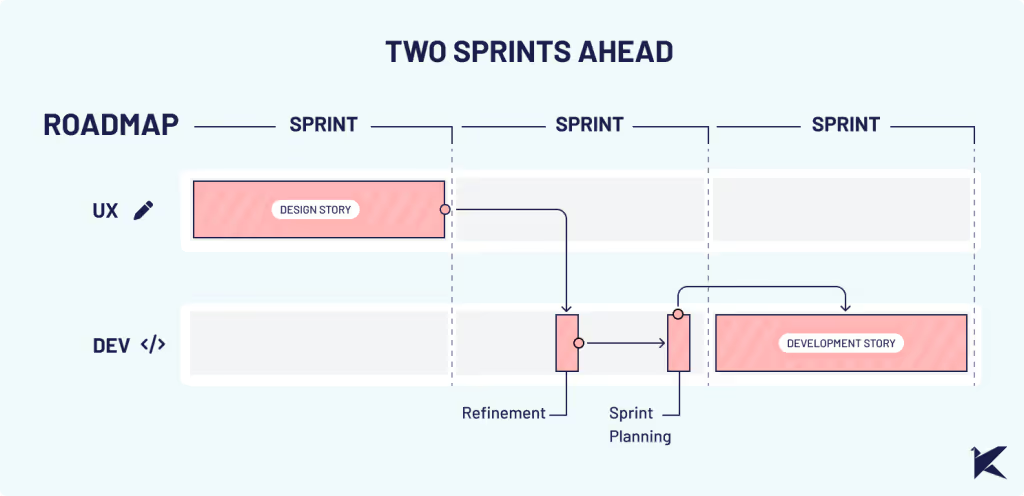
Following the creation of design stories, we meticulously monitored and tested the implementations.
This experience highlighted the critical lesson that developing without proper UX research and UX QA significantly increases costs and prolongs project timelines.
Investing in UX research not only improves user satisfaction but also optimizes development processes, ultimately saving businesses valuable time, resources, and headaches.
If you are facing similar challenges, we can help. Our experienced UX team is ready to collaborate with you to conduct comprehensive research and help you streamline your development process.
No blogs matched this category, try applying different filters.
