



Generative UI: What it is, how it works, and when to use it
Generative UI lets AI build the screen each user needs, in real time. What it is, how it works, the trade-offs, and two working demos we built.

12 min read
Read more

Insights, stories, and experiments from our team.
AI
UX Design
Generative UI lets AI build the screen each user needs, in real time. What it is, how it works, the trade-offs, and two working demos we built.

Santiago Chiappa
·

Jul 17, 2026
·
12 min read

Generative UI is a full-stack architecture that lets AI create, modify, and render user interfaces in real time, based on what each user needs at that exact moment. Instead of static, predefined screens, the interface assembles itself on the fly: a bar chart, a table, a comparison card when you're comparing things.
We've been building proofs of concept with it for the past few weeks. Most of what's written about generative UI is either too abstract or too exciting, so this is our attempt at neither: what it is, how it works, where it helps, where it doesn't, and what we learned from two demos we built.
Generative UI is a full-stack architecture: the backend talks to the LLM, decides what the answer should look like, and picks the components, while the frontend renders them and handles how the user interacts with what’s on screen.
Compare that with how interfaces have always worked. A designer decides what goes on each screen, a developer builds it, and every user sees the same thing. Forever, or until the next redesign.
Generative UI flips that. The interface becomes dynamic and personal instead of static and universal. The AI doesn't just answer your question, it designs the screen that answers your question.
Dashboards and reporting are the most common use cases, but they're far from the only one. The same pattern works for dynamic forms, onboarding flows, and customer support, as it takes input just as easily as it presents output. It can even adjust font size, contrast, or layout for users with low vision, color blindness, or cognitive load.
There are three levels of generative UI, from most constrained to most open (Google Cloud, 2026):
Most production systems today use the declarative approach, and that's what this post assumes from here on. The AI isn't writing HTML or CSS freestyle. It selects components, fills in pre-designed widgets, and composes them into the right screen.
Generative UI works by turning a user request into structured data that describes an interface, then rendering that data as real components. The flow looks like this:
To the user, the result feels like magic. Behind the scenes, it's structured data flowing through a well-defined pipeline. We prefer the second description. It's the one you can build on.
Generative UI trades real personalization and faster development for added latency, inference costs, and less predictable layouts. That's the honest version. Here are the details.
None of these are dealbreakers. There are known techniques to mitigate each one.
We built two demos. One with fictional data, one on top of a tool we use every day.
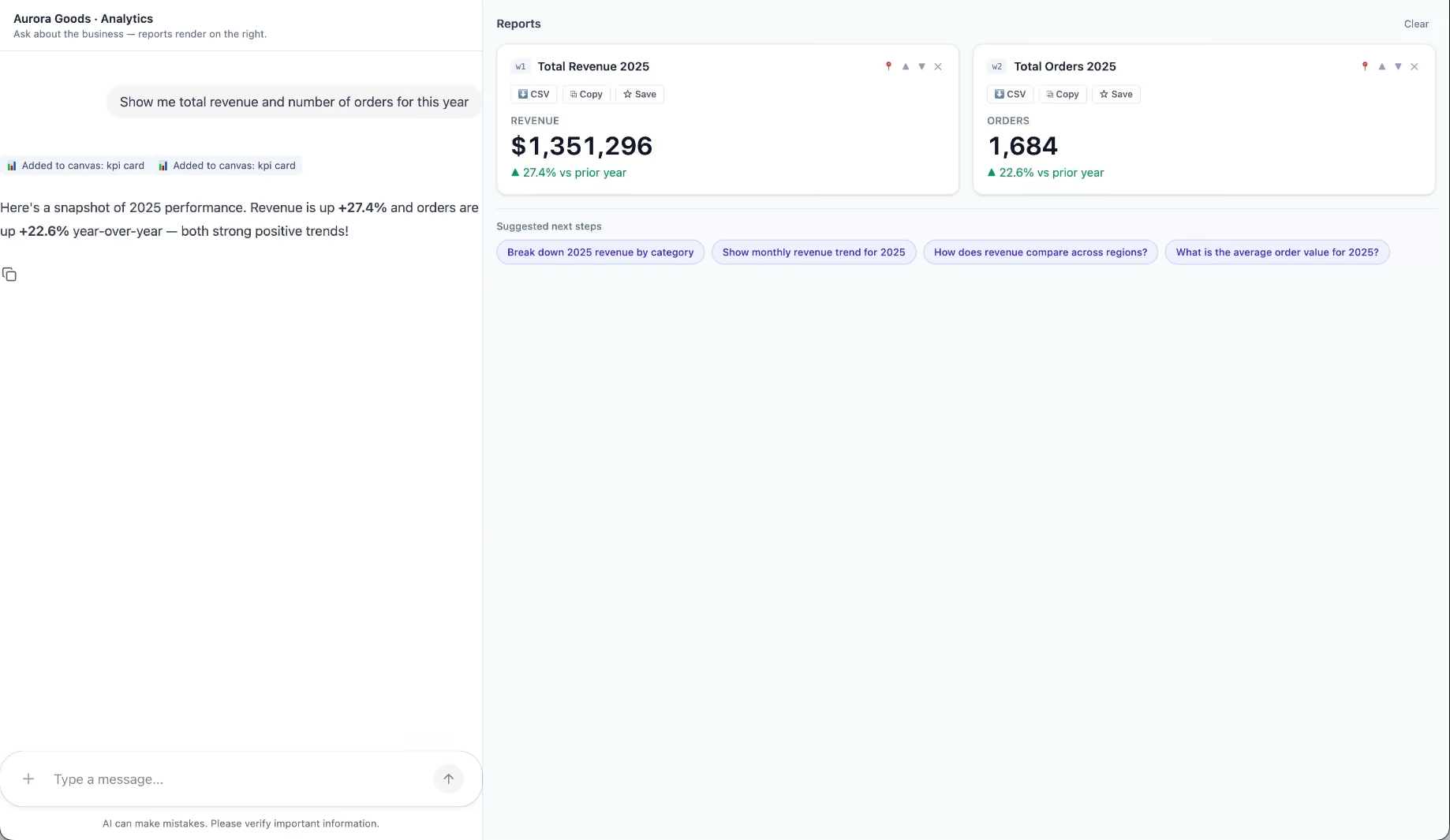
Aurora Goods is a fictional consumer e-commerce platform we created for the demo. The interface is simple: chat on the left, canvas on the right. You ask about the business, the LLM figures out what you need, pulls the data, and renders it visually.
Ask about 2025 sales and it shows the numbers on cards, with a short note on anything relevant. Ask it to break that down by region and it extends the same view instead of starting over, because it understands the second question builds on the first. This part took us a while to get right, and it's what makes the whole thing feel like a conversation rather than a search box.
The canvas isn't output-only either. You can click into any element and drill down: revenue by category, then inside electronics, then which products sold most.
You configure the widgets once. The system combines them and adds relevant commentary on the spot.
The second demo is closer to home: a generative reporting layer on top of the time-tracking tool we use every day at Kaizen. The questions in this demo are questions someone here has actually asked.
Instead of building dozens of hyper-specific reports, a small amount of code now handles virtually unlimited queries. How many hours were logged in May? Which anomalies showed up in April? How do billable and non-billable hours compare across two months? Who worked on a given project last month, and for how long? Each answer arrives as the right visualization: cards, lists, bar charts, plus a short summary that's easy to scan.
Two details won us over. The LLM suggests next steps, so exploring the data becomes a conversation. And when it's not sure, it asks instead of assuming. Ask for the hours of someone named Alex and, since we have more than one Alex on the team, it asks which one before answering.
Generative UI is a complement, not a replacement. Standard interfaces still win for stable, repetitive workflows where consistency matters. Nobody wants their checkout button to be creative. Generative UI wins where the workflow is complex and the questions are unpredictable.
It also changes what design systems are for. Beyond designing components and screens, teams will need to define semantic rules: how the AI should react to uncertainty, which interfaces match which intentions, and the guardrails that keep generated screens functional and safe.
That's a new kind of design work. And it's already starting.
We build working proofs of concept in two weeks. Your data, your workflows, a real thing you can click.
Generative UI lets AI build the screen each user needs, in real time. What it is, how it works, the trade-offs, and two working demos we built.
12 min read

About Us
12 read time
For small to mid-size companies, hiring a software development firm to help with your IT needs is essential to its success today. There are more than 500,000 software development and IT services companies in the U.S. alone, so how do you know who to hire?
For the firms that have entrusted us with this responsibility, we are grateful for them and proud of the success they have achieved using our services.
Our clients recently left us great feedback on Clutch, a ratings and reviews platform headquartered in Washington, D.C. This has allowed us to be named amongst the top software developers.
We recently worked with a Learning Solutions company to update its education platform, building its eighth and most recent version. We integrated it with email notifications and dashboard plugins, and we continue to provide maintenance.
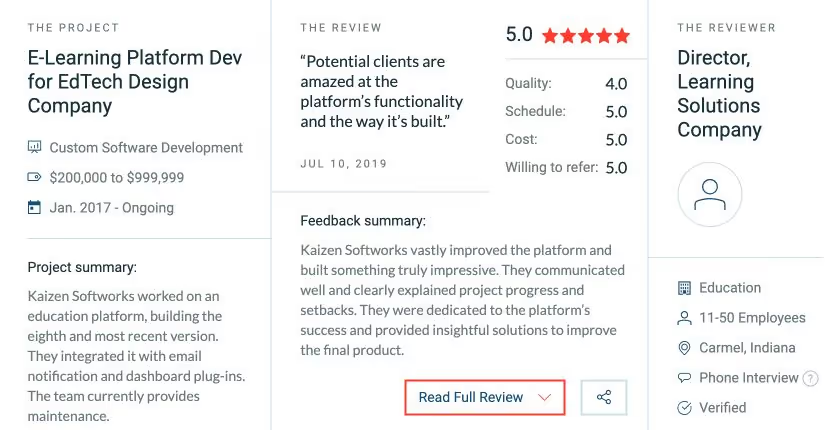
In the 5-star review, the Director said:
“Potential clients are amazed at the platform’s functionality and the way it’s built.”
This is something that all of our clients can expect if they choose to work with us. Client satisfaction and feedback are very important to us.
Another example of a satisfied client is SmartBorder, an import/export software company in Buffalo, New York. We worked on a multi-year project, upgrading and developing its main platform. The SmartBorder Director of Technology, Ron Barone, in this 5-star review, said:
“They’re hungry programmers that do a really good job.”
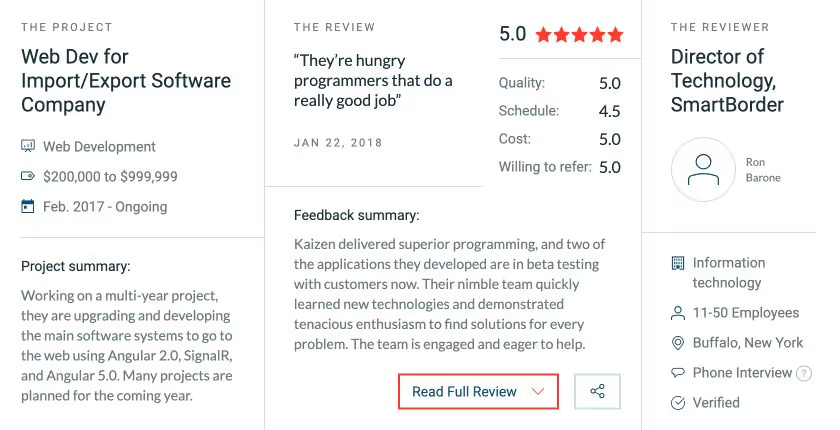
You can expect this type of commitment in terms of quality and quantity if you choose to partner with KAIZEN Softworks for your next project.
“Customer feedback is very important to Kaizen Softworks. It's one of the main tools that allows our company to continually improve and provide better services for our customers. Services like Clutch help us gather this feedback, and it has been a great source of validation for potential customers, too.” – Kaizen Softworks former CEO and Co-Founder Fabian Fernandez

About Us
12 read time
In a dynamic world driven by mobile technology, the demand for exceptional mobile app developers has never been higher. In this context, Kaizen Softworks has been recognized as top mobile app developers in the United States during Clutch's 2018 research.
Clutch's research team, led by Business Analyst Sara Philibotte, scoured the mobile app development landscape to uncover the industry's top talents. The rigorous selection process took into account a myriad of factors, including the quality of client feedback, the range of service offerings, the richness of the portfolio, and the overall market presence of the contenders.
Out of a pool of more than 640 companies, Kaizen Softworks stood out as a true mobile app development powerhouse.
Sara Philibotte, the Business Analyst behind the research, emphasized the exceptional qualities that set Kaizen Softworks apart from the competition. She noted: 'These app developers have risen to the top of our research rankings due to their phenomenal dedication to their clients and their mobile app development prowess'.
This recognition serves as an inspiration to aspiring developers and a testament to the tremendous potential of the Nearshore mobile app development industry.
Our dedication to providing exceptional services, tailored to meet our partners' specific needs, is to none. The Clutch recognition is not just a culmination of our efforts; it's a harbinger of even greater achievements on the horizon.
As we continue to set new standards in the industry, we anticipate an even brighter future for our exceptional mobile app developers.

About Us

·
Sep 26, 2018
We were named a top B2B provider in LATAM. Here’s what’s behind that.
12 read time
Headquartered in the heart of Washington, D.C., Clutch is a leading B2B research, ratings, and reviews firm dedicated to connecting small and medium businesses with the perfect agencies, software solutions, or consultants for their specific needs. By applying a meticulous methodology that considers verified client reviews, available services, work quality, and market presence, Clutch assists businesses in tackling their challenges with confidence and finds the ideal partners to collaborate with.

We're delighted to announce that Kaizen Softworks has once again secured its place in the spotlight, earning recognition as a Top-Rated B2B Service Provider in Latin America for 2018. This prestigious acknowledgment comes from Clutch, a reputable B2B research, ratings, and reviews company headquartered in Washington, D.C.
Clutch's 2018 rankings represent a careful evaluation of all the companies listed, focusing on critical aspects such as client reviews, service quality, the range of services offered, and the overall presence in the market.
Ricardo Real, the Senior Analyst responsible for the extensive research, pointed out some compelling reasons why nearshoring services in Latin America are such an attractive option for businesses, particularly those based in the United States. Nearshoring refers to the practice of outsourcing specific business operations or services to a nearby country or region.
'The highlighted agencies are top performers in their countries and the region (...) “Nearshoring the development, design, and marketing of a digital product to Latin America is a smart option for companies based in the U.S. The leading B2B companies featured in this year’s report share convenient time zones with major U.S. cities and have qualified talent, aligned working cultures, great English communication, and competitive rates, so clients get the best value for their money', Real said.
Latin America's allure as an outsourcing hub lies in its advantageous time zone compatibility with major U.S. cities, enabling real-time communication and efficient collaboration. The region also boasts a pool of highly skilled and qualified professionals who bring their expertise to the table. This remarkable talent pool is complemented by aligned working cultures, facilitating seamless cooperation between clients and service providers.
Furthermore, Latin America has seen remarkable growth in its English proficiency, ensuring effective communication between businesses from different corners of the world. Clutch's evaluation recognized the competitive pricing offered by Latin American service providers, ensuring that clients receive excellent value for their investments.

Technology

·
Sep 5, 2018
12 read time
Welcome to the first installment of our series dedicated to streamlining web development and boosting your productivity.
If you've ever found yourself drowning in repetitive CSS tasks, this post is your lifeline. In this post, we'll delve into the basics of Sass, paving the way for a more efficient and enjoyable web development journey. Say hello to cleaner, more maintainable code, and wave goodbye to CSS monotony.
The scenario is simple, you're developing a website or web app, and for sure you want it to look as good as you can, which is obviously accomplished by using CSS. Then you find yourself repeating tag names, properties, colors, and having a gigantic main.css file (or maybe a lot of <src rel="stylesheet"> tags in your HTML header?).
And what if you want to change something as the main color of your website? Dozens of lines changed just because #7a19a8 seemed slightly better than #7211a0.

Is there even a difference?
Well, to solve all of this and more, in 2006 the Syntactically awesome style sheets were created, Sass for the friends. Sass is a preprocessor scripting language that is interpreted or compiled into simple CSS. What all of this means is that Sass extends the CSS syntax, using a similar structure, with a lot more fuctionality.
All installation steps are covered in Sass' official install guide. In this post, I'm going to show you some basic syntax so you can make your CSS better since day one.
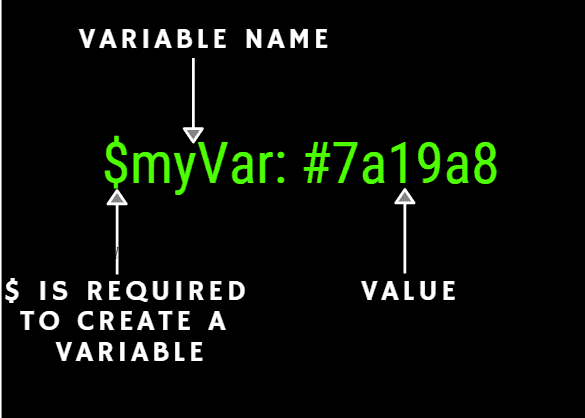
Variables are a core part of Sass, the premise is that you declare any data in the form of a valid data type in Sass, and you can use it all along your stylesheet. Here is the syntax:
With Sass Selector nesting we can transform this:
div {
  // Some properties for a div
}
div span {
  // Some properties for a span tag inside a div
}
div p {
  // Some properties for a p tag inside a div
}
Into:
div {
  // Some div properties
    span {
      // Some properties of a span tag inside a div
    }
    p {
      // Some properties of a p tag inside a div
    }
}
Basically, you can nest selectors within selectors to avoid repeating tags each time you may need to go deeper in order to win specificity.
You can also add pseudo elements and modify parent selectors inside themselves with the & symbol, this way:
div {
  // div properties
  &.steve {
    // properties of a div with steve class
  }
}
A mixin is a Sass feature that allows you to define reusable pieces of code, and even allows parameters, just as functions, in order to modify its behavior without having to draw upon semantic classes as .margin-box-size-1. Let's see them:
@mixin box-size($size: 1em) {
    margin: $size;
    padding: $size;
}
You define a mixin by using @mixin, then you name it, in this case is box-size and write down the parameters it will receive, if any. In this case we also have a default parameter $size: 1em. The variables will be replaced with their value at build time, and everything inside the mixin will be placed wherever is used across the stylesheet. You call the mixin function by using @include followed by the mixin name.
div {
    @include box-size(3em);
}
// Will be replaced by
div {
    margin: 3em;
    padding: 3em;
}
With Sass we can bring common programming sentences into stylesheets, with control directives as @if, @for, @each and @while, we can sort out, repeat and take from a map or list any piece of code. Lets take a brief look over each syntax.
@ifThe @if directive takes any SassScript truthy or false expression and executes whichever code sections applies:
@if (true) {
    // This code will always run
} @else {
    // this code will never run
}
@forThe @for directive is pretty straight forward, it runs the code inside the braces for a determined amount of times. The syntax is as follows:
// We declare a variable $i for the iterator, which starts at [from] and ends in [trough] values
@for $i from 1 through 6 {
    margin: $i+px;
}
@whileThe @while directive works pretty much as the @for directive, with the difference that the condition of the loop to execute is entirely on us, and not only an incremental operator.
$execute: true;
@while ($execute) {
    @debug($execute);
}
@debug() will print out any value to the console while building, as its name says, its awesome for debugging!
@eachLast but not least, @each works slightly different from the other directives, as it goes trough a collection such a map or a list instead of simply a condition, and exposes the current value for you to use.
$colors: red green blue;
@each $color in $colors {
    background: $color
}
And that's it! With this easy tool you can start to write cleaner and more maintainable CSS from now on.
If you have any doubts you can find me on twitter as @stiv_ml. I will be more than pleased to answer any question!

Project Management
·
Jun 15, 2018
At some point, every developer needs to level up. This is how we think about that shift.
12 read time
I've been working as a developer for around 1 year, I'm currently studying CS and always loved the idea of making things work as I want by writing code. My current stack at work is mostly JS (Angular 2+, Node), and have worked with C# (.NET).As a young developer being in the industry since so early, I've been really curious about how we developers define ourselves by 'Ranks'.When do you become a senior developer? How do you do it? What should you do/know? I still don't have answers to those questions, but I realized there's a key factor that influences every developer career, no matter how much time and experience they have...
When I was just starting, I had to fight with the overwhelming amount of things that seemed necessary to learn in order to call myself even a developer, let alone working as one. This takes us to the first point:
Nobody knows everything, and this is specially true in programming. No matter how many years of experience or how many languages a developer claims to know, what really matters is how he/she approaches learning new things. This is an attitude that will open you a huge amount of opportunities.Don't be afraid of spending hours on a problem that might seem the simplest of them all, just because you don't know how does X thing work, as long as they are spent researching and actively working on understanding it. In the end, you might have learned more than what you were first looking for.It's also important to have in mind that ...
As every other discipline, being proficient as a developer will take time, understanding some things will take time, and making things work will take time, but you should always look forward to complete what you're doing, because stress and fatigue may come, but will always pay off in the long run.You will be a better developer, and may be able to complete any similar task in a better faster and cleaner way sometime in the future.
And I can't stress this enough. Asking other developers when you're new into programming is one of the best and most enriching things you can do, because most of the time people will be eager to help you and you may learn a whole lot of things in a way it's really hard to reproduce any other way.Most experienced developers also make questions all the time. Not knowing something doesn't make you less of a developer.
What else would you add to this list? When did you stopped feeling as a junior? Leave it in the comments!

About Us
12 read time
Corporate Vision Magazine's Technology Innovator Awards have honored us with the title of "Best SME Technology Consultancy in South America" for 2018.
In recent years, the digital transformation has led to an increased demand for technology services across various industries. Businesses are relying on technology to foster their growth and stay competitive. To meet these evolving needs, technology companies must be at the forefront of innovation.
Corporate Vision Magazine (CV Magazine) is dedicated to acknowledging technology firms that lead the way in innovation and outshine the competition.
We are proud to be recognized for our innovative technology services in a rapidly evolving digital landscape.
We extend our gratitude to our valued customers for their trust in our ability to deliver significant value to their companies while staying at the forefront of technology trends.

Business
12 read time
Uruguay is a relaxed country, digitally connected, and globally competitive across a range of industries—like software development. Kaizen Softworks in Montevideo embodies these trends by building apps for U.S. customers with advanced technical needs.
It is a niche business that requires a rare blend of programming excellence, global business acumen, and a willingness to customize solutions. Kaizen Softworks favors this niche, because like Uruguay itself, the company thrives on an open and collaborative atmosphere.
Guest post by: Sean Goforth
In the early 2000s, several global businesses began making investments in Uruguay, based on the belief that the small country would make a good hub of operations for service delivery to the rest of South America. Tata Consultancy Services was among the first to set up its regional headquarters in Montevideo.
Quietly, other multinationals followed suit. Meanwhile, a succession of governments from both sides of the political aisle made a series of long-term investments to boost Internet access and expand educational opportunities.
In October of 2009 President Tabare Vazquez handed out the last of the vaguely lunchbox looking XO laptops, at Escuela 28/80, making good on the government’s one-laptop-per-child (OLPC) pledge. With this, Uruguay became the first country in Latin America to fulfill the OLPC pledge.
The occasion brought a wave of international media attention, as did The Economist’s declaration that Uruguay was its “country of the year” in 2013.
Notwithstanding these moments of fanfare, it’s been business as usual in Uruguay. Even as the rest of South America rode commodity exports from boom to bust, Uruguay just trod along.
Yet, slowly over the years the progressive social policies, and sustained commitment to technological access and education, have helped remake the country.
Open, accepting and tech savvy, Uruguay has the feel of a Scandinavian country located in South America. And more improvements are in the offing. Currently ANTEL, the state telecom provider, is carrying out a nationwide fiber optic Internet plan. If all goes according to plan, the additional investments will give Uruguay 100% fiber-to-the-house connectivity by 2022.
Owing to the educational and tech investments, Uruguay offers a thriving tech culture of software programmers and a budding startup ecosystem. This helps explain why the business technology sector in Uruguay has become increasingly fragmented since the early 2000s.
Stellar programmers may start out at multinationals, but many eventually launch their own firms in order to exploit underserved niches in the market. So unlike Argentina, Chile or Mexico, where large software development firms rule the roost, in Uruguay it is an array of small players–many with fewer than 30 programmers– that collectively drive the market.
One such firm is Kaizen Softworks. Over the past three years, the firm has grown steadily based on its offerings in full-stack Microsoft & Open Source solutions, a core element of a world-class developer team.
Robust and scalable architectures are another specialty, and in recent years Kaizen has expanded its client list by working with partners whose JavaScript-based apps demand a forte in Angular and React. All of this is supported by multi-disciplinary, self-managed, and agile teams.
When Indianapolis-based CuroGens was looking for a partner to develop its cloud-based learning application, it initially focused on options across Eastern Europe. But then one of its contacts in Canada recommended that the firm consider Uruguay.
That led CuroGens to discover Kaizen Softworks, and it is extremely happy with the result. ‘Not only did they have the required technical skills’, says CuroGens director Søren Hjorth, ‘but more importantly they went above and beyond to truly understand the application design often resulting in suggesting minor tweaks that allowed us to save both time and money‘.
Today, Kaizen is building on its technical expertise to reach further into the realms of programming and data science, an emerging differentiator between software development firms.
Its strength in Microsoft-based programming has enabled a transition to offerings that include machine learning, artificial intelligence, chatbots (based on the Microsoft bot framework), security, and big data. Still, for all of its technical prowess, Kaizen Softworks remains a small firm based in a small country.
Technical solutions matter, a lot. But the ethos of cooperation between the client and programmers, and the willingness to tailor solutions to meet a client’s needs, counts too.
Kaizen Softworks founder Fabian Fernandez points toward the firm’s recent work with SmartBorder, a leader in compliance software for imports and exports.
Kaizen is building a SaaS version of its products, a project that has advanced based on sync meetings, Agile methods, chats through Slack, and the occasional trip to SmartBorder headquarters in Buffalo, NY.
‘Understanding the business of SmartBorder and having the Kaizen team fly to their office in the US for short periods of time has been another factor that played a main role in understanding exactly what needs to be built, and how to deliver value that fits our client’s needs’, says Fernandez.
To ensure it stays on the cutting edge, Kaizen plays an active role in the programmer conferences. For example, the firm Co-Founded .NET Conf Global. Since 2014, the Microsoft programmer conferences in Uruguay, Argentina, Colombia and Chile have brought together more than 3,000 programmers in total, making it the largest tech conferences in the region.
Other smaller events abound in Montevideo, and Kaizen’s programmers actively take part. It helps ensure world-class programming skills and the early adoption of the latest trends.
Indeed, in 2018 Kaizen will be opening a “tech hostel” to host programmers from the rest of the country in a space next to the company’s new headquarters so that they can stay queued in to the latest developer trends.
These moves are helping to spread the firm’s expertise to the larger programmer community. Because like Uruguay itself, Kaizen Softworks prefers an open and collaborative atmosphere.
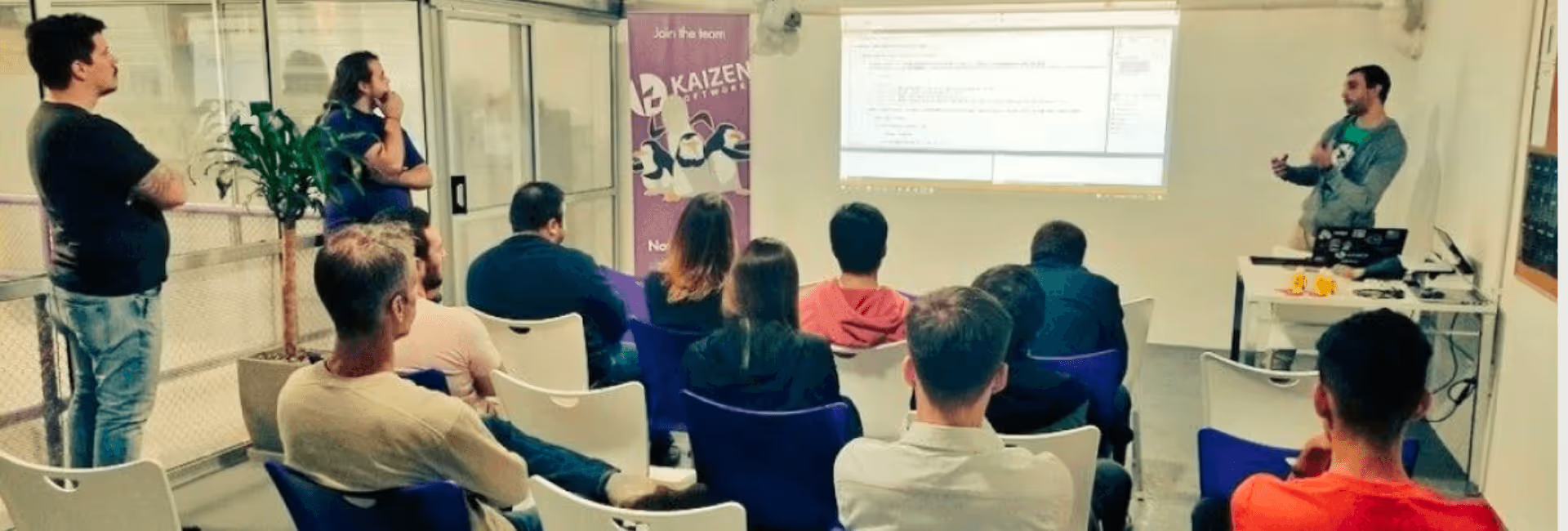
Technology

·
Apr 11, 2018
We needed push notifications with a .NET backend. This is how we set it up.
12 read time
At Kaizen Softworks, we are currently working on a site that uses Angular 2, .NET and Azure as main technologies.
In addition to this project, one of our partners was needing a mobile application that was going to use the same database as the web app. To facilitate communication between the backend and all of their applications, we needed a robust solution for sending notifications with concealed information to the mobile app.
After a thorough proof of concept, we decided to harness the capabilities of Firebase to bridge the gap between our backend and various applications.
Firebase serves as a Backend as a Service (BaaS) that simplifies the creation of a backend with minimal coding expertise. It offers seamless integration with various platforms, including iOS, Android, Unity, and C++.
Firebase's extensive range of services spans authentication, storage, real-time database, crash reports, and Firebase Cloud Messaging (FCM), which is instrumental for push notifications.
FCM gives us many advantages, here is the list of the most important:
Here's the FCM flow:
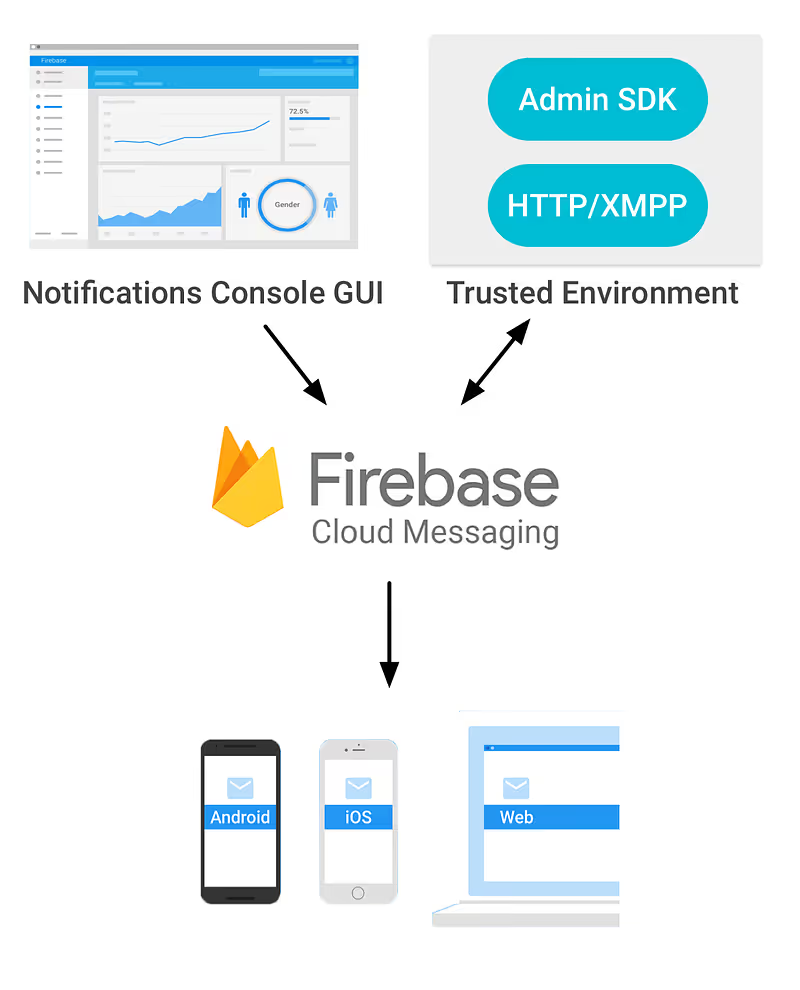
Now that the Firebase introduction is finished, it’s coding and configuring time.
To begin, create a Firebase Console project using your Google account. Once in the Firebase dashboard, select 'Add project'. Specify your project's name and region, and then click on 'Create project'.
Ok, you’re done! You have your project created, so now you are able to use all Firebase functionalities!
You must register each platform you intend to configure Firebase for. In this tutorial, we'll focus on configuring an Android project.
During app registration, you'll need to fill in the package name according to your app's specifications. Firebase's initial project already contains the package name, typically set as 'com.google.firebase.quickstart.fcm'. You can find these projects in the documentation samples section.
Following app registration, you'll need to download and add the 'google-services.json' file to your project. If you haven't already received it from Firebase, they will provide it.
Additionally, don't forget to add FCM dependencies, as they are essential for Firebase to function seamlessly within your app.
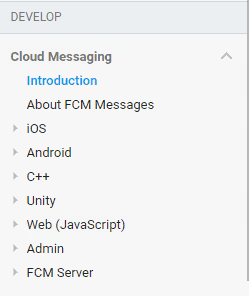
Well done, your client side is ready, if you want more information about client side configuration you can get it on the documentation guide for Android or for iOS or other platforms you will find on the side panel of the Cloud Messaging documentation page.
For each app-installation, Firebase is going to create a token that identifies it, so in case of sending a notification to that specific app-installation, you will need that token.
To learn about getting this token, please read 'Access the device registration token' part on the setting up section of the platform you want to configure Firebase to.
Well done, your client side is ready, if you want more information about client side configuration you can get it on the documentation guide for Android or for iOS or other platforms you will find on the side panel of the Cloud Messaging documentation page.
We can send push notifications without a fully configured backend, using the Firebase console.
To do this, navigate to your Firebase project, select 'Notifications' in the side panel, and click 'Send your first message'. This will take you to this configuration panel:
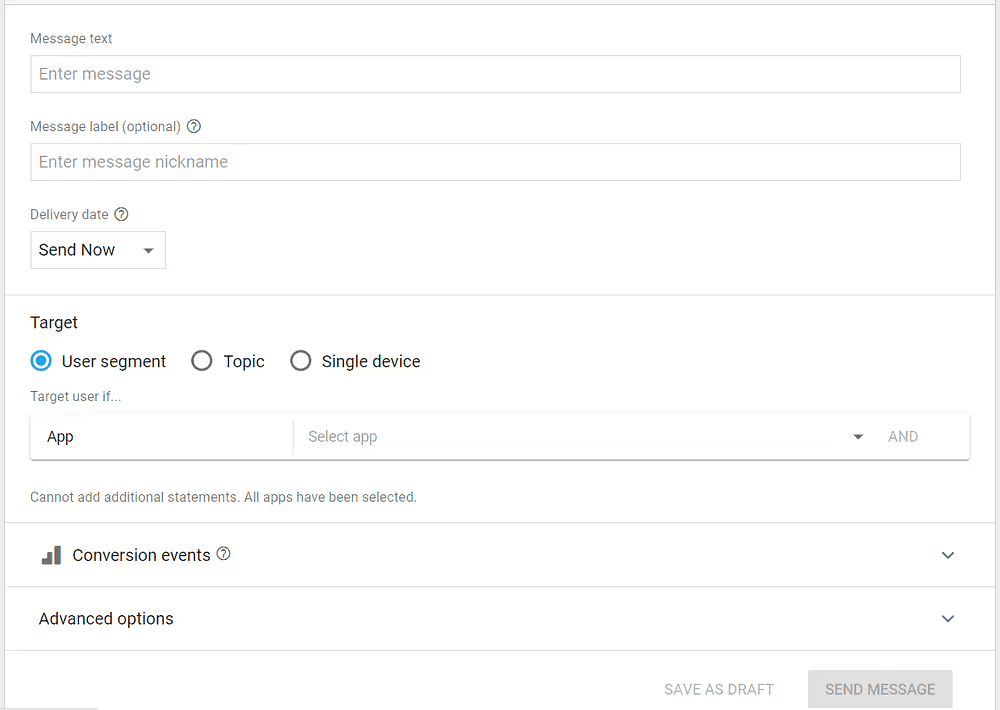
Here you'll need to provide the following details:
Once you've filled in these fields, click 'SEND MESSAGE'.
A pop-up will display, summarizing the key details of your notification. Click 'SEND', and your push notification is on its way!
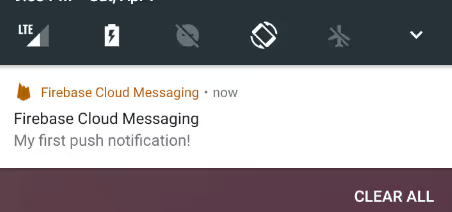
For this example, we'll use a .NET backend – a console project designed specifically for a .NET Meetup in Uruguay.
To access the Firebase API, you'll need critical information from Firebase, including the API URL (https://fcm.googleapis.com/fcm/send) and a unique server key that authenticates your Firebase project for security purposes.
To obtain the server key:
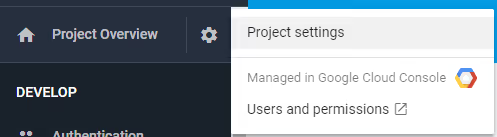
In addition to the API URL and server key, you'll require a method with specific parameters to communicate with the Firebase API. For this purpose, create a static class named "PushNotificationLogic.cs" containing the following method:

These parameters are:
For the method, I am going to suppose that all parameters are correct without bad values (you can add all the validations you want). The first thing we have to do is to create an object with all the data we need to send to the API, I created two classes for that:
public class Message
{
  public string[] registration_ids { get; set; }
  public Notification notification { get; set; }
  public object data { get; set; }
}
public class Notification
{
  public string title { get; set; }
  public string text { get; set; }
}
Then, just create a new object of type 'Message' and serialize it as I did it here:
var messageInformation = new Message()
{
  notification = new Notification()
  {
    title = title,
    text = body
  },
  data = data,
  registration_ids = deviceTokens
};
//Object to JSON STRUCTURE => using Newtonsoft.Json;
string jsonMessage = JsonConvert.SerializeObject(messageInformation);
Now we just need a request to Firebase API and we’re done.
The request has to be as a "Post" Method to the Firebase API-Url, we have to add a Header which is "Authorization" and use a value like: “key={YourServerKey}”.
Then we add the content (jsonMessage) and you are ready to hit the api.
Here it is the code you need to do the last part:
// Create request to Firebase API
var request = new HttpRequestMessage(HttpMethod.Post, FireBasePushNotificationsURL);
request.Headers.TryAddWithoutValidation(“Authorization”, “key=” + ServerKey);
request.Content = new StringContent(jsonMessage, Encoding.UTF8, “application/json”);
HttpResponseMessage result;
using (var client = new HttpClient())
{
  result = await client.SendAsync(request);
}
About Us
12 read time
In early March 2018, Kaizen Softworks achieved a remarkable milestone by securing a spot among the Top 30 Custom Software Development Companies in all of Latin America.
This prestigious recognition was announced by Clutch, a globally recognized B2B Ratings & Reviews company, in collaboration with the Embassy of Uruguay in the United States.

Clutch, a U.S.-based research company, plays a pivotal role in providing businesses with invaluable decision-making information, particularly when it comes to selecting a software services company.
They excel in delivering top-tier analytics that effectively organize data on software vendors, pinpointing trustworthy and experienced partners in the field. The result? Highly informative ratings of software companies, highlighting those who stand out in various categories.
With a vast pool of more than 7,000 companies under scrutiny, it's a remarkable achievement to secure a place in the Top 30 Custom Software Development firms ranking, and this success is entirely attributed to our valued customers.
Our Clutch profile goes the extra mile by showcasing candid client reviews in an interview format.
These reviews provide essential insights and firsthand experiences for anyone in search of a reliable and proficient software services company.
At Kaizen Softworks, our commitment to delivering exceptional software solutions is not just our mission; it's our track record, as endorsed by the voices of our satisfied clients.
No blogs matched this category, try applying different filters.
