



Generative UI: what it is, how it works, and when to use it
Generative UI lets AI build the screen each user needs, in real time. What it is, how it works, the trade-offs, and two working demos we built.

12 min read
Read more
Insights, stories, and experiments from our team.
AI
UX Design
Generative UI lets AI build the screen each user needs, in real time. What it is, how it works, the trade-offs, and two working demos we built.

Santiago Chiappa
·

Jul 17, 2026
·
12 min read
Generative UI is a full-stack architecture that lets AI create, modify, and render user interfaces in real time, based on what each user needs at that exact moment. Instead of static, predefined screens, the interface assembles itself on the fly: a bar chart, a table, a comparison card when you're comparing things.
We've been building proofs of concept with it for the past few weeks. Most of what's written about generative UI is either too abstract or too exciting, so this is our attempt at neither: what it is, how it works, where it helps, where it doesn't, and what we learned from two demos we built.
Generative UI is a full-stack architecture: the backend talks to the LLM, decides what the answer should look like, and picks the components, while the frontend renders them and handles how the user interacts with what’s on screen.
Compare that with how interfaces have always worked. A designer decides what goes on each screen, a developer builds it, and every user sees the same thing. Forever, or until the next redesign.
Generative UI flips that. The interface becomes dynamic and personal instead of static and universal. The AI doesn't just answer your question, it designs the screen that answers your question.
Dashboards and reporting are the most common use cases, but they're far from the only one. The same pattern works for dynamic forms, onboarding flows, and customer support, as it takes input just as easily as it presents output. It can even adjust font size, contrast, or layout for users with low vision, color blindness, or cognitive load.
There are three levels of generative UI, from most constrained to most open (Google Cloud, 2026):
Most production systems today use the declarative approach, and that's what this post assumes from here on. The AI isn't writing HTML or CSS freestyle. It selects components, fills in pre-designed widgets, and composes them into the right screen.
Generative UI works by turning a user request into structured data that describes an interface, then rendering that data as real components. The flow looks like this:
To the user, the result feels like magic. Behind the scenes, it's structured data flowing through a well-defined pipeline. We prefer the second description. It's the one you can build on.
Generative UI trades real personalization and faster development for added latency, inference costs, and less predictable layouts. That's the honest version. Here are the details.
None of these are dealbreakers. There are known techniques to mitigate each one.
We built two demos. One with fictional data, one on top of a tool we use every day.
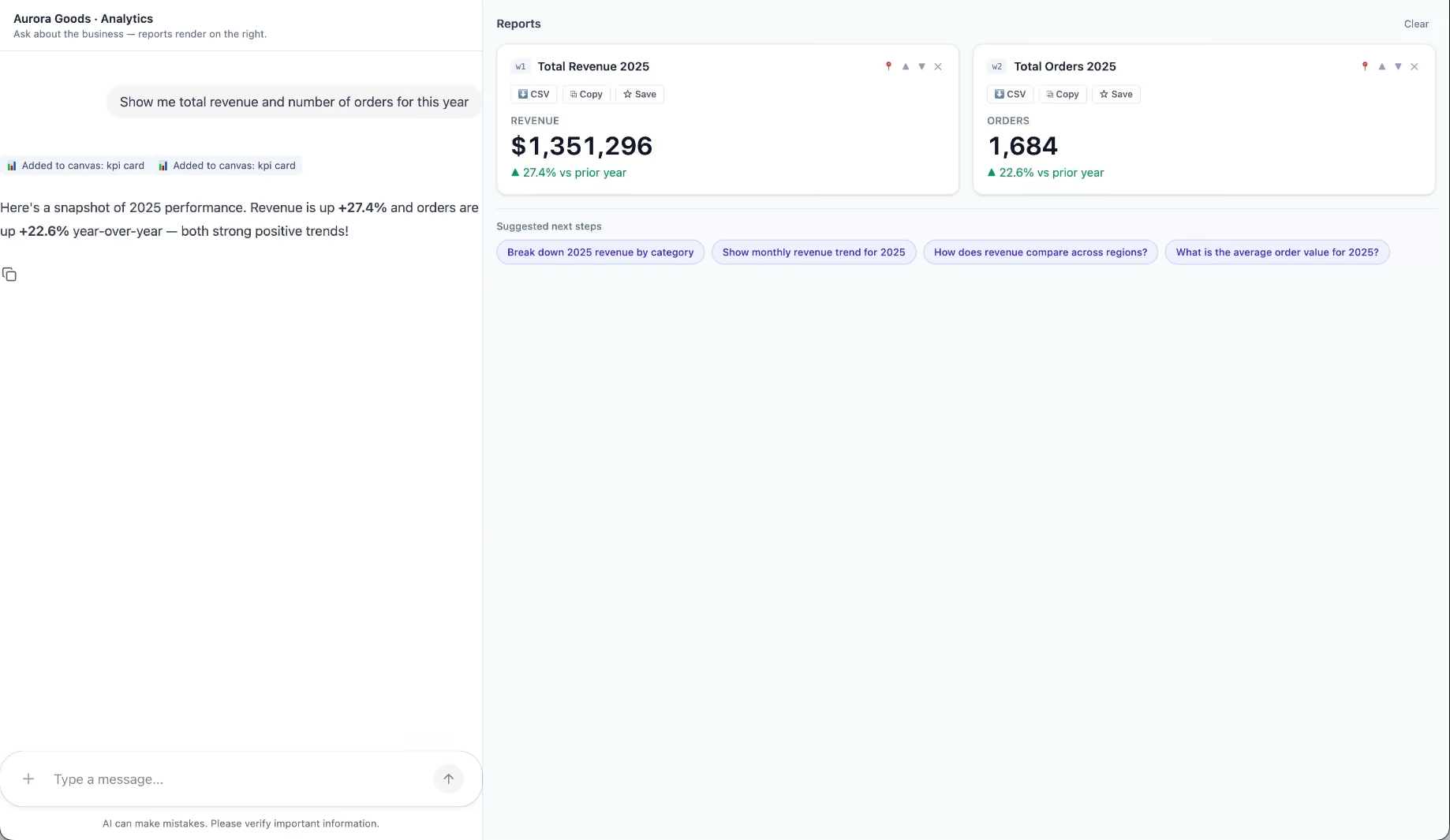
Aurora Goods is a fictional consumer e-commerce platform we created for the demo. The interface is simple: chat on the left, canvas on the right. You ask about the business, the LLM figures out what you need, pulls the data, and renders it visually.
Ask about 2025 sales and it shows the numbers on cards, with a short note on anything relevant. Ask it to break that down by region and it extends the same view instead of starting over, because it understands the second question builds on the first. This part took us a while to get right, and it's what makes the whole thing feel like a conversation rather than a search box.
The canvas isn't output-only either. You can click into any element and drill down: revenue by category, then inside electronics, then which products sold most.
You configure the widgets once. The system combines them and adds relevant commentary on the spot.
The second demo is closer to home: a generative reporting layer on top of the time-tracking tool we use every day at Kaizen. The questions in this demo are questions someone here has actually asked.
Instead of building dozens of hyper-specific reports, a small amount of code now handles virtually unlimited queries. How many hours were logged in May? Which anomalies showed up in April? How do billable and non-billable hours compare across two months? Who worked on a given project last month, and for how long? Each answer arrives as the right visualization: cards, lists, bar charts, plus a short summary that's easy to scan.
Two details won us over. The LLM suggests next steps, so exploring the data becomes a conversation. And when it's not sure, it asks instead of assuming. Ask for the hours of someone named Alex and, since we have more than one Alex on the team, it asks which one before answering.
Generative UI is a complement, not a replacement. Standard interfaces still win for stable, repetitive workflows where consistency matters. Nobody wants their checkout button to be creative. Generative UI wins where the workflow is complex and the questions are unpredictable.
It also changes what design systems are for. Beyond designing components and screens, teams will need to define semantic rules: how the AI should react to uncertainty, which interfaces match which intentions, and the guardrails that keep generated screens functional and safe.
That's a new kind of design work. And it's already starting.
We build working proofs of concept in two weeks. Your data, your workflows, a real thing you can click.
Generative UI lets AI build the screen each user needs, in real time. What it is, how it works, the trade-offs, and two working demos we built.
12 min read

Business
Startups
Technology

·
Dec 20, 2022
Not every project goes as planned. This one didn’t, but it led to something better.
12 read time
We believe in doing things the right way, and we want to make sure our partners know that. That's why we live and breathe transparency as one of our main corporate values – even if it means saying no to opportunities.
In this post, we will present you with a Product Discovery case with a pretty unusual outcome. Keep reading to find out why we lost a project but ended up gaining a friend.
UGallery is an eCommerce platform founded in 2006, that connects artists directly with collectors on its website. Headquartered in San Francisco, CA, UGallery positions itself as an approachable and convenient alternative to the brick-and-mortar contemporary art gallery.
This platform allows artists to submit their artwork, and after a strict admission process carried out by the UGallery team, the artwork gets published in their e-commerce platform allowing people from all over the world to buy fine art.

When UGallery first approached us, they were looking to improve their eCommerce platform but had the challenge of taking care of their profitability too, as each enhancement or modification to the platform implied the concentration of large resources (time and money), making it difficult to accurately estimate plans for the future.
Faced with this challenge, UGallery was concerned about their current development velocity, processes, forecasting abilities and robustness of their product. They thought that the solution would come by approaching a recommended software partner who is familiar and experienced with the technologies that compose their systems.
Our team investigated the root of their problem and we sought to understand whether the approach they considered the most appropriate was actually the most suitable solution based on the problem. Therefore, we investigated the history of UGallery and inquired about the specific pains they were experiencing.
Following a technical deep dive, we conclude that their productivity problems and system weaknesses could not be avoided just by partnering with someone experienced in their tech stack. Their codebase reflected over 2 decades of development with many code smells, moreover some technologies were already obsolete.
Despite our willingness to help, we knew that taking over the development of this platform would not change the experiences they were having. As tech debt grows, predictability, quality and velocity are taxed. When it is not properly managed, the expected return on investment for each development initiative decreases because the cost of maintenance gets higher. Hidden costs emerge, and the system becomes fragile.
After this analysis, we saw no real gain in transferring software development to us. Moreover, the learning curve costs of getting up to speed with non-standard development practices, and getting up to date with outdated technologies would be too high. And, in order to solve technical debt problems in an efficient way they would have to invest in rebuilding the software from scratch, since the cost of paying off tech debt within the current system was higher than rewriting the system.
As a result of this first consultation, UGallery could have a better picture of what was the root of their problem, and they decided not to proceed with the migration at that time, because they were not prepared money-wise.
A year later, UGallery returned to us with the idea of building a software from scratch as a solution to its problems of technical debt and platform scalability.
In order to successfully address their challenge, we stated that it was necessary to take a few steps back from the solution and understand whether a rewriting of Ugallery’s platform could solve the problems they were encountering or not. In other words, before putting hands on the rewriting, it was essential to understand what changes needed to be made and why.
Given this, our team understood that there were three possible solutions and divided the research tasks into the following lines:
After investing over a month of work on identifying the scope of the project and working on a proof of concept, we found there was a high percentage of Feature Parity with a pre-built solution.
So, the best option for this client was to apply a pre-built solution, covering almost everything of what UGallery needed, instead of a custom software development solution.
This provided the client with a number of advantages:
Faced with this situation, our team had to discuss what we were going to do, since this result could imply not selling our services. We met internally and decided to give the customer a demo of the research findings to understand whether or not the customer would go ahead with this solution.
This was a tough decision and was very strongly debated. But it was also a values-based decision—we didn't want UGallery to spend the time and money it takes to build a custom solution when there are already tested SaaS solutions available that could do the work.
Here’s what Alex Farkas, founder of UGallery said about us:
“I would like to share a few words of genuine praise for Kaizen. Since launching our online art gallery in 2006, we’ve worked with seven dev shops in four countries. We’ve had mostly positive experiences, however, these external teams generally focused on individual tasks and features.
Big picture planning and particularly cost/benefit analysis of our projects wasn’t usually considered, and my partners and I became accustomed to this. Then we met the Kaizen team. We approached them because our codebase was old and becoming difficult to debug and add new features. Kaizen did a very deep study of both our business model and code and came up with several ideas for moving into the future. They listened to our needs and understood the big picture.
Here’s the most amazing part - in the course of their research, they determined that our best course of action was a SaaS solution that they didn’t offer. And they were right. Choosing this path has saved us considerable time and money. Instead of trying to sell us on something they could do, they gave us expert advice. In all of my years in business, this is one of the most memorable experiences of integrity and technical know-how. We were first referred to Kaizen by an acquaintance who spoke very highly of their team. And now I am happy to pass on the referral. This is how business should be done”.
We can finally say that we've made our contribution to UGallery. Through our Product Discovery process, we provided quality information to determine which solution best served our partner's needs, in terms of efficiency and profitability—and that's what really matters. It's not about closing deals; it’s about building trust and putting the interests of our clients before those of our company to provide differential value.
This serves as an example of why we believe in doing things the right way. We are committed to building long-term relationships with our partners, through an honest and trusting approach. It's also why we value transparency and open communication, so we can make sure both parties are on the same page and no one feels misled or taken advantage of during their project's lifecycle!
What we learned from this experience? That there is a lot more than just the technical stuff behind collaboration and innovation. It’s about understanding each other's needs and goals, being open-minded and flexible when it comes to solutions, respecting people's time, being honest when you don't know something or being humble enough to say “we’re not the right partner for your needs” … in short: being human!

About Us
·
Oct 27, 2022
12 read time
We've been working in offices for a significant amount of time, and throughout the years, we've come to understand that there is no one-size-fits-all approach to creating the perfect workspace. So, when we embarked on the journey of establishing our brand-new commercial office in the vibrant city of Salt Lake City, we decided to break away from conventional norms.
At our Salt Lake City office, we've blended the benefits of an open workspace with the convenience of private offices, offering our team members the best of both worlds. This unique approach has transformed our office into a dynamic and versatile environment, catering to the diverse needs of our team. Whether it's a collaborative project that calls for an open setting or a task requiring focus and privacy, we've got it all covered.
Our office space is part of a global network of workspaces, providing us with the advantages of an open layout without compromising on privacy and productivity. This integration into a larger workspace community has not only enhanced our professional network but also offered us the opportunity to connect with a myriad of talented individuals from various industries.
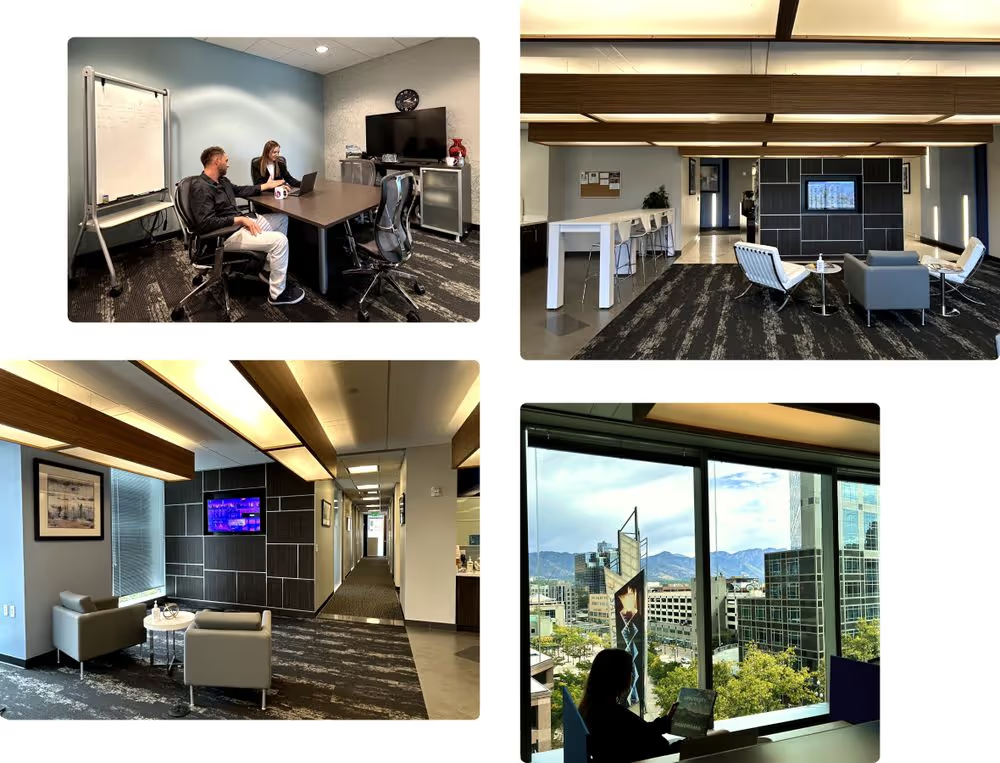
During our recent visit to the Salt Lake City office from September 24th to October 1st, Daniel Castro and I had the pleasure of experiencing our office space firsthand. It was clear that the office was thoughtfully designed to meet the diverse needs of our team members and facilitate productivity.
The office is equipped with ergonomic furniture, ensuring that every member can work comfortably and efficiently. We understand that a well-designed workspace can have a significant impact on our team's well-being and productivity, and that's why we've invested in creating a space that prioritizes their comfort.
Additionally, the availability of meeting rooms provides a conducive environment for brainstorming sessions, team meetings, and client presentations. These dedicated spaces are designed to enhance collaboration and communication, making it easier for our team to work together seamlessly.
Our Salt Lake City office is strategically located on Main Street, Downtown. This vibrant area provides not only easy accessibility but also inspiring views of the majestic Wasatch mountains. The stunning backdrop of natural beauty is a constant reminder of the importance of balance and the harmony that can be achieved in both work and life.
We invite you to stay tuned as we share more about our Salt Lake City workspace and the unique experiences of our team members within this dynamic environment. Our commitment to innovation extends beyond our projects, and it's reflected in every aspect of our work, including the spaces in which we operate. So, whether you're a part of our team or a visitor, we look forward to sharing the Kaizen experience with you in Salt Lake City.

Events
Startups
·
Oct 20, 2022
We spent some time at Silicon Slopes Summit. Here are a few things that stood out.
12 read time
Silicon Slopes Summit is one of the largest and most recognized business and technology events in the world. As every year, the sixth edition took place in Salt Lake City, Utah, being celebrated for the first time at the Vivint Arena.
Bruno Bologna, our CEO, Daniel Castro and Valentina Ibinete from our Business Development team, participated in the event alongside Alex Charpentier, Director of ROAM Social, one of Kaizen’s partners based in Tacoma, Washington State.
We’d like to share our impressions about the Summit with you! Spoiler alert: if you're in Utah, don't miss it next year!
The tech community in Utah is thriving, and it's not just because of all the startups that are popping up. It's because of events like Silicon Slopes Summit, where people from all over the world come together to learn about new technologies and best practices, and do networking that will help them empower their businesses.
This event has become an annual tradition for entrepreneurs, founders, tech executives—and even aspiring founders with a burning startup idea! It's also the place to be if you're looking for some big announcements from major companies in Utah's tech ecosystem. There's no better way to get plugged into what's going on in Utah than by attending this summit!
As I walked through the doors of this year's tech conference, I encountered booths staffed by companies from all over the globe, eager to show off what they've got and meet new people. And you'll get to do it all while sipping on complimentary drinks, eating delicious food, and listening to some of the biggest names in tech.
This year's speakers hailed from Utah's own rich and diverse tech community and included big names like Allison Abraham, Chairwoman and Director of Overstock; Aaron Skonnard, Co-Founder and CEO of Pluralsight; Richard Williams, President of Utah Tech University; Dave Wright, Co-Founder and CEO of Pattern, among many more!

This year the Summit scaled down its agenda featuring +20 sessions in only 4 tracks: Community, Ethos, Future and Growth.
“We’ve done this a million different ways…”, says Clint Betts, CEO and Co-founder of Silicon Slopes. “The first year we maybe had five or six tracks…the second year, seven. One year I had twelve. What we've learned over the years is like what the community wants more condensed programming. So this year we are doing only four tracks.” 1
Community it’s a hot topic right now, and it’s easy to see why: it can be a powerful force for good and it can bring people together in ways that are truly transformative. The sessions were about how to harness that power and influence your company at the grassroots level. To be clear, we're not talking about just any old community—we're talking about an intentional one. A community that's organized to make something happen. A community that's organized to create change.
Do you ever wonder why you're doing what you're doing? What drives you to achieve your goals? How can you become a better leader, mentor, and person? These sessions were about principles.
Principles are the foundation of your business, and when you're building a house, you need a solid foundation. You can't build a house if the foundation is weak—it'll fall over. And just like houses, businesses need to have strong foundations in order to succeed.
That's why it's so important to understand your principles: they're what hold everything together. They're what keep you grounded when things get tough and help you stay focused on what matters most to you and your business.
We’re in an age where new technologies like AI, cryptocurrencies, NFTs, decentralized autonomous organizations, are emerging every day making an impact on our community from several industries.
The sessions went around how these technologies are helping us imagine new ways of doing business and even changing how we think about ownership. They move us away from centralized systems that don't take into account the needs of people or nature and toward decentralized systems that do. They also move us away from a world where profit is king and toward one where people come first.
Growth is the mecca for any business but it can be a tricky thing. When your company is doing well, you want to make sure it keeps doing well by making smart decisions about how to grow and maintain growth in a sustainable way. This can be difficult, however—it's easy to get caught up in the excitement of having new customers or more revenue than last year, but if you don't have strategies in place ahead of time, then your growth might not last long enough for you to reap all of its benefits.

On this track, the sessions dive into what it means to scale and how this affects business's culture, finances, and marketing strategy as well as how these things impact each other over time as the business continue expanding into new markets or hiring staff members.
It was a great honor to play a part in the Silicon Slopes Summit 2022. It was fun to tour together through conferences, breakout sessions, and networking opportunities with the Utah tech community. It's not every day that you get to share with over 20,000 people in the fields of entrepreneurship, technology, marketing, product design, and sales.
But on a more personal level, I certainly hope that our efforts (and those of the other creative folks working on this event) pay off, and that this becomes an annual event that helps us connect with future partners and friends.
The Silicon Slopes community is an amazingly supportive one. It's also one of the most diverse communities in Utah, attracting attendees from a variety of industries—not just tech. If you haven't yet, definitely consider checking it out! My advice? If you're in Utah, don't miss it next year.
Related read: [“Silicon Slopes: the tech hub for entrepreneurs you need to know about”]
References:
Events
Startups
12 read time
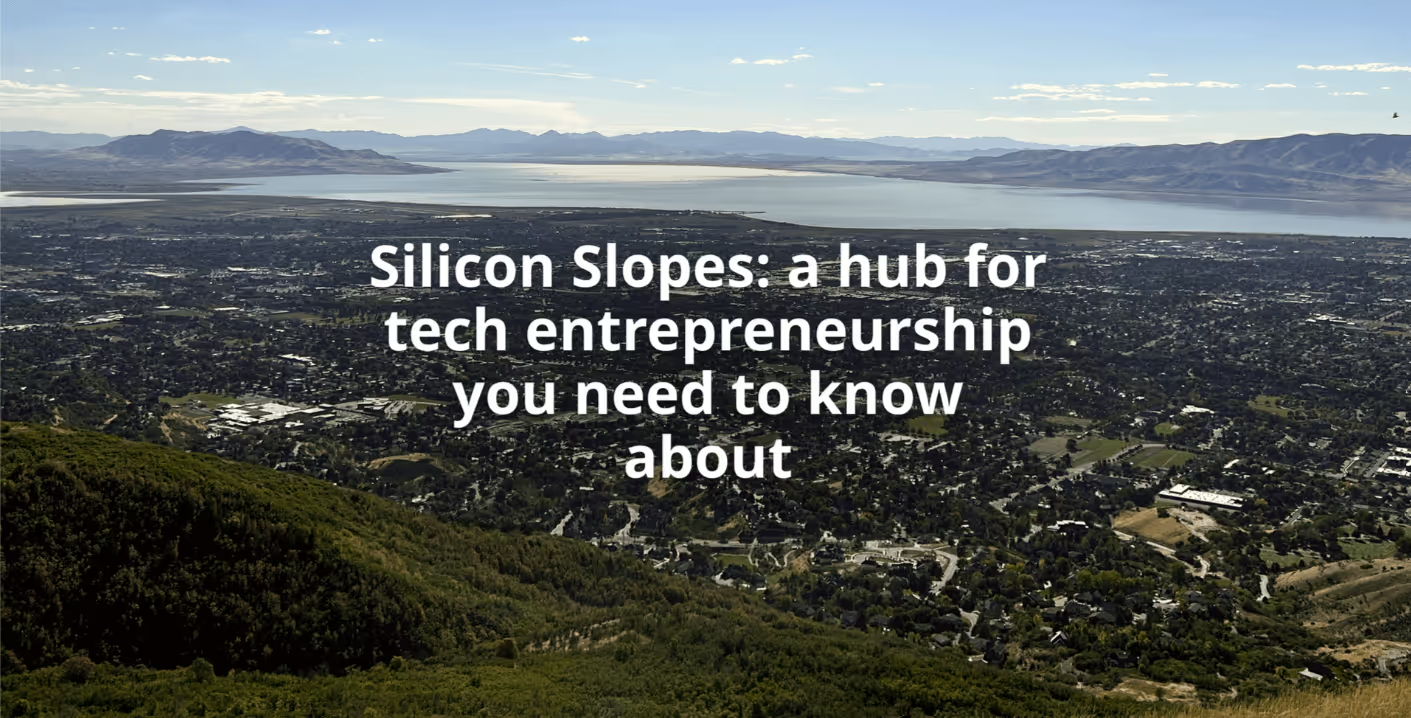
Utah is not just known for their snowboarding and Mormon lifestyle. Technology and entrepreneurship are booming in the State, especially in the area known as Silicon Slopes.
This area that goes from Salt Lake City to Provo has become one of the most diverse tech hubs in the U.S. The nickname combines the region’s tie to technology and Silicon Valley, with the mountains found all over the place.
The area also has a long history of entrepreneurship and is home to a well-known cluster of IT, software development and hardware manufacturing tech companies such as Adobe, Ancestry.com, SanDisk, Overstock, Vivint, eBay, and more.
From September 24th to October 1st, Daniel Castro and myself visited Silicon Slopes, with the aim of getting to know better the Utah entrepreneurial ecosystem on-site.
Keep reading if you’re interested in our top three impressions of this booming technological hub.
Utah is a state known for many things: its beautiful scenery, its large Mormon population, and skiing facilities. But what you may not know is that Utah has a rich history of tech innovation that goes back well before the days of Facebook and Google.
The state is home to some of the most impressive technological achievements in history, including the first electronic television transmission in 1927, which was operated by Philo Farnsworth—a man who also invented the first all-electronic TV set.
Utah is also home to the spawning of Atari, which we all know and love for its retro gaming systems (and modern ones too). Nolan Bushnell, the company’s iconic founder, was born in Clearfield, Utah, and studied at The University of Utah before moving to Sunnyvale, California and founding Atari.
The state has also been home to a number of early tech companies and founders that have had an impact on the technology industry as a whole and attracted more businesses to the area such as:
The first wave of the tech scene in Utah began in 1979 when two companies, WordPerfect and Novell, were founded. Novell was a software development company that produced programs to network computers together so they could share peripheral devices like printers and hard drives. As desktop computers became more affordable, Novell captured a large segment of the market with its NetWare program. At their height in the early 1990s, Novell controlled 65% of the market for network operating systems in the high-tech industry.
A second wave of tech companies came along in the 1990s with the founding of Omniture by Josh James and Jeff Taylor. During that same period, Utah became known on the world stage after hosting the 2002 Winter Olympics—and it's been riding that wave ever since! The 2009 acquisition of Omniture by Adobe for $1.8 billion led Adobe to establish a permanent presence in Utah.
In more recent years, Utah has spawned a number of unicorns. From SaaS unicorns like Route (which made Forbes’ 2021 list of Next Billion-Dollar Startups) to e-commerce giants like Overstock, dozens of tech influencers are either headquartered or have satellite offices in Silicon Slopes.
Many companies take advantage of Utah’s pro-business climate and Silicon Slopes’ innovative culture include:

One of the most interesting aspects about this new hub is its diversity. The area has welcomed a diverse group of people and companies to its laid-back, welcoming vibe—and they've responded in kind. Young families are flocking here to find affordable housing, good public schools, and the ability to build their own small businesses or work for larger ones.
Utah has a lot going for it when it comes to creating a thriving business ecosystem: a streamlined tax code; tax incentives; an educated workforce; and a strong emphasis on entrepreneurship and innovation.
But there’s more than just business happening in the area. Silicon Slopes has also made tremendous progress toward becoming more open to entrepreneurs of every background—particularly underrepresented minorities such as women—, and seeks to take a leading role in the region’s diversity, equity, and inclusion initiatives.
Diversity isn't just an issue of recruitment, it's an issue of culture. Companies at Silicon Slopes are making an effort not just to look for more diverse employees; they're looking for highly talented people who can help them reshape the culture. And this means every person at every level of a company—from the boardroom to the mail room—has a responsibility to make things better by being themselves and speaking up when they see something that needs changing.
After all, diversity is more than just a buzzword—it's a catalyst for innovation!
Silicon Slopes is not just a bunch of tech companies. They're a community.
The area has retained its small-town community feeling while still being a hub for growth. Something that we particularly notice when talking to different partners and companies, is the commitment and contribution to the local community:
One of the best things about the tech scene in Silicon Slopes is that there are plenty of events for startups, like Silicon Slopes Summit and Pitch Competition that are a great way for entrepreneurs to bring new ideas in an ever-changing business environment. I recommend attending to as many of these as you can, especially when you’re first getting started. New businesses face different challenges and through these platforms you can share your ideas, learn and grow through top business leaders too. When you’re passionate about what you do, it’s clever to feed off of the energy of other people.
And best of all, you learn more from other innovators. The collaboration and information exchange eliminates the feelings of isolation that a lot of startup founders feel. This is a concept known as "connecting with your tribe," and it’s something that more entrepreneurs need to embrace.
Whether you want to start a business in tech or anything else for that matter, making a name for yourself means that networking is the key to success. Instead of focusing on how many people there are in the same field as you (which can be very discouraging) try looking at how many successful entrepreneurs there are who have found success in their field.
It seems like everyone here has a vested interest in making sure people and businesses grow—and why wouldn't they? It's not only good for morale (which means more productivity), but it also makes a sense of belonging to the community stronger.
Silicon Slopes serves as an interesting example of a tech cluster that is growing in size, scope and influence. It has already seen great change, and there is a lot more to come in the coming years, becoming one of the most prevalent startup hubs in the country with its innovative tech companies.
While still most well-known for their ties to the larger Valley, it is their own growing community that should inspire us all. It seems to be a region where people love living in, and they support and celebrate the vibrant business community that contributes to it.
This shows how a group of like-minded people can push into the future together and form a new hub of technology. Silicon Slopes is an exciting place in Utah and in tech, period.
Related Read: [Inside Silicon Slopes Summit: A Leading Business and Technology Event]
Events
UX Design
·
Aug 16, 2022
This is where our Design Thinking journey actually started.
12 read time
Given the high competition in the market, companies need to develop products or provide services with an agile innovation component, delivering differential value to users. Thus, numerous methodologies and processes have proliferated in order to achieve this goal. Among them, in this article, we would like to talk about how Design Thinking contributes to adding value.
At Kaizen, we believe that innovation is achieved through collaboration. For this reason, we decided to implement our inaugural Design Thinking Workshop at Kaizen.
The workshop objectives were to create a space for our collaborators for reflection and dialogue as a team, and to learn a creative problem solving approach applicable to their own areas of work.
Carried out by Pablo Manzoni, leader of the UI/UX Design team, the 7-hour workshop was attended by 20 Kaizen’s members from different departments such as design, software development, sales and marketing.
Useful concepts of Design Thinking were covered and participants were able to understand how this process can be applied to their own challenges. We are glad to share with you some useful insights. Enjoy!
Design Thinking is a creative thinking process to design innovative solutions to complex problems, through a user centric mindset. The focus is on understanding the user and discovering their unmet needs to create solutions that matter.
Although it was born in the world of design, today its application goes beyond the creation of products, and can also be applied to all business areas.
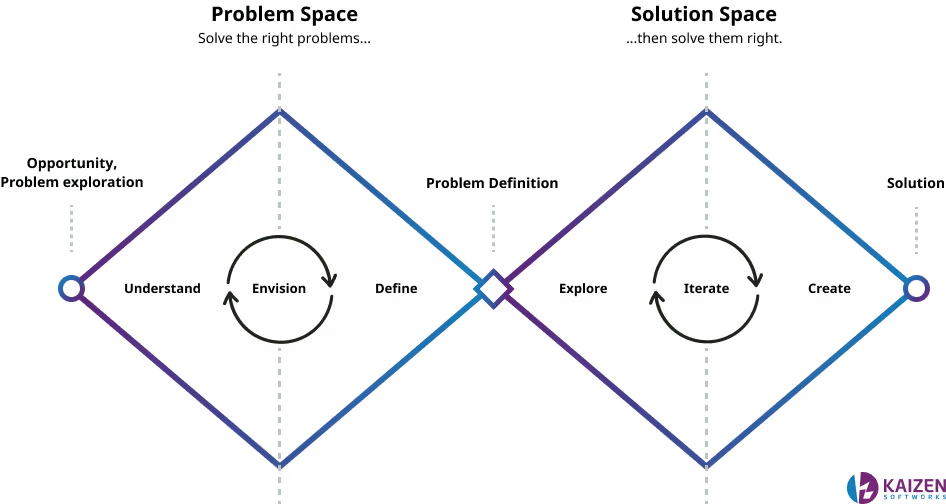
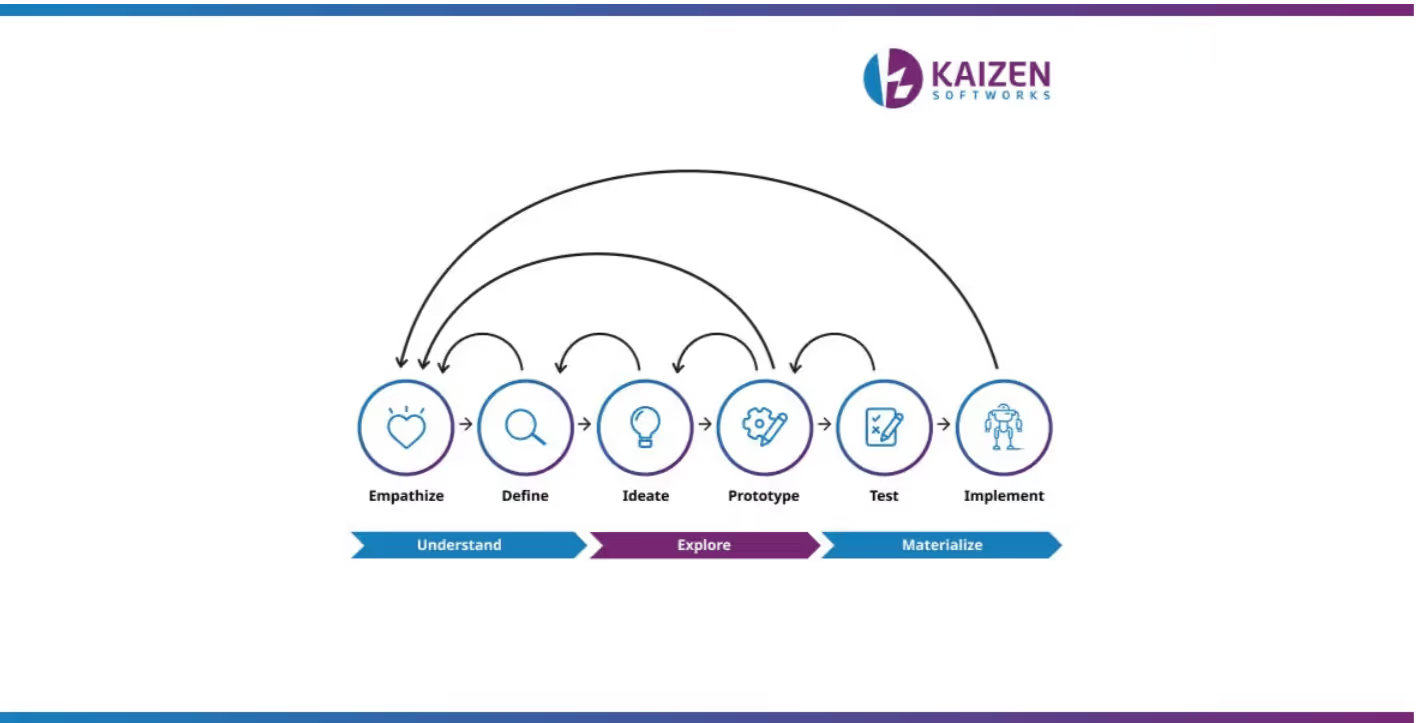
Design Thinking is a nonlinear iterative process, whose stages overlap and are not necessarily strictly sequential. It is somewhat of an “experimental” methodology, in the sense that you shouldn't be afraid to try out new ideas, tools, or processes, especially early in the flow.
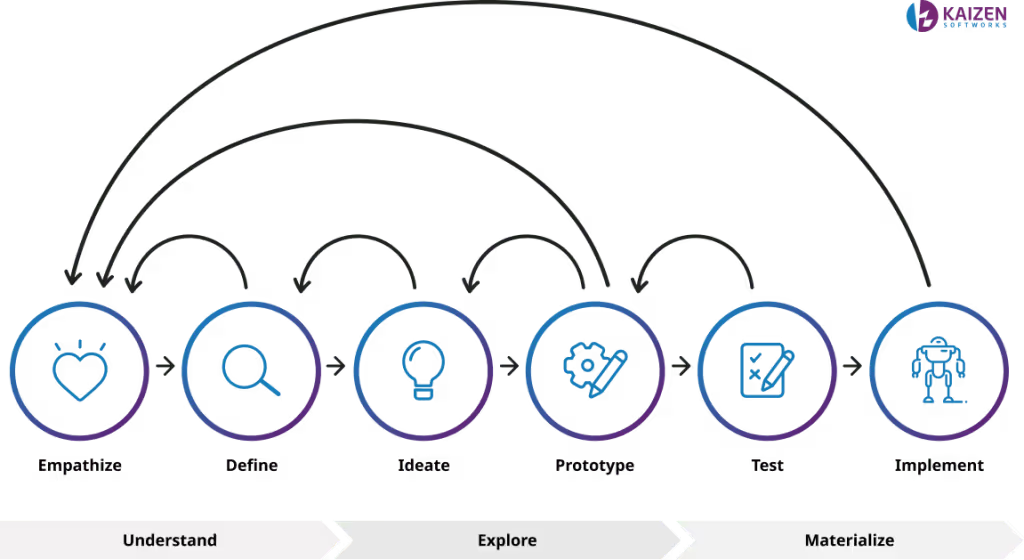
Key question: are users' needs and wants understood and considered?
Through deep user research and data analysis, Design Thinking focuses on deeply understanding user needs and wants. Its goal is to put assumptions aside and get insights from real user experiences to discover their problems, motivations, and understand current user behavior.
At the end of this stage, a lot of useful information is obtained, which will help guide the next steps.
Key question: is the problem properly defined?
Based on the analysis of the observations and the information collected in the previous stage, irrelevant aspects should be eliminated and connections should be made, to define problems and core needs.
The main objective is to define a key problem statement to address.
It is important to maintain a human-centered approach, and try to develop a “point of view” that is as aligned as possible with the needs and motivations of the target users.
Key question: what are the possible solutions to the defined problem?
Now that problems and challenges have been identified, it is time to start thinking about potential solutions that will solve the defined problem statement.
This phase represents the transition from problem identification to solution creation. The goal is to let creativity flow and discuss as a team the risks and benefits of each potential solution.
Key question: does the solution meet the real needs of users in an innovative way?
In this experimental stage the objective is to select the best idea, which will work as a solution for the defined problem.
After the ideas have been selected, prototypes are made. Each prototype is then tested to see if they are valid solutions to the defined problem. This stage is faithfully experimental and iterative, since the ideas are put to the test, accepting, rejecting or modifying them to be put to the test again.
Key question: which solution better addresses the defined problem?
To mitigate the risks of relying on assumptions, prototypes are continuously tested and evaluated to identify the best solution for the defined problem statement.
Through a user centered approach, usability tests are carried out to collect feedback from real users. These discoveries are used to identify improvements and refine the problems to be solved.
Because the process is iterative, results are constantly analyzed by doing more iterations to finally define the final solution that best meets the needs and motivations of the users.
This stage is essential as it saves production time and prevents loss of commercial value.
Key question: is it feasible?
In this stage the solution finally becomes real and is launched and tested in the real market. Many designs will never reach this stage. While the design may be wonderful, it may not meet the user's needs as expected. Going back to the ideation stage to rework ideas and improve them is also a valid stage of the process.
Since the process is not linear, it is essential to take in what is learned throughout the process and continue iterating to add improvements.
The challenge was successfully met: we managed to understand the essence of Design Thinking, which is a mindset change towards innovative solutions of complex problems, in different contexts beyond design.
Through success stories and different practical workshop activities, participants worked as a team and discovered the potential of this process for our daily challenges in our respective areas of the company.
Thanks to Pablo Manzoni for creating a space to teach other members of the Kaizen team, offering the opportunity to learn new knowledge and skills in pursuit of continuous improvement.
Until the next Design Thinking Workshop!
About Us
·
Jul 6, 2022
98% of our team said they’re happy working here. This is what that actually looks like behind the scenes.
12 read time
We are happy to be recognized as a Great Place to Work!
Furthermore, we are delighted to receive recognition as a Great Place to Work! The Certification™ by Great Place to Work® is a program that acknowledges and evaluates the quality of an organization's culture.
The Certification Program, based on 30 years of research, quantifies the organizational culture and compares it to The Best Places to Work.
What's truly remarkable is that a staggering 98% of our Kaizen team members wholeheartedly agree that we indeed are a Great Place to Work. This affirmation results from implementing a comprehensive labor climate survey, known as the Trust Index©
The Trust Index is made up of 60 statements that analyzes the perception of employees about what they experience in their workplace through behaviors related to Trust.
We organize these statements into 5 dimensions:
To obtain the Certification™, the survey data must meet the minimum requirement of 90% statistical confidence with a maximum margin of error of 10.5%.
Below, let's look at some of the most distinguished results based on the survey.

The survey's outcomes have provided us with valuable insights, highlighting both our areas of strength and those that require enhancement. We found participating in this assessment process incredibly enriching!
We are profoundly grateful to every team member who openly and honestly shared their feedback, thereby contributing to our collective success in making Kaizen a resounding Great Place to Work!
At Kaizen, our belief in the importance of transparency, collaboration, and commitment is unwavering. We invite you to explore more about our values, our exciting success stories, and join us on our thrilling journey.
Discover how at Kaizen Softworks, we not only craft high-quality software but also build strong relationships and an exceptional work environment.
Your journey to an exceptional workplace begins here.

Business
·
Jul 1, 2022
Uruguay didn’t become a tech hub overnight. These are some of the factors that made it happen.
12 read time
When people talk about the software and IT industry in Uruguay, the country is well known as the “Silicon Valley of South America”. Its fast-paced innovation environment and skilled workforce makes Uruguay a high-quality technology exporter and one of the most prominent technology markets in Latin America.
Because of the rapid growth of the software industry in the country, major U.S. software and IT firms have been established over the past decade. Companies like IBM, Microsoft, Oracle, Netflix, Cognizant, NetSuite, and VeriFone, among others, have set foot in Uruguay and hire Uruguayan talents.
According to experts of the Uruguayan Chamber of Technology (CUTI), this number will continue to increase over the next 5 years. So, you might be wondering how can such a small country of only 3 million people could achieve such a feat?
Below , we will tell you 5 reasons Uruguay has converted into an IT Hub in Latin America.
Uruguay is the second digitally-ready country in Latin America after Chile, according to the Cisco Global Digital Readiness Index. The report aims to measure the level of digitization that is needed to achieve competitive advantage and boost economic growth.
Uruguay has a robust Internet penetration rate of 83.4%, and one of the fastest download speeds in Latin America, ranging from 30 to 120 Mbps. 1 Almost all homes and businesses have access to high-speed Internet connections, of which 75% have fiber optic access. The state-owned telecommunications company, Antel, plans to provide full coverage of the country's fiber optic network by the end of 2022. 2 Isn’t it great for companies and even families at home, to know that they have one of the fastest speeds in the continent?
Also, Uruguay is the leading country in the region in terms of 4G-LTE mobile communications, with a 63.3% penetration rate, and one of the first countries to launch a 5G commercial mobile network (#1 in LATAM and #3 in the world).3
In addition, it is the number one country to adopt the IPv6 protocol in Latin America and #8 in the world, according to the Google IPv6 country ranking. Moreover, it has one of the best Data Centers in Latin America with several underwater connection systems to numerous countries such as the U.S, Brazil and Argentina.
In 2021, Google announced the construction of a Data Center near Montevideo (the capital city of Uruguay), its second in Latin America. Google stated that the investment:
“(...) reinforces Google's commitment to Uruguay and Latin America and to the development of the local technological ecosystem”. 4
Uruguay is a member of Digital Nations, a collaborative forum of the world’s most advanced digital governments that aim to use technology to improve citizens services. Currently, the forum has 10 members, such as Canada, Israel, Denmark and New Zealand, who promote digital inclusion and accessibility, open government, digital citizenship, among others.
Uruguay ranks #1 country in terms of e-governance in Latin America, according to the United Nations.
The various characteristics of Uruguay's business climate and technological advancements make it an ideal location for global service providers.
In order to drive sustainable technological growth, Uruguay’s main investment was, and still is, its people. The country is committed to ensuring that everyone has access to high-quality education and promoting digital inclusion.
The public education system in Uruguay is recognized as one of the best in Latin America, with the highest population literacy rate of 99%. 5
Uruguay was also the first country in the world to provide a laptop computer to every public primary and secondary school student and teacher.
The One Laptop Per Child government program (nationally known as ‘Plan Ceibal’), which was launched in 2007, has promoted the country’s digital literacy rate bridging the gap between the poorest and richest households.
High school students can also take advantage of several tech public programs that are available through the University of Work (UTU), such as Networks and Softwares, Telecommunications or Networks and Optical Communications. This way, students are then familiarized with IT jobs and educational opportunities they can choose to pursue when they finish high school.
Uruguay’s state University, University of the Republic (UdelaR), is known for its high quality education. It has been consistently ranked among the best universities in Latin America, ranking #1 in the country and #21 in the region, according to a survey conducted by the U.S. World News & Report. 6

For those who are interested in computing, the University offers a variety of programs, including a three-year degree in Computing or a four-year bachelor’s degree in computing engineering. UdelaR also offers masters in: Software Engineering, Computing Engineering, Electric Engineering, and Computing.
In addition, private universities are also shining in the software and IT field. They are hiring more experts and providing internships to some of the most prominent tech companies. This is the case of ORT University, which offers a wide range of degrees in technology such as video games design, animation and art.
The wide range of courses Uruguay has to offer, makes following an IT career more tempting and easy to achieve.
Uruguay is a strong software export country. It is the largest software exporter in Latin America and the third largest in the world.
According to the Financial Times:
“More than 1,000 software development companies now operate in the nation of 3.4m people, generating almost $1bn in exports — mostly to the U.S. That makes it one of the world’s leading software exporters in per capita terms”. 7
The U.S. is Uruguay's largest export market, accounting for 65% of the country's tech revenue. Uruguay is getting the recognition of the “Silicon Valley of South America”, thanks to the investments made to develop its tech industry and the country's relationship-building efforts with the U.S, through its investment promotion agency, Uruguay XXI.
Uruguay XXI, has been strongly marketing the country's tech companies in the U.S. It has also been able to establish a variety of platforms for its companies, such as the country's own country pavilion at the annual tech conference in Silicon Valley, known as TechCrunch Disrupt.
For the second year in a row, in 2021, the Bank of the Oriental Republic of Uruguay (BROU) has recognized our company, Kaizen Softworks, as the country's Largest Exporter of Information and Communications Technology (ICT) services.
Uruguay is an innovation and entrepreneurial hub. Especially the capital, Montevideo, where the startup scene is promising due to its technological achievements. From the first pacemaker to the development of a mammography exam, the country has been able to create some truly remarkable innovations.
U.S. venture capital firms have also been instrumental in helping build the local tech market in Uruguay. Companies like IBM, Microsoft, Oracle, Netflix and Cognizant, have established operations in Uruguay, hiring local talents.
In June 2017, 500 Startups, a leading startup accelerator, announced that it would be launching its operations in the country. Through the Montevideo Accelerator Program, the goal was to help early-stage companies grow and attract the necessary resources to succeed.
Also, in 2017, the country's telecommunications company, Antel, partnered with Google to build a fiber optic cable that will link the U.S and Uruguay. This will also help greatly with communications in the long run.
Evan Henshaw-Plath, the co-founder of the company that later became Twitter, moved from the U.S. to Uruguay to found his own company in Montevideo. He explains the growing interest in Uruguay from the American tech industry as such:
“Uruguay is a remarkably open place when it comes to attracting talent”.9
Frederick Terman, a Stanford University professor and one of the core founders of Silicon Valley, introduced the co-working spaces before the term was even coined, by allowing students to use university facilities to start their own businesses.
Co-working facilities are the incubator places for Uruguayan startups. These are dedicated facilities that provide a space for freelancers and entrepreneurs to lower their initial startup costs and address the isolation that many people experience when they work from home. Sinergia Cowork, Del Plata Office and Smart Office are some of the biggest groups of co-working spaces in Montevideo.
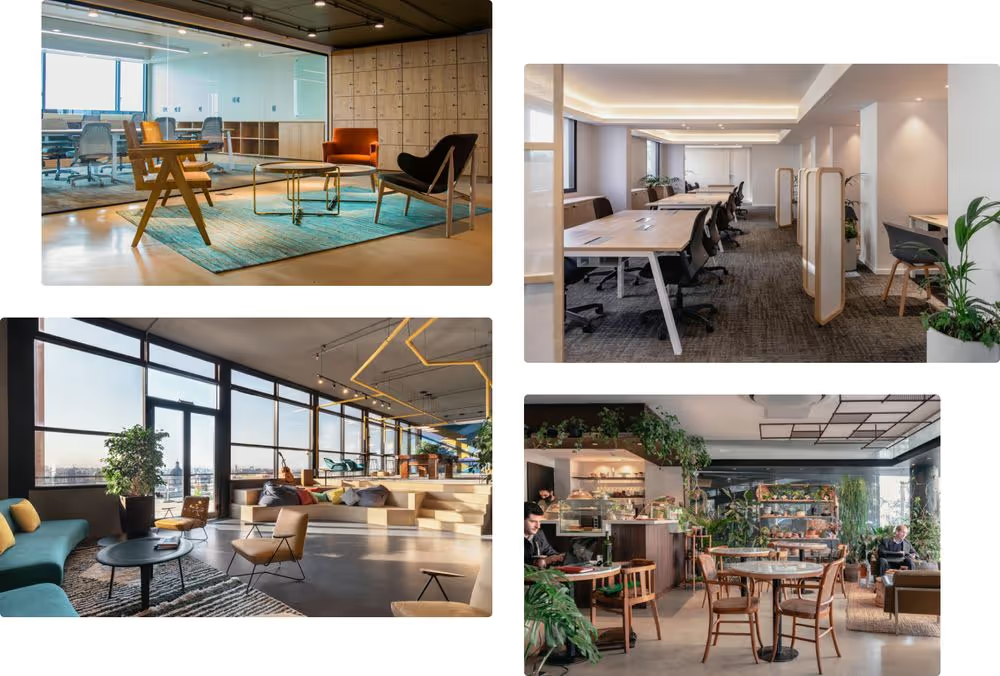
One of the advantages of working with Uruguayan companies is that it's only an hour ahead of the U.S. Eastern Time Zone (EST +1). This greatly impacts on the workflow and the success of any project. By sharing every office hour, Uruguayan companies and developers can work as if they were side by side with their U.S. partners, improving collaboration.
These are some of the reasons why Uruguay is associated with quality. Today, international companies choose Uruguay as a place to develop technological products and services and as a place to launch their operations to the rest of Latin America.
Without a doubt, the software and IT industry in Uruguay is constantly growing.
Its time zone similarity with the U.S., the high quality of tech talent, and its competitive cost-benefit rate of software development services makes the country an extremely attractive place for U.S. companies seeking this type of service.
U.S companies can lower their software development costs by working with companies from Uruguay, without compromising the quality of work. What’s best here is that although you pay a lower price for software development services from Uruguay, the high quality of work we provide is on a par with any company you could hire within the U.S. Thus, an excellent cost-benefit makes Uruguay a great choice to seek this service.
As an Uruguayan company, at Kaizen Softworks, we care about meeting the needs of our partners through constant improvement and innovation. We not only have high standards for software development talent and quality of work, but we also seek to provide a holistic approach to what it means to outsource software development services.
To achieve innovation and high levels of productivity, we provide support in project management and consulting services to improve our partners' internal processes, and in technology mentoring for team members of our clients, among other initiatives that make up the DNA of our people and company.
I invite you to learn more about who we are and our work. Thanks for reading!
Technology
12 read time
When dealing with high volumes of data and traffic in web application APIs, it is imperative to avoid wasting resources so that end users won’t perceive any slow downs, as well as to reduce costs in the underlying infrastructure. The topic of today’s article is to examine under what circumstances it is possible to cancel already-running HTTP requests before their completion in an API implemented with ASP.NET, and how to implement these capabilities in a few common scenarios.
Long running HTTP requests may occur as a consequence of having to deal with an ever-increasing amount of resources for their execution, which is a scenario that can be expected in an active API serving thousands of clients per minute. Under those circumstances, having a way of knowing when the results of such requests may end up being unused would be highly desirable in order to free up server resources, such as CPU, RAM, database locks, network sockets, etc., that other clients may need to use.
Common situations where this may arise are:
Short lived requests that consume too little resources are better left alone, as the cost of implementing cancellation capabilities would be most surely greater than any real benefit that could be gained from that.
Requests that can have side effects, such as creating, updating, or deleting data, should also be left as they are, because there is a real risk of compromising data integrity of the system if the request is interrupted at the wrong moment, especially if there are multiple internal steps to the operation.
That leaves us only with nullipotent requests, that is, those that only fetch data but don’t modify anything after they finish, metrics and logs notwithstanding. In other words, if implemented correctly, HTTP GET requests.
As an example, we’ll start with a basic ASP.NET controller written in C#:
using Microsoft.AspNetCore.Mvc;
namespace Kaizen.Blog.Examples.Controllers;
[ApiController]
[Route("api/[controller]")]
public class CancellationController : ControllerBase
{
    [HttpGet]
    public ActionResult<string> Get()
    {
        return "The endpoint was called.";
    }
}
The change to allow a request to be canceled is as simple as adding a parameter with type CancellationToken to the endpoint. This type has two useful members that can be leveraged for our purposes:
IsCancellationRequested: Returns true if the caller asked for the request to be canceled; otherwise, false.ThrowIfCancellationRequested(): Throws an OperationCanceledException if the caller asked for the request to be canceled.With this in mind, the endpoint can be updated to handle request cancellations manually:
using System;
using System.Threading;
using Microsoft.AspNetCore.Mvc;
namespace Kaizen.Blog.Examples.Controllers;
[ApiController]
[Route("api/[controller]")]
public class CancellationController : ControllerBase
{
    [HttpGet]
    public ActionResult<string> Get(CancellationToken cancellationToken)
    {
        try
        {
            cancellationToken.ThrowIfCancellationRequested();
            return "The request was not canceled.";
        }
        catch (OperationCanceledException)
        {
            return "The request was canceled.";
        }
    }
}
Cancellation tokens can also be used with common asynchronous operations in web APIs. Here are some examples:
// Non-cancellable version
await Task.Run(() => LongRunningSynchronousOperation());
// Cancellable version
await Task.Run(() => LongRunningSynchronousOperation(), cancellationToken);
var collection = GetExpensiveToCreateCollection();
// Non-cancellable version
await foreach(var item in collection)
{
    // do something with item...
}
// Cancellable version
await foreach(var item in collection.WithCancellation(cancellationToken))
{
    // do something with item...
}
var collection = GetCollection();
// Non-cancellable version
var results = collection.AsParallel()
    .Where(Condition)
    .ToArray();
// Cancellable version
var results = collection.AsParallel().WithCancellation(cancellationToken)
    .Where(Condition)
    .ToArray();
var usersQuery = DbContext.Users.GetAll().Where(Condition);
// Non-cancellable version
var results = usersQuery.ToList();
// Cancellable version
var results = usersQuery.ToListAsync(cancellationToken);
using var connection = new SqlConnection(connectionString);
await connection.OpenAsync();
// Non-cancellable version
var results = await connection.QueryAsync(sqlQuery);
// Cancellable version
var results = await connection.QueryAsync(
    new CommandDefinition(sqlQuery,
        cancellationToken: cancellationToken));
From the front-end perspective, web client applications can cancel API calls before their completion by making use of the so-called “Abort API” (AbortController and AbortSignal). Both the standard Fetch API, as well as popular HTTP library Axios, allow canceling requests this way. An example using the former can be found in Mozilla's dom-examples repository, while usage of the later can be found in Axios Docs.
It should be noted that canceling long running requests in cases where they’re caused by an inefficient implementation is only a stopgap measure. It’s no substitute for a good implementation, but a way of mitigating the damage a bad one can cause. Having said that, I’ve seen situations where the cost of reimplementing an existing piece of functionality is accompanied by a high risk of breaking something, so, as a short term patch to scalability-related problems, request cancellation is a good tool to have in your arsenal.
Business
Project Management
·
May 11, 2022
Hiring is hard. Keeping great developers is even harder. This is what’s worked for us.
12 read time
There is a very restricted talent pool and a massive demand for software developers in the U.S. Companies must do their best to attract the greatest people to their team. The IT industry is highly competitive so attracting and retaining top talent becomes one of the biggest challenges for every tech company.
In this scenario, we are frequently asked how we manage to have such a low turnover rate (10% overall) when IT recruiters are constantly contacting our teams with new job offers. In this context, it is essential to understand the motivations of our developers and the ways we can structure work environments to maximize longevity and career satisfaction.
Now, what is your plan to attract and retain high quality software development talent? We’ve come up with several strategies that have helped us to do so.
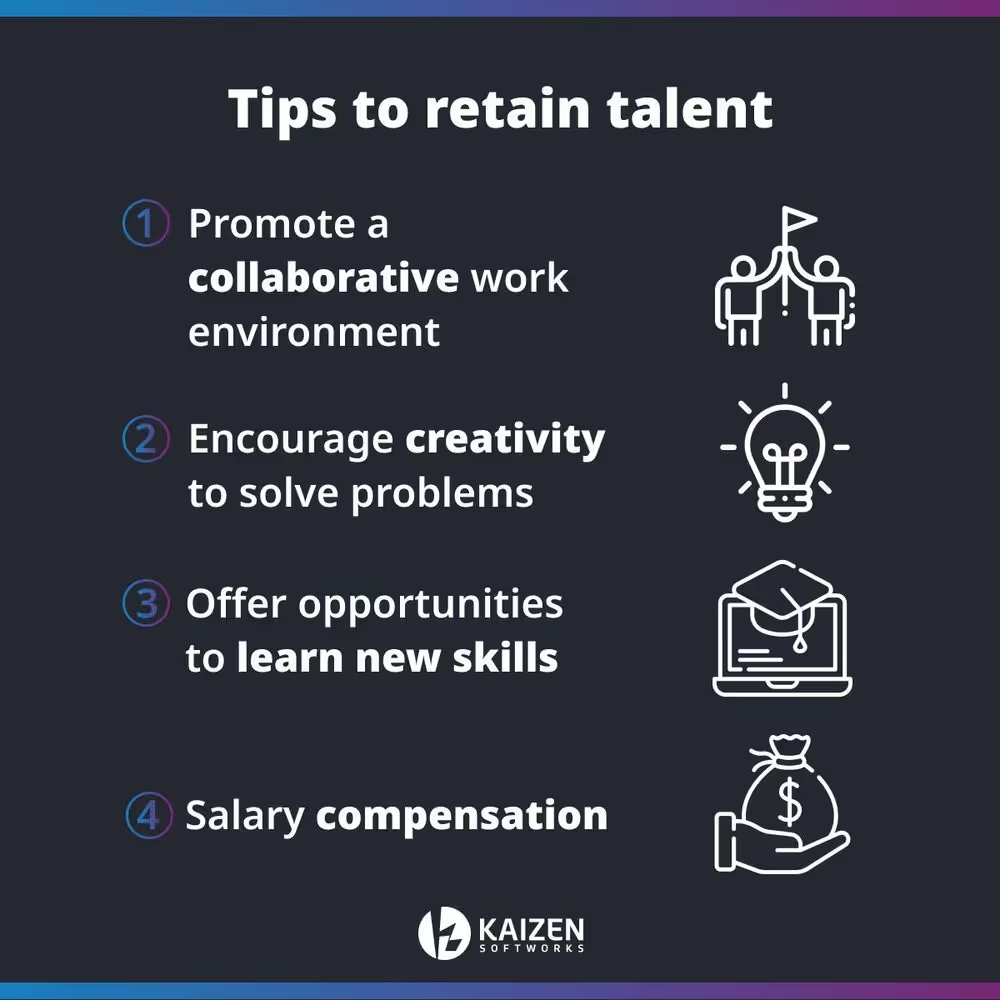
Creating a collaborative work environment fosters people to express their talents. Developers want to be part of an organization where their voices are heard, where they feel part of the company culture and have an influence on what happens within it.
You should allow your developers to participate in decisions that may affect both the institutional and software development team environment. Encouraging people to participate in the decision-making process that involves aspects beyond the specific tasks of their role, increases the perception of the influence they have both on the team and the company.
In other words, this means allowing and promoting cross-area collaboration.
By listening to and, more importantly, acting on the feedback provided by your developers, you'll let them know that you recognize their talents and make them feel that their contributions have a tangible impact on a team and organization level.
There is nothing more counterproductive than having to solve a problem with techniques that may not be the most efficient ones. So why don't let your developers play with the methods they try and be the ones to come up with effective and creative solutions?
It's important to promote creative freedom to solve important problems. This job is, after all, their domain, which means they must have a responsible level of independence within it.
Also, this will encourage them to be more engaged with the company as there is trust in their work.
As the technology market continues to grow and evolve, your software developers should have the opportunity to grow with it.
Please notice that continual updating and self-improvement drew many developers to their profession in the first place.
You should offer the suitable training as these tech talents like to be challenged but they may resent being thrown into a new expertise without properly learning it first.
Keep in mind that having suitable resources is a crucial factor in developers' enthusiasm and outcomes. For example, let's say your engineers find a problem and don't know how to fix it. Hitting an obstacle directly proportional to the limits of their experience will end up discouraging them, affecting the project and the company in general.
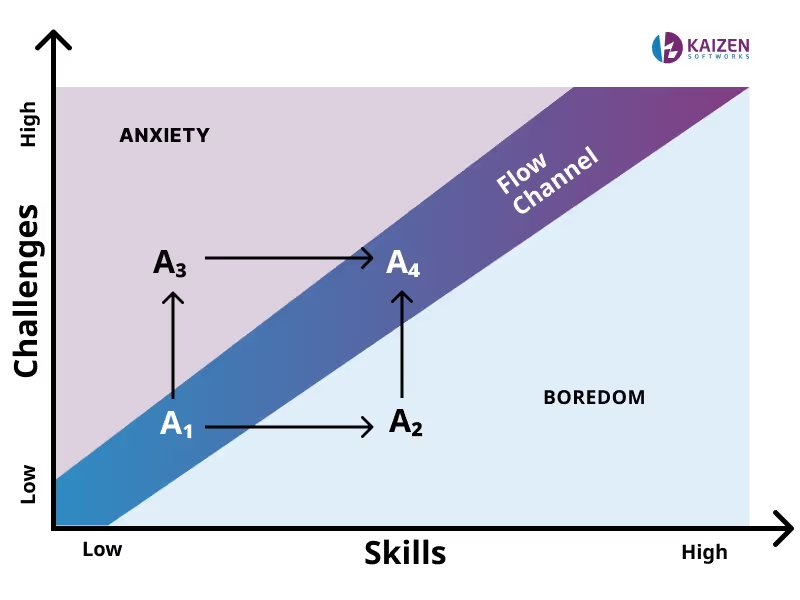
This is an opportunity to provide enrichment. Empower them to master their skills and encourage them to continually improve by creating a culture where they learn that a long, profitable and fulfilling career comes from using skills to deliver software and create impact.
This fosters a culture of self-determination and adds to employee’s benefits.
A key aspect of a developer's motivation is salary and compensation package for their work. To recognize the market value of a person, it is necessary to carry out labor market research and more importantly, ask yourself what gives them their experience and skills necessary for their job?
It is important to research the value that other companies in the industry provide, to ensure that the salaries and compensation plans offered, such as additional benefits, are attractive enough to keep developers engaged with the company.
A good employee deserves to be recognized for the value of their work and paid according to their responsibilities. Otherwise, they will be open to new opportunities that give them the compensation they believe their work deserves.
Purpose has to do with being able to make a contribution to others and pursuing a higher goal. We find more and more professionals who no longer focus primarily on how much they are going to earn or what they are going to achieve, but on one main question: “what am I going to work for?”.
Connecting people with purpose, makes the differences between the technical and human sides of a person disappear. Working and living guided by a purpose benefits people because it gives them the opportunity to look inward and renew themselves by going beyond their own limits. Likewise, it gives a sense of belonging to the organization and reinforces organizational commitment.
Motivate people to ask questions like: why does what we do matter? What difference do we make in the world? What motivates us to continue offering our services? What motivates our clients to hire us?
The first few years as a software developer might be a stressful time that comes along with different challenges. Going through these early years can be an extremely frustrating experience if developers are not supported by a strong structure. That's why every company needs to have leaders with the experience and vision to support less experienced employees as they grow with the company.
Providing a safe space for developers to teach other team members is one of the best ways to increase team seniority. When developers are mentored, they learn. When they learn, they get involved. When they get involved, they are much more likely to stick around.
Therefore, recognizing and encouraging mentoring within teams and companies is one of the most important things a company can do.
Also, teaching others inspires them to take on new challenges, to share their knowledge and to continue growing from a soft skill point of view since it is an opportunity to develop empathy and improve leadership and communication skills.
There is nothing more encouraging and fulfilling than knowing that your work makes a difference in your company and also in your client businesses. Let your employees know that their day-to-day work is important!
Implement recognition initiatives, celebrate team milestones, and provide small confidence boosts.
But recognition is not enough incentive to retain talent if you don’t support it with career advancement opportunities.
Career growth can mean fostering a culture of knowledge-sharing, which enables employees to discover new interests within the company, allowing role gaps to be filled internally.
Also, it makes them feel like they’re growing with the company and provides a sense of purpose and belonging, which in turn fosters loyalty and long term engagement.
Losing a team member can become an opportunity to learn from the experience and mitigate the risk of having the same problem in the near future. Just as not all problems have a solution, you can’t fix a problem you don't know about either.
Conducting an exit interview can help you to learn more about the reasons why people decide to leave the company and their perception of the work environment.
This information works as an opportunity to improve your current talent management process through receiving honest feedback on the true state of the organization, and the problems employees face on a day-to-day basis.
We invite you to reflect on the following questions: what excites your developers to go to work? How does the structure of your organization affect its overall performance? Are your developers surrounded by peers who can encourage and challenge them to improve? And more importantly, can your developers visualize a career within your company?
Whether you’re looking for software developers to take your business idea into a digital solution or want to further expand your current development team, we’re here to help.
No blogs matched this category, try applying different filters.


