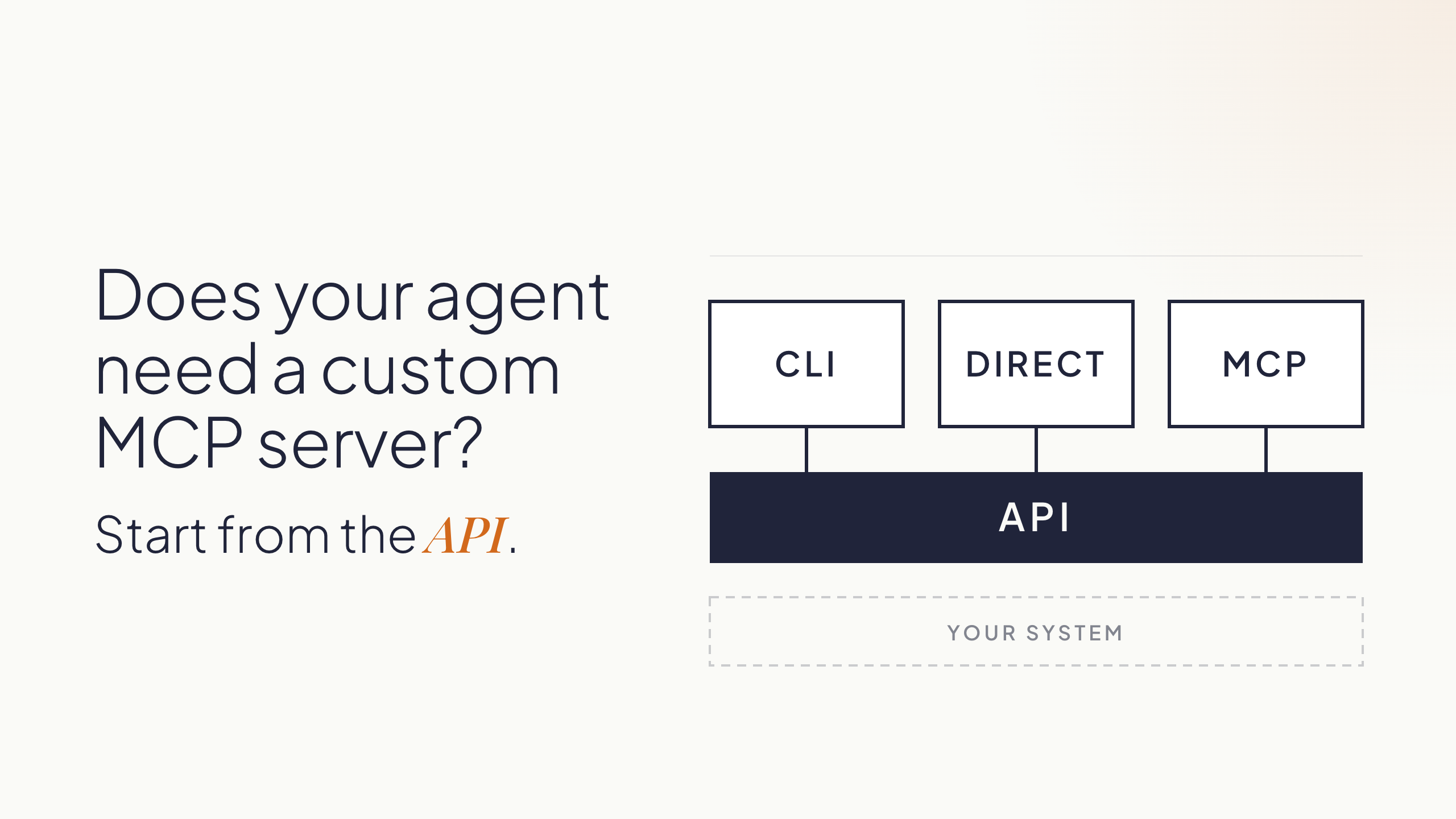
Your engineering team says your AI agent needs a custom Model Context Protocol (MCP) server. Should you approve it?
MCP is an open standard that lets AI applications connect to your internal systems in a consistent way. It is a useful idea, but it is not the only way to connect an agent, and it is not always the right one.
Take a simple case. An agent needs to look up a ticket in your internal system and update its status. The system already has an application programming interface (API), and your engineers also use a command-line interface (CLI). All three options can get the job done. What changes is where the agent runs, how many AI applications need access, and how you control what the agent can and can't do.
A custom MCP server pays off when several compatible AI applications need to plug into your system the same way, and you can justify building and maintaining it. If your agent runs in a controlled development environment, the CLI you already have may be enough. If it is an assistant inside your own product, a direct integration with your API may be simpler.
Before you decide, here is how the three options fit together.
Key takeaways
- An existing CLI or a direct API integration may already give your agent everything it needs. Start by checking what your systems and your AI applications already support.
- A custom MCP server becomes worthwhile when people need the same capabilities in several compatible AI applications and no existing connector covers the workflow.
- MCP can sit on top of your existing API, but it does not remove the work. Tool design, permissions and reliable behavior still need engineering, and someone has to own the result.
What is the difference between CLI, API, and MCP?
A CLI gives a program a set of commands to run. An API defines how software requests information or operations from a system. MCP gives compatible AI applications a standard way to discover and use tools and context.
They are not three rivals. The API is usually the layer underneath: a CLI can call it, a direct integration can call it, and an MCP server can call it. The real choice is how the agent reaches the API.
To make this concrete, take one request: “Show me ticket 482 and move it to In Progress.” The task stays the same. What changes is the path to the system and what your team has to maintain.
CLI. If the agent runs in a managed development environment with an approved ticketing CLI, it can use that tool to read the ticket and change its status. The CLI must be installed and authenticated, and your application must handle its output and its errors. Access can be limited to specific commands and validated arguments, rather than an open shell. If the environment and commands already exist, the work is making their use reliable and restricted. (GitHub CLI works this way for viewing and closing issues.)
Direct API integration. Your application gives the agent two tools, such as get_ticket and update_ticket_status. When the model asks to use one, your code checks the request and the user's permissions, calls the ticketing API and returns the result. The agent can change a status without being handed every administrative operation the API offers. For an assistant inside your own support product, this is a reasonable starting point, because your application already controls the workflow and the user's identity.
MCP. An MCP server exposes the same two tools. Any compatible AI application can discover them and ask for them to run, and the server calls the ticketing API behind the scenes. This helps when people need ticket access from several independently managed AI applications. Each one connects through the same protocol, within the limits of what that application supports. The server still has to connect to the ticketing system and enforce the rules for changing a ticket.
A CLI and an MCP server can both call the same API, so these approaches can be parts of one architecture.
CLI vs. API vs. MCP: which would we choose?
For our ticketing example, the starting point depends on where the request happens:
Where the agent worksWhere we would startWhyA managed development environment with an approved ticketing CLICLIThe commands and runtime already cover the task.An assistant inside your support productDirect API integrationYour application controls the workflow, tools and identity.Independent MCP-compatible AI applicationsAn existing MCP connector, or a custom server if none fitsThe applications need a shared way to access the ticketing capabilities.
Before building a custom server, check the connectors that already exist. Look at who maintains them, which operations they expose, how they handle permissions, and whether they work with the applications your people use.
When is a custom MCP server worth building?
A custom MCP server is worth considering when you have a specific need for MCP access that existing connectors cannot meet.
Suppose your operations team wants ticket access from its AI workspace, while engineering uses a different compatible application. Maintaining a separate adapter for each means repeating work. One shared server could expose the same ticket tools to both.
The number of agents alone does not make the case. Ten agents inside your product can share one API client perfectly well. Two independently managed applications create a stronger need for a common interface.
Tailored tools can also justify it. Before updating a ticket, an agent may need its current status, the valid next steps and related work. A purpose-built tool can return all of that in one step. You can build that tool in a direct integration too. MCP matters when several applications need to find and use it through a common protocol.
Keep one cost in mind. Every tool a server exposes is described to the model, and those descriptions take up space in the model's working context. A small, well-designed set of tools tends to work better than exposing everything the API can do.
Questions to ask your team before approving it
Whichever option you choose, reading a ticket and changing one carry different risks. These questions help you check that the integration has clear limits and predictable behavior.
- What exactly can the agent do? It should have only the operations the task requires. An agent that summarizes tickets does not need deletion or administration tools. Inputs, outputs and errors should be defined so the agent can tell a successful update from a rejected one.
- Whose permissions apply? Decide whether the agent acts for the individual user or under a shared service identity. For remote servers, MCP defines an OAuth-based authorization framework, but that only controls who can connect to the server. Your team still has to check access to each ticket and each action.
- What happens when something goes wrong? A working tool can still update the wrong ticket. Ask how the team tests ambiguous requests and permission denials, and which sensitive changes need a human approval enforced in code rather than left to the model. If an update times out, the system should check what happened before trying again, because the first attempt may have succeeded. Retries must be safe to repeat.
- What are the security risks? Text the agent reads, such as a ticket comment, can contain instructions meant to trick it (prompt injection). Ask how the design limits what a tricked agent could do, and whether actions are logged so you can audit them.
- Who owns it afterward? A server needs an owner for monitoring, backend changes, dependencies and compatibility with the AI applications that use it. A local server needs packaging and process management. A remote one has to be run as a service. Count this ongoing work when you compare it with a direct integration.
How did Kaizen use MCP with an existing API?
In our KZHoras experiment, we connected Claude to our internal system for tracking project hours and time off. The MCP server calls the existing KZHoras API, with permissions defining what each user can see.
The API remained the access path to the system. What MCP added is a new way in: instead of opening the system and navigating to the right screen, people ask a question in plain language, such as how many hours a project has logged this month.
That is a concrete reason to add MCP: the interface supports where people already want to work.
How do you choose your starting point?
Write down what the agent needs to do, where your users will work with it, and whose permissions apply. Then compare the interfaces you already have and the maintenance each option adds.
If a CLI or a direct API integration covers the workflow, start there. Consider a custom MCP server when access from compatible AI applications is worth the cost of maintaining another interface.
If your people need to query internal systems from their AI applications, talk to us about our Custom MCP Connector service. We can help you work out which option fits your workflow.