




Our Work
Synthetic Users

Research earlier with synthetic users

Create AI users with defined goals, behaviors, knowledge, and constraints, then use them to uncover usability issues and explore how different profiles may react to your product.

What it is

A user with rules, not just a persona

Synthetic users are AI agents built to represent a defined type of user. You give each one a role, goals, behaviours, knowledge, and constraints, creating a reusable profile to evaluate different product experiences.

A profile can include

Role & experience

Role & experience

Objective & success criteria

Objective & success criteria

Motivations

Motivations

Decision-making

Decision-making

Frustrations

Frustrations

Time & operational limits

Time & operational limits

Behavioral rules

Behavioral rules

Abandonment conditions

Abandonment conditions

Assumptions they can't make

Assumptions they can't make

Why it matters

Each agent is constrained to the information in its profile and the interface it sees. That makes it easier to compare runs, spot recurring issues, and decide what deserves validation with real users.

Synthetic users do not replace research with people. They help your team learn earlier and prepare better research.

What we built

One profile, specialized agents

We built a web app to create and reuse synthetic user profiles, plus an agentic workflow in Claude that generates reports automatically. Each agent has a specific job, from evaluating usability to analyzing how a user may react to the experience.

01

Define the user

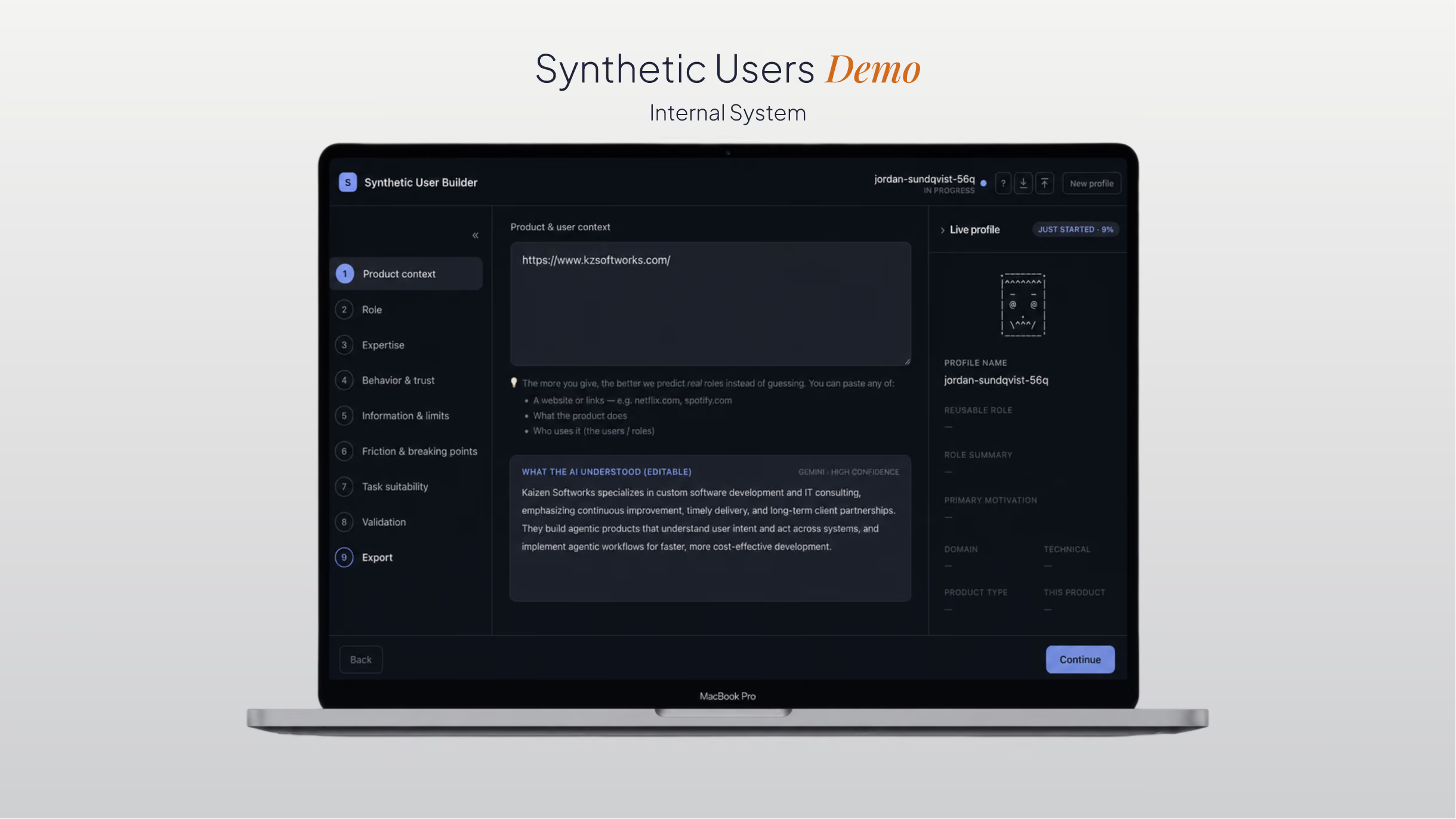
Define the user’s context, goals, behaviors, knowledge, and limits in the synthetic users app.

02

Bring the user into Claude

Copy the generated profile into Claude together with the product flow you want to evaluate.

03

Run the agentic workflow

The profile starts a workflow where specialized agents take on separate roles for simulation, evaluation, and synthesis.

04

Get the reports

The workflow combines the runs into structured reports that show usability issues, their priority, and how different user profiles may react.

What you get back

Two reports to guide your next test

From Claude, you can choose between two types of reports. Run a heuristic report without a synthetic user to identify usability issues based on Nielsen's 10 heuristics. Or add a synthetic user to generate an emotional reaction report from that profile's perspective.

Heuristic report

Each finding is assessed against the same rubric so you can compare issues and decide what deserves attention first.

Nielsen's 10 usability heuristics

Nielsen's 10 usability heuristics

Business impact (0–3)

Business impact (0–3)

Usability severity

Usability severity

Composite priority score

Composite priority score

Rater convergence

Rater convergence

Suggested fix

Suggested fix

Priority 8.1

Contact form submit shows no confirmation

Heuristic

#1 Visibility

Business impact

3 / 3

Convergence

3 / 3 raters

Prioritized backlog

No submit confirmation

8.1

Pricing hidden until step 3

6.4

Unclear error copy on email

4.2

Low contrast on footer links

2.6

Emotional report

Each profile rates the issue, describes whether it would affect the task, and explains why.

These are generated reactions, not user evidence. Use them to decide which scenarios and questions to validate with real people.

Power user

Lowest severity

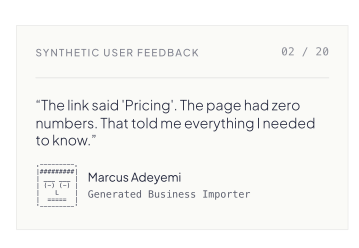
“I'll enter my real email regardless of a glitch. It doesn't visibly break the form for me.”

Average user

High severity

“With no confirmation I've no idea if I just started a $50k+ conversation or it vanished into the void.”

Low-literacy user

Highest severity

“If I hit send and nothing tells me it worked, I'll assume it broke and call the competitor instead.”

Demo

See the full run

Follow one synthetic user from profile creation in the web app, to the workflow in Claude, to the reports your team receives.

Read more

Two notes on how this works

A conceptual image of 'Synthetic Karen': a digital AI agent simulation of an impatient user, featuring a facial tracking wireframe and a glowing red robotic eye.

·

February 20, 2026

Synthetic users: a practical guide for AI-driven testing

Synthetic users are AI-driven test agents that help reveal where a design creates doubt, confusion, or unnecessary friction.

12 read time

Read more

Karen has no patience.

If a button is disabled without explanation, she gets annoyed.
If an empty state looks like an error, she assumes the system is broken.
If a loading spinner doesn’t explain what’s happening, she asks for the manager.

Karen isn’t a real person.
She’s a synthetic user.

And she might be one of the most useful ways I’ve found to stress-test a design before putting it in front of real users.

What Is a Synthetic User?

A synthetic user is a constrained AI decision agent embedded in a controlled simulation framework.

It is not just a profile. It is a structured behavioral model with:

  • Identity (role + expertise)
  • Intent (clear objective)
  • Limits (constraints + forbidden assumptions)
  • Logic (behavioral and abandonment rules)
  • Boundaries (strict evaluation scope)
  • Accountability (structured output requirements)

It operates only within what is defined and cannot compensate for ambiguity, missing signals, or structural gaps in the interface.

A synthetic user is not:

  • A fictional persona or a storytelling device
  • A predictive AI that guesses user preferences
  • An intelligent assistant that fixes unclear design

A synthetic user interacts strictly with what is visible in the interface and nothing more. It does not infer intent, fill gaps, or compensate for ambiguity. When the path forward is unclear, it hesitates. That hesitation is not failure. It is the signal that reveals structural friction.

What a Synthetic User Needs to Work

A technical workflow diagram showing how synthetic users work: Context and instructions are combined with a synthetic persona and fed into an AI LLM. The AI interacts with a Figma prototype via an MCP connection to generate a final structured report.

If you want this to be more than “ChatGPT pretending to be someone,” you need structure. You must define:

  1. Functional Role: Who this user is in operational terms (Operations Manager reviewing trip segments).
  2. Domain Expertise Level: How much they understand the subject matter (6 months in logistics, still learning edge cases).
  3. Technical Proficiency: How comfortable they are with software (Uses dashboards daily, avoids advanced filters).
  4. Explicit Objective: What they must accomplish in this session (Confirm whether a trip contains excursions).
  5. Success Criteria: What level of certainty is required to consider the task complete (Needs explicit confirmation, not inference from a map).
  6. Motivations: What they prioritize when making decisions (Speed over exploration).
  7. Constraints: Operational limits that shape behavior (Low tolerance for ambiguity, under time pressure).
  8. Behavioral Rules: How they interpret and act on information (If unclear after 3 seconds, move to another visible option).
  9. Abandonment Rules: When they stop the flow (If the same friction appears twice, they exit).
  10. Forbidden Assumptions: What they cannot infer or mentally “fix” (Cannot assume disabled filters require prior calculation unless explicitly stated).
  11. Evaluation Scope: What part of the experience they are allowed to simulate (Only the “Segments” tab, not the full dashboard).
  12. Structured Output Format: How the simulation must report results (Step → Action → Clarity → Doubt → Reason → Highest friction).

What I Learned About Using Synthetic Users

Synthetic users don’t validate whether something “works.” What they actually do is expose where a design forces users to interpret instead of confirming things explicitly. They surface structural ambiguity that often goes unnoticed in internal reviews and help distinguish between friction that affects everyone and friction that only impacts less experienced users.

In practice, they make design discussions more concrete because you’re no longer debating opinions, you’re observing constrained behavior. They don’t replace usability testing, but they significantly improve how prepared you are before running it.

How to Start Using Synthetic Users 

If you want to try it today:

  1. Define a synthetic user with strict rules
  2. Write a clear objective
  3. Declare your "forbidden assumptions"
  4. Provide the flow step-by-step
  5. Force a structured output 

If the synthetic user never hesitates, your constraints are too weak

I’ve pulled together the exact resources I use:

This Is Still Early

Agent-based simulation is not a new idea.

What is still underdeveloped is how to apply it in a structured, practical way inside UX workflows. There is no widely adopted standard yet. No clear implementation pattern most teams follow.

What I’m sharing here is not an academic breakthrough. It’s a working implementation.

It can evolve. It can scale into automation.

But even in its current form, it has helped me detect structural friction before running formal usability testing, that alone makes it worth exploring.
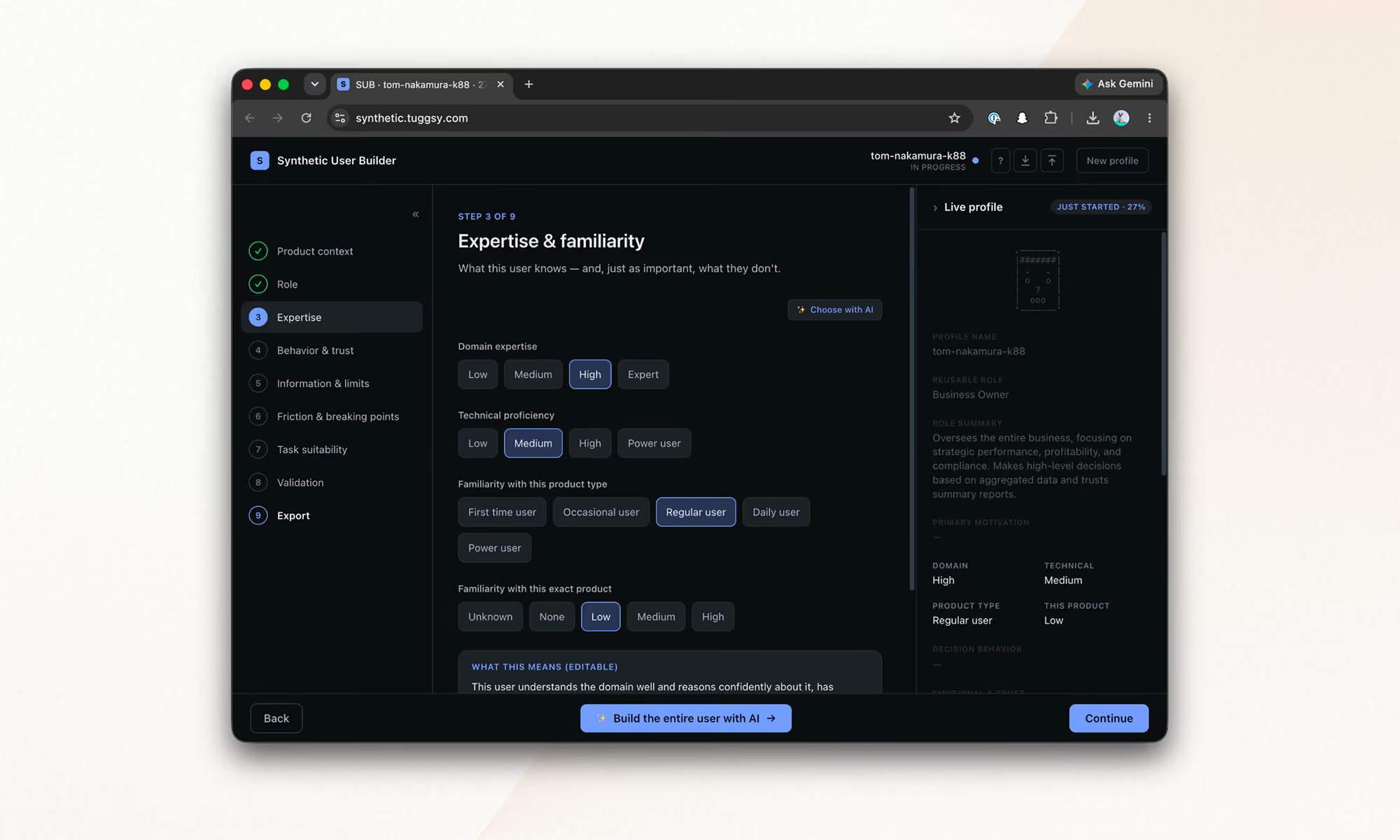
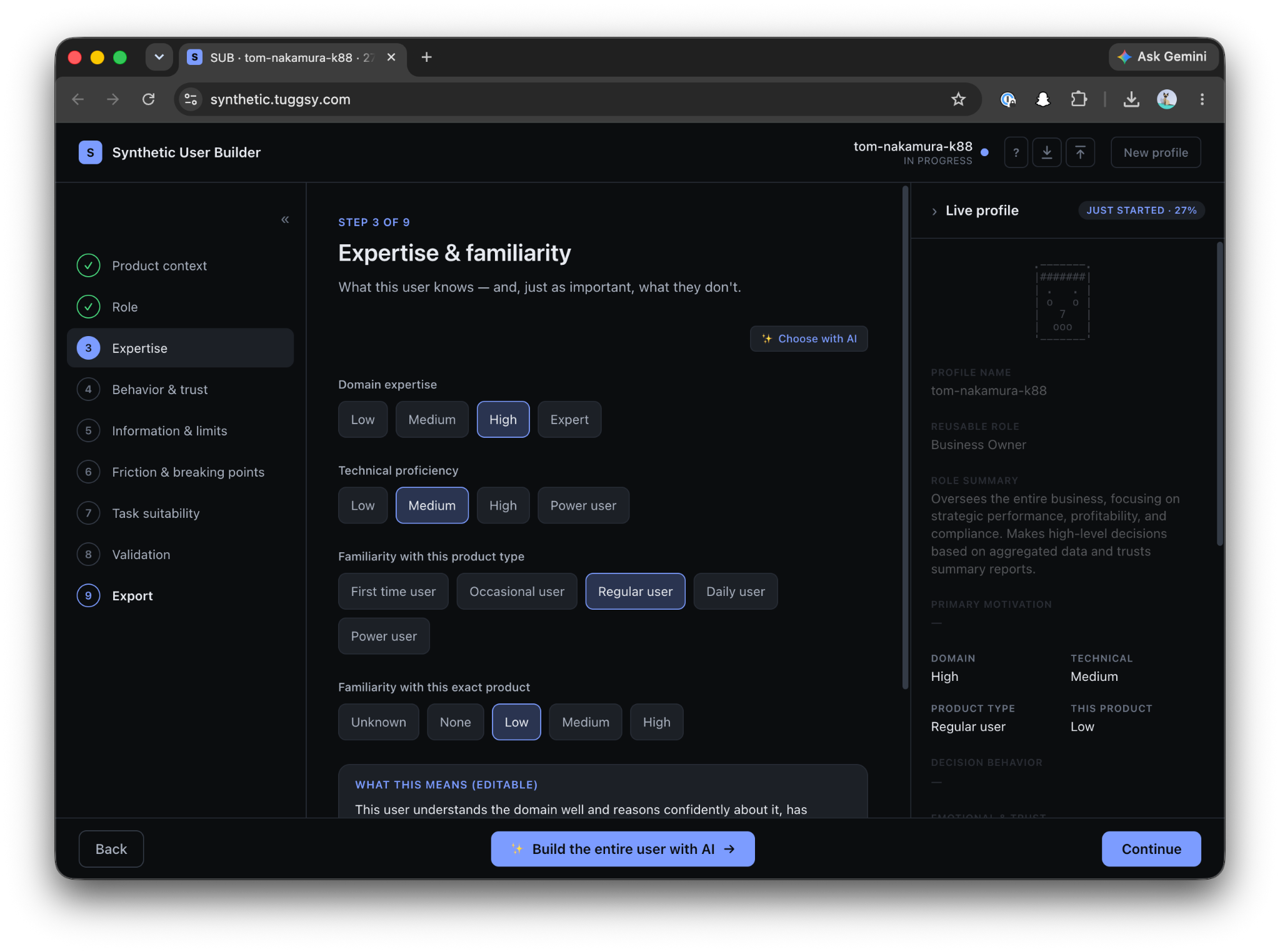
Synthetic User Builder interface showing step 3 of 9, setting a profile's domain expertise, technical proficiency, and product familiarity levels.

·

August 14, 2026

Running synthetic users into Claude Code

A synthetic user research framework, turned into a Claude Code plugin that runs automated UX tests with AI agents, step by step.

12 read time

Read more

A synthetic user is a constrained AI decision agent defined by twelve fields, from functional role and context to assumptions and abandonment rules.

In the previous post I built an early, working implementation, and the next question was whether the same rules could hold up in a repeatable, automated test.

This post is that next step: how I turned the framework into a Claude Code plugin, and the technical decisions behind adapting methods designed for people into something an AI can execute without cheating.

Why “find the usability issues” is not enough

Give a model a URL and ask it to “find the usability issues.” It works halfway. And the “halfway” is the interesting part, It gives you a generic list, correct in the abstract, useless in practice.

A usability issue matters because of who encounters it and under what conditions.

Using an app from bed is not the same as using it on a factory floor. Urgency changes, lighting changes, attention changes, previous knowledge changes. The same confusing button can be irrelevant to a power user and an abandonment point for an operator wearing gloves.

The whole design comes from that observation: the AI does not evaluate the interface. It acts as a specific person in front of the interface.

The person brings the context with them. And the context turns a list of defects into a list of priorities.

Anatomy of a simulation

An orchestrator controls the browser through Playwright MCP. It reads each screen as an accessibility snapshot: text, roles, states, no guessing pixels. Then it acts on specific elements.

The decision on each screen is made by an isolated subagent, which returns a JSON for each step:

{

  "action": "...",

  "clarityLevel": "High|Medium|Low",

  "doubtDetected": true,

  "reason": "...",

  "abandoned": false,

  "estimatedTimeSeconds": 40,

  "emotionalState": "...",

  "memory": "..."

}

Two rules make this look more like a person and less like an oracle.

1. The evaluator never sees the end.

The evaluator receives one screen at a time, without knowing how many are left or what comes next in the flow.

If the interface leaves room for a mistake, the synthetic user makes the mistake. It clicks where a person would click, not where it is convenient to click in order to complete the test. This is where the framework’s forbidden assumptions live. The agent cannot assume backend logic or mentally complete what the screen does not show.

2. Emotion is memory, not decoration.

The memory field travels from one step to the next. The emotional state is inherited and accumulates. A frustration +1 persists. This detects something that is structurally invisible to any test that evaluates screens separately.

Screen five does not necessarily fail because of screen five. It fails because the user gets there with accumulated frustration.

Evaluated alone, that screen passes. Evaluated by someone carrying three doubts and one broken promise, it triggers abandonment. In the first post, I wrote that doubt is not failure. It is the signal that reveals structural friction.

Emotional memory is that idea turned into architecture.

Eight subagents, one job each

Each subagent gets a clean context. It knows the minimum required to do its job.

That ignorance is deliberate.

The agent acting as the user does not know what the orchestrator knows. It cannot compensate for bad design with knowledge a real person would not have.

Subagent

What it does

Subagent What it does
synthetic-screen-evaluator Acts as the user on one screen and returns the JSON for that step
synthetic-flow-synthesizer Reads the complete run and writes the report. It never simulates again
synthetic-profile-generator Generates a complete profile from an approved spec, choosing from a controlled vocabulary
synthetic-autopilot-synthesizer Consolidates N runs and classifies findings by convergence across users
heuristic-persona-generator Creates the 3 persona raters based on the business being evaluated
heuristic-expert-evaluator Detects violations of the 10 heuristics using forced enumeration
heuristic-persona-rater Scores each finding from the experience of ONE persona. It runs ×3
heuristic-report-synthesizer Builds the final report using the already computed numbers

Adapting a human test: the heuristic evaluation

A textbook heuristic evaluation uses three to five human evaluators because each human finds different problems.

My first experiment was literal, and it went meh.

I iterated until I reached two synthetic detection runs with different agents, coverage was extremely high, but it exposed another problem: an unmanageable list. Dozens of valid issues, very few important ones.

The final design separates those two jobs.

1. An expert finds violations.

Based on Nielsen’s literature, an expert goes through each screen and is forced to produce a verdict for every heuristic: 

  • Violation
  • Clean
  • Not observable

Each verdict includes textual evidence from the snapshot, forced enumeration breaks the habit of reporting only the things that stand out.

2. Three synthetic personas decide what matters based on what they bring with them: context, emotions, urgency, and constraints.

Three synthetic personas are generated according to the business being evaluated: 

  • power user
  • average user
  • low digital literacy

They score the findings without seeing the expert’s conclusions. The same issue can matter very differently depending on what each persona brings to it.

The formula is business impact × usability impact, with agreement between personas as the tiebreaker.

This keeps issue detection and user impact as separate jobs: the expert identifies the violations, and the personas help determine which ones deserve attention first.

Three modes, and a tool for building users

The plugin currently has three modes.

simulation-run (custom)

You build a profile field by field in the Synthetic User Builder, the tool I built to materialize the framework.

First come the attributes: 

  • Role in relation to the product
  • Boundaries
  • Initial emotional state
  • Context
  • Forbidden assumption

Only after that, and separately, comes the task.

The profile describes how someone decides, never what they have to do. That is why the same profile can be reused across tests.

simulation-auto (inferred)

You only give it the URL.

It researches the business, infers the typical roles, proposes users with tasks, and you adjust that proposal in natural language before anything runs.

heuristic-test (inspection)

The heuristic test described above, for one screen, one flow, or the entire site.

Everything run becomes a file

Every run leaves Markdown artifacts inside the project:

user-simulation-tests/

├── simulation/

│   ├── profiles/    ← users: the .md used for simulation + a .builder.json

│   │                   that can be imported back into the Builder and edited manually

│   └── results/     ← one report per run + the consolidated report from auto mode

└── heuristic/

    ├── personas/    ← the 3 raters + business research, reused across runs

    └── results/     ← reports with the prioritized findings table

Simulation reports include the full step by step flow, the emotional arc, risks, and a single “Fix this first.”

The consolidated report classifies findings by convergence: did one user suffer from this, or did all of them?

The decision to keep everything as accumulating .md files is strategic.

These are different runs, using different lenses, that can be analyzed together later, crossing heuristic violations with simulated emotions answers something no individual test gives us:

Of everything that is wrong, what actually matters?

Models and costs

What worked for me for the synthesis subagents:

  • For reports, consolidation, and the heuristic expert, the best available model makes sense. That is where the judgment lives.
  • For the screen evaluator, a medium and fast model is enough. There are many short, constrained calls, and the profile already restricts the decision.
  • The raters are the lightest case.

A complete run consumes between 100k and 400k tokens, depending on the model and mode, in around 20 minutes.

That is the cost of a test that previously required coordinating the schedules of three professionals, and that can now run against every iteration of the product.

See it in action

Here's a complete run against our site, kzsoftworks.com: a skeptical "Business Leader" profile, five live browser steps, and a full Markdown audit in under three minutes that names the exact moment the executive persona lost trust.

It is still early, but it already runs

Every rule in the framework became an architectural constraint: clean context, one screen at a time, emotional memory, forbidden assumptions.

The plugin is open source: github.com/PabloManzoni/user-simulation.

Three commands, and the inferred mode only needs your URL.

If you try it and your synthetic user abandons on screen three, you already know what it means:

It is not failure. It is the signal.

Want to explore how agents like these could fit into your process?

Start a conversation
Dark background with subtle diagonal light beams fading toward top right corner.
llms.txt